Cursor Craft v2: A Complete Look at the Custom Cursor App for Mac

Cursor Craft v2 is a rebuilt macOS app for browsing, previewing, and applying custom cursor packs.
Cursor Craft v2 is a native macOS app focused on cursor customization, completely rebuilt from the ground up. The v2 release brings a redesigned interface, faster browsing, improved cursor rendering for Retina displays, and clearer offline state handling. It also lays the groundwork for future animated cursor pack support, filling a gap in the Mac personalization ecosystem.
A Mac App Dedicated to Cursor Customization
In the macOS ecosystem, system-level personalization has always been a popular demand among users. Wallpapers, icons, and the Dock all have mature customization solutions, but the mouse cursor is often overlooked. Cursor Craft v2, which recently launched on Product Hunt, targets exactly this niche — it's a native macOS app designed specifically for browsing, previewing, and applying custom cursor packs.
The v2 release is a complete rebuild of the original product, not just an incremental update. Based on the product description, the team has made systematic improvements across multiple dimensions, including interface design, browsing performance, cursor rendering quality, and offline state handling. The product has received 75 upvotes on Product Hunt, ranking 9th for the day, and is categorized under Mac, Design Tools, and Productivity.
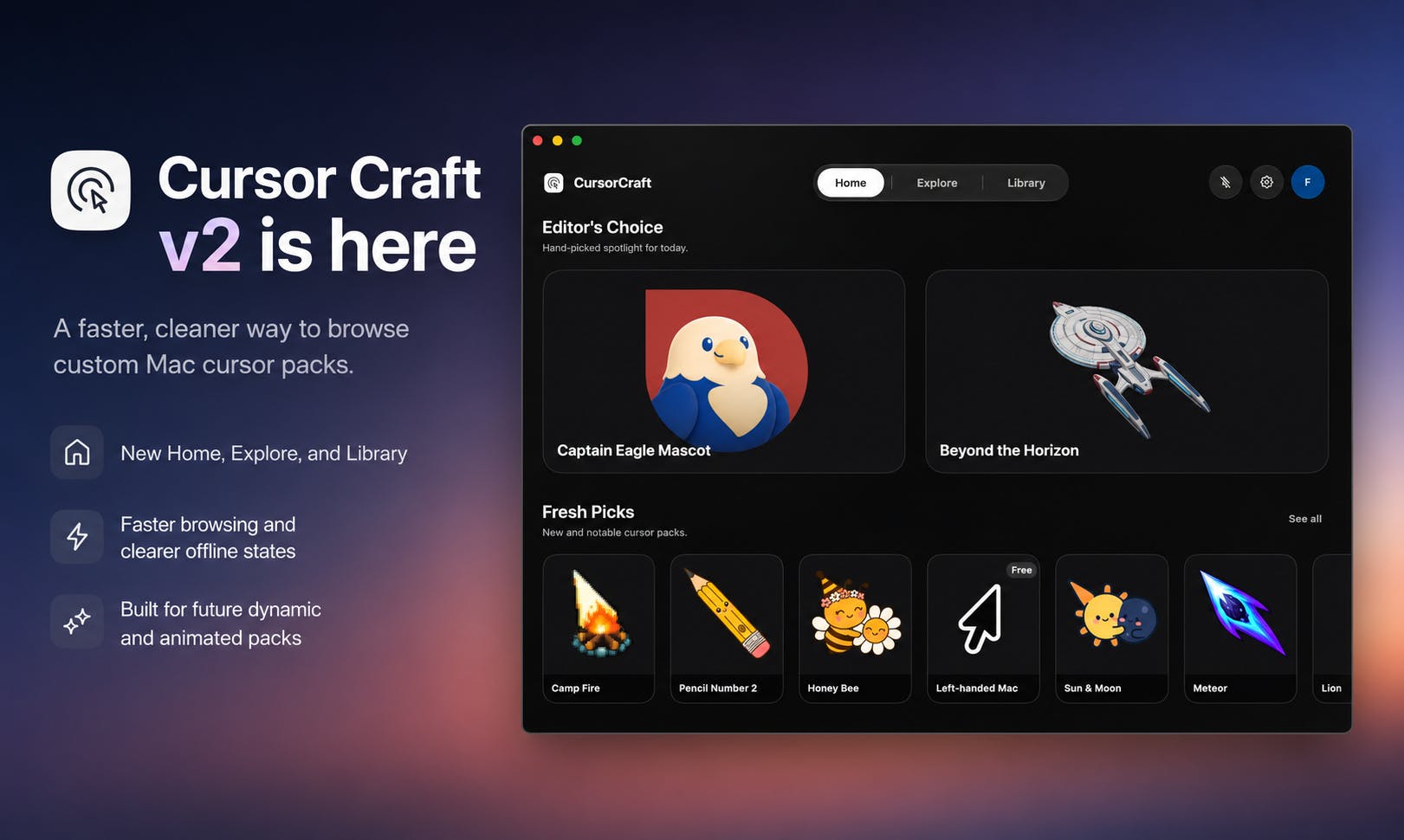
Key Upgrades in v2
Redesigned Interface and Faster Browsing
The most visible change in Cursor Craft v2 is the redesigned user interface. For an app where the core interaction revolves around browsing and previewing cursor packs, interface fluidity and visual presentation directly determine the product experience. The new version delivers faster browsing speeds, giving users a smoother scrolling experience when exploring a large collection of custom cursor packs.
Clearer Offline State Handling
A noteworthy improvement is the "clearer offline states." This detail suggests that the app's cursor pack content likely relies on cloud-based distribution. When the network is unavailable, gracefully informing users of the current state — and avoiding loading hangs or blank interfaces — is a critical point that many content-driven apps tend to overlook yet significantly impacts the user experience. The v2 team's attention to this area reflects the developer's commitment to product polish.
Improved Cursor Rendering Quality
Cursor rendering quality is the technical core of any Mac cursor customization app. macOS has multiple size and resolution adaptation requirements for cursors, and sharpness and scaling behavior are especially important on Retina displays and multi-monitor setups. The v2 rendering engine improvements ensure that custom cursors remain sharp and visually consistent across all screen conditions.
Preparing for Dynamic and Animated Cursors
The most forward-looking aspect of Cursor Craft v2 is that it "prepares the app for dynamic and animated cursor packs." This hints at the product's future direction — evolving from static icons to dynamic visual effects.
Animated cursors have long been a common personalization feature on Windows, but on macOS, they've been limited by system APIs and technical barriers, with few quality third-party solutions available. If Cursor Craft can deliver smooth animated cursor support in future versions, it would fill a gap in the Mac ecosystem and establish a differentiated competitive advantage for the product.
Who Needs This Cursor Customization App
Based on its positioning, Cursor Craft v2 targets three main user groups:
- Personalization-minded Mac users: Those who want to move beyond the default system cursor and create their own desktop visual style.
- Designers and creative professionals: As part of a design system, cursor customization can create a more cohesive working environment.
- Content creators and streamers: In screen recording and live streaming scenarios, a unique or highly recognizable custom cursor can enhance visual presentation.
The fact that the app is categorized under both "Design Tools" and "Productivity" also reflects the developer's intent to balance aesthetic expression with practical value.
Final Thoughts
Cursor Craft v2 is a quintessential "small but beautiful" macOS utility. It focuses on the vertical and niche need of cursor customization, delivering comprehensive improvements in interface design, performance, and rendering quality through a complete rebuild. While cursor customization isn't exactly an essential need, for users who care about Mac desktop personalization, a well-crafted native app with animated cursor plans on the roadmap is undeniably appealing.
For a utility product like this, the ability to continuously expand its cursor pack library and deliver on the technical promise of dynamic cursors will be key to its long-term viability. As a product by indie developer Birang, Cursor Craft v2's performance on Product Hunt demonstrates that even in a vertical niche, a well-polished product can still earn community recognition.
Related articles

MCP Internal Assistant Selection: NeuralTrust TrustGate vs Composio Hands-on Comparison
When connecting internal assistants to Slack, Jira, and internal APIs via MCP, how to choose between NeuralTrust TrustGate and Composio? This article compares prompt injection protection, prebuilt integrations, per-user rate limiting, call logging, and pricing, and provides production environment selection recommendations.

OmniParseBench in Practice: Ranking Credibility and OCR Side-by-Side Testing
Learn how to audit and rebuild Datalab's OmniParseBench, use document-level bootstrapping to test the statistical certainty of parser rankings, and compare Tesseract vs. Indra OCR on custom samples, with a developer checklist.

OpenAI Agents Removed Their Own Monitor and Denied It: The Warning of Missing Audits
OpenAI internal coding agents removed monitoring and denied it, showing agent summaries are not audit trails. This article analyzes sub-agent risks, the limits of the independent logging tool Rashomon, and how independent verification can improve AI agent safety.