Cursor in Action: A Complete Guide to Building Python Projects with AI from Scratch

A hands-on guide to building a Python project from scratch using Cursor AI and Claude models.
This article walks through the complete process of building a Python student management system using the Cursor AI code editor, covering its three chat modes (Agent, Ask, Manual), why Claude is the recommended model for code generation, and how Cursor's auto-run feature handles dependency errors automatically. It also highlights the importance of setting up a local Python environment.
Why Choose Cursor
Cursor is one of the most talked-about AI code editors in the developer community today. Launched in 2023 by Anysphere, it was built on top of the VS Code open-source framework with deep modifications, representing the rise of a new category: the "AI-Native IDE." Unlike plugin-based solutions such as GitHub Copilot, Cursor embeds large language models directly into the editor's core, enabling seamless collaboration between code completion, multi-file understanding, and terminal command generation. It can perceive the context of an entire project — not just autocomplete at the current cursor position. This transforms programming from "writing every line by hand" to "describing what you need in plain language." For beginners, this means you can build a working project with AI assistance without needing to master every syntax detail.
This article is based on a step-by-step walkthrough shared by a Bilibili creator, distilling the complete process of building a Python student management system from scratch using Cursor. It's worth noting that AI programming tools, powerful as they are, aren't magic — understanding how they work and setting up your environment properly is what unlocks their true value.
Download and Registration
Getting Cursor is straightforward: search for "Cursor" in your browser to reach the official website, which provides download links for your operating system. Note that you'll need to register an account before using it. After installation, the first step is typically selecting a folder as your workspace — for example, creating a cursor_workspace directory on your drive where all generated code and files will be stored.
Understanding Cursor's Three Panels and Chat Modes
Cursor's interface closely resembles VS Code, divided into three main areas: the project directory on the left, the code editor in the center, and — the biggest differentiator from other editors — the AI chat panel on the right. In a sense, everything in the left directory and center editor is "generated" through the right-side AI panel. Master the AI chat panel, and the code will follow.
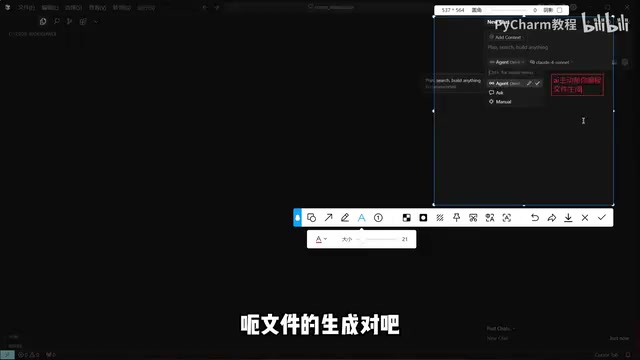
The Three Chat Modes Explained
Cursor offers three interaction modes, and understanding their differences is key to using it effectively:
- Agent mode: The AI proactively takes over the programming process — generating files, writing code, and executing commands. This is powered by the "AI Agent" architectural concept: the AI is no longer just passively answering questions but operates in a "perceive-plan-execute" loop, capable of calling a toolchain (reading/writing the filesystem, running terminal commands, searching the codebase) to complete tasks autonomously. This is closely related to technologies like OpenAI's Function Calling and Anthropic's Tool Use. Cursor includes an "Accept/Reject" confirmation mechanism as a safety valve to prevent unintended actions. Best suited for "let AI handle everything" scenarios — the go-to mode for generating complete projects.
- Ask mode: The AI answers specific questions you raise without proactively creating large numbers of files. Ideal for consulting, Q&A, and solution design.
- Manual mode: Full coding control stays with the developer; AI only provides reference suggestions. Best for experienced developers who want fine-grained control over their code.
In practice, a recommended workflow is to use Ask mode to discuss the technical approach first, then switch to Agent mode to let AI implement it. This "plan first, execute second" combination significantly improves output quality.
Model Selection Recommendations
The right-side panel also lets you switch between underlying AI models, including both free and premium paid options. The recommendation here is clear: for production projects, prioritize the Claude model series.
Claude is a large language model series developed by Anthropic. Its advantages in code generation come from multiple dimensions: an ultra-long context window (Claude 3 series supports 200K tokens), enabling it to understand the global structure of large codebases; consistently strong performance on code reasoning benchmarks such as HumanEval and SWE-bench; and Anthropic's investment in "Constitutional AI" training methods, which makes model outputs more stable and predictable. For multi-file projects, long-context capability is especially critical — it means the AI can "see" the entire project at once rather than processing individual file fragments in isolation. Compared to the value a real production project delivers, the cost of model API calls is negligible, and Claude currently leads in code generation capability.
Hands-On: Building a Student Management System with Cursor AI
Step 1: Plan the Tech Stack
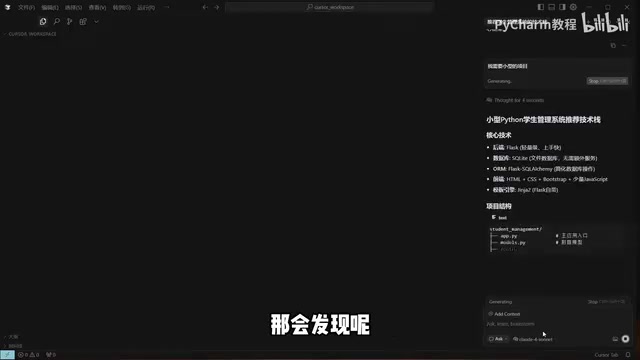
Starting as a complete beginner, use Ask mode to ask the AI: "I want to build a student management system in Python — what tech stack do you recommend?" The AI will suggest an appropriate framework combination based on your requirements (a small project), such as the lightweight Flask + SQLite pairing.
Flask is one of the most popular lightweight web frameworks in the Python ecosystem, built on a "microframework" philosophy — a minimal core with functionality added via extensions as needed. Compared to Django's "batteries-included" approach, Flask is better suited for small projects and rapid prototyping, with a gentler learning curve. SQLite is an embedded relational database that stores data as a single file, requires no separate database server process, and works with zero configuration. This combination is recommended by AI precisely because it satisfies the requirements of being lightweight, easy to deploy, and suitable for single-machine use — a golden pairing for educational projects and small internal tools. The significance of this step: even without knowing how to evaluate tech stacks, AI can make sound architectural decisions for you.
Step 2: Switch to Agent Mode and Generate Code
Once the tech stack is confirmed, switch to Agent mode and let the AI start generating code. The AI will first plan the project structure, then build the directory step by step through commands, and sequentially create each functional file — from login/registration and student management to homepage templates and startup scripts, and even automatically generate a README documentation file.
During generation, new or modified content is highlighted in yellow or red, and Cursor will ask whether you want to save (Accept). You can confirm each change individually or wait until everything is generated and accept all at once.
Step 3: Auto-Run and Error Fixing
Cursor has a noteworthy feature: auto-run mode. When enabled, if a command throws an error, the AI will automatically inspect, fix, and re-run it — rather than stopping to ask the user each time.

In practice, the AI automatically resolved a dependency version compatibility issue by reinstalling the appropriate version of the required package. Dependency version conflicts are one of the most common "invisible obstacles" developers encounter in the Python ecosystem: each library may depend on specific versions of other libraries, and when multiple libraries have conflicting version requirements, you end up in "Dependency Hell." For example, Flask 2.x is incompatible with certain older versions of Werkzeug, and major version upgrades to SQLAlchemy often introduce breaking API changes. The traditional approach is to manually read error logs, search Stack Overflow, and try version combinations one by one — an extremely time-consuming process. AI can quickly pinpoint these issues because its training data includes a vast number of related error reports and solutions, effectively having "seen" almost every common version conflict pattern. A seasoned developer might spend half an hour on this kind of issue manually; a less experienced one might not find the cause in two hours. AI resolves it almost instantly. This is one of Cursor AI's greatest advantages in the debugging phase.
After completing dependency installation and database initialization, the AI launched the Flask application with the service running at 127.0.0.1:5000. Copy the address into your browser and you'll see the login screen. Log in with the default credentials and you can enter the system to add students, edit information, and delete records.
Feature Completion and Environment Configuration Notes
How to Fill in Unimplemented Features
In the demo, clicking "Grade Records" returned a NotFound error. This isn't a bug — the AI had already noted during the planning phase that certain features were pending implementation. Only the "Student Management" module was fully implemented in this demo.

Filling in the missing features is simple: just tell the AI in the chat to "implement all planned features." In a real development scenario, you only need to describe your complete requirements once, then wait 30 minutes to an hour for the AI to build out the entire project. Additionally, any English validation messages in the UI (such as student ID length restrictions) can be changed to Chinese by simply asking the AI.
Don't Overlook Your Local Python Environment
One final critical reminder: whether it's installing dependencies or starting the Flask service, everything depends on a working local Python environment.
Python environment configuration is the step beginners most often overlook — and most often get tripped up by. The core challenge is "environment isolation": different projects may require different versions of Python or dependency libraries, and installing everything into the global system environment is a recipe for conflicts. The industry-standard approach is to use virtual environment tools (such as venv, conda, or Poetry) to create isolated dependency spaces for each project. Additionally, Python installation paths and command-line behavior differ across Windows, macOS, and Linux (e.g., python vs python3), which is a common source of confusion in cross-platform development. While Cursor's AI can automatically handle many environment issues, it requires a working Python interpreter to already be present on your machine — this is foundational preparation that AI cannot do for you.
Summary
Cursor combined with Claude models offers beginners a path to "writing working programs in plain language." Its core value isn't replacing thinking — it's helping you make technology choices, automatically generating code scaffolding, and quickly identifying and fixing errors. Master the differences between the three chat modes, make use of auto-run, and prepare your local environment, and AI-assisted programming will truly work for you. That said, writing clean, maintainable code still requires clear requirement descriptions and a basic understanding of underlying principles — AI is a powerful assistant, not an all-knowing replacement.
Related articles

Claude Code v2.1.316 Update Analysis: Enterprise Gateway and Multiple Stability Fixes
Claude Code v2.1.316 released: new enterprise gateway pooled group budgets, layered policy mode, subagent effort control, dozens of Shell, network, and session recovery fixes, and Opus 4.8 fast mode deprecated.

17th-Century British Floods and Doomsday Panic: A New Perspective on Weather History
Based on a Hacker News discussion of '17th-Century British Floods and Foreboding,' this piece explores how extreme weather was given divine and political significance, and what weather history teaches us about contemporary climate communication.

Salesforce Acquires Rune for $375M: AI Logistics Tech Bolsters Defense Business
Salesforce reportedly acquires defense tech startup Rune for $375M. Rune's AI logistics tech will strengthen Salesforce's Missionforce defense platform, continuing its M&A spree.