Cursor Launches Remote Control: Manage AI Coding Agents from Your Phone

Cursor launches Remote Control, letting developers monitor and command local AI Agents on their computers from their phones.
Cursor released Remote Control on October 6, allowing developers to view and control AI Agents running on their personal computers through the iOS Cursor app. Pairing is simple: log in on your phone, tap your computer name, and confirm on the desktop. You can then view the Agent list, execution status, and send text commands. The key limitation is that the Agent still runs locally — your computer must stay on, online, and not sleep, so enabling "Keep Computer Awake" is recommended. The feature continues Cursor's local-first architecture, trading off between code privacy and remote convenience, and suits developers who often have Agents run long tasks.
AI coding tool Cursor is breaking free from the physical boundaries of the desktop. Its newly launched Remote Control feature lets developers view and control AI Agents running on their personal computers directly from their phones — meaning you no longer have to sit in front of your computer waiting for code generation results.
What Is Remote Control?
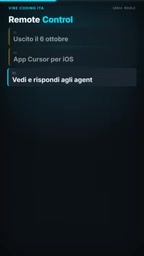
According to the YouTube channel Vibe Core (an Italian-language AI coding content creator), Cursor officially released a new feature called Remote Control on October 6. The core logic is straightforward: the Cursor Agent running on your computer can now be remotely monitored and interacted with through the iOS Cursor app.

The practical significance of this feature lies in the fact that Agent tasks often take a long time — whether it's refactoring a module, generating a set of test cases, or handling multi-file modifications. Previously, you had to sit at your computer watching the progress; now you can leave your workstation and check the Agent's status anytime from your phone.
Cursor Agent is the built-in agent feature in the Cursor editor. It's not simple code completion — it can autonomously plan and execute multi-step tasks: reading project files, modifying multiple source files, running terminal commands, generating tests, and iteratively fixing errors. Users only need to describe their goal in natural language, and the Agent will break down the steps and complete them one by one. It's precisely because it can work continuously unattended for long periods that the pain point of "not being able to check progress when away from the computer" emerged — and Remote Control was designed to fill this gap.
How to Connect Your Phone to Your Desktop Agent
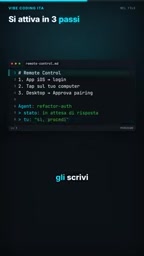
The entire pairing process isn't complicated. According to Vibe Core's demonstration, you need to first install the Cursor app on your iOS device and log in, then tap your computer's name on the phone. At this point, the desktop Cursor will pop up a pairing confirmation request — click approve on your computer to complete the binding.
Once binding is complete, you can see a list of currently running Agents on your phone. Tap any Agent to view the specific operations it's executing, and you can also type text directly to send new instructions to the Agent. This interaction method essentially turns your phone into a lightweight monitoring and command terminal.
Key Limitation: Your Computer Must Stay On and Online
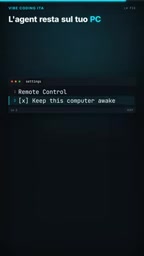
This point requires special attention. According to Vibe Core, the Agent itself still runs on your personal computer — Remote Control merely provides a window for remote viewing and interaction. Therefore, your computer must remain powered on and connected to the internet; otherwise, the phone cannot establish a connection with the Agent.
For laptop users, this means paying attention to power settings. In the video, Vibe Core recommends enabling the "Keep Computer Awake" option in system settings to prevent the computer from entering sleep mode and causing connection interruptions. This limitation also indicates that Cursor is currently still using a local Agent architecture rather than a cloud-based execution solution.
The difference between local Agent architecture and cloud architecture is key to understanding this feature's limitations. Cloud solutions (such as GitHub Codespaces or cloud CI) place computation and Agent processes on remote servers, so as long as the server is online, users can shut down their local devices without affecting task continuation. Cursor, however, adopts a local-first architecture — Agent processes, code, indexing, and model calls all happen on your own machine, and the phone is simply a "remote control" communicating with the local process through an encrypted channel. This has two consequences: code and data never leave your local environment, providing stronger privacy; but once the local machine shuts down, sleeps, or disconnects from the network, the Agent process is terminated along with it, and the remote end naturally cannot connect either.
Use Cases and Experience
At the end of the video, Vibe Core used a very relatable scenario to describe the value of this feature: sitting on the couch in the evening, pulling out your phone to check the Agent's coding progress, or giving the Agent new task instructions.
From a more practical perspective, the pain points this feature addresses include: remote monitoring during long code generation tasks, timely response to Agent error states after leaving your workstation, and quickly checking the execution status of different Agents when switching between multiple tasks. For developers who are used to having Agents handle batch tasks, remote control reduces the constraint of "having to stay in front of the computer."
Pros and Cons of Local Architecture
Remote Control continues Cursor's local-first strategy. The benefit is that code and data always stay local and don't need to be uploaded to the cloud for execution; the cost is that the prerequisites for remote control are fairly strict — the computer cannot be shut down, cannot sleep, and cannot lose its network connection.
Compared to cloud development environments like GitHub Codespaces, Cursor's approach is better suited for developers who have code privacy requirements or rely on local development environment configurations. But if you want to continue running Agent tasks after shutting down your computer, the current Remote Control cannot meet that need.
For Cursor users, this is a feature update worth trying, especially for developers who frequently have Agents execute long-running tasks. You just need to make sure your computer's power management settings are properly configured, and you can continue to stay in control of your Agent's progress even when away from your desk.
GitHub Codespaces is a cloud development environment provided by GitHub. It runs a complete containerized development container (dev container) on remote servers, and developers can connect remotely through a browser or VS Code. Compared to Cursor's local approach, Codespaces' advantages are environment consistency, device independence, and the ability to continue tasks after shutting down your local computer; the costs are that code needs to be hosted in the cloud, it's typically billed by usage time, and support for local-specific configurations and private dependencies is weaker. The two are not substitutes for each other, but rather oriented toward different trade-offs: privacy and local environment controllability vs. availability anytime, anywhere.
Related articles

AgentCore in Practice: Connecting Custom Tools and MCP Servers to Agents
DebuggerCafe tutorial shows how to connect custom tools and MCP servers to Amazon Bedrock AgentCore agents, covering tool contract design, MCP reuse, and production concerns.

816B Parameters Scores Only 39? The Real Cost-Effectiveness of the Open-Source LLM Parameter Race
Meta's 816B Muse Spark Open scores just 39 on Artificial Analysis, while 180B Qwen3.8-Flash-Next scores 40. This article analyzes 11 open-weight models' parameters vs. scores, exploring the real impact of activated parameters, quantized size, and deployment cost.

Aerial Manipulators: The Next Step for Drones from 'Seeing' to 'Changing'
Starting from a Reddit discussion, this article analyzes the technical challenges, potential applications, and deployment bottlenecks of aerial manipulators, exploring the key challenges for drones moving from environmental perception to physical manipulation.