Cursor's New Feature: Build Apps with AI, One-Click Publishing with Built-In Security Gates

Cursor's Build Live Apps lets cloud agents scaffold, deploy, and secure apps with shareable links.
Cursor's Build Live Apps closes the deployment gap for AI-generated apps: cloud agents scaffold apps, spin up Postgres, configure authentication, host in the cloud, and generate shareable links. Mandatory security scans and explicit user confirmation prevent insecure auto-publishing. Team admins can view all apps and secrets. Repositories live on Cursor Origin or GitHub; the feature is included in paid plans with cloud agents enabled.
Writing code with AI is no longer novel, but most AI-generated apps stop at the local development environment—you can run them on your machine, but getting them truly published is another matter. Cursor's newly launched Build Live Apps feature aims to close that "last mile."
From Scaffolding to Launch: Cloud Agents Handle the Entire Workflow
According to a breakdown by Harnesses and Agents Daily on YouTube, Cursor's Build Live Apps allows cloud agents to directly scaffold an application and automatically spin up a Postgres database when needed. The agent can then configure login authentication, host the app in the cloud, and ultimately generate a shareable link.
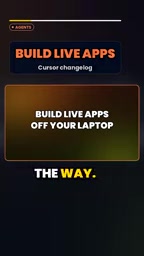
The significance of this workflow is that it brings deployment steps that previously required manual effort—database configuration, authentication integration, hosting—into the execution scope of the AI agent. Developers no longer need to leave the Cursor environment to deal with cloud provider consoles.
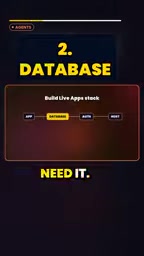
Postgres is an open-source relational database management system (object-relational database) known for its stability, standards compliance, and extensibility. In cloud-native development, it is often offered as a managed service (such as Supabase, Neon, or AWS RDS), allowing developers to obtain a database instance without maintaining servers themselves. Build Live Apps automatically launching Postgres means the agent creates a managed database instance on demand and likely auto-generates connection strings, environment variables, and other configuration, giving the app persistent storage capability—a key step from "runs locally" to "ready to launch."
Cloud Agent refers to an AI agent running in the cloud that can call tools and execute multi-step tasks, as opposed to models that only provide completions or chat within a local IDE. It typically has a sandboxed execution environment, network access, and resource management capabilities, enabling it to autonomously create projects, install dependencies, configure services, and more. Build Live Apps relies on cloud agents to connect scaffolding, databases, authentication, and hosting, so the feature requires users to have cloud agent capabilities enabled rather than just basic code generation.
Security Gate Before Publishing: No Launch Without Passing Checks
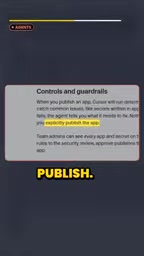
You might not have noticed, but Build Live Apps doesn't sacrifice security controls in pursuit of "one-click publishing." According to Harnesses and Agents Daily, apps must pass a security scan before publishing, and users must explicitly confirm the publish action; otherwise, the app will not be made publicly available.
This design addresses a real problem: AI-generated apps may contain insecure dependencies or configurations, and if automatically launched, the risk would be directly exposed to external users. Making security checks and manual confirmation mandatory steps strikes a balance between automation and controllability.
Team Governance: Admins Can See Every App and Secret
For team scenarios, Cursor provides administrative visibility. Team admins can view all built apps and the secrets associated with each app. This means AI-generated apps are no longer black boxes scattered across individual accounts but are brought under team oversight.
In the context of AI-assisted development, the value of this point is easily underestimated. As app creation becomes easier, teams may see a proliferation of small tools quickly generated by individuals; without a unified view, secret leaks or resource abuse would be hard to trace. The admin's global visibility provides at least a layer of auditing foundation.
Secret in the context of app deployment refers to sensitive credentials such as API keys, database passwords, and OAuth client secrets. They should generally not be hardcoded in code repositories but injected at runtime via environment variables or secret management services. Admins being able to view the secrets associated with each app helps identify hardcoding or over-authorization issues; however, visibility alone does not equal rotation and least privilege—teams still need to pair it with secret lifecycle management to reduce leak risk.
Repository Hosting and Plan Requirements
On the code repository side, Build Live Apps currently supports storage on Cursor Origin or GitHub, so developers can choose based on team habits. The feature itself is covered under paid plans that have cloud agents enabled.

This also clarifies the positioning of Build Live Apps: it's not a free-tier trial feature but aimed at users who already pay for cloud agent capabilities. For developers evaluating Cursor's team plans, whether this feature is included may influence purchasing decisions.
What This Feature Changes
The competitive focus of AI coding tools is shifting from "quality of generated code" to "efficiency of delivering complete applications." Cursor's Build Live Apps packages deployment, databases, authentication, hosting, and security management into a single pipeline, which can significantly reduce friction from idea to shareable link for prototype validation and internal tool development.
But note that increased automation also means developers need to better understand the implications of the security confirmation step—the review before clicking publish remains the final responsibility.
FAQ
Can Build Live Apps automatically create a database? Yes. The cloud agent spins up a Postgres database when needed.
Will the app go live directly? No. It must pass security checks and be explicitly published by the user.
What can admins see? Team admins can view all apps and their secrets.
Where can repositories be stored? Currently Cursor Origin or GitHub.
Which plans can use this? Paid plans with cloud agents enabled.
One-line Summary
Cursor launches Build Live Apps, letting cloud agents handle databases, authentication, hosting, and security checks to generate shareable links.
Paragraph Summary
Cursor's Build Live Apps aims to close the deployment gap—the "last mile" for AI-generated apps. Cloud agents can scaffold an app, create a Postgres database on demand, configure login authentication, host it in the cloud, and generate a shareable link. Mandatory security scans and explicit user confirmation before publishing prevent insecure apps from going live automatically. Team admins can view all apps and their secrets, providing audit visibility. Repositories are supported on Cursor Origin or GitHub, and the feature is included in paid plans with cloud agents enabled. This marks a shift in AI coding tool competition from code generation quality to complete app delivery efficiency, though developers remain responsible for pre-publish review.
Related articles
 Tech Frontiers
GitHub Daily · November 8: Agent Infrastructure Blooms Across the Board
GitHub Daily Nov 8: agent infrastructure dominates Trending—browser automation, design systems, skill libraries, VM runtimes, and context compression—while veteran tools warm up.
 Tech Frontiers
Comparing Routing Mechanisms of 10 Open-Source MoE Models: DeepSeek, Qwen, Mixtral, Llama 4, gpt-oss
A configuration-based comparison of routing mechanisms in 10 open-source MoE models, analyzing DeepSeek, Qwen, Mixtral, Llama 4, and gpt-oss on expert count, top-k, shared experts, gating, and load balancing.
 Tech Frontiers
Vibe Coding Step-by-Step Guide: Learn to Build Products with AI in Six Steps
Breaking down the six-step methodology of Bilibili's 748-episode Vibe Coding course, analyzing the usage boundaries and prompt techniques of Codex, Claude Code, and Cursor, and discussing who this AI coding course suits, who it doesn't, and how to avoid the trap of watching without acting.