Cursor 'Unlimited Refills' Demystified: A Reverse Engineering Analysis of the Account Rotation Mechanism

Cursor "unlimited refill" tools rotate through account pools rather than restoring quota.
This article reverse-engineers Cursor "unlimited refill" tools to reveal their true mechanism: they are not magic quota restorers but automated account rotation systems. An operator-controlled account pool supplies fresh credentials whenever the current account's quota runs out. Hot token switching (within a ~500ms cache window) enables seamless handoffs, device fingerprints are spoofed to evade server-side risk controls, and a local UI patch creates the illusion of PRO membership. The process loops continuously across four steps — monitor, confirm exhaustion, fetch new account, sync identity — and relies on the ongoing consumption of real accounts in a gray area of service terms.
What Is Cursor's "Unlimited Refill"?
Cursor is an AI-powered code editor capable of completing code, understanding project structure, and helping developers tackle complex programming tasks through an Agent interface. Because these capabilities depend on underlying AI models, different subscription tiers come with corresponding usage quotas. Once a quota runs out, the official options are straightforward: wait for the periodic quota reset, pay per use, or upgrade to a higher subscription tier.
Against this backdrop, a category of so-called "unlimited refill" tools has emerged on the market. They claim that by entering a license key, you can maintain Pro-level quota indefinitely — even after it's exhausted, it auto-restores. This sounds as if the tools bypass the official billing system and directly modify server-side quota limits. However, Bilibili creator 赤羊001 (from the 赤小羊揭秘 series) reverse-engineered one of these programs and uncovered a very different truth.
The Real Nature of Cursor "Refills": Swapping Cups, Not Refilling Them
Once the program is disassembled, it becomes clear that these tools are not "restoring the same account's quota" — they are automatically switching accounts.
Lines 8 through 18 of a file named 02 Account Switch Fills reveal that the program handles email addresses, access tokens, refresh tokens, and includes numbered paths like AccountInfo-Renewed. This indicates the tool maintains an account pool controlled by the operator. When the current account can no longer be used, the program pulls the next set of credentials from the pool and swaps it in.
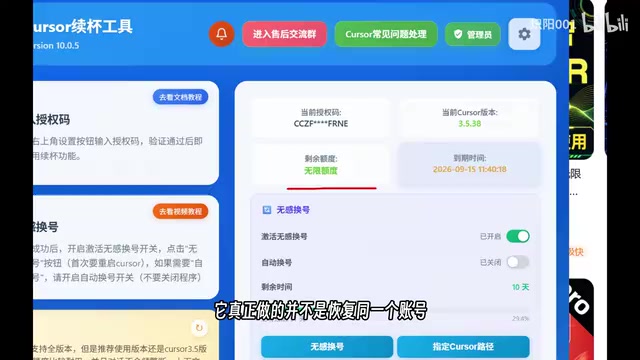
As the creator put it: a "refill" doesn't mean topping off the original cup — it means finishing one cup and grabbing a new one. This distinction is critical, because it defines the entire technical logic of the tool. It's a system built around account rotation, not a "quota generator."
Hot Token Switching: The Core Mechanism Behind Seamless Account Changes
Once an account is swapped, how does a running instance of Cursor adopt the new identity without disrupting the user? The answer lies in hot token switching.
Code from lines 14 through 27 of files related to 03 Token Hold Renewed shows that the program reads an Active Token file and sets a cache window of approximately 500 milliseconds. A token can be thought of as the account's "digital ticket." After the tool writes the new account's token to the file, it simply waits for the old cache to expire — at which point Cursor re-reads the updated identity. No manual re-login is required.

The 500-millisecond cache window is an elegant design choice: short enough to make the switch nearly instantaneous, yet leveraging the app's own cache-refresh mechanism to achieve a truly seamless account change.
Additionally, lines 10 through 27 of 04 Request Rewrite show that the program intercepts outgoing requests before they are sent. When it detects a request destined for Cursor's servers, it reads the current token and rewrites the Authorization header accordingly. In plain terms: just before the ticket is checked at the gate, the old ticket is quietly swapped out for the current account's new one.
Device Fingerprint Spoofing: Completing the Identity Disguise
Switching account tokens alone isn't enough. Modern services typically use device identifiers (machine fingerprints) to detect anomalous behavior — if the same device rapidly cycles through large numbers of accounts, it's likely to be flagged by anti-abuse systems. These tools therefore also alter the device identity in sync.
Code from lines 11 through 24 of 06 My Machine ID shows that before modification, the program uses an ID derived from the real machine; after modification, it switches to a Telemetry ID that can be controlled by local state. This means the device identifier shifts from "real and fixed" to "arbitrarily spoofable."
Further, lines 16 through 38 of 05 Machine ID Mapping show that the program replaces old identifiers in requests with new identifiers of identical length, allowing account identity and device identity to rotate together.

This component demonstrates that the tool's developers have a solid understanding of server-side risk controls — only by updating both the account credentials and the device fingerprint simultaneously can the system minimize the risk of being flagged as bulk account abuse.
The PRO Label in the UI: A Visual Illusion
Many users, after running these tools, see "PRO member" displayed in the UI and assume that quota has been generated out of thin air. The reality is different.
Lines 15 through 20 of 07 Workbench Pro Patch reveal that before the membership type is written to local state, it is forcibly set to PRO. However, local display and server-side permissions are entirely separate things. This local patch can make the UI show a PRO label, but it cannot conjure quota on the server. What actually allows requests to keep working is the valid token belonging to the newly loaded account.
In other words, the "PRO" label in the interface is more of a psychological reassurance than a reflection of reality. The actual quota supply still comes from the real accounts being continuously cycled through the account pool.
The Complete Automated Loop: A Four-Step Cycle
Putting all these components together reveals the full operational logic of this account rotation system. Lines 10 through 23 of 08 Usage Detection Evidence show that the tool continuously monitors account usage and quota exhaustion status. Once it confirms the current account's quota is depleted, it fetches the next set of credentials from the pool, then updates the token and device identifier.

The entire workflow can be summarized in four steps:
- Monitor quota — Continuously track the current account's usage
- Confirm exhaustion — Determine whether the quota has been fully consumed
- Fetch a new account — Pull the next set of credentials from the operator's account pool
- Sync the new identity — Update the token and device identifier to complete the seamless switch
Once the switch is complete, the system loops back to step one, forming a fully automated cycle.
Conclusion: The Truth Behind Cursor's "Unlimited Refills" Is No Longer a Mystery
This technical teardown leads to a clear conclusion: Cursor's "unlimited refill" is not an infinite quota generator — it's a carefully engineered account rotation system.
Within this system, each module plays a specific role:
- The account pool provides a continuous supply of quota
- Hot token switching enables seamless account changes
- Machine identifier modification keeps the device fingerprint in sync with the account identity
- The local patch creates the illusion of PRO membership in the UI
Once each of these layers is peeled back, the mechanism is no longer mysterious. What's marketed as a "refill" is, in essence, a constant stream of cup replacements — not a single cup that never runs dry. Understanding this also helps developers and users recognize the real mechanisms and potential risks behind such tools: they depend on the ongoing consumption of large numbers of real accounts, and they operate squarely in the gray area of service terms of use.
Related articles

WorkBuddy Comprehensive Review: A Practical Guide to Local Automated Office Assistant
A comprehensive review of WorkBuddy, a local automated office assistant: core features, multi-file linkage, browser control, a 720-minute tutorial, and blue book resources.

WorkBuddy for Beginners: Office Automation Made Easy from Zero
A beginner's guide to WorkBuddy, the local AI assistant: covering the core content of a 720-minute Bilibili tutorial, including document and spreadsheet automation, data analysis, and browser control, helping zero-experience users quickly get started with AI office automation.

AI Agent Performance Evaluation: Two Paths and Testing in Practice
A Bilibili open class breaks down two paths of AI Agent testing: AI-empowered testing and testing AI products themselves, and explains why traditional testing fails on generative agents, plus how Python+Locust stress testing and the AIES evaluation platform divide performance evaluation work.