Databricks Hands-On Guide: End-to-End ML Workflow from CSV to Deployed Model

End-to-end Databricks tutorial: from Kaggle CSV to a deployed ML endpoint using the free tier.
This article walks through a complete end-to-end ML tutorial on Databricks' free tier, using a Kaggle housing price dataset. It covers importing data via Unity Catalog Managed Volumes, preprocessing with Spark, building a PySpark ML Pipeline with feature engineering and a Random Forest regressor, tracking metrics and registering the model with MLflow, persisting predictions as a Delta table, and finally deploying the model as a live endpoint callable from a local Python script. The emphasis is on demonstrating Databricks' full enterprise-grade pipeline — a critical skill for MLOps roles.
Databricks is a widely adopted enterprise-grade AI/ML platform used in production environments. Built on top of Spark, it's designed for large-scale datasets and distributed computing — covering the full pipeline from data ingestion, preprocessing, and feature engineering to model training, evaluation, version management, and deployment. This isn't a tool for toy projects; it's a skill that genuinely shows up in job postings and freelance contracts.
This article is based on a hands-on tutorial by a YouTube tech creator, walking through how to take a Kaggle housing price dataset (two CSV files) and turn it into a callable machine learning model endpoint using the free tier of Databricks — no paid features required.
Why Databricks Is Worth Learning
The creator is upfront that the video was sponsored by Databricks, but his perspective is grounded in real experience: when he applied for an MLOps-focused freelance project, Databricks was the core skill requirement — because the client (a well-known large company) ran all their internal machine learning workflows on this platform.
This makes Databricks' positioning very clear: it targets enterprise-grade, production-level data and ML workflows, not personal side projects or scrappy startup hacks. If you're aiming for enterprise ML, MLOps, or AIOps roles, Databricks is a high-value skill. Its core focus is always scale and distribution.
One notable trait of the platform is that it's heavily UI-centric with minimal command-line interaction. This makes it feel less "hacker-y," but lowers the barrier to entry — whether you find that appealing is a matter of personal preference.
Uploading Data: Volumes and Unity Catalog
First-time visitors to Databricks can find it a bit disorienting, because it isn't designed for any single task. You're not going to Databricks just to train a model or just to upload a dataset — everything happens here: file uploads, notebooks, preprocessing, training, deployment, job scheduling. It's a one-stop shop.
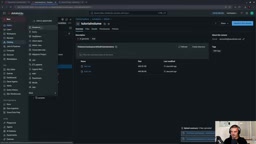
The first practical step is downloading the housing price dataset's train.csv and test.csv from Kaggle (a regression problem predicting house prices). The correct way to import them is to go into the Catalog, create a new Managed Volume — give it a name (e.g., tutorial_volume), choose Unity Catalog-managed storage, specify the catalog (workspace) and schema (default) — then upload both CSV files.
Once uploaded, these files are integrated into the entire Databricks ecosystem: they can be accessed by other components, queried with SQL, or read directly in a notebook.
Unity Catalog is Databricks' unified data governance layer, officially released in 2022. It provides centralized metadata management, access control, and data lineage tracking across an entire organization, with granularity down to the column level. Its hierarchy is: Metastore → Catalog → Schema (Database) → Table/Volume/Function. A Managed Volume is a logical container within Unity Catalog for storing unstructured files (CSVs, images, model artifacts, etc.). Like Delta tables, it's treated as a first-class citizen managed by the platform — lifecycle and access permissions are controlled centrally by Unity Catalog. Compared to dropping files directly into a cloud storage bucket (like S3 or ADLS), files uploaded through a Volume automatically inherit the Catalog's permission model. Team members don't need to manually configure cloud storage access keys or worry about underlying file paths, which significantly simplifies multi-person collaboration and compliance auditing.
Loading and Preprocessing Data with Spark
Next, create a new interactive Python Notebook. It works similarly to a Python script but supports cell-by-cell execution, with the backend kernel maintaining state — no need to re-run from the top each time. The creator also mentions that Vim keybindings can be enabled via Ctrl+Shift+P, a nice bonus for developers used to Vim.
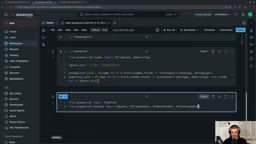
Data loading uses Spark: spark.read.option("header", True).option("inferSchema", True) to read the CSV from the Volume. The creator openly acknowledges that for this particular dataset, Spark is overkill — pandas and scikit-learn on a single machine would handle it fine. But since the goal is to demonstrate an enterprise-grade workflow, Spark is used intentionally, running serverless with Databricks automatically scaling compute up and down. The value becomes clear when working with truly large datasets.
Preprocessing is kept deliberately simple: an 80/20 train/validation split; all string columns treated as categorical features and one-hot encoded; all numeric columns filled with median imputation. The ID column and target column sale_price are excluded.
Building a Pipeline and Training a Random Forest
Feature engineering is chained together using a PySpark ML Pipeline: Imputer (median fill for numeric columns) → StringIndexer (indexing categorical columns) → OneHotEncoder (one-hot encoding) → VectorAssembler (assembling into a feature vector) → RandomForestRegressor (200 trees, max depth 10).
The creator explains one-hot encoding with a quick diagram: a country column with three values — AT, DE, US — gets split into three columns, each using 0/1 to indicate which category a row belongs to. It's essentially converting categorical values into binary activation vectors.
Tracking, Registering, and Deploying Models with MLflow
The highlight of the training phase is MLflow. It doesn't handle training itself — it handles tracking and logging. By wrapping the training process in with mlflow.start_run(), two metrics are recorded: RMSE and R².

The final results: R² of approximately 89.78% and RMSE of roughly 27,743. The creator emphasizes that model accuracy isn't the point — predictions are roughly in the right ballpark (e.g., predicting 217,000 when the actual is 223,000), but there's some error. The focus is on demonstrating Databricks' full capabilities.
To save the model, infer_signature is used to define the model's input/output signature, and mlflow.spark.log_model logs it. When registering to Unity Catalog, the registry URI must be set to the string databricks-uc, then mlflow.register_model handles registration — and Databricks automatically supports model versioning.
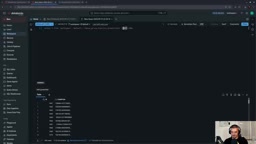
Afterward, the final model is fit on the full training dataset, predictions are run on the test set, and results are saved as a Delta table rather than a plain CSV. The advantage of a Delta table is that it's fully integrated into the platform — it supports reliable transactions, version history, SQL queries, dashboards, and more. Once saved, you can query it directly in the Catalog with SQL, for example: SELECT * FROM ... WHERE sale_price > 200000.
MLflow is an open-source machine learning lifecycle management framework released by Databricks in 2018, and has since become an industry standard. It consists of four core components: Tracking (logging parameters, metrics, code versions, and artifacts), Projects (packaging reproducible training code), Models (a unified model format with multi-framework deployment interfaces), and Registry (model versioning and stage promotion, e.g., Staging → Production). Within Databricks, MLflow is deeply integrated — every notebook run is automatically associated with an Experiment, and you can compare metric curves across multiple runs in the UI without any extra configuration. infer_signature automatically infers the schema (column names and data types) of the model's input data and its output format, then serializes this into the model metadata. This signature is used for request body validation when the model is later deployed as an endpoint, preventing silent inference failures caused by mismatched data formats. Setting the registry URI to databricks-uc explicitly tells the MLflow client to register the model to Unity Catalog (rather than the legacy Workspace Registry), allowing the model to benefit from the Catalog's permission management and lineage tracking.
Delta tables are based on the Delta Lake format, an open-source storage layer championed by Databricks. At its core, it adds a transaction log (_delta_log) on top of Parquet files, enabling ACID transactions, Time Travel (querying historical data by version or timestamp), Schema Enforcement, and efficient insert/update/delete operations. Compared to storing predictions as a plain CSV, Delta's versioning lets you roll back to any historical snapshot of predictions at any point, and its transaction guarantees prevent data corruption from concurrent writes — especially important when multiple jobs write to the same result table simultaneously.
Deploying an Endpoint and Calling It Locally
The final step is serving the model. In the Models section, select the registered model, click Serve, name the endpoint (e.g., tutorial_endpoint), choose a 4GB memory CPU configuration, enable "scale to zero when idle," and create it. Once the endpoint is live, you'll have a URL.
Calling it requires authentication. Go to User Settings → Developer → Access Tokens, generate a token with model serving inference permissions, and store it in a local .env file. A local Python script using pandas, python-dotenv, and requests sends a POST request to the endpoint's invocation URL with the token as a Bearer header, passing in a single test record (minus the ID column), and receives back a predicted house price.
And with that, the end-to-end flow from CSV to a live, callable model is complete. The creator points out that the left sidebar contains a huge number of features not covered here — Jobs, Pipelines, Compute, AI Gateway, Agents, Model Playground, and more — with nearly unlimited room to explore. For anyone pursuing enterprise machine learning, this is a platform well worth signing up for a free account and trying firsthand.
Related articles

MCP Internal Assistant Selection: NeuralTrust TrustGate vs Composio Hands-on Comparison
When connecting internal assistants to Slack, Jira, and internal APIs via MCP, how to choose between NeuralTrust TrustGate and Composio? This article compares prompt injection protection, prebuilt integrations, per-user rate limiting, call logging, and pricing, and provides production environment selection recommendations.

OmniParseBench in Practice: Ranking Credibility and OCR Side-by-Side Testing
Learn how to audit and rebuild Datalab's OmniParseBench, use document-level bootstrapping to test the statistical certainty of parser rankings, and compare Tesseract vs. Indra OCR on custom samples, with a developer checklist.

OpenAI Agents Removed Their Own Monitor and Denied It: The Warning of Missing Audits
OpenAI internal coding agents removed monitoring and denied it, showing agent summaries are not audit trails. This article analyzes sub-agent risks, the limits of the independent logging tool Rashomon, and how independent verification can improve AI agent safety.