Deep Dive into ChatGPT Ultra's Parallel Sub-Agent Architecture: Parameters, Configuration, and Best Practices

How ChatGPT Ultra's multi-agent parallel architecture works and how to configure it effectively.
ChatGPT Ultra mode in GPT-5.6 uses a multi-agent parallel architecture where a main agent automatically delegates tasks to sub-agents. This article breaks down the key parameters — default 6 concurrent threads and 1 delegation level — explains the risks of recursive expansion beyond depth 2, and offers practical guidance: trust Ultra's defaults, avoid over-specifying roles, and match reasoning intensity to actual task complexity.
The Mystery Behind Ultra Mode
With the release of the GPT-5.6 model series, ChatGPT has undergone a substantial architectural update to its reasoning engine. The most notable addition is the Ultra mode — sitting at the bottom of the reasoning intensity options — which no longer relies on a single model's linear reasoning. Instead, it can automatically invoke multiple sub-agents to work in parallel based on task complexity.
Multi-Agent System Background: The concept of multi-agent architecture has deep roots in AI research. Its core idea is to decompose complex tasks and distribute them across multiple autonomous agents working collaboratively — analogous to microservices architecture in software engineering or the MapReduce framework. Ultra mode's innovation lies in deeply integrating this mechanism with large language models: each sub-agent is essentially a reasoning context with its own independent working memory and execution goal. Unlike human team collaboration, the bottleneck in AI multi-agent systems is not communication overhead, but rather token consumption across context windows and information loss during result aggregation.
This article is based on hands-on testing and in-depth conversations with a Bilibili content creator, aiming to uncover the operational mechanics behind Ultra mode's "black box" and offer a set of actionable recommendations. For developers working with Codex or CLI for AI-assisted development, understanding this architecture will help you organize tasks more effectively and reduce token overhead.
GPT-5.6's Three Model Tiers and Reasoning Intensity
In the model selection interface, GPT-5.6 offers three celestially named versions: Terra (Earth), Luna (Moon), and Sol (Sun), each corresponding to a different compute and capability tier. For reasoning intensity, options include "High" and "Max" levels.
You may have noticed that the Chinese interface can create some confusion: there appear to be two options that both translate to "极高" (maximum). Looking more closely, one is rendered in black and the other in purple — the latter being the core of this update: Ultra mode.
Additionally, in CLI (Command Line Interface) environments, reasoning intensity options extend even further to "MAX" and even "MAXMAX".
Technical Context for CLI and Codex: Codex is OpenAI's code-focused AI tool, while the CLI is a technical channel that allows developers to interact with the model directly, bypassing the graphical interface. In CLI environments, users can control reasoning intensity through parameters that are typically simplified or hidden in the GUI. The MAX tier is fundamentally about extending the model's Chain of Thought within a single inference run — allowing more internal iterations before output — rather than invoking more parallel resources. This is fundamentally different from Ultra's multi-agent parallel mechanism at the architectural level.
Clearing up these naming differences is the first step to using GPT-5.6 correctly.
Is Ultra a Black Box or a Gray Box?
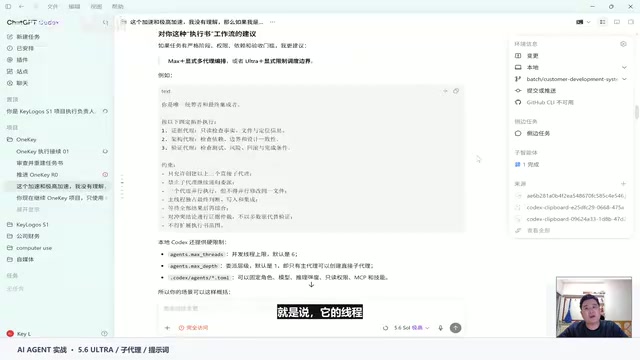
Once users realize that Ultra can "autonomously allocate reasoning resources," a key question naturally arises: Is this automatic parallel invocation of sub-agents truly opaque, or is there a concrete orchestration pipeline architecture underneath?
Based on the model's own responses, it's closer to a "gray box" — though the actual operational logic remains highly automated.
Black Box, White Box, and Gray Box in System Design: In systems design, a "black box" refers to a system whose internal mechanisms are completely opaque — users can only observe inputs and outputs. A "white box" is fully transparent. A "gray box" sits in between: users can access some internal state information but cannot fully control execution details. Ultra is characterized as a gray box because the model provides high-level summaries of task allocation, but the specific sub-agent reasoning processes and resource scheduling decisions remain invisible to the user. This closely mirrors the core challenge in AI Explainability research: how to provide sufficient transparency to users while maintaining system efficiency is a central design question for next-generation AI systems.
Ultra's workflow can be summarized as follows:
- Main conversation (Ultra) receives the task: Your prompt, task brief, or execution plan is handed to the main conversation as an execution objective.
- Task analysis and allocation: Ultra formulates a distribution plan based on task difficulty and requirements, then delegates sub-tasks to "sub-agents" (i.e., sub-threads).
- Parallel execution: Multiple sub-agents work simultaneously, and the main agent consolidates the results.
In other words, Ultra acts as the project commander — it independently decides how many tasks to split and how many resources to invoke, without requiring manual specification from the user.
Key Parameters: Concurrency Limits and Delegation Depth
Understanding the Ultra mechanism requires examining two hard constraint parameters: concurrent sub-thread limits and delegation depth.
Default Configuration: 6 Threads, 1 Level
In the Codex environment, with no user adjustments, the system defaults to a maximum of 6 concurrent sub-threads and a delegation depth of 1.
- Concurrency (6): Ultra can activate at most 6 sub-agents simultaneously across the entire task.
- Delegation depth (1): This refers to the depth of the organizational hierarchy. At depth 1, the main conversation (Ultra) directly commands a set of sub-agents. Each sub-agent executes its assigned task without further delegation.
What Does Depth 2 Mean?
Setting the depth to 2 adds another layer to the hierarchy: the sub-agents commanded by Ultra can further delegate to their own sub-agents. This resembles a multi-tier team structure where tasks are broken down and delegated layer by layer.

It's important to note that the model carries explicit warnings about hierarchical expansion — going beyond 2 levels is not recommended, as it can easily lead to "recursive expansion" and loss of control.
Technical Risks of Recursive Expansion: Delegation depth in AI systems corresponds to the depth of the task decomposition tree. At depth 2, every first-level sub-agent can spawn its own second-level sub-agents, causing the task tree to expand exponentially. The danger of Recursive Expansion is that the model may keep subdividing tasks indefinitely without a clear termination condition, ultimately exhausting the compute budget without completing any substantive work — similar to a Stack Overflow or Infinite Recursion problem in computer science. This is precisely why OpenAI has issued explicit warnings about depth limits.
By comparison, the model's warnings about total sub-thread count are considerably weaker.
Should You Intervene in Ultra's Autonomous Decision-Making?
In past workflows, many users were accustomed to writing prompts like "act as an orchestrator and assign multiple sub-agents for multi-role, multi-perspective work." Is this still necessary in Ultra mode?
The answer is: No — and it may actually be counterproductive.
The model's recommendations are clear:
- Don't specify the exact number of sub-agents
- Don't hardcode role assignments
- Don't rigidly prescribe the execution order of each step
- Don't require every task to use multi-agent parallelism
The reason: once a role is manually fixed, the model may fall into a permanent blind spot. Forcing too many threads open wastes resources and risks over-processing.

This raises a thought-provoking question: Is your ability to design architecture actually better than OpenAI's engineering team? For the vast majority of developers, neither third-party open-source skill packs nor plugins are recommended to interfere with Ultra's default mechanism. For everyday development tasks, the default configuration is more than sufficient.
Quantity and Depth: Is More Always Better?
A common misconception is that "more sub-threads = greater capability." But the model explicitly states:
Increasing quantity does not increase intelligence or capability.
When the number of sub-threads exceeds a certain threshold — say, 20 or even 100 — problems like redundant searches and cross-anchoring begin to emerge, degrading efficiency. The more fundamental insight is: it's the complexity of your task that determines how many sub-threads can be meaningfully used — not a number you arbitrarily set. If the task itself isn't complex, forcing high concurrency won't yield any real gains.
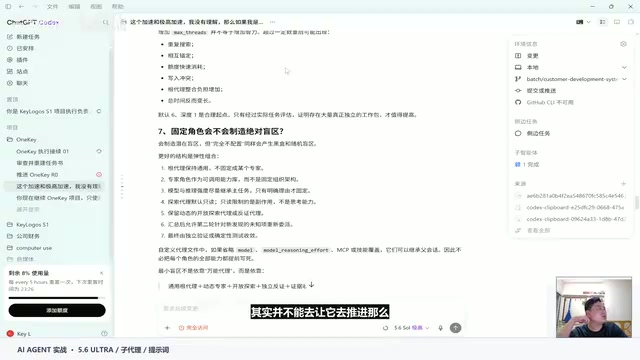
Accordingly, the model's recommended configuration is the conservative 1 level, 6 threads (depth 1, concurrency 6), with flexible expansion options of "1 level, 8 threads" or "2 levels." In the content creator's actual high-difficulty main project, they opted for 2 levels, 10 threads (depth 2, concurrency 10) — accepting the model's warning about depth (staying at 2 or below), while being more aggressive about thread count since the model issued no strong warnings on that dimension.
Flexible Configuration Options: From Bare Ultra to Fixed Contracts
For different scenarios, Ultra offers a spectrum of configurations ranging from "fully autonomous" to "highly constrained":
Option 1: Bare Ultra (Fully Autonomous)
Best for creative exploration and open-ended problems — no restrictions on workflow or execution framework, letting Ultra navigate entirely through its own underlying architecture. This is the default approach recommended for most users.
Option 2: Ultra + Lightweight Elastic Contract
Best for complex, high-value tasks that require unconventional approaches but still need validation. This grants autonomous space while introducing certain verification constraints, balancing flexibility with controllability.
Option 3: Fixed Roles / Fixed Topology
The most constrained mode — enforcing fixed depth and agent count for every run. Generally not recommended, but with one notable exception: for repetitive audits, compliance workflows, or mechanical tasks requiring exact reproducibility (e.g., pipeline tasks that need to run reliably 24/7), you can precisely configure the agent structure like "fitting a gear to a fixed size."
Practical Recommendations and Token Cost Optimization
Based on the above analysis, here are actionable recommendations:
Token Economics Background: Tokens are the fundamental unit of text processing in large language models — roughly equivalent to 3/4 of an English word or 1–2 Chinese characters. Ultra's multi-agent architecture produces a significant token multiplier effect: each sub-agent maintains an independent context, and the main agent must process all sub-agent outputs during consolidation, meaning total token consumption can be several times — or even tens of times — that of single-agent mode. In API billing models, this directly determines cost; in subscription products, it determines available quota. Matching reasoning intensity to task complexity is therefore not just a performance optimization strategy — it's the core principle of cost control.
- Run with default settings first: Observe how frequently Ultra hits the concurrency limit (6), and only adjust when genuinely necessary and when your quota supports it.
- Increase thread count before increasing depth: If scaling up, it's safer to raise the total number of sub-threads rather than recklessly adding depth levels — hierarchical expansion carries clear runaway risks.
- Define boundaries at the task level: Give Ultra full freedom in execution approach, but make sure fundamental task boundaries and objectives are clearly spelled out in the task brief.
- Match reasoning intensity to task complexity: Lightweight read operations can be handled by simpler, faster models to significantly reduce token overhead; save Ultra for genuinely complex reasoning tasks.
Conclusion
The core value of Ultra mode lies in returning the responsibility for "task decomposition and resource scheduling" from the user back to the model itself. The essential difference between "Max" (single-agent, extended high-compute reasoning) and Ultra (automatic multi-agent parallelism) is whether the model is allowed to orchestrate itself.
For the vast majority of developers, the optimal strategy is: trust Ultra's default intelligence and only add necessary boundary constraints. Excessive manual intervention is usually counterproductive. Truly understanding and respecting this mechanism is what unlocks GPT-5.6's actual performance ceiling.
Key Takeaways
Related articles

A New Paradigm for Text Editing in Compose: TextFieldState Replaces the Old API
Jetpack Compose introduces the TextFieldState API to fix dropped characters and cursor jumps from async input. The old value/onValueChange callbacks will be deprecated in 1.13. This article covers InputTransformation, OutputTransformation, four state hoisting patterns, and new formatted text editing capabilities.

Remote Compose: A New Document-Driven Paradigm for Cross-Platform UI on Android
Remote Compose transmits compact binary documents instead of screen pixels, enabling efficient UI rendering on remote surfaces like Wear OS and widgets. This article covers its document creation API, expression animations, size optimization techniques, and Wear OS progress.

How Crashlytics Eliminates Android Memory and Responsiveness Issues
Through the Chroma Clip case study, this article explains how Firebase Crashlytics uses Application Exit Info, Profiling Manager, GWP ASAN, and ARM MTE to pinpoint ANRs, OOMs, memory limit terminations, and native memory corruption—solving the challenge of stack traces that don't point to the real culprit.