DeepSeek for WeChat Official Account Formatting: A Hands-On Tutorial to Generate Beautiful Layouts in 2 Minutes

Use DeepSeek to generate HTML code for free, fast WeChat Official Account formatting
This article introduces a method for using DeepSeek AI to format WeChat Official Account articles: by uploading a style reference screenshot, requesting HTML output, and emphasizing WeChat web standards as three key prompt elements, the AI generates layout code in two minutes. The code is then opened in a browser, copied to a third-party editor, and synced to the Official Account backend—reducing traditional 30-minute formatting work dramatically with zero learning curve.
Why Is WeChat Official Account Formatting Such a Headache?
Anyone who's managed a WeChat Official Account knows the struggle: the built-in editor is bare-bones. To create an attractive layout, you typically rely on third-party tools like 135 Editor or Xiumi—picking templates, tweaking styles, adjusting color schemes. A single article easily takes 30 minutes or more to format.
Is there a faster way? Absolutely—use DeepSeekAd to generate formatting code directly. It's completely free, requires zero design skills, and takes just two minutes to produce a polished layout.
Here's the complete step-by-step process.
Complete Workflow for Generating WeChat Official Account Layouts with DeepSeek
Step 1: Prepare Your Prompt and Reference Screenshot
The core of this method is a carefully crafted prompt that includes three key elements:
1. Upload a reference image: Find a WeChat article style you like and take a screenshot. This image determines the visual direction of DeepSeek's output—color scheme, font hierarchy, and paragraph spacing will all be generated based on it.
2. Request HTML format output: This is the critical factor that makes the entire method work. Having DeepSeek output the layout as HTML code ensures the formatting is complete and ready to use directly.
3. Emphasize compliance with WeChat Official Account web standards: Adding this constraint effectively prevents garbled text or broken formatting when pasting into the Official Account backend.
Why are all three elements indispensable? Prompt Engineering is the methodology of carefully designing input instructions to guide AI models toward producing expected results. In this scenario, each of the three elements plays an irreplaceable role: the reference image solves the "style ambiguity" problem—text descriptions like "clean and elegant" are highly subjective, but a picture is worth a thousand words; requiring HTML format solves the "output usability" problem—if the AI outputs in Markdown or plain text, style information is largely lost and can't be used directly; emphasizing WeChat web standards solves the "platform compatibility" problem, guiding the AI to avoid CSS properties unsupported in the WeChat environment (such as certain Flexbox layouts, external font references, etc.). Together, these three form a complete constraint framework that is "goal-specific, format-usable, and platform-compatible"—removing any one of them will significantly degrade output quality.
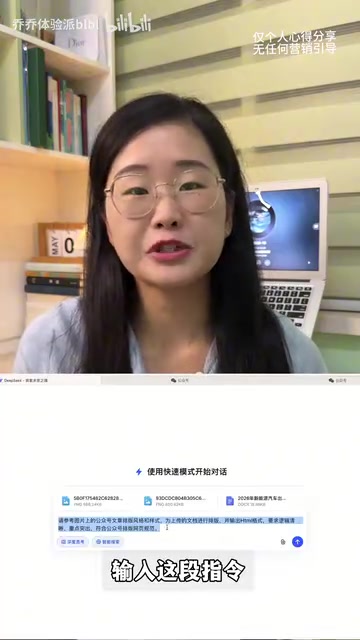
Once your prompt is ready, send your article content along with the reference screenshot to DeepSeek, and the AI will begin auto-formatting.
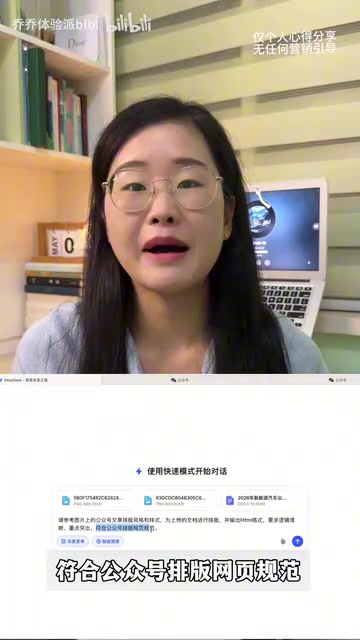
Step 2: Preview the Layout and Export the Code
After about two minutes, DeepSeek will output complete HTML code. Click the "Run" button in the upper right corner to preview the layout directly on the page.
How does DeepSeek "understand" your reference image? DeepSeek is a large language model developed by DeepSeek (the company). Its multimodal version has image understanding capabilities, enabling it to analyze visual information in uploaded images and convert it into code. When you upload a WeChat article screenshot, the model identifies the color scheme (primary, secondary, and background colors), font hierarchy (heading sizes, body text sizes, blockquote styles), and layout structure (single/double column, divider styles, card borders, etc.). It then combines these visual features with your article content to "translate" them into corresponding HTML+CSS code. This process is similar to a designer "replicating a reference image," except the executor is now AI, compressing hours of work into two minutes. Understanding this underlying logic helps you describe your desired style more precisely in prompts, resulting in higher-fidelity output.
From actual testing, the AI-generated layouts perform well in terms of article structure hierarchy and color schemes, with solid aesthetic quality. Compared to the uploaded reference images, the reproduction accuracy is quite high.
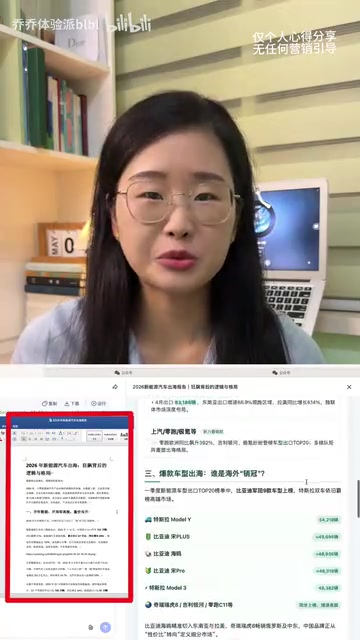
Step 3: Sync to the Official Account Backend with One Click
Once you're satisfied with the layout, follow these steps:
- Click the "Download" button at the top to save the HTML code locally
- Open the downloaded HTML file in a browser
- Select all page content (Ctrl+A), then copy (Ctrl+C)
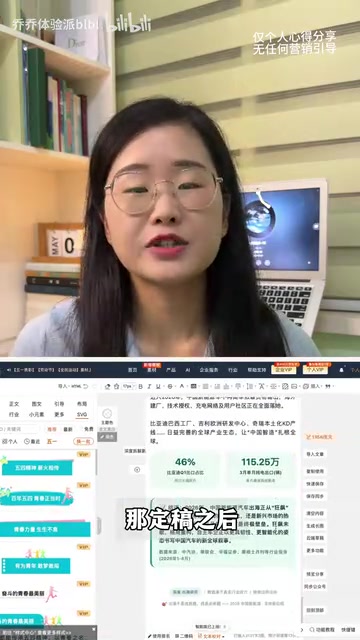
- Open your preferred Official Account editor (135 Editor, Xiumi, etc.)
- Paste the copied content into the editor
Why can't you paste HTML directly into the Official Account backend? For security reasons, the WeChat Official Account backend has strict filtering mechanisms for directly pasted HTML code—many tags and style attributes are automatically stripped, causing your carefully designed layout to instantly lose all formatting. Third-party tools like 135 Editor and Xiumi can serve as intermediary bridges because they have officially authorized content sync interfaces with WeChat Official Accounts, capable of writing rich text content (including styles) into the backend in a WeChat-recognizable format. The pathway of "open HTML in browser → select all and copy → paste into third-party editor → sync to Official Account" essentially leverages the browser's rendering engine to convert code into visual rich text, then uses the third-party editor to complete the format "compliance" processing.
In the editor, you can keep the AI-generated styles or make further adjustments. Once finalized, click "Copy to Use" in the sidebar to sync to the WeChat Official Account backend for publishing.
What Makes This Method So Good?
Immediate Efficiency Gains
Compared to traditional manual formatting, using DeepSeek for layout offers clear advantages:
- Dramatically reduced time cost: From 30+ minutes of manual formatting down to about 2 minutes
- Zero learning curve: No need to master complex editor operations—if you can type, you can use it
- Great style consistency: Reuse the same prompt for subsequent articles to easily maintain uniform formatting
Why is HTML the key bridge connecting AI and WeChat Official Accounts? HTML (HyperText Markup Language) is the foundational language for building web content, using tags to define text styles, image positions, paragraph structures, and other visual elements. A WeChat Official Account article is essentially a mobile webpage, and its backend editor is also based on HTML rendering under the hood. When DeepSeek outputs HTML code, it includes CSS inline styles (style code written directly in tag attributes). This approach maximizes style compatibility across platforms—unlike external CSS, inline styles don't depend on external files, so formatting isn't lost after copy-pasting. This is precisely the technical reason it can smoothly "transition" into the Official Account editor.
Four Practical Tips for Better Results
- Save your prompt template: Remember to save your first well-tuned prompt for direct reuse later, eliminating repeated debugging time
- Build a reference image style library: Prepare different style screenshots for different article types—tutorials, stories, and product articles should each have their own set
- Check details before publishing: The AI-generated layout looks great overall, but font sizes, line spacing, and other details are worth a manual review
- Leverage conversational iteration: If the first result isn't satisfactory, tell DeepSeek directly in the conversation what needs adjustment, such as "change the heading color to dark blue" or "increase the paragraph spacing a bit more"
Summary
The essence of this method is leveraging DeepSeek's multimodal code generation capabilities to transform a visual reference image into usable HTML layout code—the model extracts visual features like color schemes, font hierarchies, and layout structures through image understanding, then "solidifies" them in the form of inline CSS styles.
Related articles
 Tutorials
ChatGPT Plus Subscription Guide: Are GPT-5.5, image-2, and Codex Worth the Upgrade?
A detailed look at ChatGPT Plus features — GPT-5.5, image-2, and Codex — with a Plus vs Pro comparison and a complete step-by-step subscription guide for users outside the US.
 Tutorials
Harness AI Engineering in Practice: Using Claude Code to Master Enterprise-Level E-Commerce Development
Deep dive into Harness AI Engineering: master enterprise e-commerce development with Claude Code using the Rules, Skills, Wiki, and Changes framework.
 Tutorials
Cursor + Codex Dual-IDE Collaboration: A Practical Methodology for Open-Source Project Customization
A complete methodology for open-source project customization based on real-world experience, detailing the Cursor+Codex dual-IDE workflow, seven-stage process, MVP validation, and AI source code reading techniques.