DeepSeek Harness 2.0 Hands-On: Native Images, Prompt Caching, and Controllable Sub-Agents

DeepSeek Harness 0.1.5-rc1 brings image input, smarter prompt caching, file previews, and controllable sub-agents to the V4.1 Flash model.
DeepSeek's updated Harness framework (0.1.5-rc1) for its V4.1 Flash model introduces four key improvements: a smarter prompt caching mechanism that appends updated system instructions to conversation history instead of inserting them mid-stream (achieving 92–98% cache hit rates in testing); native image input for screenshots and design mockups; a sidebar for in-app file previews; and controllable sub-agents that can be queued, edited, or steered mid-task. The open-source, MIT-licensed framework uses a plugin-based architecture. All performance figures are client-side observations from two demo runs and should not be treated as comparative benchmarks.
DeepSeek has updated its Harness programming framework to accompany the V4.1 Flash model (referred to in the video as YE Flash/V1 E-Flash). This upgrade isn't simply a matter of adding a new model to a menu — it spans multiple dimensions including native image input, prompt cache handling, file workflows, and sub-agent control. As of the video's recording date of September 10, the latest version was 0.1.5-rc1, still in developer preview. This article breaks down the core changes and real-world experience based on a hands-on demonstration by a Bilibili creator.
What a Framework Actually Is
To understand why this upgrade matters, it helps to clarify what a "framework" does. The model handles decision-making, while the framework is the software layer surrounding the model — it determines which tools the model can call, how files get edited, how conversations persist, and how multiple agents communicate. Put simply, the model provides the reasoning, and the framework translates that reasoning into actual operations on your machine.
DeepSeekAd's framework is open-sourced under the MIT license, with each capability designed as a plugin. Developers can swap out individual components — including model connectors, tools, storage, or the interface — without rebuilding the entire application. This modular approach allows the framework to integrate new models quickly and makes it easy for the community to extend.
One detail worth noting is the genuine connection between model training and the framework. According to DeepSeek's technical report, its reinforcement learning training spanned multiple framework environments — including its own open-source code paths and various versions of Claude Code — rather than being optimized for a single application. In DeepSeek's own comparisons, running the same checkpoint at best effort, its minimal framework scored 72.6 on benchmarks while the open-source code scored 65.5. This illustrates why surrounding software matters — though the creator explicitly noted these are official research results, not his personal benchmarks from the current release candidate.
It's worth elaborating on why RL training across multiple framework environments is significant. Traditionally, coding agents are trained in a single, fixed tool environment, which causes models to overfit to a specific framework's API and tool-calling conventions — leading to noticeable performance drops when switched to a different framework. DeepSeek's approach involves alternating training across multiple framework environments, including its own open-source paths and different versions of Claude Code. The goal is to teach the model a more generalized ability to "use tools to accomplish tasks," rather than memorizing the specific call signatures of one framework. This is why the same model checkpoint produces different scores with different frameworks: a framework's tool design, context organization, and error-handling logic directly affect whether the model can translate its reasoning into correct action sequences.
Prompt Caching: Cost Optimization for Long Tasks
One of the most interesting improvements in this update is the cache handling mechanism. In long-running tasks, the framework sometimes needs to change its system instructions. Previously, modifying something at the start of a conversation could prevent the model from reusing the cached history that follows it, meaning the entire context would need to be recomputed.
Now, Flash combined with the framework can append updated system instructions after the existing history. The model adopts the latest system message while earlier conversation turns remain cache-eligible. When an agent is carrying large amounts of context through a long task, this improvement has real implications for both efficiency and cost.
It's worth noting this doesn't mean every request will hit the cache — changing tools or other parts of earlier requests can still break reuse. But maintaining reusability across long conversations even when instructions change is a practical improvement. Real-world data showed cumulative input cache hit rates of approximately 92.5% on a coding repair task and 97.8% on a web task. The creator cautioned, however, that these numbers reflect requests where context was resent, and don't directly translate to a percentage savings on your final bill.
Prompt caching is a billing optimization mechanism in large language model APIs. Since every API call requires forward computation across all input tokens, when multiple requests share the same prefix content (such as system instructions, tool definitions, or lengthy conversation history), redundant computation leads to significant unnecessary token consumption and latency. Prompt caching allows API providers to store the computed results of shared prefixes server-side, so subsequent requests hitting the same prefix can reuse them — typically billed at a reduced rate (e.g., 10–20% of the standard price). The critical constraint is that caching requires an exact token-sequence match: if anything changes anywhere in the prefix, the cache is invalidated, and all tokens from that point onward must be recomputed. This is precisely what the framework improvement addresses — by appending changed system instructions to the end of history rather than inserting them in the middle, it maximizes the length of the reusable prefix.
Native Image Input: Screenshots Enter the Coding Workflow
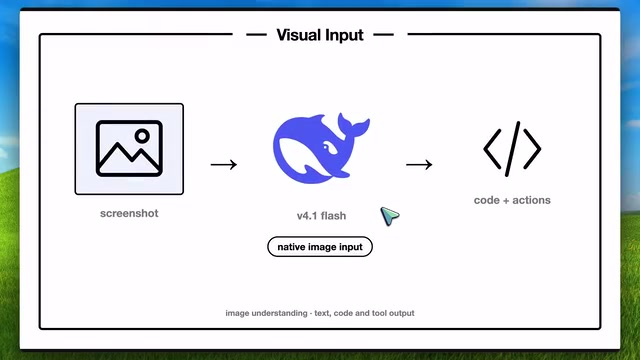
Flash supports image input via an official adapter, which means screenshots can genuinely enter the coding workflow. The model can examine design mockups, error dialogs, or charts alongside your instructions — a reflection of its visual understanding capability. Output still comes in the form of text, code, and tool operations.
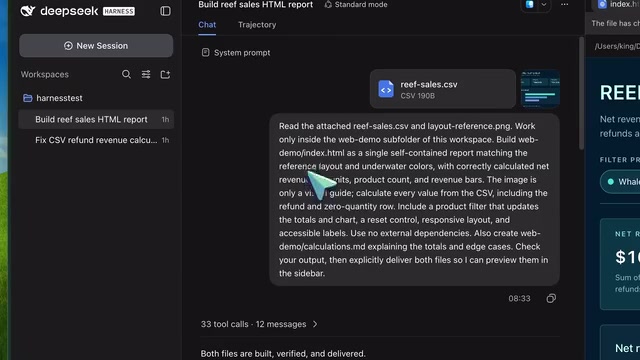
The creator's second demo illustrated this well: he uploaded a sales CSV alongside an image showing the desired report layout. The CSV provided data; the image provided visual direction. The task was to generate an HTML report and a separate document explaining the calculations. The framework produced both index.html and calculations.md — a self-contained page with correct totals (net revenue $165, net units 18, three products), a layout that followed the reference image, and a calculations document explaining where the numbers came from. The entire web workflow completed in under six minutes, with a browser verification step briefly stalling before recovering — "useful results with some bumps," as he put it.
File Workflows and Sidebar Previews
File handling also saw meaningful improvements. The September 4 update added support for uploading arbitrary file types, with progress indicators and a cancel option, plus the ability to switch conversations while an upload is in progress. Uploaded files are made available to agents via saved paths — an important distinction: uploading a spreadsheet or document doesn't mean the model magically understands every format. The agent needs to use available tools to read and process files, while images go through a separate visual input channel.
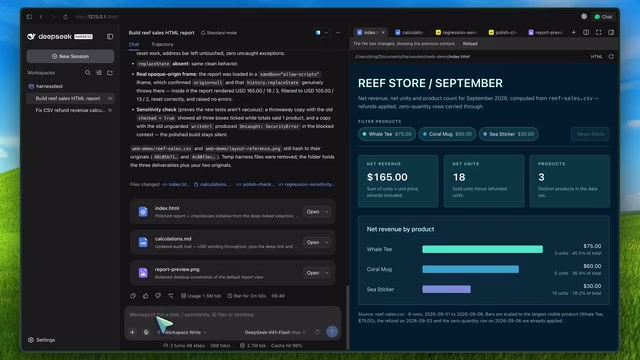
A new sidebar makes outputs easier to inspect. You can preview Markdown, code, HTML, PDFs, and images directly within the app, with support for tabs, split view, and full screen — keeping the conversation visible while reviewing output. For coding tasks, this means not having to dig through folders for the page or report you just generated. The creator did encounter a snag, though: while Markdown and image previews worked fine, HTML previews rendered as blank in the in-app browser — the same HTML rendered correctly in Chrome. This is a rough edge the release candidate still needs to address.
Controllable Sub-Agents and Run Modes
Another significant addition is control over sub-agents. You can queue a follow-up instruction, then edit or delete it before it's sent, or steer an agent's direction while it's still working. Once a queued message begins sending, control pauses until that send completes. This is useful when tasks shift mid-execution — for instance, with one agent handling the UI while another investigates a bug, you can course-correct a single agent without waiting for everything to finish.
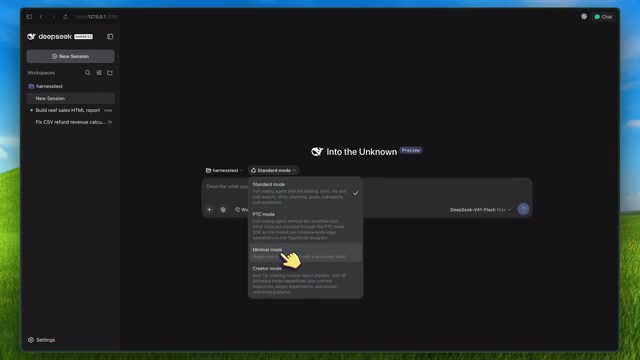
The framework also offers installable "agent team packs," though these remain experimental and require explicit activation. The creator emphasized that more agents means more API requests, and whether the parallel workload justifies the additional cost still needs verification.
In terms of available modes: standard mode provides conventional coding tools; build mode supports inspecting the runtime and composing custom agent configurations. In the current version, solve mode defaults to providing a persistent shell, while the standalone file editor has become a manually-enabled option. Since some older documentation still references two default tools, it's worth consulting the current version's release notes when configuring.
The sub-agent architecture is a design pattern where multiple specialized agents run beneath a primary coordinating agent, each handling a different subtask. Compared to a single agent executing all steps sequentially, multi-agent parallelism can shorten overall completion time — but at the cost of each parallel branch independently consuming API calls and token quota. In practice, the real benefit of an "agent team" depends on how parallelizable the task is: if subtasks have strong dependencies (where A's output feeds into B), parallelism offers limited benefit; if subtasks are independent (such as simultaneously handling the frontend and backend), parallelism can meaningfully accelerate progress. Additionally, running multiple agents simultaneously increases coordination complexity — the primary agent must merge results from sub-agents and resolve conflicts, which is itself additional overhead. Designing agent team packs as explicitly-enabled experimental features rather than defaults is therefore a reasonably cautious approach.
Reliability Improvements and Upgrade Notes
There are also some practical stability fixes under the hood. A streaming fix preserves tool call names and identifiers when subsequent response chunks contain empty fields — without this, a valid request could silently become a failed tool call, or leave behind a conversation that can't be reopened. Recent updates also addressed reconnection issues and reduced UI freezing when opening or resuming long conversations.
The interface now groups statistics into turns, speed summaries, and detailed token usage and cost breakdowns — the numbers worth watching when assessing actual runtime performance. Based on client-side observations from two demos, the creator estimated average output speeds of roughly 242 tokens per second for the coding repair task and 269 for the web task, for a weighted average of approximately 262 tokens per second (including reasoning tokens). Factoring in wait times per model request brought the composite rate to around 136 tokens per second. He explicitly noted these were client-side measurements from just two runs, and cannot be taken as evidence of a general speed advantage over other frameworks.
Existing users should be aware of one migration detail: the log (painting) format has been upgraded to version 3. Supported legacy logs will be migrated to new files, with original files preserved — but older versions of the app cannot read the upgraded records. Plugin authors will also need to address API changes.
Takeaways
For the slightly tongue-in-cheek question of "Claude Code who?" — the more practical answer is that DeepSeek Harness's value lies in having an open-source application that leverages Flash's specific capabilities while making generated output easier to inspect. You still pay for model usage — maximum thinking, repeated tool calls, and multi-agent setups will drive costs up, while reusable context helps bring input costs down.
Across both demos, the framework fixed calculation logic and generated a report with correct numbers — a solid showing for a release candidate. The creator was candid that further testing on larger projects is needed before broader comparisons can be drawn. Installing this version requires a supported Node environment (22.1, 19+, or 24+); install via the official NPM package, then run the web interface to configure an official provider, enter your API key, and select a workspace.
Related articles

Should U.S. College Fraternities Be Banned? A Researcher's Incisive Observations
Why not just ban U.S. college fraternities? A researcher finds the key resistance comes from decision-makers' own fraternity identities and schools' "willful ignorance."

Microsoft Discovery: Accelerating Scientific Discovery with AI Agents
Microsoft's Discovery platform runs specialized AI agents to help researchers screen and prioritize the most promising compounds and experimental paths, reducing experiments and accelerating scientific discovery.

Cambridge Heavy Industries Secretly Develops Desktop-Scale Nuclear Fusion Device
Cambridge Heavy Industries is secretly developing a desktop-scale laser-driven nuclear fusion device, targeting the equipment supply market for fusion power plants. This article analyzes its miniaturization technology path, commercialization logic, and unique positioning in the fusion startup wave.