DeepSeek Harness + 4K Image Generation Model: 3 Advanced Techniques

Connect H3 Image to Harness and bridge code and art with one sentence.
Based on Bilibili creator Shanke's分享, the article notes that coding agents like DeepSeek Harness and Claude Code can only write code and fall back on geometric shapes when illustrations are needed. The solution is mounting an image generation plugin calling MiniMax's open-source H3 Image: create an API Key on the open platform and hand it to Harness to auto-generate the plugin, after which all image actions route through that API. The author breaks down three techniques — cinematic VFX videos, high-quality illustrated websites, and complete game art assets from one sentence — with character consistency maintained via up to 16 reference images. H3 Image renders 4K images in about 10 seconds, far faster than peers, and can be deployed locally or accessed cheaply via API; the approach also applies to Codex, Mcode, and others.
AI coding tools writing code is no longer novel, but the moment image assets are needed, pages generated from pure code can only make do with geometric shapes. Bilibili creator "Shanke" shared an approach: plug MiniMax's open-source H3 Image generation model into DeepSeek Harness to dissolve the barrier between code and art. Based on that video, this article breaks down three reproducible advanced techniques.
Why the vanilla Harness can't draw good images
Products like DeepSeekAd Harness and Claude Code are positioned for writing code and have no image generation capability themselves. When the vanilla version produces a science video or web page that needs illustrations, it can only cobble them together from squares and lines, visually stuck at the level of a "program schematic."
That said, pure code can also produce visuals — the Web Coding content that recently went viral is an example: its essence is using code to precisely compute motion trajectories and shapes frame by frame, rather than video model generation. The rocket science video the UP host ran out of Harness with a single prompt already looks decent, but that's only a beginner-level technique.
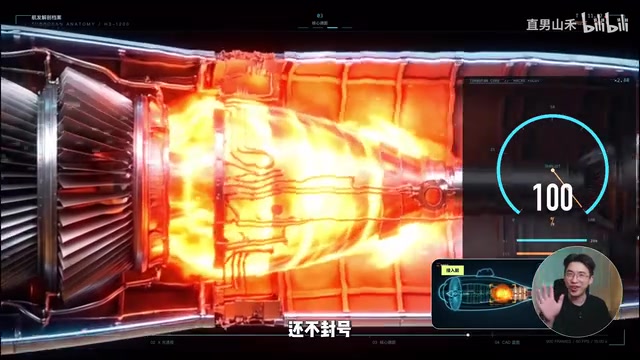
The difference between Harness and Web Coding
"Harness" here refers to a class of AI coding agent frameworks centered on code generation, such as DeepSeek Harness, Claude Code, and Codex. They work by receiving natural language instructions and then continuously writing, running, and debugging code to achieve the goal; their output is programs and code artifacts, so they naturally lack the pixel-level image generation capability of diffusion models.
"Web Coding" refers to the practice of precisely controlling graphics, animation, and motion trajectories entirely with code (HTML/CSS/JavaScript, or Canvas, SVG, WebGL). Its advantages are controllability, interactivity, and small size, but visual quality depends on the developer's manual design of coordinates, easing curves, and rendering logic — it cannot conjure photo-realistic materials and lighting out of thin air. Understanding this distinction makes it clear why Harness in its vanilla state can only draw geometric shapes, and why the visual ceiling jumps sharply once an image generation model is connected.
Technique 1: Connect H3 Image and generate a VFX video from one sentence
The core operation is mounting an image generation plugin in Harness that calls MiniMax's open-source H3 Image model. The key reason the host chose it is speed: about 10 seconds to render one 4K high-definition image, whereas other models on the market take fifty-odd seconds for a 4K image — Harness itself thinks long and executes slowly, so if the image generation step also gets stuck, the entire project timeline gets dragged down.
The integration process isn't complicated: go to the MiniMax open platform, create an API Key, copy the secret, drop it into Harness's creation mode, and simply ask it to "make an image generation plugin connected to MiniMax H3 Image." After a few minutes the plugin is generated, and from then on all image-drawing actions automatically call that API. If you don't want to use it, just disable it in the left sidebar under plugins.

Once the plugin is ready, drop the prompt into the dialog box and let it run through the storyboard frames on its own. With the same prompt, the output upgrades directly from stick figures to cinematic imagery. The host notes that compared to Claude, this approach is cheaper and won't get your account banned.
Worth mentioning: H3 Image is an open-source, SOTA-level image generation model. If your home computer is powerful enough, you can deploy it locally and get top-tier image output for free; if you don't have top-spec hardware or don't want the hassle, going through the API is equally convenient.
API Key and the plugin mechanism
An API Key is a credential cloud service providers use to identify the caller and bill them, usually a long string of characters. After creating one on the MiniMax open platform, handing it to Harness is essentially giving the agent a key to "call the image generation service."
The plugin mechanism is how these Harness products extend: the agent can write a piece of tool code on the spot per natural language request, wrapping an external service into a function it can call. Once the plugin is enabled, the model treats "generate an image" as an executable action when planning tasks, automatically carrying the prompt to send a request, retrieve the image file, and embed it in the web page or video project. The sidebar toggle controls whether the plugin participates in the current task; once off, the agent falls back to pure code mode.
Technique 2: Build a richly illustrated website from one sentence
Using AI to write web pages is nothing new; the pain point is that when a web page needs image assets, the AI is at a loss — pages run out of vanilla Harness have decent layout, but all the characters are crude silhouettes. With the H3 Image plugin enabled, the same prompt yields a noticeably different site quality: the illustrations are 16-megapixel 4K originals, still crisp when zoomed in several times, with solid material textures and shadow lighting, lacking the blurriness and cheap plastic feel of past AI-generated images. The host even whipped up a mouse magnifier effect along the way.
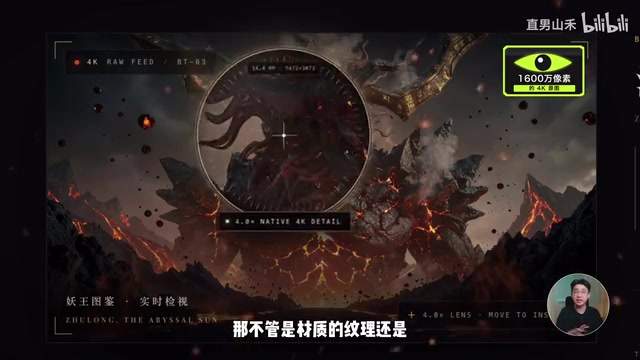
Before, building this kind of web page meant the code was done in three minutes, but hunting for illustrations and cutting out assets threw off the entire rhythm; now everything from layout to large visual images runs through in one go.
Technique 3: Cover all the game art assets
Plenty of people have AI write small games, but a pure-code game's protagonist can only be assembled from geometric shapes — it can't even stretch its legs when running. With the H3 Image plugin enabled, the same prompt can also solve the game's biggest headache, art assets: characters can swap weapons and outfits, and clicking to switch skins instantly changes the look and lets you keep playing.
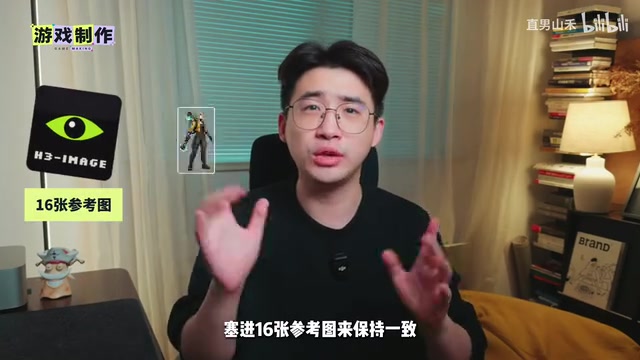
The difficulty lies in character consistency. A single character portrait isn't hard; what's hard is keeping the character from falling apart after changing equipment. H3 Image supports up to 16 reference images to maintain consistency, so even if several skin assets swap out all clothing and weapons, the protagonist's appearance stays stable. The host considers this already a fairly complete small game — a little fine-tuning and it's ready to publish.
Reference images and character consistency
An inherent challenge of diffusion-based image generation models is "consistency": the same character tends to change faces or clothing details across different images. The industry's common solution is reference-image conditioning, i.e., feeding several character images as input so the model extracts and preserves their facial features, color schemes, and clothing structure when generating new scenes.
The more reference images, the richer the information that can be constrained — but the higher the demands on the model's multi-image fusion capability and context length. H3 Image supports up to 16 reference images, so when swapping weapons or skins, the old look can serve as an anchor, maintaining character stability across batch-produced game portraits and action frames — precisely the prerequisite for it to handle a small game's art asset pipeline.
Where this approach applies
The host emphasizes that the technique isn't limited to DeepSeek Harness — any commonly used Harness-type product can connect, whether Claude Code, Codex, or MiniMax's own Mcode. Once the "visual brain" of H3 Image is attached, the wall between code and art disappears. Work that used to require a front-end developer, a concept artist, and a motion designer working together can now be run through with a single sentence, letting ordinary people without professional skills enjoy the fun of creation.
All the steps and prompts shown in the video have been compiled into a manual by the host and placed in the comments section.
(This article is based on the video content of Bilibili creator "Shanke"; the views and data all come from the original author.)
Related articles

Gemini 4 Neon Leak: A Potential Strong Contender Against Opus 5.5
A Hacker News thread suggests Gemini 4 Neon looks like an Opus 5.5 competitor. This article unpacks the product positioning behind this community signal, shifts in the top-model competitive landscape, and what it means for developers' model selection strategy.

Claude Fable 5.2's Self-Authored Short Film 'Fable' Sparks Discussion
A short film 'Fable,' credited to Claude Fable 5.2 for script, visuals, and directing, appears on Hacker News. This article analyzes the significance of full-pipeline AI creation, community reactions, and what it means for content creators.

Anthropic IPO Pricing: A Signal of AI Giants Going Public
Anthropic's IPO pricing draws attention. This article analyzes its potential impact on AI industry valuation, commercialization paths, and the competitive landscape, and highlights public-market expectations and challenges for AI companies.