DeepSeek Harness: Architecting an Agent Workbench Where Everything Is a Plugin

DeepSeek Harness is an 'everything is a plugin' Agent runtime that lets models, tools, sessions, and UI be freely composed and swapped.
DeepSeek's open-source Harness framework (Developer Preview) is built on the principle that everything is a plugin, using Cordis to provide a shared context, typed events, and reversible side effects. Model adapters, tool registries, session storage, and the agent loop itself are all independently replaceable modules. Profile, Bundle, and Patch mechanisms layer these plugins into a concrete runtime, with config inspection before launch. Agent work is broken into Turns and Steps, with session logs serving as a replayable source of truth. It suits developers who need to maintain multiple runtime environments with independently evolving models and tools — though it remains in an unstable preview stage and requires external sandboxing.
DeepSeek has open-sourced an Agent runtime framework called Harness, currently in Developer Preview. Its core proposition can be summed up in one sentence: everything is a plugin. Models, tools, sessions, file systems, sandboxes, and even the agent loop itself are all broken down into freely composable modules. This article is based on the official repository's README, architecture docs, and CLI guide — walking through what problems it actually solves and who it's built for.
Why Break an Agent into Plugins
If you think of an agent as a chat window, then swapping out the model, tools, or session storage usually means touching a large chunk of code. That's exactly the pain point DeepSeekAd Harness aims to address.
Imagine a common scenario: you already have a model adapter and a tool registry, and now you want to add session logging, an approval flow, background tasks, and a web interface. The most straightforward approach is to cram all of this into one application. It moves fast at first, but a few familiar problems tend to emerge over time:
- Switching model providers means conditional branches scattered throughout the call chain;
- Tool execution, session logs, and UI state are all tangled together — changing one thing easily breaks another;
- As the agent completes tasks, it becomes increasingly unclear what state should be saved and what events should be replayable.
Harness doesn't try to solve this by adding a fancier chat button. Instead, it decouples these capabilities and then reassembles them through composition. Its most important design principle translates to plain English as: every unit of capability is a plugin. Model adapters are plugins, tool registries are plugins, session storage is a plugin, and the agent loop itself is a plugin.
Under the hood, Cordis provides a shared context responsible for service contributions, typed events, and reversible side effects. This means no single capability gets to own an irreplaceable "privileged core." Want to add a model provider? Register an adapter at the model capability point. Want to expose tools to the model? Register them to the tool context. Think of it like a motherboard — models, tools, sessions, and UI are all modules in slots, not components soldered permanently into a single machine.
Profile, Bundle, and Patch: Assembling Plugins into a Runnable Product
With so many plugins, how do you assemble them into something that actually runs? Harness uses Profiles and Bundles.
A Profile is essentially a "run recipe" — an ordered list of Bundles to layer together. For example, WebProfile adds the browser application, while HeadlessProfile provides a one-shot runner with no server. On top of these base layers, you can further stack the Profile's own Patches, Patches from HarnessHome, and Overlays passed in via the command line.
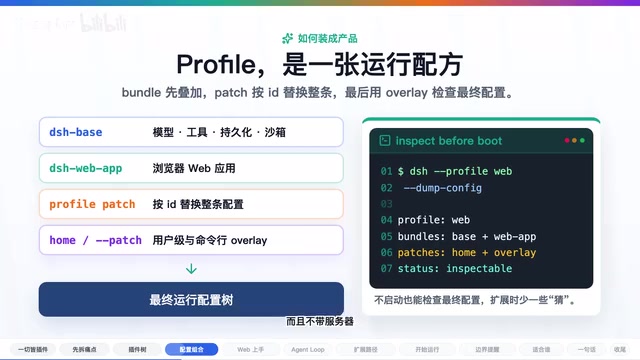
Later Patches look up configurations by ID: if there's a match, the entire entry is replaced; if not, a new entry is inserted. This follows a "last layer wins" rule. The framework also provides a config dump capability, letting you print out the final resolved configuration before actually starting — so you can verify what you're about to run.
The key insight here isn't how many config files there are — it's that the composition of a runtime becomes inspectable and replaceable. You can clearly see which layers were stacked to produce a given run, rather than facing a black box.
Getting Started Quickly with the DeepSeek Harness Web UI
For most people, the Web UI is the most approachable entry point. The process breaks down into four steps:
- Run
npx @deepseek/dsh webdirectly — it starts a page on port 3080 by default; - Open the model settings page, fill in your available model credentials, and save — the model router won't work until this is done;
- Select a Workspace — the project directory you want the agent to read from and write to. The input field is disabled without a Workspace;
- Send a concrete task, such as "summarize this repo and identify the main packages" or "run the tests first, then explain the failures."
The Standard Agent Preset can read and write workspace files, execute commands, delegate work, and maintain plans — subject to your permission settings. When a permission policy requires approval, the Web UI surfaces the operation for you to confirm first. It presents a complete workflow, not just a stream of chat bubbles.
Turn and Step: Making Long Tasks Replayable
Looking deeper, Harness breaks agent work into clearly defined Turns and Steps. A single Turn can contain multiple Steps; each Step issues a model request, streams the output, handles tool calls and results, and then decides whether to continue or terminate.
A complete chain looks like: Turn Start → Step Start → Model Request → Tool Calls and Results → Step End → back to Turn End.
The session log is the "source of truth" here. System prompts, model outputs, tool calls and results, sub-agent dispatches, and context injections can all be replayed along the event stream. This matters because the biggest risk with long-running tasks isn't a missing pretty interface — it's that "what was done, why it was done, and what comes next" eventually lives only in someone's memory.
Extension Paths and Choosing an Agent Preset
The real value of a plugin architecture is that extending the system doesn't require copying an entire agent implementation. The official architecture docs lay out several clear paths:
- Add a model provider by registering an adapter via
ctx.llm; - Register tools via
ctx.tools; - Swap out the Shell or file system by replacing the corresponding Provider;
- Integrate a new UI by driving the agent registry and rendering from session events.

The framework also ships four Agent Presets — Standard, PTC, Minimal, and Creative — ranging from a full toolchain, to TagScript-based tool composition, to a minimal toolset. It's worth noting that these are Agent Presets and should not be confused with CLI Profiles like Web or Headless.
That said, this doesn't mean all plugins are drop-in interchangeable without modification. Interfaces, configuration, and dependencies still need to be aligned — but the system at least makes clear where extensions should happen.
Boundaries and Risks: What DeepSeek Harness Is Not
Before adopting it, the boundaries need to be understood clearly to avoid misjudgment.

First, it is explicitly in Developer Preview — breaking changes may occur, and it should not be treated as a stable, production-ready enterprise product.
Second, it is not a blanket security guarantee for all tasks. The current default is closer to working-directory-level access. Operation approval prompts are not equivalent to sandboxing, and network and process visibility are not fully isolated. Enabling dangerous-class access bypasses file isolation — running untrusted code still requires you to handle isolation, review, and access control yourself, outside the framework.
Third, plugin composition doesn't magically improve model capability. The model, tools, token budget, and network environment all affect the final outcome. What Harness is good at is organizing these runtime components so you can replace, inspect, and extend them — not guaranteeing the agent will always complete the task.
Who Should Use DeepSeek Harness

All things considered, DeepSeek Harness is a good fit for three kinds of people:
- Developers building their own agent workbench who want models, tools, and UI to evolve independently;
- Teams that need to support multiple runtime Profiles (Web, Headless, or others) and want clear boundaries around configuration and extensibility;
- Developers willing to work with a preview-stage framework who want to study how a large agent system decomposes its capabilities into plugins.
On the other hand, if you're looking for something you can "install today, use reliably tomorrow, and never think about the internals" — a consumer-grade tool — Harness probably isn't the most frictionless choice yet.
The core of Harness isn't that DeepSeek built a chat page. It's that they decomposed the runtime capabilities of an agent into composable plugins: models, tools, session events, file systems, and UI can all be swapped and extended through capability interfaces, while Profile, Bundle, and Patch handle the job of assembling those plugins into a concrete run. What it actually delivers isn't a prettier dialog box — it's a method for reorganizing how an agent runtime is put together.
Related articles

WorkBuddy Beginner's Guide: How AI Agents Automate Office Tasks
WorkBuddy tutorial: learn how this desktop AI agent workbench automates files, organizes data, and generates documents, compared with LLMs and Codex, plus a beginner path and cost analysis.

Doubao Work in Practice: Three Modes That Let AI Actually Get Work Done
Doubao Work practical tutorial: from chat mode to Work Mode Lite and Pro, explaining the logic for choosing among three modes with real office task demonstrations. Even complete beginners can learn to use an AI agent to handle local files, organize materials, and generate documents.

AI Agent Runs the Entire GEO Database Mining Workflow with a Single Prompt
Based on a Bilibili creator's demo, this article explains how the WorkBuddy AI agent completes GEO database mining with a single prompt: automatically searching datasets, downloading and organizing data, batch correction, differential analysis, WGCNA, machine learning-based feature gene screening, and regulatory network construction, and generating a complete analysis report.