DeepSeek Harness Complete Tutorial: A Practical Guide to Building Plugin-Based AI Agents

A complete hands-on guide to building plugin-based AI Agents with DeepSeek Harness.
This tutorial covers everything you need to know about DeepSeek Harness — from installation and Web UI setup to its four Agent preset modes (Standard, PTC, Minimal, Creative), third-party model integration, and plugin management. Two practical examples demonstrate building a personal blog and a task management app, showcasing the full power of its plugin-based architecture.
What is DeepSeek Harness
If large language models are the "brain" responsible for thinking and reasoning, then Harness is the "limbs and nervous system" that actually puts that brain into action. It handles file reading, tool invocation, context management, and task execution. In a nutshell: Model + Harness = Agent.
The biggest difference between DeepSeekAd Harness and common AI coding tools on the market is its plugin-based architecture — everything is a plugin. From models, tools, and session sandboxes to even the Agent's main loop itself, everything can be swapped out and recombined at any time. Rather than giving you a fixed program, it provides a foundation for building your own Agent tech stack.
As its creators put it, it's more like a set of "LEGO bricks": you can freely plug, unplug, and modify pieces to assemble an Agent that fits your specific needs. This design philosophy defines its ceiling — the base functionality may not be as comprehensive as mature tools, but the extensibility is extremely powerful.
Installing DeepSeek Harness and Launching the Web UI
DeepSeek Harness officially offers two installation methods: NPM installation and source code installation. This tutorial uses NPM as the example, with the prerequisite that Node.js is installed on your machine (installation instructions are available for both Windows and Mac).
Once you see the success message after running the installation command, you can launch the Web UI service with the dsh web command. Here, dsh is the abbreviation for DeepSeek Harness, and web starts the Web UI.
On first launch, you'll need to enter an API key — simply go to the DeepSeek Open Platform to create one. After saving it, the entire installation and setup process is complete. The whole thing truly lives up to the "5-minute setup" promise.
Four Agent Preset Modes Explained
The Web UI interface is similar to most Agents: an input box in the center and a workspace on the left. A core concept here is Agent preset modes — there are four of them, and understanding them is crucial for efficient usage.
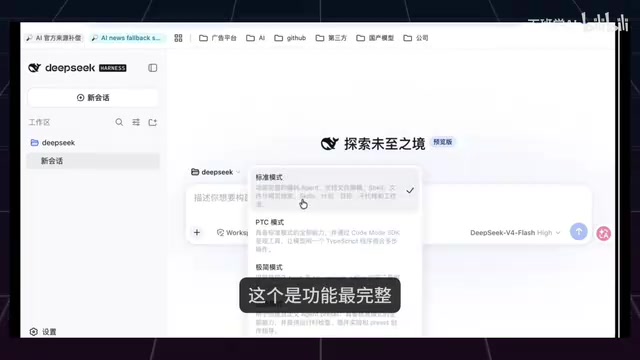
Standard Mode
The most feature-complete and comprehensive option, and the go-to choice for most users' daily work.
PTC Mode (Code Mode)
Specifically designed to improve efficiency for multi-step structured tasks. The core idea is to organize tool calls using code — the model generates a TS program that consolidates what would normally require multiple back-and-forth tool interactions into a single execution.
Minimal Mode
Retains only the model's most basic tools, removes all auxiliary features, and lets the model run nearly "bare" — useful for testing the model's raw capabilities.
Creative Mode
The "creator mode" for advanced users. The purpose isn't to use an Agent, but to create and debug new Agents.
Additionally, permission settings are worth noting: they're divided into "Read-only," "Writable," and "Full Access." The default recommendation is "Writable," which eliminates repeated authorization prompts during local operations. If set to read-only, every file write will trigger a confirmation dialog.
Configuring Third-Party Model Access
DeepSeek Harness uses DeepSeek models by default (such as DeepSeek V4 Flash and V4 Pro) — click the model name to switch. But thanks to the plugin-based architecture, it also supports third-party model integration.
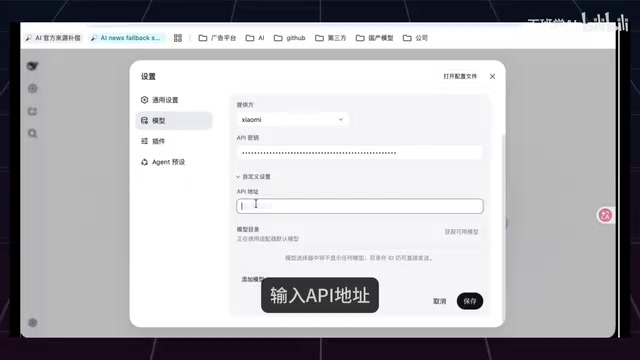
In the "Providers" section of settings, you can add third-party models like Xiaomi's MiMo: enter the API key, specify a custom API endpoint, click "Fetch Available Models," and save. In testing, after switching to the Xiaomi model and asking "What model are you?", the response confirmed the configuration was working. This open model access capability prevents vendor lock-in and greatly enhances flexibility.
Practical Example 1: Generate a Personal Blog in 3 Minutes
The prompt for the first example was straightforward: "Develop a personal blog."
After sending it, the Agent didn't just dive in — it first presented an interactive plan: asking which tech stack you'd prefer (with recommended options), which core features you need (article list, detail pages, tag categories, search, etc., with multi-select), and where you want to deploy.
After confirming requirements, it created a task checklist (similar to a Todo list), marking execution progress item by item. About three minutes later, a complete blog with article listing, detail pages, category tags, and site search was finished, along with the project structure and instructions for running it. This "plan first, execute second, track progress" workflow is the hallmark of modern AI Agents.
Plugin Management: Filling in Core Agent Capabilities
The native Web UI functionality is relatively basic. To match mature tools like Codex, it's missing several capabilities — for instance, you can't reference files using the @ prompt, nor can you open a system terminal within the page. This is exactly where the "everything is a plugin" philosophy shines.
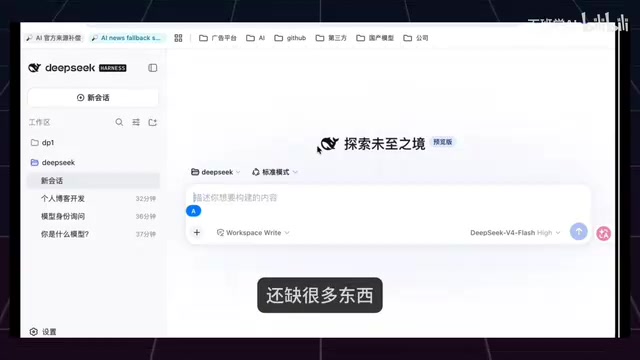
Web UI Enhancement Plugin
After installation, new features include a draggable "pet," a skin center (supporting theme changes), remote access configuration, plus a sidebar and bottom terminal. The sidebar lets you browse project file contents, while the bottom bar opens a terminal by default — no more switching between IDE and terminal, which is extremely convenient.
Coding Capability Plugin
Once installed, you can reference individual files or directories in your current project using the @ prompt. For example, referencing the "About page" and asking what it does — the Agent can accurately read and answer.

Community Plugin Ecosystem
Beyond official plugins, the community plugin library is rich: covering UI beautification, memory management (auto-memory, project memory, cross-Agent local memory), multimodal tools, environment manager, archive management, and more. Users can freely combine them as needed.
Practical Example 2: Task Management Single-Page App Development
The prompt for the second comprehensive example was: "Build a task management single-page app that supports adding, deleting, and marking tasks as complete, with statistical charts."
The Agent again generated a task checklist first, then rapidly completed development. After launching the service through the previously installed terminal plugin, a task board appeared — adding tasks, marking completion, and statistical charts all updated in real-time, with all features testing correctly.
Taking it further, the creator wasn't satisfied with the color scheme and instructed: "Change the color scheme of task-manager related files to blue tones and close the left navigation bar." Using the file reference plugin, the Agent precisely located and completed the modifications. After refreshing, the interface switched to a blue color scheme. This example fully demonstrates the complete development loop enabled by plugin collaboration.
Summary: Core Advantages of DeepSeek Harness
The core value of DeepSeek Harness isn't in how powerful its out-of-the-box features are, but in providing a highly customizable, plugin-based Agent foundation. For developers, this means you can assemble an AI Agent tailored to your workflow, just like building with LEGO bricks.
For users looking to get started with AI Agents, Standard Mode combined with a few common plugins (Web UI enhancement, terminal, file references) covers most daily needs. For power users, Creative Mode opens up the imaginative space for custom Agents. Flexible and open — that's its biggest differentiator from similar tools.
Related articles

Should U.S. College Fraternities Be Banned? A Researcher's Incisive Observations
Why not just ban U.S. college fraternities? A researcher finds the key resistance comes from decision-makers' own fraternity identities and schools' "willful ignorance."

Microsoft Discovery: Accelerating Scientific Discovery with AI Agents
Microsoft's Discovery platform runs specialized AI agents to help researchers screen and prioritize the most promising compounds and experimental paths, reducing experiments and accelerating scientific discovery.

Cambridge Heavy Industries Secretly Develops Desktop-Scale Nuclear Fusion Device
Cambridge Heavy Industries is secretly developing a desktop-scale laser-driven nuclear fusion device, targeting the equipment supply market for fusion power plants. This article analyzes its miniaturization technology path, commercialization logic, and unique positioning in the fusion startup wave.