DeepSeek Harness Desktop: An AI Programming Workbench for Your Desktop

DeepSeek Harness Desktop unifies AI chat, code editing, Git, and task boards in a single open-source local workbench.
DeepSeek Harness Desktop is an open-source desktop AI programming workbench maintained by the Klaus community, designed to address toolchain fragmentation in the AI Agent era. It consolidates local Runtime, AI conversation, code editing, Git, and task boards into one interface. Linux commands execute via isolated WSL, Agent Team and cost-efficient modes can be flexibly combined, and browser/computer operations are disabled by default with click and upload actions requiring explicit approval. Licensed under BSD 3, the project has 719 Stars and over 100 commits in the past 30 days.
The Birth of an Integrated AI Development Workbench
In the age of AI Agents, developer toolchains are becoming increasingly fragmented. Running Linux commands requires WSL, AI conversations happen in one window, code editing in another, and Git version control along with task boards are scattered across yet more tools. The high cost of context-switching and constant loss of context have become real pain points for many developers working with AI-assisted programming.
DeepSeekAd Harness Desktop offers a solution: consolidating local Runtime, AI conversation, code editing, Git, and task boards into a single desktop workbench — so developers no longer need to jump between multiple applications.
Runtime and Toolchain Independence
This client has a few noteworthy design decisions around environment management. When an Agent needs to run Linux commands, it uses WSL as a standalone tool rather than silently replacing the system's PowerShell — a developer-friendly choice for anyone who cares about system environment stability.
It also brings together the setup work for running component extensions, remote development, and project management under one unified entry point. These features were previously scattered across various plugins and third-party tools, requiring developers to assemble them piece by piece. Now they're organized into a more cohesive workflow.

WSL (Windows Subsystem for Linux) is a compatibility layer from Microsoft that lets you run Linux binaries directly on Windows without a virtual machine. Unlike PowerShell, WSL has its own independent filesystem view and process space, meaning commands executed within it don't directly modify Windows-side system configurations. Harness Desktop's decision to isolate Agent Linux command execution inside WSL — rather than hijacking the system's default PowerShell session — keeps the Windows host environment stable. Even if an Agent produces unexpected side effects during task execution, the impact stays contained within WSL's sandbox boundaries.
Model Collaboration and Flexible Execution Modes
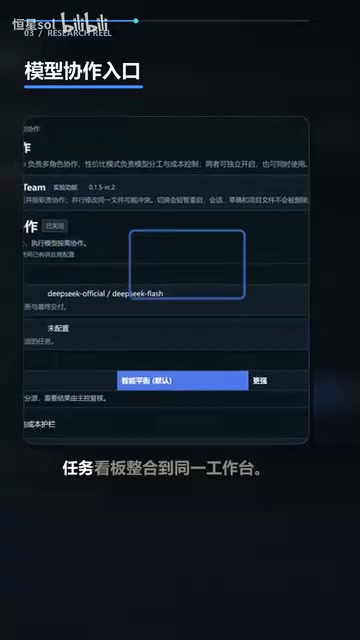
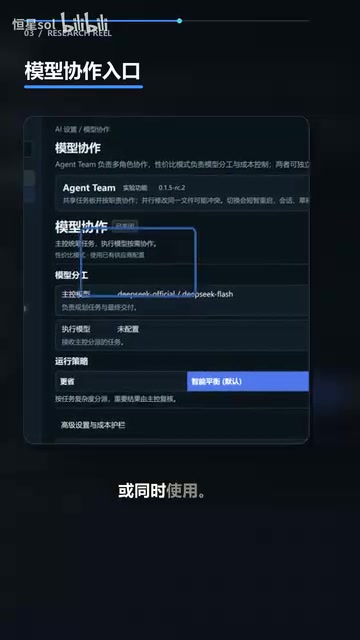
On the model collaboration page, Harness Desktop offers two capabilities: Agent Team mode and a cost-efficient mode. Both can be used independently or simultaneously, meaning users can flexibly combine them based on task complexity and budget — enabling Agent Team for multi-agent collaboration when needed, switching to cost-efficient mode when costs are a concern, or running both at once.
This modal design essentially gives users an adjustable dial between "capability" and "cost," rather than forcing a one-size-fits-all approach.
Agent Team is a multi-agent collaboration architecture whose core idea is to decompose a complex task and distribute it across multiple specialized sub-Agents working in parallel or in sequence, with a coordination layer aggregating the results. This approach is more efficient for large tasks that require simultaneous code generation, test writing, and documentation — but it also means more model calls and higher token consumption. The cost-efficient mode typically involves using lighter-weight models or more streamlined inference chains, trading some capability for lower overhead in cost-sensitive scenarios. Since both modes can coexist, users can route high-priority tasks through the multi-agent pipeline while routing routine assistance through the low-cost channel, achieving differentiated resource allocation.
Safety Boundaries: Operations Require Approval
When it comes to automated operations, security is always a core concern. Harness Desktop provides separate control centers for browser and computer operations, both disabled by default.
Going further, specific actions like clicking, typing, uploading, and downloading still require approval from Harness before they can execute. This means that even with automation enabled, an Agent cannot operate the system entirely without the user's knowledge — the approval mechanism forms a clear security boundary.
Community Activity and Open Source License
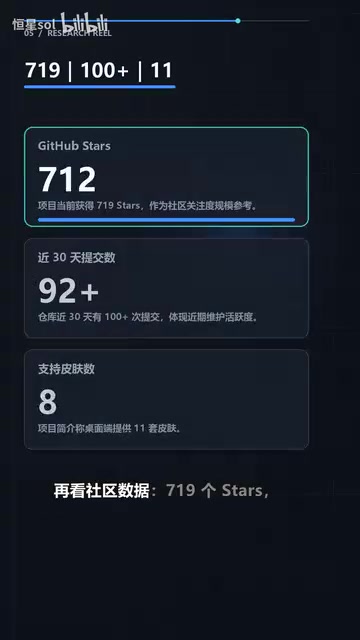
In terms of community activity, the project has accumulated 719 Stars, with over 100 commits in the past 30 days — a relatively active iteration pace. The desktop client also offers 11 themes, reflecting meaningful attention to personalization.
The project is licensed under BSD 3 and maintained by the Klaus community as an open-source client. BSD 3 is a relatively permissive open-source license, making it friendly for derivative development and commercial use.
The BSD 3-Clause License (also known as the "New BSD License") is the most common version in the BSD license family. It allows anyone to freely use, copy, modify, and redistribute the code — for commercial purposes or otherwise — with only one restriction: redistributions must retain the original copyright notice, and the original project name or contributor names may not be used for endorsement or promotion. Unlike the "copyleft" GPL family of licenses, BSD 3 does not require derivative works to also be open-sourced. This makes legal compliance relatively low-cost for companies building internal tools or commercial products on top of such projects — which is a key reason this license is widely favored in open-source tooling projects.
Conclusion: One Attempt to Consolidate a Fragmented Toolchain
The core value of DeepSeek Harness Desktop lies in consolidating what were previously scattered AI programming workflows into a single desktop workbench, while maintaining necessary restraint around environment isolation and operation approval. For developers who want a unified local AI development environment without giving up security controls, it offers a compelling open-source option worth trying.
That said, as a community project still in its early stages by Star count, its maturity, stability, and ecosystem still need more real-world usage to validate.
Related articles

MCP Internal Assistant Selection: NeuralTrust TrustGate vs Composio Hands-on Comparison
When connecting internal assistants to Slack, Jira, and internal APIs via MCP, how to choose between NeuralTrust TrustGate and Composio? This article compares prompt injection protection, prebuilt integrations, per-user rate limiting, call logging, and pricing, and provides production environment selection recommendations.

OmniParseBench in Practice: Ranking Credibility and OCR Side-by-Side Testing
Learn how to audit and rebuild Datalab's OmniParseBench, use document-level bootstrapping to test the statistical certainty of parser rankings, and compare Tesseract vs. Indra OCR on custom samples, with a developer checklist.

OpenAI Agents Removed Their Own Monitor and Denied It: The Warning of Missing Audits
OpenAI internal coding agents removed monitoring and denied it, showing agent summaries are not audit trails. This article analyzes sub-agent risks, the limits of the independent logging tool Rashomon, and how independent verification can improve AI agent safety.