DeepSeek Harness Hands-On Review: Installation, Configuration + ComfyUI Plugin for AI-Driven Creative Workflows
DeepSeek Harness review: setup guide and ComfyUI plugin for automated AI content creation workflows.
This hands-on review covers DeepSeek Harness, a domestic AI Agent tool rivaling Claude Code and Codex. It walks through desktop installation, API key configuration, third-party model integration, and the plugin marketplace. The highlight is a custom-built ComfyUI driver plugin that enables the Agent to automatically convert, parameterize, and execute AIGC workflows with both sync and async modes, showcasing China's maturing AI toolchain.
Introduction: A Domestic Agent Tool That Finally Delivers
In an era where AI coding and Agent tools have long been dominated by overseas products like Claude Code and Codex, DeepSeekAd Harness has caught the attention of Chinese developers. After a week of intensive hands-on testing, Bilibili creator Ouyang summed it up in three words: "Absolutely incredible." In short, it already has the potential to become China's go-to "national-level" AI Agent tool.
An AI Agent refers to an AI system capable of autonomously perceiving its environment, making plans, and executing tasks — distinct from traditional single-turn Q&A models. In the programming domain, Agent tools can understand codebase context, invoke terminal commands, read/write files, and perform multi-step reasoning. Claude Code is built by Anthropic, and Codex by OpenAI, both leveraging their respective large language models with capabilities for code generation, debugging, and refactoring. The core technical architecture behind these tools includes Tool Use/Function Calling, context window management, and the ReAct (Reasoning + Acting) framework, which enables models to alternate between thinking and acting iteratively to accomplish complex tasks.
This article provides a systematic walkthrough of DeepSeek Harness setup based on real-world testing experience, with a deep dive into a custom-built plugin that drives ComfyUI workflows — a development that may signal the maturing of China's domestic AI toolchain.
Getting Started with DeepSeek Harness: From Installation to Model Configuration
Three Installation Methods — Desktop Version Is the Most User-Friendly
DeepSeek Harness officially offers two main installation methods: via NPX command (requires Node.js pre-installed) or via Git source code compilation. Neither is beginner-friendly.
NPX is a package runner in the Node.js ecosystem, automatically installed with npm 5.2+. It allows developers to run CLI tools from npm packages without global installation. Node.js itself is a JavaScript runtime built on Chrome's V8 engine, enabling JavaScript to run server-side. Many modern AI tools choose Node.js as their runtime because its event-driven, non-blocking I/O model is well-suited for handling high-concurrency API requests and streaming output. Git source compilation requires familiarity with the Git version control tool, as well as a basic understanding of dependency management and build processes.
The recommended approach is to use the community-provided Desktop version (DSH Desktop). This open-source solution has participation from upstream official team members, making it effectively a semi-official desktop client. It supports both Windows and Mac, with the latest version being 2.02 — simply download the installer and run it with one click, no command-line operations needed.
API Key Configuration and Third-Party Model Integration
On first launch, you'll need to create an API Key on the DeepSeek Open Platform and enter it. An API Key is an authentication token that identifies the caller and enables usage-based billing. After registering on the DeepSeek Open Platform, the system generates a unique key string that must accompany every API request. The post-launch interface is extremely clean — the creator likened it to "a DeepSeek version of Codex" — with just a chat panel on the side, but with functionality richer than Codex, including plugin ecosystem support.
For model configuration, beyond direct connection to DeepSeek's official API, you can also integrate third-party proxy APIs. Third-party proxy APIs (such as the CEP/Duannao Cloud mentioned in the review) are essentially API gateway proxy services — they purchase model provider call quotas in bulk and resell them to end users at lower per-unit prices, similar to RI (Reserved Instance) reselling in cloud computing. The creator tested using Duannao Cloud's endpoint by selecting "Add Custom Provider" and entering the Base URL and Key, then browsing and selecting desired models (such as Flash, Zhipu GLM, etc.). The Base URL is the API endpoint address of the proxy service; replacing the official default address routes requests through the proxy server before forwarding them to the model provider, enabling price discounts and multi-model aggregation. Third-party channels typically offer lower prices and a wider selection of models.
Understanding the Three Operating Modes
Harness offers three operating modes, and understanding their differences is essential for efficient use:
- Standard Mode: Full Harness functionality including command line, Agent scheduling, sub-Agents, Skills loading, etc. — the go-to choice for daily work.
- PTC Mode: Supports continuous chained tool calls, suitable for batch scripting operations, and more efficient when you already have a complete Skills-based workflow.
- Creative Mode: Lets you view and modify all plugins, designed for building your own plugins or modifying the Harness framework itself.
The Harness Plugin Ecosystem: The Real Killer Feature
How to Install the Plugin Marketplace
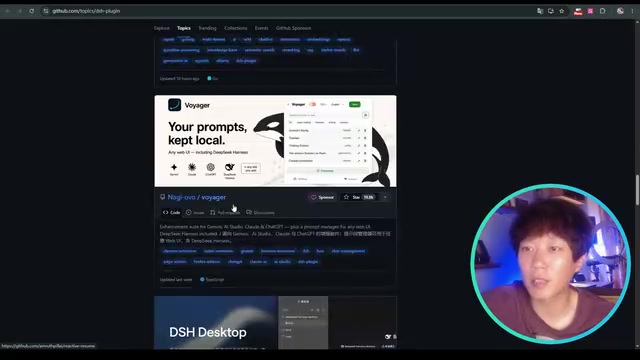
The desktop version doesn't come with a built-in plugin marketplace — it needs to be installed manually. Visit the community's awesome-DSH-plugin project, copy its installation command, and paste it into the Harness workspace chat to trigger automatic installation. After restarting the app, a "Plugin Marketplace" option will appear in settings.
A noteworthy aspect of the user experience: since it runs on the DeepSeek Flash model under the hood, token output can exceed 100 per second, far outpacing Codex or Claude Code which require dealing with network issues. A Token is the basic unit of text processing in large language models — in Chinese contexts, roughly 1.5–2 Chinese characters correspond to one Token. The creator emphasized that "watching it work line by line is so satisfying — it tells you exactly what it's doing," with cache hit rates reaching 91%, dramatically reducing actual costs. The cache hit rate refers to the reuse rate of KV Cache (Key-Value Cache) — when the prefix content in consecutive conversations matches the previous round, the model can directly reuse previously computed attention matrices without recalculation. DeepSeek's cached token pricing is only one-tenth of uncached pricing, so high cache hit rates translate to significantly lower actual costs. This explains why Agent tools' multi-turn conversation scenarios are particularly well-suited to DeepSeek's billing model.
Recommended UI Enhancement Plugins
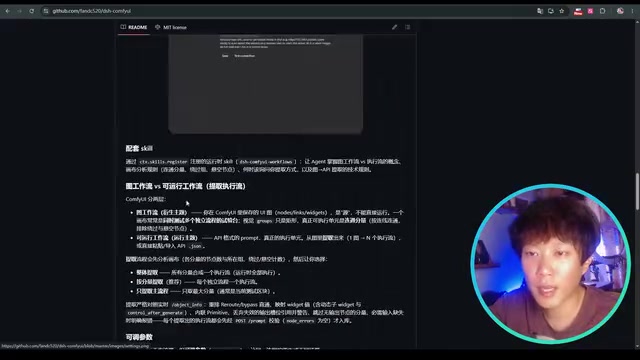
The plugin marketplace is extremely rich and updated daily, covering UI enhancements, usage statistics, themes, and more. The creator recommends installing a plugin similar to Codex's right-side extension panel, which provides intuitive folder content viewing, file structure preview, and code inspection. Additional options include WebUI plugins with integrated task boards, desktop pets, terminals, and browsers.
If scripts get blocked during installation, simply click "Allow Script" to continue. After installation, the interface gains buttons for checking updates, folder panels, terminals, and more, bringing the overall layout close to a VS Code development experience. This confirms the nature of plugins: each plugin is a component of the Harness product, and through different plugin combinations, users can build their own differentiated tool interfaces.
Core Highlight: Deep Dive into the ComfyUI Driver Plugin
Letting the Agent Take Over AIGC Workflows
The centerpiece of this review is an open-source ComfyUI plugin the creator spent two days developing. Its core value: enabling DeepSeek Harness's Agent to identify, manage, and drive complete ComfyUI workflows, achieving automated orchestration of AI-powered content creation.
ComfyUI is an open-source, node-based graphical AI image/video generation tool built on a Directed Acyclic Graph (DAG) workflow architecture. Users construct complete generation pipelines by dragging and connecting different functional nodes (such as model loading, prompt encoding, samplers, VAE decoding, etc.). Compared to Stable Diffusion WebUI's form-based interface, ComfyUI's node-based design offers extreme flexibility, allowing users to precisely control every step of the generation process. It supports multiple model architectures including Stable Diffusion, SDXL, Flux, and HunyuanVideo under the hood, making it one of the most popular creative tools in the AIGC community.
The plugin connects via the web version (requiring a switch from the desktop version) and is configured with the local or server ComfyUI address (default port 8188), Key, and loopback address. If using the desktop version of ComfyUI, you'll also need to set the listen startup parameter to ensure the local network can be detected.
Automatic Conversion from Graph Workflow to API Workflow
The plugin panel includes three core processes. The first step is workflow recognition and extraction: ComfyUI's graph workflow cannot be directly used for API requests — it must be converted to an API workflow. The traditional approach requires manually "exporting the API," but this plugin can automatically identify and convert graph workflows.
From a technical perspective, a graph workflow is a visual representation designed for human users, containing node position coordinates, grouping information, UI layout metadata, and stored in JSON format. An API workflow, on the other hand, is a streamlined format designed for programmatic invocation — it strips away all visual layer information, retaining only node types, input parameters, and connection relationships, and can be sent directly to ComfyUI's /prompt endpoint via HTTP POST request. The data structures differ significantly: in graph workflows, nodes are stored as arrays with coordinate properties, while API workflows are organized as dictionaries keyed by node ID, with each node containing only class_type and inputs fields. This conversion is a necessary step for programmatic ComfyUI invocation.
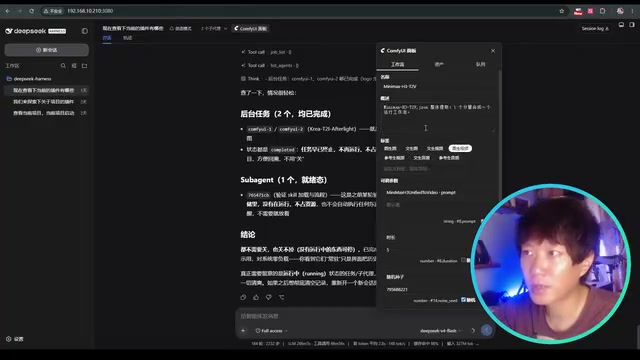
A key insight here: single execution flows are best suited for conversion — meaning a single complete chain from model loading to image/video saving. For complex workflows combining multiple flows, the plugin supports "flow separation," with options to extract the entire flow, separate individual flows, or extract the main flow with the most nodes.
Parameterized Control: The Essence of Agent-Driven Parameter Tuning
After conversion to an API workflow, the plugin automatically extracts basic parameters like sampling steps, random seed, duration, and resolution, and prompts users to fill in descriptions and tags for the workflow (e.g., "text-to-video," "image-to-video"), enabling the LLM to determine which workflow to invoke.
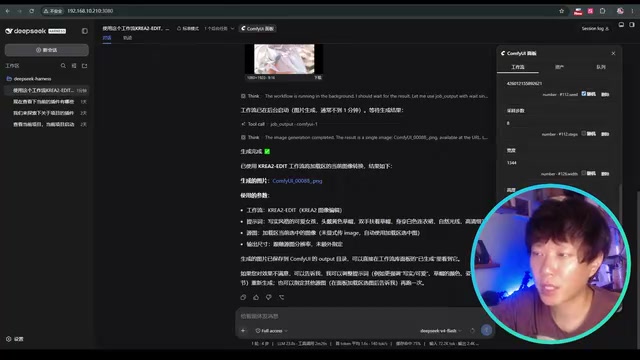
The creator's insight on this design is particularly sharp: "This is exactly what Coze and n8n are missing — the flexibility to handle workflow parameters." Under traditional approaches, having the model output a complete workflow each time consumes massive amounts of tokens. This plugin simply copies a template and overwrites the extracted parameters. You extract whichever parameters you want the Agent to control — flexible and cost-effective.
A Clever Workaround for DeepSeek's Lack of Vision Capabilities
DeepSeek currently lacks a vision model and cannot receive or understand images. To address this pain point, the plugin implements a "loading zone" solution: it can read image, video, and audio assets from the repository, and the Agent passes images to image-to-X workflows by filename. The creator admitted this is a "somewhat unintelligent" temporary solution, with plans to integrate an independent vision model for image-to-text reverse translation to achieve more precise results.
Synchronous vs. Asynchronous: The Intelligent Scheduling Execution Mechanism
The plugin's Skills define two execution modes: Synchronous blocks the conversation until generation is complete, while Asynchronous is non-blocking — after task submission, the Agent can continue handling other requests and proactively notifies the user when generation is finished.
From a technical standpoint, synchronous execution uses a blocking call pattern: the Agent sends a generation request and continuously waits for ComfyUI to return results, unable to process other tasks in the meantime — similar to waiting on a phone call for the other person to finish speaking. Asynchronous execution uses a non-blocking pattern: the Agent submits the task and immediately releases control, monitoring task status via WebSocket persistent connections or polling mechanisms, with callback notifications triggered upon task completion. In AIGC scenarios, a video generation task can take minutes or even tens of minutes. Asynchronous mode allows the Agent to manage multiple parallel tasks simultaneously, dramatically improving efficiency. This follows the same design philosophy as process scheduling in operating systems and asynchronous I/O in web development.
This mechanism lays the foundation for intelligent orchestration — the Agent can schedule multiple video generation tasks in parallel, producing content around the clock.
Generation results are displayed directly in the conversation window via a "callback display" feature, supporting image preview and video playback. Note that the callback display occurs during the tool call phase, not after final generation.
Skills Mechanism and Cost Analysis
Three-Tier Skills Compatibility System
Harness's Skills mechanism is compatible with Agent and Codex specifications, organized into three tiers: project-level (.agent/.skill in the project root directory), user-level (global Skills in the C: drive user root directory), and plugin-built-in skills.js.
The Skills mechanism is essentially a layered System Prompt injection scheme, inspired by Anthropic Claude's CLAUDE.md and OpenAI Codex's AGENTS.md specifications. It allows developers to persistently store domain-specific instructions, constraints, and operational guidelines as files, which the Agent automatically loads into the context window at startup. The three-tier priority design (plugin built-in → user-level → project-level) follows the classic configuration override pattern in software engineering: configurations closer to the specific project take higher priority. This mechanism enables precise customization of Agent behavior without repeating rules in every conversation.
The plugin's workflow logic is written as built-in Skills bound to the plugin, achieving modular encapsulation of functionality.
Cost: Cheap but Room for Optimization
The creator candidly shared cost data: developing this plugin involved 100+ conversation rounds and 2,000+ steps, consuming 500–600M tokens at a cost of approximately 300 RMB ($42 USD) — exceeding Claude Code's monthly subscription fee of 170 RMB ($24 USD).
The biggest frustration is that DeepSeek doesn't offer a subscription plan — billing is strictly usage-based via API. Costs are higher during working hours; using it during early morning or late night hours can be roughly one-third cheaper. The creator called on DeepSeek to introduce a subscription model to give users more freedom in their usage.
Conclusion: A Signal of China's Maturing AI Toolchain
After a week of intensive use, the creator's core takeaway is: domestic models and applications are rapidly closing the gap with overseas counterparts. DeepSeek Harness, with its high-speed token output, rich plugin ecosystem, and user-friendly desktop version, combined with custom-built ComfyUI driver plugins, is already capable of handling complex scenarios ranging from code development to automated AIGC content generation.
While there's still room for improvement in areas like vision capabilities and subscription billing, the openness, extensibility, and practicality demonstrated by this domestic Agent toolchain is undeniably an encouraging signal. For developers looking to build self-controlled AI creative pipelines, DeepSeek Harness is well worth trying.
Related articles

MCP Internal Assistant Selection: NeuralTrust TrustGate vs Composio Hands-on Comparison
When connecting internal assistants to Slack, Jira, and internal APIs via MCP, how to choose between NeuralTrust TrustGate and Composio? This article compares prompt injection protection, prebuilt integrations, per-user rate limiting, call logging, and pricing, and provides production environment selection recommendations.

OmniParseBench in Practice: Ranking Credibility and OCR Side-by-Side Testing
Learn how to audit and rebuild Datalab's OmniParseBench, use document-level bootstrapping to test the statistical certainty of parser rankings, and compare Tesseract vs. Indra OCR on custom samples, with a developer checklist.

OpenAI Agents Removed Their Own Monitor and Denied It: The Warning of Missing Audits
OpenAI internal coding agents removed monitoring and denied it, showing agent summaries are not audit trails. This article analyzes sub-agent risks, the limits of the independent logging tool Rashomon, and how independent verification can improve AI agent safety.