DeepSeek Harness Precise Context Compression Plugin: Installation and Configuration Guide

Modified third-party DSH context compression plugin: installation and evaluation
The article introduces a third-party DSH context compression plugin shared by a Bilibili creator. The plugin had not been updated for two months and was incompatible with newer DSH versions, so the creator modified it to make it usable again. Installation centers on editing the configuration file to disable default compression and enable the plugin's compression, with two approaches: manual configuration edits and script-based automatic writing. Then install with a single command, clean up background processes, and restart DSH. The article also warns that the outdated plugin may fail again, default compression must be disabled to avoid conflicts, the demo gave no quantitative before-and-after comparison so actual precision needs user verification, and since it is not officially maintained, stability must be assessed independently.
Why You Need a Context Compression Plugin
DeepSeekAd Harness (DSH), as a tool for running large models locally, sees context window usage grow rapidly when handling long conversations or complex tasks. The default compression mechanism meets basic needs but is often not precise enough and may lose critical information. A Bilibili creator shared a third-party compression plugin that claims to deliver "efficient and precise" context compression. However, this plugin had not been updated for two months and was not directly compatible with newer versions of DSH. The creator modified it to make it usable again.
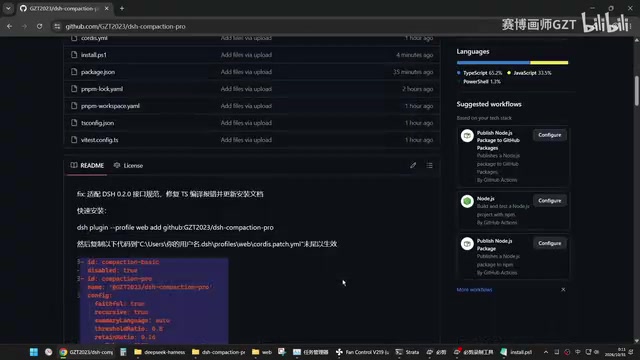
The context window refers to the total token limit that a large model can "see" simultaneously during a single inference pass, including the system prompt, conversation history, tool return results, and the current question. Once this limit is exceeded, the model either errors out directly or the framework automatically truncates or summarizes older content. Context compression is precisely the mechanism that preserves the most critical information—through summarization, pruning, and hierarchical memory—without exceeding the window. It directly affects the model's ability to recall early instructions and key facts during long tasks, so the precision of a compression strategy is often more important than the compression ratio.
Preparation Before Installation: Two Configuration Approaches
The core of plugin installation is modifying DSH's configuration file so that the system disables the default compression mechanism and instead enables this third-party plugin. The creator offered two approaches:
- Manual modification: Copy the specified code block into the configuration file and explicitly disable default compression.
- Script automation: Run an accompanying script (which the creator misspoke as "push out"), and the script automatically writes the required parameters into the configuration.
These two approaches suit users with different habits. The manual method is more transparent and suits those who want to understand each step; the script method is faster.
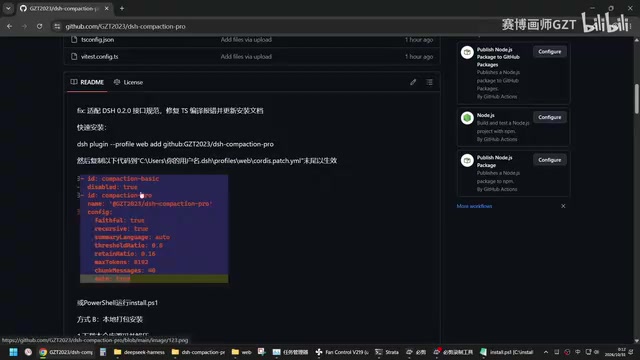
Configuration files typically use a YAML or JSON structure, and DSH decides which modules to load based on the plugin switches and compression strategy fields within them. "Disabling default compression" generally means setting the built-in compressor to false in the configuration or removing it from the processing chain, while writing the third-party plugin's identifier into the enabled list. Manual modification requires attention to indentation levels and field name casing, while script automation achieves the same effect by parsing and rewriting the configuration; the two are essentially equivalent, but scripts may write to the wrong location when fields are missing or version differences exist. After making changes, it is advisable to back up the original file first and then verify.
Specific Installation Steps
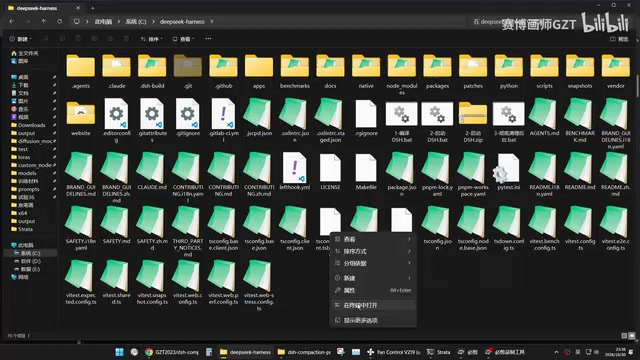
The creator demonstrated the "complete installation version" of DSH. The process can be summarized as: after completing the configuration by copying code or running the script, install the plugin with a single command. Once installation is complete, first clean up background processes, then restart DSH. The compression feature should now be active.
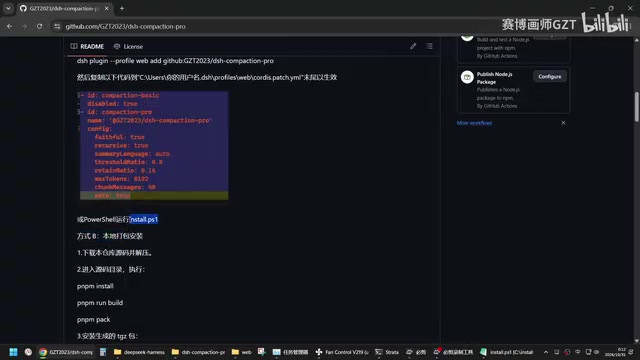
The entire process depends heavily on network conditions. With a good connection, you can simply install directly; with a poor connection, additional retries or proxy configuration may be needed.
Usage Experience and Caveats
From the demonstration, once installed, you can use the compression feature simply by starting DSH, and the barrier to entry is low. However, there are a few things to keep in mind:
- Plugin version lag: The original plugin had not been updated for two months and has compatibility issues with newer versions of DSH. This modification is only a temporary adaptation and may fail again after future DSH upgrades.
- Default compression is disabled: Before enabling plugin compression, you must turn off default compression, otherwise the two may conflict.
- Lack of quantitative validation: The demonstration only showed the installation process and did not provide before-and-after comparison data on context usage, so the actual degree of "precision" remains for users to verify themselves.
For users who need to handle long contexts, this plugin offers a solution worth trying, but it is not officially maintained, and its stability and long-term usability require your own assessment.
Compatibility issues usually stem from the plugin depending on DSH's internal interfaces or configuration file schema; after major version upgrades, field renames and changes to hook signatures can cause loading failures. Temporary adaptations typically only patch the call entry point without following upstream refactoring, so they are in a "usable but not guaranteed for the long term" state. When evaluating compression effectiveness, you can compare token usage for the same task before and after compression, key information recall rate, and consistency across multiple runs; installation success alone cannot determine compression quality, so it is best to use fixed long-conversation samples for regression testing.
Who Should Use It
If you frequently run long-conversation tasks in DSH and are bothered by the information loss caused by default compression, you can try this plugin following the steps above. If you value stability more, or are unfamiliar with manually editing configuration files, it is recommended to wait for official updates or more mature alternatives.
Related articles

Tencent WorkBuddy Hands-On: How AI Agents Crush Traditional Chat Assistants
WorkBuddy vs Doubao tested: how AI Agents directly operate computers to convert PPT to PDF, archive files and more. Analysis of WorkBuddy's low barrier, domestic ecosystem, pricing and plugin marketplace, plus AI Agent selection advice.

Azure Cross-Tenant Attack Chain: Root Cause Analysis of Five Paths
Binary Security analyzes five full cross-tenant compromise paths in Azure, trending 271 points on HN. This article interprets their shared root cause perspective and offers defense recommendations for cloud tenant isolation and reflections on responsibility boundaries.

Recreating a Real Bubble Tea Station in Isaac Sim: Script-Driven Unitree G1 Brews Tea
Developers recreated a real self-service tea station in NVIDIA Isaac Sim, using scripts to drive a Unitree G1 through a five-step tea-brewing process, exploring whether physics simulation can be a source of synthetic robot demonstration data and discussing contact stability and imitation learning.