DeepSeek Harness Step-by-Step Tutorial: Four Modes and Plugin in Practice

DeepSeek Harness is a local plugin-based Agent framework: PTC mode batches tool calls by writing code, and it can remake itself as a desktop app.
Based on a Bilibili creator's hands-on sharing, this article covers the local service-based Agent framework DeepSeek Harness. It explains how workspaces act as isolated project containers to avoid context contamination, then breaks down the four modes — standard, PTC, minimal, and creation — with PTC using AI-generated TypeScript code to batch tool calls for major efficiency gains. It also covers the three access permission levels (read-only, workspace write, full authorization), the 100+ plugin system, and a hands-on demo of turning Harness into a desktop app.
Why You Need DeepSeek Harness
If you've used various Agent tools, you've likely run into two pain points: first, every time you run a task you have to repeatedly start a local service and open a browser, which is tedious; second, the way ordinary Agents call tools is "one question at a time," which makes batch tasks inefficient. DeepSeekAd Harness attempts to solve both of these problems.
According to a hands-on sharing from a Bilibili creator, DeepSeek Harness is itself a local service-based Agent framework that supports connecting to dozens of models, both domestic and international. Its core idea is "everything can be a plugin" — not only are features extended through plugins, but even Harness itself can be turned into a desktop application.
This tutorial is based on the actual usage flow, taking you from understanding the interface to automating the transformation, so you can truly get DeepSeek Harness up and running.
Workspace and Conversation Area: Understand the Overall Structure First
After opening DeepSeek Harness, the workspace is on the left, and the conversation area is on the right.
Many people are confused by the concept of a workspace at first. The creator used a very intuitive analogy: you can think of it as "a house," and all conversation content is stored inside this house. If you want to switch to an independent environment, just create a new workspace. This means the context between different projects is naturally isolated and won't contaminate each other.
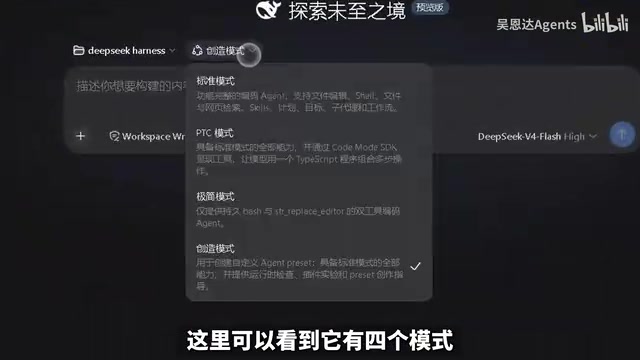
The conversation area is the core area for daily operations, offering four modes that correspond to different usage scenarios. Understanding the differences between these four modes is the prerequisite for using Harness efficiently.
The Relationship Between Workspaces and Context Isolation
In Agent tools, "context" refers to the historical information the model can see during a task, including conversation records, files it has read, tool return results, and so on. The context window is limited in size. If all projects share a single context, it's not only easy to exceed the limit, but the terminology, paths, and requirements of different projects will also interfere with each other. The workspace mechanism is designed precisely to solve this problem: each workspace has its own independent conversation history, file read/write scope, and configuration state, essentially acting as an isolated project container. When you create a new workspace, the system creates a brand-new context starting point for it, and the conversations from previous workspaces won't be carried over. This design is especially useful when maintaining multiple projects at the same time, or when switching between formal tasks and experimental tasks — you don't need to manually clean up conversations to avoid contamination; instead, you avoid it at the source through physically isolated workspaces. Access permissions and model configurations also take effect on a per-workspace basis.
Four Modes: From Ordinary Conversation to DIY Agent
Standard Mode
Standard mode is essentially no different from other Agent tools, and is suitable for ordinary users in daily use. Conversations, Q&A, and simple tasks are all completed in this mode.
PTC Mode
PTC is the most differentiated mode of DeepSeek Harness. It includes all the functionality of standard mode, but the core change is: it lets the AI stop calling tools one by one and instead directly write a piece of TS code to complete tasks in bulk all at once.
The official description mentions several key capabilities: batch execution, canvas isolation, built-in planning compression, a sub-agent mechanism, and a full set of coding capabilities. Simply put, when you need to handle a batch of similar tasks, the efficiency advantage of PTC mode becomes very obvious — it isn't "take a step, then look," but rather "think it through, then do it in bulk."
What Is PTC (Programmatic Tool Calling)
PTC stands for Programmatic Tool Calling. It is an execution paradigm that contrasts with the traditional ReAct-style "think—call—observe" loop of Agents. A traditional Agent needs a round of reasoning and back-and-forth for every tool call: the model first generates a tool call request, gets the result, then reasons about the next step, repeating this over and over. This approach performs well for single-step tasks, but when a task contains dozens or even hundreds of similar operations, it becomes extremely inefficient — it not only consumes a large amount of tokens and time, but also tends to lose track of the goal or deviate from the plan midway. PTC's core change is to have the model first plan once, then directly generate an executable piece of TypeScript code, writing multiple tool calls as loops, conditionals, and function composition, which the runtime then executes all at once. This way the model only needs to "think once, write once," and the number of tool calls and reasoning round-trips drops dramatically.
Sandboxing and Canvas Isolation for TS Code Execution
Having the AI directly generate and execute TypeScript code naturally raises security concerns: the code may read or write sensitive files, make network requests, or fall into an infinite loop. Therefore, PTC mode is usually paired with a sandbox runtime environment and a canvas isolation mechanism. The sandbox limits the range of resources the code can access, exposing only controlled tool interfaces; canvas isolation provides an independent context for each execution, preventing variables and state from contaminating each other between different tasks. The sub-agent mechanism allows complex tasks to be split into multiple subtasks handled by independent sub-agents, each executing in an isolated environment and then being aggregated; planning compression automatically compresses historical plans during long tasks to prevent the context window from being filled too early. Only by understanding these points can you see why PTC dares to let the model "write code to work in bulk" instead of calling tools step by step.
Minimal Mode
Minimal mode is a lightweight option, mainly aimed at developers and suitable for development testing. With streamlined functionality, both startup and response are faster.

Creation Mode
Creation mode is another highlight. It allows you to DIY your own Agent — unleash your imagination and generate all kinds of useful plugins for your Agent. In other words, Harness itself is an open platform where you are both a user and a creator.
Access Permissions and Model Configuration
Before actually running tasks, you need to understand the access permission settings. Harness provides three permission levels:
- Read-only mode: The Agent can only read information and cannot modify anything.
- Workspace write mode (workspace write): The Agent can write and modify files within the workspace. This is the recommended level for daily use.
- Full authorization mode: The Agent automatically executes high-risk operations without user confirmation. The creator explicitly advises using this with caution.

In terms of model selection, Harness supports dozens of models, both domestic and international. If you only configured DeepSeek, then the available option is DeepSeek's latest model. In addition, you can adjust the reasoning level up or down, flexibly switching according to task complexity.
What Exactly Is "Reasoning Level"
The "reasoning level" mentioned in the article corresponds to the controllable thinking budget of a reasoning model. Before giving a final answer, such models generate an internal thinking process. The longer the thinking, the more it usually helps with complex reasoning, but it also consumes more tokens and time. The reasoning level is the adjustment switch for this thinking length: at a low level, the model tends to answer quickly, suitable for simple tasks like Q&A and rewriting; at a high level, the model expands into a longer reasoning chain, suitable for code debugging, logical planning, and multi-step decision-making. Different vendors name this parameter differently; some call it reasoning effort, others call it thinking budget. In actual use, it's recommended to adjust dynamically according to task difficulty — always keeping the highest level on will make simple tasks slow and expensive, while always keeping the lowest level on will noticeably reduce intelligence on complex tasks. Only by considering it together with mode selection and permission level is the task configuration strategy complete.
Plugin System: 100+ Ready-Made Capabilities
Go to settings and click "Plugins," and you'll see that the plugin list already has over 100 available plugins. These plugins cover various scenarios, from coding assistance to task automation.
The significance of the plugin system isn't just "having many features," but that it standardizes extensibility. You don't need to modify the core code; through plugins you can install new skills into the Agent. This is also the foundation that makes the later step of "turning Harness into a desktop application" possible.
Hands-On: Turning Harness Into a Desktop Application
Local service-based tools share a common hassle: every time you use them, you have to restart the service and open a browser, repeating steps inefficiently.
The creator's solution is very direct — since the official line is "everything can be a plugin," let Harness turn itself into a desktop application that automatically starts the service and executes tasks every time it opens.
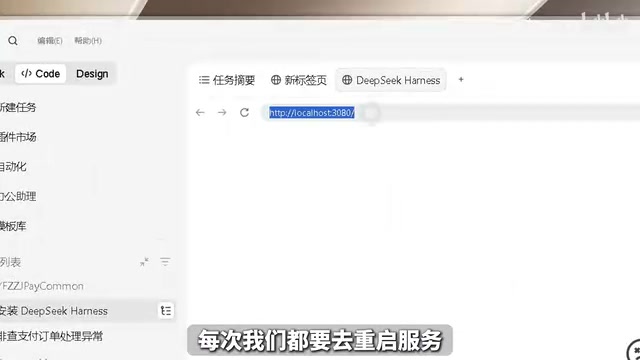
During execution, one obvious difference between Harness and other Agents is that it has a clear trace, allowing you to see the task execution process, what tool was called at each step, and what the execution results were. This observability is important for both debugging and building trust.
After a short wait, the desktop application is generated. Double-click the exe to enter the main interface directly, the conversation history is fully preserved, and the background plugins installed earlier also work normally. The whole process changes from "manually restarting every time" to "double-click and use."
Design Ideas Worth Noting
Looking back at the entire usage process, DeepSeek Harness has several design choices worth noting:
Batch-first PTC mode. The traditional Agent's "tool calling loop" is enormously expensive in batch scenarios, while PTC replaces "step-by-step calling" with "writing code for batch execution," an approach closer to how human engineers work.
An open plugin ecosystem. 100+ plugins plus creation mode make Harness more than a tool — more like a platform. Plugins generated by users themselves can feed back into the entire ecosystem.
Self-transformation capability. Having the Agent package itself into a desktop application demonstrates the framework's flexibility — it doesn't lock itself into the form of "a service in the browser."
Observable process. The trace feature makes the Agent's decision-making process transparent, which is especially valuable when debugging complex tasks.
For developers currently selecting Agent tools, DeepSeek Harness's PTC mode and plugin architecture are two points worth experiencing firsthand. And the idea of "transforming the tool into a form that suits you" may be even more worth learning from than the tool itself.
One-line Summary
DeepSeek Harness is a local plugin-based Agent framework whose PTC mode replaces step-by-step tool calls with batch code generation, and can transform itself into a desktop application.
Paragraph Summary
Based on a hands-on sharing from a Bilibili creator, this article introduces the core usage of DeepSeek Harness, a local service-based Agent framework. It first explains the structure of the workspace and conversation area, noting that a workspace acts as an isolated project container that prevents context contamination; it then breaks down the four modes — standard, PTC, minimal, and creation — among which PTC mode significantly improves efficiency on batch tasks by having the AI directly write TypeScript code to complete multiple tool calls in bulk. The article also covers the three access permission levels — read-only, workspace write, and full authorization — recommending workspace write for daily use and caution with full authorization. The plugin system includes 100+ built-in capabilities, and with creation mode you can DIY your own Agent, turning Harness from a tool into a platform. Finally, through the hands-on practice of "turning Harness into a desktop application," it demonstrates features such as observable traces and double-click usability, and summarizes four major design ideas: batch-first, open ecosystem, self-transformation, and observable process.
Related articles

GitHub Daily · October 22: Claude Code Tutorial Soars to 40K Stars
Claude Code tutorial project gains 428 stars in a day, topping GitHub Trending as AI coding tools shift toward ecosystem and onboarding methods.

Python 3.15 New Feature: Is the sentinel Type Better Than None?
Python 3.15 adds the sentinel type, using named unique sentinel objects to replace None and bare object(), resolving confusion among missing values, explicit emptiness, and invalid input while avoiding type hint failures.

Deep Learning's Three Architectures and the Universal Approximation Theorem: A Complete Guide to MLPs, CNNs, and Transformers
Explaining the inductive bias differences among MLP, CNN, and Transformer, the existence meaning of the Universal Approximation Theorem (UAT), and the role of Taylor expansion in approximation analysis, while clearing up common misconceptions.