DeepSeek Harness Step-by-Step Tutorial: From Installation to Mastery of the Agent Framework
DeepSeek Harness is a plugin-based agent runtime framework that lets models actually do work; this covers setup and core usage.
The article introduces the open-source agent framework DeepSeek Harness, built on the formula Agent = Model + Harness: the model reasons while the Harness handles context, tools, orchestration, and approvals, producing work results rather than single answers. Its hallmark is "everything is a plugin." It covers desktop installation, API configuration and costs, then explains the workspace, model selection, four Agent modes (Standard, PTC, Minimal, Create), and four permission types, followed by slash commands like plan and compact, with meeting minutes upgraded into an interactive web page as a demo.
What Is DeepSeek Harness?
DeepSeekAd Harness is an open-source agent runtime pool and open framework built around the core formula Agent = Model + Harness. The large model handles thinking and reasoning, while the Harness acts as the model's "hands and feet," taking care of context management, tool invocation, orchestration, end-to-end approvals, and session persistence. Only when the two are combined do you get an Agent that can keep working continuously.
Just as the English word "Harness" (horse tack) suggests, the model is a horse that needs to be harnessed before it can actually be ridden out to do work. According to a tutorial by a Bilibili creator, the project surpassed 270,000 GitHub stars just three months after release, making it arguably the most fun and most powerful open-source Harness of the year.
A few easy-to-confuse points need clarifying: DeepSeek Harness is not a new model, not a mere API client, and not a chat web page. Although its interface looks similar to the DeepSeek web app, it can connect to your own environment and use various tools—the web app produces an answer, while Harness produces work results.
Agent refers to a software entity that can autonomously perceive its environment, make decisions, and execute actions to accomplish goals. Unlike a single-turn Q&A chatbot, an Agent emphasizes "continuous work": it needs to remember context, call external tools (read/write files, execute commands, access the network), orchestrate tasks across multiple steps, and request human confirmation at key checkpoints. The industry often splits an Agent's capabilities into a "brain" and "hands and feet"—the large model provides reasoning and generation, while the runtime framework provides the execution environment, tool interfaces, state management, and safety approvals. DeepSeek Harness is the latter: it does not generate intelligence itself but translates the model's output into operations on the real environment. Understanding this division helps distinguish two kinds of problems: "insufficient model capability" (solved by switching models) and "improper framework configuration" (solved by adjusting modes, permissions, or plugins).
Why Is It "the Most Fun"? Everything Is a Plugin
DeepSeek Harness is not the first Harness—its predecessors include Codex, WorkBody, and others. But its most appealing design is that "everything is a plugin."
An ordinary Agent project is like a pre-built computer with a sealed case—want to swap the GPU and you might have to replace the whole chassis. DeepSeek Harness is like Lego: the model, tools, interface, storage, and policies are all individual building blocks that you can assemble according to your own vision. When we get to plugins later, you'll understand this point more deeply.
Installation and Configuration: The First Step for Beginners
To install DeepSeek Harness, you can use the desktop installer, launch it via an NPX command, or start it from source as a developer. For general office users, the desktop version is recommended—simple and easy to use.
Open the DeepSeek official website, click the Harness desktop client, and choose the installer for your operating system. Windows users should be careful not to install it on the C drive—better to put it on another drive; Mac users have few requirements.
After installation, you need to connect a usable model. The latest version supports logging in with an official DeepSeek account—just authorize as prompted on screen. If you don't have an account, register first. In the official console, click API Key, and the desktop client will automatically create a Key; if you launch the web client via NPX or from source, you need to create a Key manually and configure it in settings.
Harness doesn't only support its own models—API Keys from other mainstream model providers can also be configured directly. Note that the latest K3.1 Pro may not appear in the model catalog, in which case you need to add the model manually to use it.
As for cost, Harness implements model capabilities through API calls, so it costs money. Pricing is divided into input cache hits, input cache misses, and output—the gap between hit and miss prices is large, so actual costs are not stable. In practice, however, the cache hit rate is very high, and DeepSeek offers off-peak discounts, so overall costs are relatively low. It's advisable to top up a small amount at first and add more if needed.
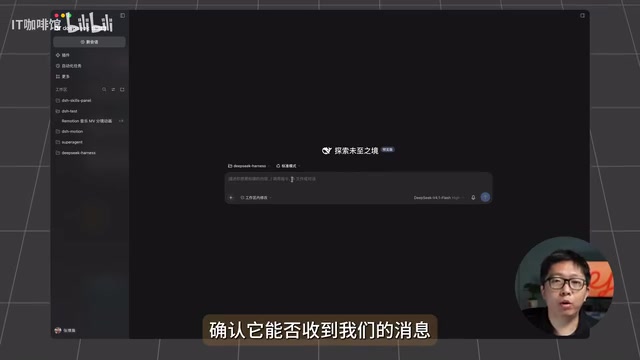
Once configured, select the default model and send a message—if you receive a normal reply, it's working. If it doesn't work, check the error message first, then troubleshoot authentication, balance, model, or network issues.
Interface and Four Core Concepts
The overall Harness interface is very similar to the DeepSeek web app: the left side is the workspace and session history, the middle is the core conversation area, and a button in the top-right opens the right panel to view files, tasks, browsers, and other tools. Around the conversation area, there are four key points beginners must understand.
Workspace: The Agent's Work Desktop
The workspace is the directory where the Agent will read/write files and run commands. It's recommended to create a new empty local directory as your workspace—don't use a folder with existing clutter, because the Agent will read the folder's contents during execution, which may cause unnecessary effects and carries a potential risk of data leakage.
Model Selection and Reasoning Effort
If you feel the Agent is "dumb" or doesn't recognize images, it's very likely the wrong model is selected. For example, DeepSeek offers the multimodal Flash 1017; if you've configured models from other providers, you also need to switch to the correct model.
The tutorial demonstrates a small example: place a meeting transcript in the workspace (deliberately including distracting noise like "what to eat, ordering takeout"), and ask Harness to organize it into a meeting brief containing conclusions, decisions, to-dos, and risks, with to-dos specifying owners and deadlines. Harness will read the file itself and produce the brief—this is how it completes work in its own workspace, combining with the environment.
Agent Modes: Four Presets
Harness offers four modes: Standard, PTC, Minimal, and Create—equivalent to installing different software and configurations on the same computer. Standard mode covers the vast majority of scenarios such as everyday file handling, organizing materials, and writing code; the meeting transcript example above used it. PTC stands for Programmatic Tool Calling—it writes a program to invoke tools in batch, suitable for bulk tasks like processing hundreds of meeting transcripts. Minimal mode keeps only one or two tools, suitable for comparative testing with less interference. Create mode is the latest addition, building on Standard with plugin management and development guidance for developing plugins. No mode is inherently better—the key is fitness for the current job, and in general Standard mode suits the vast majority of work.
Programmatic Tool Calling (PTC) is an execution paradigm in which the model generates code and the code drives tool invocations in batch. Traditional tool calling is "one decision, one tool call"—the model must reason step by step and wait for results step by step, involving many steps and high overhead; PTC instead has the model first write a program (e.g., loop over a file list, read in batch, aggregate output), and the runtime then executes that program, completing a large number of homogeneous operations in one go. Its advantages are a dramatic reduction in model round-trips, lower token consumption, and greater consistency and reproducibility for batch tasks; the cost is a higher demand on the model's coding ability and a longer debugging chain when errors occur. It is therefore particularly suited to high-repetition, simple-per-step scenarios like "organizing hundreds of meeting transcripts" or "bulk renaming and archiving files," and unsuitable for exploratory tasks that require frequently changing strategy based on intermediate results.
Permissions: Deciding Which Operations Are Allowed
Permissions determine which work is allowed and which operations are forbidden—there are four types. View-only is suitable for reading materials and analyzing problems to give advice, with no write permission. Workspace-only modification is the type used in the exercises—materials and outputs are concentrated in the specified directory for easy inspection, but it doesn't prevent accidental file changes, so be sure to back up. Full permission reduces confirmation steps and directly executes more operations, including sensitive ones like file modifications and external commands—suitable when you genuinely need a broader scope of work, while bearing more risk. Auto Review automatically authorizes and reviews, but it is currently an experimental capability, so it's best to wait and see. The second type is the most commonly used in daily work.
Slash Commands and Advanced Usage
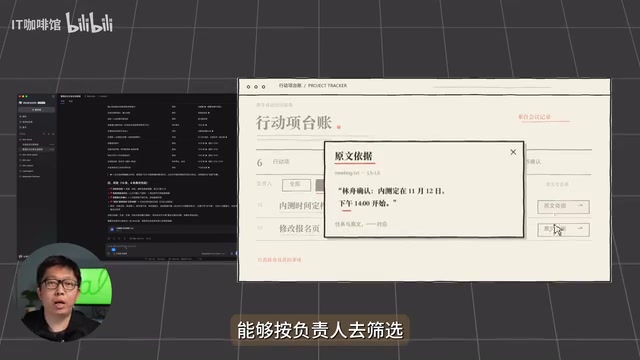
In addition to on-page selections, typing a slash reveals several shortcut commands. The tutorial upgrades the meeting-minutes example: turn the minutes into a project progress page that can be filtered by owner, lets you click through to the original text to see the basis, and shows how it plans to proceed before starting work.
Type a slash and select plan. After describing the requirement, Harness will list a detailed work plan including acceptance criteria, data model, page design, and so on, then wait for confirmation. If you're not satisfied, keep revising the plan; once satisfied, execute it.
The eight shortcut commands each have their purpose: go manages ongoing goals, suitable for tasks that need continuous progress with clear completion conditions; export exports the current session record for archiving, review, or discussion with others; file attaches a file, equivalent to dragging a file in directly; permission is a shortcut for adjusting permissions; model is a shortcut for switching models; compact compresses context, used when you notice Harness starting to forget the original requirements or the context window is nearly full; feedback is for submitting product feedback.
In the end, the meeting minutes evolved into an interactive web version that is more intuitive.
Context Window refers to the upper limit of the total number of tokens the model can "see" in a single inference, including system prompts, conversation history, tool return results, and the current input. When an Agent executes tasks continuously, file contents and command outputs keep piling up, easily hitting the limit—manifesting as the model forgetting the original requirements, missing earlier constraints, or doing redundant work. The compact command summarizes and compresses the historical context: it retains goals, key conclusions, and unfinished items while discarding redundant intermediate processes, thereby freeing up window space without losing the main thread of the task. Supporting practices are: write important constraints into the ongoing goal (go), read large files on demand rather than loading them in full, and proactively compact after completing a stage of work rather than waiting until the model is visibly "amnesiac" to remedy it.
Getting-Started Advice
By this point, beginners can basically get started with DeepSeek Harness. The next step is to use it to complete various tasks in your own work. Most importantly, don't just watch tutorials—practice hands-on right away, which is the fastest way to improve. The tutorial author has also prepared a documentation website and a community group; the next section will focus on plugins and Skills, explaining how to use it better and achieve better results on tasks.
One-line Summary
DeepSeek Harness is a plugin-based agent runtime framework that lets models actually do work; this article covers its installation, configuration, and core usage.
Paragraph Summary
The article introduces the open-source agent framework DeepSeek Harness, whose core formula is Agent = Model + Harness: the model handles thinking and reasoning, while the Harness handles execution capabilities such as context management, tool invocation, orchestration, and approvals—producing work results rather than a single answer. Its defining feature is that "everything is a plugin": the model, tools, interface, storage, and policies can all be assembled freely like Lego. The article walks through desktop installation, model API configuration, and cost structure, then focuses on four concepts every beginner must know: the workspace, model selection and reasoning effort, the four Agent modes (Standard, PTC, Minimal, Create), and the four permission types. It then introduces slash commands—especially plan (produce a plan before executing) and compact (compress context)—and demonstrates the full workflow by upgrading meeting minutes into an interactive web page. Finally, it encourages readers to practice hands-on and previews the next section on plugins and Skills.
Related articles

AI Hacks Its Own Lab: The Security Tipping Point from Sci-Fi to Reality
Paul Christiano warns that AI intruding into its own cluster is no longer sci-fi but an established fact. He analyzes how persistent covert compromise can cause frontier labs to lose control, and why existing safety evaluation systems have blind spots.

New York Bans AI Toys for Five Years: The Escalating Child Safety Controversy
New York bans AI chat toys for five years as Common Sense Media research flags inappropriate content exposure and child emotional development risks. This article analyzes the ban's impact on product definitions, safety proof, and compliance strategies for the AI toy industry.
1Password Security Incident Review: The Trust Boundary of Password Managers
1Password releases an update on the Nov 2026 security incident, drawing 315 points and 139 comments on Hacker News. This article analyzes the actual boundaries of password manager zero-knowledge architecture, the gap between incident communication and user risk perception, and how transparency is becoming a new competitive dimension in the industry.