DeepSeek Harness Step-by-Step Tutorial: From Installation to Real-World Software Testing

DeepSeek Harness: open-source AI testing tool with web UI, one-command deploy, and full agent observability.
DeepSeek Harness (DSH) is a domestically developed, fully open-source AI-driven testing tool that replaces CLI-based workflows with a web UI, addressing Claude Code's usability and data security concerns. A single NPX command handles the entire setup. DSH supports DeepSeek's official models as well as third-party providers like Qwen and MiniMax, with workspace-based file isolation. Its standout feature is agent observability — a Traces panel that visualizes tool calls, Token usage, and full context. As a Technical Preview, native file editing and multi-user access are not yet supported, but its open-source nature makes enterprise customization straightforward.
Why DeepSeek Harness Deserves Your Attention
AI-driven testing is reshaping the software testing landscape. Traditionally, whether you were doing automated testing or test development, writing code was a prerequisite — both a barrier to entry and a competitive moat for practitioners. In the AI era, however, that dynamic is shifting, and mastering AI tools has become an industry trend that testers simply cannot afford to ignore.
Much of the earlier AI-driven testing instruction was built around Claude Code. Claude Code is a decent tool, but it has two notable drawbacks: first, as a command-line interface (CLI) tool, it requires keyboard-only operation inside a dark terminal window, which is not particularly friendly to testers without a development background; second, it raises concerns around data security and compliance. Given both technological self-reliance and data security considerations, a domestically developed, open-source alternative has become increasingly necessary.
DeepSeekAd Harness (officially abbreviated as DSH) has emerged at exactly this moment. It has three defining characteristics: domestically developed, fully open-source, and highly extensible — supporting integration with a wide variety of models, including Xiaomi, MiniMax, Qwen, Zhipu AI, and others. Crucially, it uses a web UI instead of the command line, which dramatically lowers the barrier for users without a development background. It's reasonable to predict that, within China's ecosystem, DeepSeek Harness may gradually replace Claude Code as the go-to tool.
Environment Setup: Starting with Node.js
The first step in setting up DeepSeek Harness is preparing a Node.js environment. The core runtime depends on the NPX command, NPX comes from NPM, and NPM requires Node.js — it's a complete dependency chain.
It's recommended to install Node.js v24 LTS (Long-Term Support), and older versions like Node.js 18 should be avoided. Installation is straightforward: download the installer from the official website, double-click to run it, and follow the prompts.
Once installed, there is one essential configuration step — setting up a domestic mirror registry. NPM's default registry is hosted overseas, which makes direct downloads extremely slow from within China. Configuring a domestic mirror ensures acceptable download speeds.
Afterward, verify the two key commands:
- NPM: the package manager, responsible for managing dependencies
- NPX: the package executor, responsible for running packages (download, install, and launch all in one)
Run npm -v and npx -v respectively — if both print version numbers, the base environment is ready. If NPX is still unavailable after installing the latest version, it's usually due to residual environment issues; a clean uninstall followed by reinstallation typically resolves it.
NPX (Node Package eXecute) is a package execution tool built into NPM since version 5.2.0. Its core value lies in the ability to run a package directly without installing it globally first — NPX temporarily downloads the package, runs it, then either cleans it up or reuses a cached version. This mechanism makes "launch an app with a single command" possible, eliminating the need to manually run
npm install -gbefore executing. NPM mirror configuration typically uses the commandnpm config set registry https://registry.npmmirror.comto point to the Taobao mirror, which stays synchronized with the official registry at minute-level intervals and can deliver download speeds tens of times faster on Chinese networks. LTS (Long Term Support) versions receive security patches and bug fixes for a longer period compared to Current releases. For both production and learning environments, stability is the priority — choosing LTS is standard industry practice.
Install and Launch with a Single Command
Installing DeepSeek Harness is remarkably simple — just one NPX command does the job. One important reminder: do not run it under a system directory on the C drive. Instead, create a clean working directory (for example, named beifan-dsh) and launch from there to avoid many potential issues down the line.
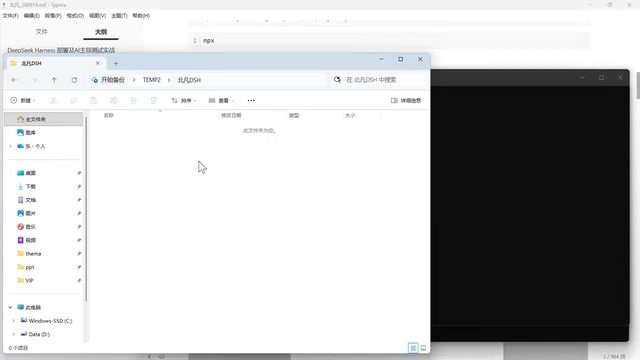
Some users have tried the "clone source → local build" approach, only to hit a compilation failure for a certain module on Windows, leaving the deployment broken. There's really no need to go through all that trouble. A single NPX command automatically handles three things:
- Downloads dependencies — automatically fetches DSH and all its dependency packages
- Starts the Web UI — launches a local service and provides an access URL (e.g., localhost:3080)
- Opens the browser automatically — once the command completes, it launches the browser and pre-fills the Token
Note that starting from version 1.2, a Token authentication feature was added — directly accessing port 3080 without a valid Token won't work. This adds a layer of security. If you want to access it from another browser, simply copy the full URL including the Token.
Configuring LLMs: DeepSeek Official and Third-Party Models
When you launch for the first time, a prompt will appear asking you to add an API Key. As DeepSeek's official tool, DSH naturally guides users toward its own models first. There are two configuration scenarios.
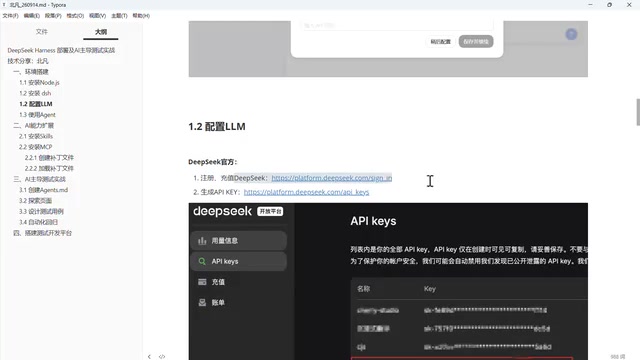
Scenario 1: Using the official DeepSeek model — you only need an API Key. Register an account on the DeepSeek website, top up your balance (beginners are advised to start with a small amount to get a feel for usage before committing to a subscription), generate an API Key, and enter it in the configuration field. Keep your Key secure and never share it, as it's tied to your account balance.
Scenario 2: Connecting third-party models — this is where DeepSeek Harness's openness really shines. It's not limited to DeepSeek models. Connecting a third-party model requires four pieces of information:
- Interface type: Most model providers offer an OpenAI-compatible format; when in doubt, choose OpenAI-compatible mode
- Endpoint URL: Required for third-party models (not needed for the official model)
- API Key: Required for all models
- Model name: Must be the exact, correct model ID
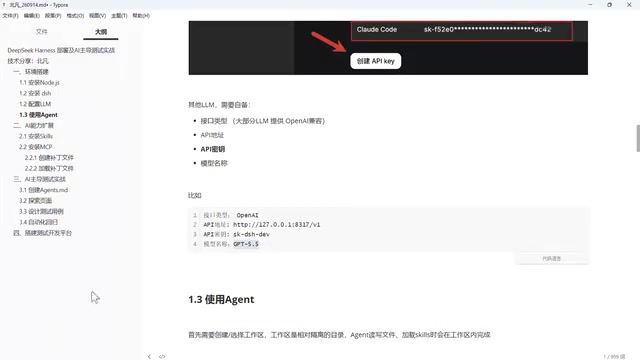
A common mistake: many users switch from Qwen to a Xiaomi model, update the endpoint and API Key, but forget to change the model name — Xiaomi's platform doesn't have Qwen models, so an incorrect name will simply fail. All four fields must be correct for the integration to work. The configuration entry point is Settings → Models → Add Provider; well-known providers have preset options, while unfamiliar sources can be configured manually by selecting "Custom Provider."
Workspaces and Core Capabilities in Practice
After configuring a model, you may find the input field is still inactive. That's because one critical step is missing — you must select a workspace. A workspace is essentially a directory; all file reads/writes and skill loading by the AI happen within that directory. Workspaces are isolated from each other — files created in one workspace are invisible to another. This is a hard requirement: you cannot use DSH without selecting a workspace.
Once you've selected a workspace (for example, the beifan-dsh directory created earlier), you can verify whether each model is working. Ask something simple like "What is 1+1?" — the point isn't the answer itself, but whether the pipeline is functioning end-to-end. In practice, the official DeepSeek model responds near-instantly (effectively 0 seconds), while some third-party GPT models take around 6 seconds. DeepSeek strikes a solid balance between speed, cost, and sufficient capability.
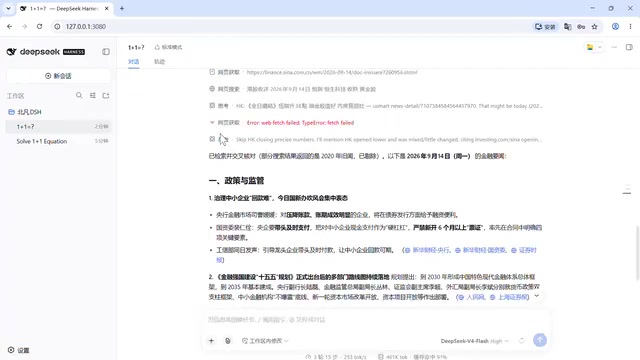
Configuring an official DeepSeek Key also unlocks an additional capability — web search. Enable it under Settings → Plugins → Web Search, and the AI can retrieve real-time information. For example, asking about "today's financial headlines" will trigger a real search, fetch web page content, cross-reference sources, filter out outdated articles, and return a curated summary — not just a list of links. This is made possible by the DeepSeek ecosystem integrating large model capabilities, web search, and multimodal features into a unified stack.
File read/write capability is equally worth noting. Ask the AI to create a beifan.md file and write some content — it will invoke a file-writing tool to complete the task and return a card-style confirmation. Files in the workspace can be previewed directly; Markdown is rendered, and code files display line numbers. However, in the native version, files can only be viewed — in-place editing is not supported.
Observability: A Power Feature for Technical Users
DeepSeek Harness is currently a Technical Preview, primarily aimed at technical users. Its most technically sophisticated feature is agent observability.
The Traces panel on the right side of the conversation view displays highly detailed execution information — somewhat like the browser's F12 Developer Tools. It records the full user prompt, system prompt, and context content, making the abstract concept of "context" tangible and visible.
Even more valuable is the visualization of Tool Calling. Tool Calling was originally called Function Calling when OpenAI introduced it, and was later renamed for clarity. Large language models can only truly function as agents when they possess tool-calling capabilities. DeepSeek Harness makes this entire process fully visible: simple questions receive a direct reply, while tasks requiring action trigger tool calls — fetching the current time (by executing a PowerShell command), searching (Web Search), scraping pages (Web Fetch). Each tool's call parameters, execution time, and Token consumption are all clearly displayed.
This level of observability is extremely helpful for later optimization and debugging. Whether you're building an AI-powered testing platform or developing other business agents, it significantly reduces the cost of troubleshooting.
The Tool Calling mechanism is the core capability that distinguishes modern AI agents from ordinary chat models. The underlying principle works like this: when the model determines during inference that an external capability is needed, it generates a structured "tool call request" in its output (containing the tool name and parameters). The host framework captures this, executes the corresponding function (such as reading a file, making an HTTP request, or running a shell command), and returns the result as new context to the model, which continues reasoning until the task is complete. This "reason → call → get result → continue reasoning" loop forms the ReAct (Reasoning + Acting) paradigm at the heart of agent design. Token consumption visualization also has practical value: every tool call's input and output consumes Tokens, and the accumulation of system prompts and conversation history significantly increases per-request Token usage. Understanding these numbers helps you make informed trade-offs between capability and cost, and serves as essential data for optimizing your prompt engineering over time.
Limitations of the Native Version and Directions for Customization
Overall, DeepSeek Harness performs well for general Q&A, web search, and file read/write as a baseline. But as a Technical Preview, it still has rough edges. For instance, file management only supports viewing and previewing — direct editing is not available; the native version also doesn't support multi-user access.
This is precisely where test development expertise adds value. In enterprise practice, the tool needs further wrapping and configuration. For example, to address the file manager's limitations, you could build a complete file management module that supports uploading, downloading, editing, modifying, and deleting files. To handle multi-user needs, the system can be adapted to support multiple accounts. By deeply integrating the entire testing workflow with DeepSeek Harness, you can ultimately build a comprehensive AI-powered testing and development platform that overcomes the native tool's limitations.
At this point, the environment is up and running, and DSH's core capabilities have been validated. The next step is thinking about how to extend those capabilities further.
"Technical Preview" is a stage in the software release lifecycle that sits between internal testing and the official GA (Generally Available) release. It typically means the core features are functional but the API and feature set are not yet stable — breaking changes may occur, and it's not recommended for direct production dependency. For open-source tools like DeepSeek Harness, common enterprise customization directions include: adding an authentication proxy layer in front of it to support a multi-user account system, integrating with internal knowledge bases and test case management systems, and extending the toolset via custom MCP (Model Context Protocol) services (such as connecting to internal CI/CD pipelines or defect management platforms). Because DSH is fully open-source, these modifications can be made at the source code level or via its plugin and API extension interfaces — and this is precisely the core advantage that domestically developed open-source tools have over closed-source commercial products in enterprise customization scenarios.
Related articles

AI Visibility Metrics: Definitions Matter More Than Dashboards
AI visibility measurement tools are proliferating, but the lack of unified definitions makes data incomparable. This article analyzes the mismatch and explores why repeatable methodology matters more than dashboards, and how a shared vocabulary can make AI search measurement truly credible.

Tev Cracks Long-Horizon Agent Training with Dense Progress Rewards
Tev-Gym and progress potential reward shaping (PPRS) provide verifiable intermediate states and dense reward signals for long-horizon agents. Tev-27B matches closed-source models on ALE-CM and Terminal-Bench. This article analyzes its latent-world-first design, checkpoint strategy, and deployment limits.

Liquid AI Releases LFM2.5-24B-A2B: A 2B Active-Parameter MoE Built for On-Device Agents
Liquid AI releases LFM2.5-24B-A2B, an open-weights MoE model with 24B total and 2B active parameters for on-device agents, scoring 48.09 on LiveClaw and hitting 184 tokens/s on Apple M5 Max.