DeepSeek + RAGFlow Local Deployment AI Knowledge Base Tutorial (2025 Latest)

Locally deploy a RAG knowledge base so DeepSeek can answer accurately based on private data
This article explains the necessity of locally deploying an AI knowledge base (data privacy, computing limits, context management) and the core principles of RAG technology. RAG solves LLM limitations like knowledge gaps, staleness, and hallucinations through a three-step "Retrieve → Augment → Generate" workflow that dynamically injects relevant content from external knowledge bases. The article also covers Embedding vectorization technology and step-by-step instructions for locally deploying the DeepSeek model with Ollama.
Why Do You Need a Locally Deployed AI Knowledge Base?
Many people's first reaction is: why not just upload files to the web version of DeepSeekAd? But in practice, the web version has three core pain points:
Data privacy cannot be guaranteed. When you upload local knowledge base files through the web interface, your data is submitted to DeepSeek's servers. For enterprise applications—especially those involving sensitive domains like legal, medical, or financial private data—this is completely unacceptable.
File upload and computing power are limited. While the web version is free, it doesn't support unlimited uploads. When files are large, computing bottlenecks cause noticeably slower response times, seriously affecting work efficiency.
Context management is difficult. You need to re-upload files for every conversation, yet knowledge bases often require real-time updates. The web version cannot provide an effective knowledge expansion mechanism.
Local deployment perfectly solves these problems—all data is stored locally and never uploaded to the cloud, while you can flexibly build and update personalized knowledge bases.
Core Principles of RAG Technology: Stopping LLMs from "Hallucinating"
Why Do LLMs Need RAG?
Large language models have several inherent limitations:
- Knowledge limitations: Models are trained on public data and lack vertical domain and enterprise private data
- Knowledge staleness: After training is complete, the model knows nothing about any new data generated afterward
- Hallucination problems: The probabilistic nature of inference means models will "confidently make things up" in areas they're not proficient in
RAG (Retrieval Augmented Generation) is a technology created specifically to solve these problems. RAG was originally proposed by the Meta AI research team in 2020 in the paper Retrieval-Augmented Generation for Knowledge-Intensive NLP Tasks to address knowledge coverage issues in open-domain question answering tasks. With the explosive popularity of large language models like ChatGPT, RAG quickly became a core architectural paradigm for enterprise AI applications—it doesn't modify the model itself but dynamically injects external knowledge during inference, balancing flexibility and accuracy.
RAG's Three-Step Workflow
RAG's core workflow can be summarized in three words: Retrieve → Augment → Generate.
- Retrieve: After a user asks a question, the system first retrieves content relevant to the question from an external knowledge base
- Augment: The retrieved content is combined with the user's question and sent together to the LLM
- Generate: The LLM generates more accurate, evidence-based answers based on the complete context and question
At the underlying level of the retrieval step, RAG systems rely on vector databases as their knowledge storage engine. Unlike traditional relational databases that perform exact keyword matching, vector databases achieve millisecond-level semantic similarity retrieval through Approximate Nearest Neighbor (ANN) algorithms—even if the user's phrasing is completely different from the original document text, as long as the semantics are similar, the system can still accurately recall relevant content. Common vector databases include Milvus, Weaviate, Qdrant, and Chroma. RAGFlow internally integrates Elasticsearch and Infinity as vector storage backends by default, so users don't need to deploy them separately.
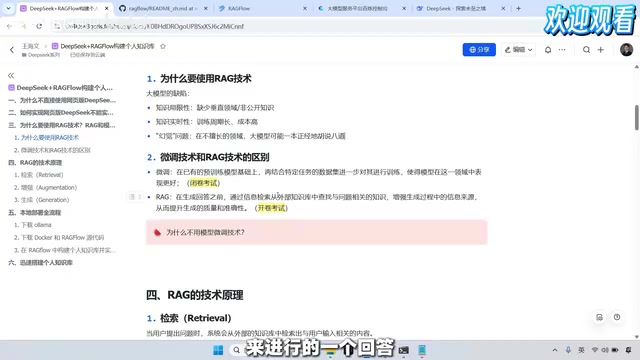
RAG vs Fine-tuning: Open-Book Exam vs Studying Before the Test
A very vivid analogy: Model fine-tuning is like studying before a test—you prepare data in advance for the model to learn, then answer questions from memory during the exam; RAG is like an open-book exam—after seeing the question, you look up relevant materials before answering.
If your requirements demand high knowledge freshness, fine-tuning isn't suitable because frequent fine-tuning is too costly. RAG allows you to update the knowledge base at any time without retraining the model.
Embedding Vectorization: The Key to Machines Understanding Semantics
In RAG's retrieval step, the system doesn't match character by character but performs semantic search. This requires Embedding (vectorization) technology—using specialized Embedding models to convert text into vectors, then calculating semantic similarity through methods like cosine similarity or Euclidean distance.
The concept of Embedding technology originates from the Word2Vec model proposed by Google in 2013. The core idea is mapping discrete text symbols into a continuous high-dimensional vector space, making semantically similar texts closer in vector space. Modern Embedding models are typically based on BERT or its variant architectures, outputting dense vectors ranging from 768 to 4096 dimensions. BGE-M3 is a multilingual, multi-granularity, multi-functional Embedding model open-sourced by the Beijing Academy of Artificial Intelligence (BAAI), supporting over 100 languages with particularly outstanding performance in Chinese semantic retrieval tasks. It is currently one of the most mainstream Chinese Embedding models for RAG scenarios.
Therefore, in practical applications, we need two types of models: a Chat model (responsible for dialogue generation) and an Embedding model (responsible for text vectorization). Commonly used Embedding models include RAGFlow's built-in model, BGE-M3, Qwen3 embedding model, and others.
Ollama Installation and DeepSeek Model Download
Step 1: Install Ollama
Ollama is a tool for running LLMs locally, suitable for individual users (enterprise users may consider Xinference, which has more comprehensive features). Ollama's underlying implementation is based on llama.cpp for CPU/GPU hybrid inference, supporting quantized models in GGUF format. Quantization technology compresses model weights from FP32/FP16 to low-precision formats like INT8/INT4, reducing model size by 50%-75%. This enables ordinary consumer-grade hardware to smoothly run models with billions of parameters—this is the core technical foundation that allows individual users to run DeepSeek locally.
- Go to the Ollama official website, click the Download button, and select the version corresponding to your operating system
- The installation process is very simple—just click "Next" all the way through
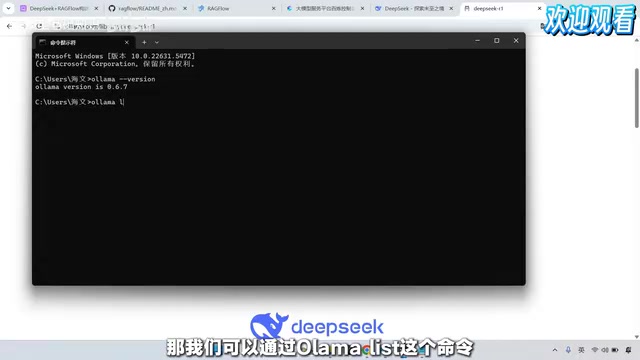
- After installation, type
ollama versionin the command line to verify the installation was successful
Step 2: Download the DeepSeek R1 Model
Search for "DeepSeek-R1" on the Ollama official website
Related articles
 Tutorials
ChatGPT Plus Subscription Guide: Are GPT-5.5, image-2, and Codex Worth the Upgrade?
A detailed look at ChatGPT Plus features — GPT-5.5, image-2, and Codex — with a Plus vs Pro comparison and a complete step-by-step subscription guide for users outside the US.
 Tutorials
Harness AI Engineering in Practice: Using Claude Code to Master Enterprise-Level E-Commerce Development
Deep dive into Harness AI Engineering: master enterprise e-commerce development with Claude Code using the Rules, Skills, Wiki, and Changes framework.
 Tutorials
Cursor + Codex Dual-IDE Collaboration: A Practical Methodology for Open-Source Project Customization
A complete methodology for open-source project customization based on real-world experience, detailing the Cursor+Codex dual-IDE workflow, seven-stage process, MVP validation, and AI source code reading techniques.