Deploying an AI Incident-Response Agent with Docker: A Hands-On Guide to Hindsight Long-Term Memory Integration

Solving RecallOps–Hindsight integration blockers across Docker networking, authentication, and fallback visibility.
The article addresses a developer's Reddit request for help integrating RecallOps with Hindsight, breaking down three key challenges: inter-container communication, API token authentication, and memory read/write verification. Core recommendations include using Docker Compose service names instead of localhost with the base URL as an environment variable, enabling token auth early via environment injection, and making SQLite fallback explicit through structured logs and status badges. It also covers actively stopping Hindsight to test the fallback path, a pre-demo checklist, and architectural advice on interface abstraction.
A developer reached out on Reddit for help with the RecallOps project—an AI incident-response agent built on Docker Compose, designed to pull long-term memory during incident handling and combine it with runbooks and guardrails to guide responses. The project is already partly working: RecallOps starts on port 8000, Hindsight runs in Docker and port 8888 is accessible from the host, and the memory bank is set up. What's actually blocking progress is the integration details: the API token isn't configured, it's unclear whether inter-container URLs should use localhost or the service name, and there's no way to verify that memory is really being read and written rather than silently falling back to SQLite.
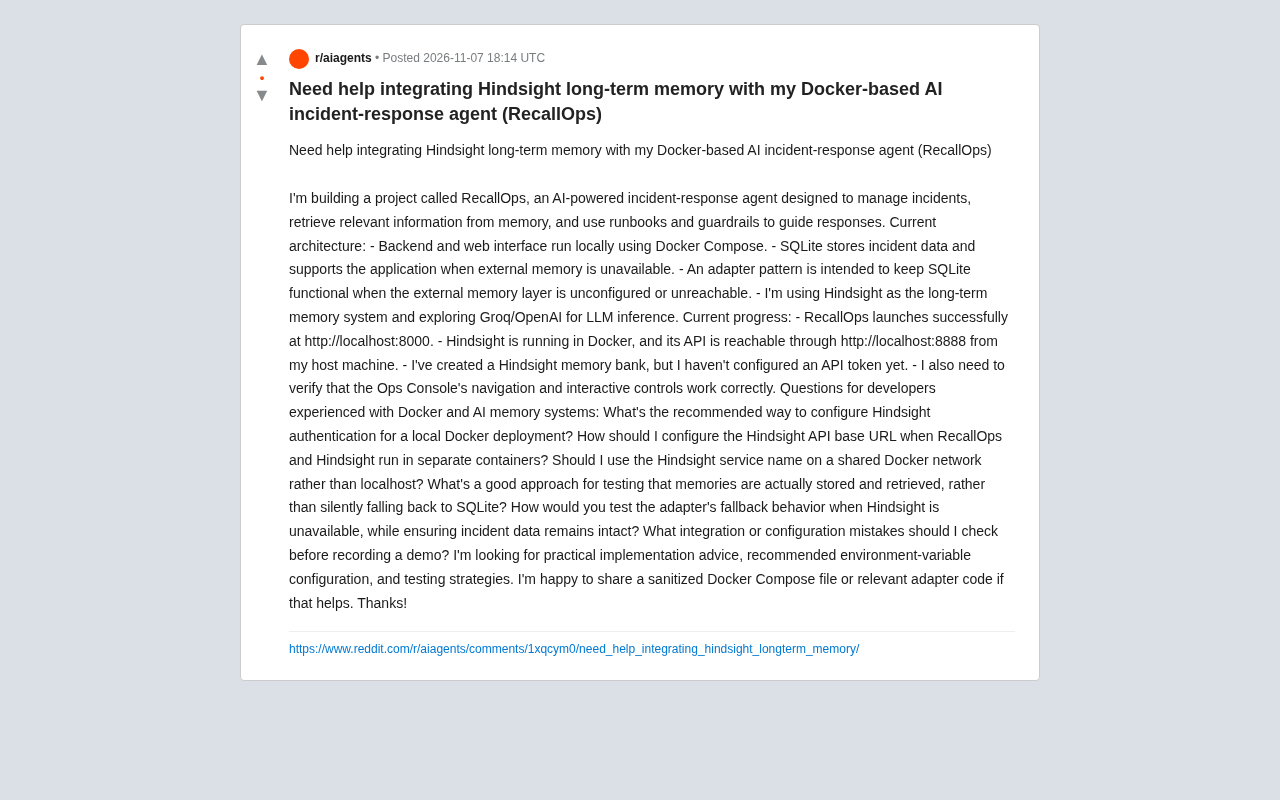
This problem is a pitfall that virtually every combination of "local AI application + external memory layer" runs into. Below, I'll break down each of the developer's questions one by one and offer actionable recommendations based on common Docker networking and memory-system practices.
Inter-Container Communication: Don't Use localhost, Use the Service Name
This is the most error-prone and also the most easily diagnosable part of the whole architecture. RecallOps and Hindsight run in separate containers, and localhost inside a container points to the container itself—not the host, and not its sibling containers. So http://localhost:8888 inside the RecallOps container will definitely fail to reach Hindsight—even though that address works perfectly fine in a browser on the host.
The correct approach is to put both services on the same Docker Compose-defined network (Compose creates a shared network by default), then configure the API base URL as the Hindsight service name plus the internal port, something like http://hindsight:8888. The service name is determined by the service key in the Compose file.
A common improvement is to make the base URL an environment variable rather than hardcoding it, so that local development, CI, and any future multi-environment deployments can all reuse the same image. Use localhost:8888 for debugging on the host and the service name inside containers—the two don't interfere with each other.
Docker Compose creates a shared bridge network for all services in the same compose file by default, and each service gets a DNS name based on its service key within that network. The localhost loopback address inside a container points to the container's own network stack, so it cannot reach ports exposed by the host or other containers; service-name resolution is handled by Docker's built-in embedded DNS with no extra configuration. Note that service names are only resolvable within the same network, so if you've manually specified multiple networks, make sure both RecallOps and Hindsight are attached to the same one. Also, port mapping ports: "8888:8888" only affects host-to-container access; inter-container communication should use the container's internal listening port directly, not the mapped port (unless the mapping differs).
Hindsight Authentication: Don't Run Exposed Even in Local Deployments
The developer mentions having created a memory bank but not yet configured an API token. Even for a local demo, it's best to enable token authentication from the start—not for security reasons, but to avoid breaking adapter logic when you switch later. Authenticated and unauthenticated request paths are often different, so configuring early saves trouble down the line.
The recommended approach is to inject the token via an environment variable, such as HINDSIGHT_API_TOKEN, passed to the RecallOps container through the Compose environment section. Don't write the token into the image or commit it to the repository; use a .env file with .gitignore, and sanitize the example values before the demo.
If Hindsight supports binding a token when creating a memory bank, then make the token one-to-one with that memory bank, so the adapter layer only needs to care about the pair of "current memory bank + corresponding token." That keeps the logic cleaner.
In Docker Compose, the environment section injects environment variables into containers and supports either direct assignment or reading from a .env file. It's recommended to reference the token as ${HINDSIGHT_API_TOKEN} so that it only exists in the host's .env file and never enters the image layer or the Compose file. The .env file should be added to .gitignore, and the repository should include a .env.example as a template with the token field left empty or filled with an obvious placeholder. For local demos, you could also consider Docker secrets or external secret management, but environment variables plus .env already cover the vast majority of scenarios.
Verify Memory Is Actually Being Read and Written: Make Fallback Visible
The whole point of the adapter pattern is to fall back to SQLite when external memory is unavailable, keeping the service running. But this also introduces a hidden risk: you never know which storage you're actually using. If the memory layer isn't actually working during a demo, the page still runs fine, and the problem is silently masked.
The solution is to make fallback "call attention to itself." A few actionable measures:
- Add structured logging in the adapter: print on every read and write whether it's going through Hindsight or SQLite, and the reason for any fallback (timeout, connection refused, authentication failure, etc.).
- Add a status badge to the Ops Console showing memory backend health in real time. It's both a debugging tool and a demo highlight.
- Write a minimal verification script: write a memory with a unique marker directly through the Hindsight API, then trigger a retrieval from the RecallOps side and confirm the marker can be retrieved. If it can't, check the logs to see whether a fallback occurred.
One point worth emphasizing: falling back to SQLite should not be treated as a normal state and handled silently. It should be an explicit, observable degradation. Many memory problems in self-built AI applications are ultimately traced back to a single ignored fallback record in the logs.
The Adapter Pattern is a structural design pattern that converts the interface of one class into another interface the client expects, allowing otherwise incompatible classes to work together. In the RecallOps context, the adapter layer defines a set of memory operation interfaces, with Hindsight and SQLite each providing implementations, and the upper-level business code depends only on the interface and doesn't care about the specific backend. This pattern naturally supports degradation: when Hindsight is unavailable, the adapter can switch to the SQLite implementation. But the trigger conditions, switch timing, and recovery strategy for degradation all need to be explicitly defined—otherwise you get the "silent fallback" problem mentioned above. It's recommended to explicitly configure the fallback strategy when initializing the adapter (such as timeout, retry count, whether to auto-recover) and to manage these configurations as environment variables as well.
Testing Fallback Behavior: Deliberately Inject Failures
To verify that "incident data remains intact when Hindsight is unavailable," the most direct way is to actively stop Hindsight. Use docker compose stop hindsight or disconnect the container from the network, then walk through a complete incident flow: create, write, read, update. Focus on three things—whether RecallOps still responds, whether the data in SQLite is complete, and whether the logs correctly flag the fallback.
After restoring Hindsight, verify once more whether the system returns to using external memory. Ideally the adapter should reconnect automatically, or at least give a clear indication, rather than being permanently stuck in SQLite mode.
It's also worth adding a switch for "failure injection," for example forcing Hindsight off via an environment variable, so you can quickly regression-test the fallback path after every code change without actually stopping the container.
Pre-Demo Checklist
The developer mentions needing to confirm that the Ops Console's navigation and interactive controls work properly, and this is often underestimated—demo disasters are frequently caused not by the backend but by some unresponsive button on the front end. Here's a consolidated checklist:
- Network: Confirm the container uses the service name rather than localhost, and that both services are on the same network.
- Authentication: Token is injected via environment variable, not hardcoded in plaintext, and example configs are sanitized.
- Memory path: Write a test memory and successfully retrieve it, with no fallback records in the logs.
- Fallback path: The application remains usable after stopping Hindsight, and data isn't corrupted.
- Frontend: Click through every navigation item and interactive control in the Ops Console.
- Log level: During the demo, set memory-related logs to a visible level so you can show the system "thinking."
One Architectural Suggestion
RecallOps's adapter-pattern design is correct, but you can take it one step further: abstract "memory operations" into a set of clear interfaces (write, semantic retrieval, time-range retrieval, delete), and have both Hindsight and SQLite implement them. That makes fallback behavior predictable and tests easier to write—write one set of test cases against the interface and run it against both backends to prove the adapters are consistent.
For the Groq/OpenAI inference layer, I'd similarly recommend keeping a switchable configuration. Incident-response scenarios are latency-sensitive, and different models differ noticeably in tool calling and long-context performance, so keeping a switch handy is more flexible for both demos and real use.
The overall integration isn't complicated; the hard part is making the "implicit assumptions" of each step explicit: how the network connects, how authentication is carried, and how fallback is made visible. Get these three things straight, and the RecallOps memory layer will run reliably.
Related articles
 Tech Frontiers
GitHub Daily · November 8: Agent Infrastructure Blooms Across the Board
GitHub Daily Nov 8: agent infrastructure dominates Trending—browser automation, design systems, skill libraries, VM runtimes, and context compression—while veteran tools warm up.
 Tech Frontiers
Comparing Routing Mechanisms of 10 Open-Source MoE Models: DeepSeek, Qwen, Mixtral, Llama 4, gpt-oss
A configuration-based comparison of routing mechanisms in 10 open-source MoE models, analyzing DeepSeek, Qwen, Mixtral, Llama 4, and gpt-oss on expert count, top-k, shared experts, gating, and load balancing.
 Tech Frontiers
Vibe Coding Step-by-Step Guide: Learn to Build Products with AI in Six Steps
Breaking down the six-step methodology of Bilibili's 748-episode Vibe Coding course, analyzing the usage boundaries and prompt techniques of Codex, Claude Code, and Cursor, and discussing who this AI coding course suits, who it doesn't, and how to avoid the trap of watching without acting.