Developing a Game Auto-Farming Script: A Hands-On Guide with Template Matching + Behavior Trees

Building a game auto-farming script with OpenCV template matching and behavior tree logic.
This article documents a developer's process of building an automated EXP-farming script for an asymmetric PvP game. The technical approach uses OpenCV template matching to identify game UI elements, combined with behavior trees to control the automation workflow, achieving a fully automated loop of character switching, mode selection, match waiting, and in-game actions. The article covers practical experience including template capture techniques, delay control strategies, and window size handling.
Project Background: Why Build a Game Auto-Farming Script
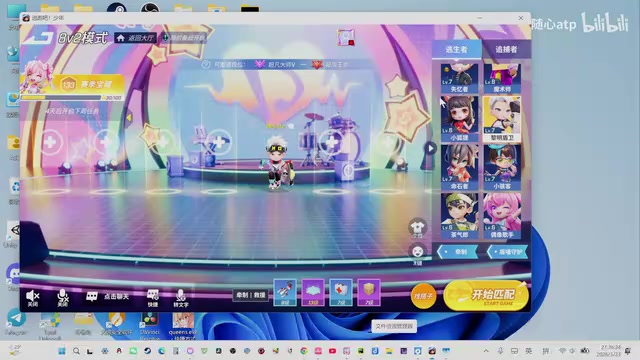
This article documents the complete process of a developer using behavior tree technology to build an automated EXP-farming script for an asymmetric PvP game (a survival/chase mode similar to Identity V). The core technical approach uses Template Matching to identify various UI elements in the game interface, combined with behavior tree logic to fully automate operations like matchmaking, character switching, and entering games.
The motivation was straightforward — the experience points required to level up in the game were enormous, and grinding manually was extremely inefficient. Rather than spending hours each day repeating the same actions, why not write a script and let the computer handle it?
There are several technical approaches to game automation. The lowest-level approach involves directly reading and writing game memory (typically requiring reverse engineering), which provides the most precise game state information but carries a very high risk of detection. A mid-level approach involves hooking the game's rendering pipeline or intercepting network packets, which has a high technical barrier. This project uses the highest-level approach: "screen visual recognition + simulated input" — it only observes the screen and simulates mouse/keyboard actions without touching the game process itself. From the operating system's perspective, this approach is virtually indistinguishable from human player behavior. It has the lowest implementation barrier and is the most commonly used automation approach for individual developers.
Template Matching: The Core Recognition Technology for Game Automation
Basic Principles of Template Matching
Template matching is a fundamental technique in computer vision, and the principle is straightforward: slide a pre-captured small image (template) across a screenshot of the screen, comparing at each position to find the location with the highest match score. The specific workflow is as follows:
- Capture the current screen image (screen)
- Load the template image (e.g., start.png)
- Run the matching algorithm, which returns a confidence score and coordinates
- When the confidence exceeds a threshold, perform a click action at the corresponding position
In practice, template matching is typically implemented using the OpenCV library. OpenCV's matchTemplate() function provides six matching algorithms, among which TM_CCOEFF_NORMED (normalized correlation coefficient) is the most commonly used in game automation scenarios — it normalizes results to the [-1, 1] range, where values closer to 1 indicate a better match. Developers simply set a fixed threshold (typically 0.8–0.95) to determine whether the target has been found. In comparison, deep learning-based object detection approaches (such as YOLO) offer stronger generalization capabilities but require annotated datasets and a training process, which is clearly overkill for game scenarios with fixed UI elements. The "screenshot and go" nature of template matching makes it the go-to solution for this type of project.
The advantage of this approach lies in its simplicity — no model training is needed, and it delivers very stable recognition results for fixed UI interfaces.
Capturing and Managing Template Assets
The developer needed to capture a large number of UI elements as template images, including:
- Start1: The "Start Game" button
- Match: The "Start Matching" button
- 4V1 / 8V2: Selection buttons for different game modes
- White X / Black X: Close buttons in different colors (must be captured separately to avoid confusion)
- Character switch button: Switching between survivor and hunter
- Confirm button: Various confirmation actions
A key detail when taking screenshots: don't capture too large an area. Since UI elements may shift slightly in position, a smaller capture area provides better matching tolerance. Additionally, although the black X and white X buttons serve the same function, they are visually distinct enough that treating them as separate templates prevents misidentification.

Behavior Tree Logic Design: From Workflow Planning to State Control
Behavior Trees (BT) originated in game AI, where they were used to describe NPC decision-making logic, and have since been widely adopted in robotics and automation. Compared to traditional Finite State Machines (FSM), the core advantage of behavior trees lies in their modularity and composability — each node represents an independent behavior or condition. Simple behaviors are assembled into complex logic through composite nodes such as Sequence (all children must succeed), Selector (succeeds if any child succeeds), and Parallel nodes. This tree structure naturally fits the "check state first, then execute action" pattern of automation scripts: leaf nodes handle specific screen recognition and click operations, while composite nodes control the flow. The overall logic is clear, readable, and easy to extend or modify later. In the Python ecosystem, py_trees is a commonly used behavior tree library, and the ROS (Robot Operating System) community also has mature behavior tree toolchains available for reference.
Complete Automation Workflow
The developer mapped out the following auto-farming workflow:
- Launch the game: Double-click to open the game client and confirm it's running
- Switch character: Switch from the current character to the target role (hunter/survivor)
- Select mode: Enter the 4V1 hunter mode
- Start matching: Click the start matching button
- Wait for match: Approximately 15–20 seconds
- Enter game: Confirm entry after detecting a successful match
- In-game actions: Execute basic operations (possibly simple inputs like the spacebar)
- Natural exit: Return to the lobby after the game ends
- Loop: Re-enter matchmaking and repeat the above workflow

Delay Control and Timeout Detection
In automation scripts, timing control is the aspect most prone to issues. The developer determined the required delays for each step through actual timing (counting method: 1001, 1002...):
- Character switch animation: ~1 second
- Certain loading animations: ~2 seconds (insufficient delay causes clicks to fail)
- Match waiting: ~18–20 seconds
Delay control is essentially trading "fixed wait times" for the simplicity of "state confirmation." A more robust approach is polling — repeatedly taking screenshots and running template matching at fixed intervals until the target UI element appears or a timeout is reached. This method adapts to uncertainties like network fluctuations and device performance variations, preventing click timing errors caused by occasional slow loading. Setting the timeout threshold is equally critical: too short and it falsely triggers an error; too long and it wastes significant time when the game genuinely freezes. In practice, timeouts are typically set at 2–3x the normal wait time. When a timeout triggers, the script force-quits and restarts the game, ensuring it can self-recover from abnormal states.
Additionally, timeout scenarios need to be handled, such as matchmaking timeouts and login timeouts (which must complete within 1 minute). Without timeout detection, the script could get stuck indefinitely at a waiting step.
State Machine and Loop Design
The behavior tree divides the entire workflow into several key states:
- First run: Requires the full character switch and mode selection process
- Loop run: After completing a game and returning to the lobby, directly re-enter matchmaking
- Error handling: Force-quit the game and re-match after a timeout

The developer acknowledged that implementing comprehensive exception detection (timeouts, delays, various edge cases) would require a massive amount of work. The current version is "built specifically for personal use," prioritizing getting the main workflow running smoothly without excessive error handling.
Practical Lessons from Development and Debugging
Organizing Project Files
The developer created a dedicated folder to manage template images, named by function:
Start1- Start gameMatch- Match button4V1_After/Second- Mode selection- Common images grouped separately
This organizational approach becomes especially important as the number of assets grows, enabling quick location of templates that need updating.
Pitfalls Encountered During Debugging
- The survivor and hunter UI interfaces differ — the same button may look different depending on the active role, requiring separate template captures
- A character switch operation is needed every time, with no assumption about the current state
- In-game penalty mechanisms must be cleared before matchmaking can continue
- Window size (large/small) affects template matching accuracy, requiring either a fixed window size or separate templates for each size
The impact of window size on template matching deserves special attention. Template matching is based on pixel-level comparison, so when the game window resolution changes, UI element pixel dimensions scale proportionally, causing existing templates to fail completely. There are two solutions: one is to force the game window to a fixed size when the script starts (using Win32 API or libraries like pygetwindow); the other is to normalize the screenshot or template scaling before matching, or use OpenCV's multi-scale template matching (running matches at different scale ratios and taking the highest confidence result). For personal projects, fixing the window size is the lowest-cost solution.
Conclusion: Development Approach for Game Automation Scripts
This project demonstrates a typical game automation development workflow: using template matching to identify UI states, combined with behavior trees to control operation logic, automating repetitive tasks. While the current version is still rough and lacks comprehensive exception handling, the foundational framework is in place.
The developer mentioned that the next phase will involve writing the core code, integrating all captured assets and mapped-out logic into behavior tree code. This development approach of "collect assets first → map out the workflow → then write code" is a sensible workflow for visual automation projects — figuring out what needs to be recognized and what actions need to be taken before writing any code helps avoid significant rework.
Key Takeaways
- Uses template matching to identify game UI elements, automatically executing click actions upon successful matches
- The behavior tree logic covers the complete workflow including character switching, mode selection, match waiting, in-game actions, and loop farming
- Delay parameters for each step are determined through actual timing: 1 second for character switching, 2 seconds for loading animations, ~20 seconds for match waiting
- Assets are organized and named by function; visually similar UI elements like black/white X buttons require separate captures to avoid confusion
- The current version is for personal use only, with no comprehensive timeout or exception handling mechanisms implemented yet
Related articles
 Tutorials
ChatGPT Plus Subscription Guide: Are GPT-5.5, image-2, and Codex Worth the Upgrade?
A detailed look at ChatGPT Plus features — GPT-5.5, image-2, and Codex — with a Plus vs Pro comparison and a complete step-by-step subscription guide for users outside the US.
 Tutorials
Harness AI Engineering in Practice: Using Claude Code to Master Enterprise-Level E-Commerce Development
Deep dive into Harness AI Engineering: master enterprise e-commerce development with Claude Code using the Rules, Skills, Wiki, and Changes framework.
 Tutorials
Cursor + Codex Dual-IDE Collaboration: A Practical Methodology for Open-Source Project Customization
A complete methodology for open-source project customization based on real-world experience, detailing the Cursor+Codex dual-IDE workflow, seven-stage process, MVP validation, and AI source code reading techniques.