Developing WeChat Mini Programs with Claude Code: Structured Prompts That Make Code Work on the First Run

Use structured prompts to make Claude Code generate runnable WeChat Mini Program frameworks
This is Episode 1 of the "Mini Program + AI: Ship a Product in One Day" series. The core thesis: by using structured prompts containing five elements (feature description, tech stack, page list, data storage plan, and color scheme), you can get Claude Code to generate truly usable WeChat Mini Program framework code with roughly 87% usability rate. The article also breaks down mini program file structure and dual-thread architecture to help readers understand the organizational logic behind AI-generated code.
Introduction: Why Does Your AI-Generated Code Never Run?
Many people open an AI tool, type "make me a mini program," and end up with a pile of unusable code. The problem isn't the AI—it's that your instructions are too vague. It's like going to a restaurant and saying "give me something tasty"—the chef has no idea what you want.
This article is Episode 1 of the "Mini Program + AI: Ship a Product in One Day" series. The goal is crystal clear: use Claude Code to build a mini program framework from scratch that actually runs in WeChat Developer Tools. Not a toy demo—a real, usable foundation.
The series follows four steps: EP1 lays the foundation (framework setup), EP2 builds the walls (component development), EP3 installs plumbing and wiring (data logic), and EP4 applies the finishing coat (polish and launch). Today we're only doing step one—making sure the foundation is solid.
About Claude Code: Claude Code is a developer-focused AI programming assistant from Anthropic, built on the Claude large language model. Unlike general-purpose conversational AI, Claude Code is specifically optimized for code generation, debugging, and refactoring scenarios. It can understand project context, trace dependencies across files, and execute operations directly in a terminal environment. Its core advantage lies in the depth of its code semantic understanding—it doesn't just do string matching, but truly comprehends function call chains, data flows, and framework conventions.
Structured Prompts: Making Claude Code Actually Understand Your Needs
The Gap Between Vague Instructions and Structured Prompts
When asking AI to generate code, some people get usable results while others get a wall of errors. The core difference is prompt quality.
On the left is what most people do: "Make me a mini program." The AI isn't unintelligent—it just doesn't know what you want, so it gives you the most generic answer possible. On the right is a structured prompt—clearly specifying features, tech stack, and page requirements so the AI can deliver truly usable output.
There's a technical reason behind this: The essence of Prompt Engineering is designing input text to guide large language models toward desired outputs. LLMs are probability-based text prediction systems—given an input sequence, the model calculates a probability distribution for the next token. Vague input causes the model to sample in a high-entropy state, with outputs trending toward the most common generic answers in the training data. Structured prompts reduce output space uncertainty by providing explicit constraints, enabling the model to generate results within a narrower solution space that better matches your needs. The five-element framework essentially builds a complete task specification for the model, similar to a requirements document in software engineering.
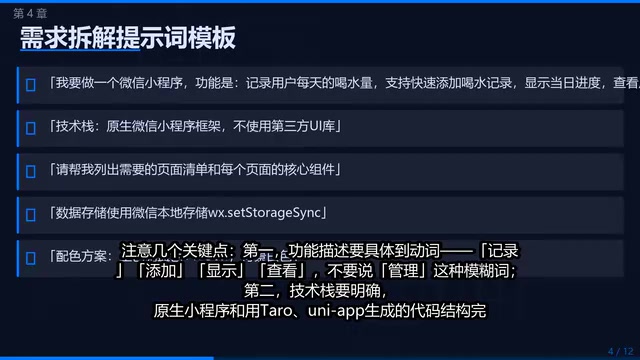
The Five Key Elements of a Prompt Template
After working through over a dozen mini program projects, here are the five essential elements every prompt must include:
- Feature Description: Be specific with verbs—record, add, display, view. Avoid vague words like "manage"
- Tech Stack: Native mini programs and code generated with Taro or UniApp have completely different structures—you must be explicit
- Page List: Enumerate each page and its core functionality
- Data Storage Plan: Specify upfront whether you're using local storage or a cloud database, otherwise the AI might give you an overly complex solution
- Color Scheme: Specify the primary color, and the AI will automatically apply it to elements like the navigation bar
Native Mini Programs vs. Cross-Platform Frameworks: Taro and UniApp mentioned in this article are two mainstream cross-platform development frameworks. Taro, developed by JD.com's Aotu Lab, lets you write one codebase in React syntax and compile it to WeChat, Alipay, ByteDance, and other mini program platforms. UniApp, from DCloud, uses Vue syntax and similarly supports multi-platform compilation. The advantages of native mini program development include: code directly corresponds to WeChat platform specifications, shorter debugging chains, more predictable AI-generated code structures, and suitability for the learning phase and single-platform products. Cross-platform frameworks are better for commercial projects that need to cover multiple platforms simultaneously, but they introduce an additional compilation layer that increases debugging complexity.
Using a water intake tracker mini program as an example, specifying "primary color blue #1890FF" in the prompt caused Claude Code to automatically set the navigation bar to that color. The more precise your information, the closer the returned code matches what you want, and the fewer modifications needed.
Real-world performance data: Structured prompts achieve roughly 87% code usability, meaning eight or nine times out of ten you can paste the code into Developer Tools and it just runs. Framework generation takes about 5 minutes—the framework code itself isn't complex; what's complex is knowing what to tell the AI to generate.
Mini Program File Structure: Understanding Code Like Reading a Floor Plan
WeChat Mini Programs are a lightweight application format launched by Tencent in 2017, running within a sandbox environment inside the WeChat client without requiring standalone installation. Their technical architecture uses a dual-thread model: the logic layer (JS) and rendering layer (WXML+WXSS) run separately, communicating through the WeChat client's Native layer. This design delivers better security and performance, but also means it fundamentally differs from standard web development—you cannot directly use DOM APIs, event binding syntax is different, and you must comply with WeChat's platform review requirements. Understanding this architecture helps you make sense of the file division logic below.
The file structure Claude Code generates based on the prompt has very clear logic:
- app.json: The address plate and room layout (configuration file)
- app.wxss: The building's overall decoration style (global styles)
- app.js: The main electrical panel (global logic)
- pages/index: Homepage (record water intake)
- pages/history: History page (view records)
- pages/settings: Settings page (goal configuration)
- utils/storage.js: Data storage utility functions
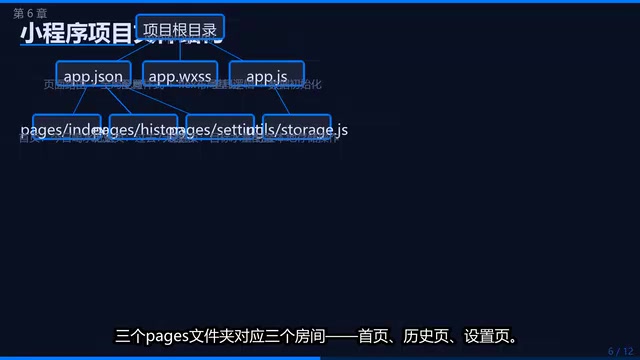
Extracting storage.js as a separate file is good practice—when you need to change the storage solution later, you only need to modify this one file. You don't need to design this structure yourself; just tell the AI in your prompt how many pages you have, what each page does, and require it to "conform to WeChat Mini Program specifications."
Related articles
 Tutorials
ChatGPT Plus Subscription Guide: Are GPT-5.5, image-2, and Codex Worth the Upgrade?
A detailed look at ChatGPT Plus features — GPT-5.5, image-2, and Codex — with a Plus vs Pro comparison and a complete step-by-step subscription guide for users outside the US.
 Tutorials
Harness AI Engineering in Practice: Using Claude Code to Master Enterprise-Level E-Commerce Development
Deep dive into Harness AI Engineering: master enterprise e-commerce development with Claude Code using the Rules, Skills, Wiki, and Changes framework.
 Tutorials
Cursor + Codex Dual-IDE Collaboration: A Practical Methodology for Open-Source Project Customization
A complete methodology for open-source project customization based on real-world experience, detailing the Cursor+Codex dual-IDE workflow, seven-stage process, MVP validation, and AI source code reading techniques.