DGX Spark vs. Mac Studio M5 Ultra: Which One Should You Choose for Local AI?

DGX Spark vs. Mac Studio M5 Ultra: bandwidth, ecosystem, and memory capacity trade-offs for local AI.
This article compares the Mac Studio M5 Ultra (up to 512GB unified memory, 1.2TB/s bandwidth) with the NVIDIA DGX Spark (GB10 chip, 128GB, 273GB/s) for local AI inference. Beyond raw specs, the analysis covers Pre-Fill vs. Decode phases, MoE architecture, multi-node scaling, and software ecosystems. NVIDIA leads in compute throughput, CUDA ecosystem, and new model support; the Mac Studio wins on massive unified memory, extreme bandwidth, and all-in-one usability — each suited to a different kind of user.
Apple's latest Mac Studio packs a serious punch — the M5 Ultra configuration supports up to 512GB of unified memory with memory bandwidth pushing all the way to 1.2TB/s. On the other side of the ring, NVIDIA has its own compact AI supercomputer aimed squarely at AI enthusiasts: the DGX Spark. When the goal isn't video editing or office work, but running large language models locally, which machine is actually worth your money? This article is based on hands-on analysis and benchmarks, helping you cut through the noise and understand the real differences between these two machines.
Hardware Specs at a Glance
The DGX Spark is built around the GB10 Grace Blackwell Superchip, featuring a 20-core Arm CPU, a Blackwell-architecture GPU, 128GB LPDDR5X unified memory, and 273GB/s memory bandwidth. It also includes a ConnectX-7 interface supporting up to 200Gbps, which sets the stage for multi-node scaling.
The Mac Studio, in its M5 Ultra configuration, offers up to an 80-core GPU, up to 512GB of unified memory, and 1.2TB/s memory bandwidth. On paper, the Mac Studio's memory bandwidth is nearly 4× that of the DGX Spark.
But don't jump to conclusions just yet — memory bandwidth is only half the story.
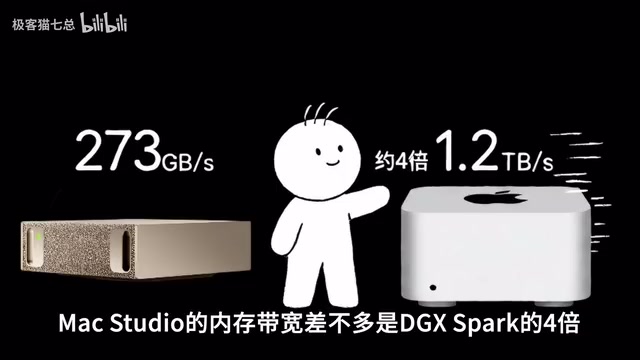
Why Bandwidth Isn't the Whole Story: Pre-Fill vs. Decode
To truly understand the gap between these two machines, you need to understand the two phases of AI inference.
The Pre-Fill phase is when the model ingests your entire input prompt — say, 10,000 tokens at once. This phase is computationally heavy and relies on matrix computation throughput, which is exactly where NVIDIA excels. Blackwell's Tensor Cores, combined with CUDA and TensorRT-LLM, are purpose-built for this kind of workload.
The Decode phase is what you actually see: the model generating tokens one by one. Especially with a single user and a small batch size, each token generation requires repeatedly reading model weights from unified memory — and that's where memory bandwidth becomes critical. In theory, the Mac Studio's massive 1.2TB/s bandwidth gives it a significant edge during the Decode phase.
That said, whether theoretical bandwidth translates directly to real-world token generation speed depends heavily on GPU architecture and software optimization. Raw numbers don't always tell the full story.
KV Cache is another key concept for understanding bandwidth bottlenecks. During the Decode phase, every time the model generates a new token, it needs to reference the attention intermediate results (Key and Value matrices) for all previous tokens. These are cached to avoid redundant computation — hence the term KV Cache. As conversations grow longer or context windows expand, the KV Cache balloons in size, potentially consuming anywhere from a few gigabytes to tens of gigabytes. This means memory bandwidth must serve not only repeated model weight reads, but also the ever-growing KV Cache I/O — which is precisely why high-bandwidth machines shine in long-context inference scenarios.
Batch size also shifts where the bottleneck lies. When serving multiple users simultaneously (large batch), computation density rises, GPU matrix units stay busy, and compute becomes the bottleneck. But in single-user interactions (small batch or batch size = 1), there isn't enough computation to saturate the hardware, so memory bandwidth becomes the primary factor limiting token generation speed.
MoE Models Change the Game
With more and more models adopting MoE (Mixture of Experts) architecture, things get even more interesting. Take the previously tested Qwen 3.5 122B A10B as an example: 122B is the total parameter count, but only 10B parameters are activated per inference pass.
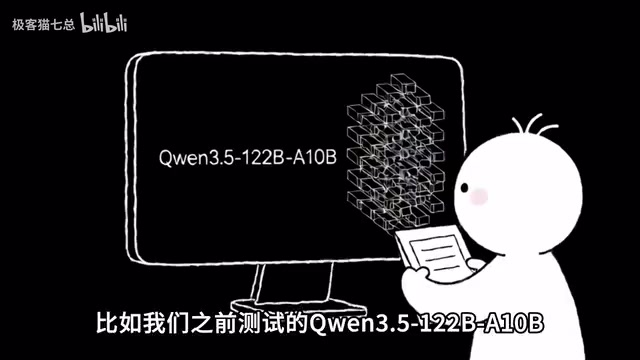
This explains why a 128GB DGX Spark or a 128GB Mac can already handle 100B-class models. Well-optimized MoE models can achieve quite respectable speeds on the DGX Spark.
But regardless of the model architecture, the first question is always: will it even fit? Using 4-bit quantization as a rough guide — approximately 0.5 bytes per parameter — just the weights alone can already run into tens or even hundreds of gigabytes. Add in quantization metadata, runtime caches, and a KV Cache that grows with context length, and whether 128GB is actually enough is far from a simple multiplication problem.
This is where the M5 Ultra's true killer feature comes in: up to 512GB of unified memory. Apple has confirmed that the 512GB configuration will be available by late October, at which point the scale of models you can run locally will jump to a whole new level. For enthusiasts who love pushing the limits with massive models, the Mac Studio is genuinely compelling.
MoE (Mixture of Experts) architecture works by splitting a large model into multiple "expert" sub-networks. During each inference pass, a lightweight "router" decides which experts to activate for the current input — rather than running all parameters through the computation. Take Qwen 3 235B A22B as an example: 235B is the total parameter count across all experts, but each forward pass only activates roughly 22B parameters. This delivers two direct benefits: the actual compute load per inference is dramatically reduced (comparable to a dense model of the same activated parameter size), while the model's "knowledge capacity" approaches that of a dense model with the full parameter count. The trade-off is that all expert weights must remain resident in memory, so memory capacity requirements don't shrink with the activation ratio. This is exactly why MoE models, despite running faster, still have a strong appetite for large memory.
Multi-Node Scaling: Unified Memory vs. Distributed
What if a single Spark doesn't have enough memory? Simple: buy another one. Two DGX Sparks give you 256GB total memory — which might sound comparable to a 256GB Mac Studio, but these are very different beasts.

Two Sparks are fundamentally two separate computers. The model must be split using Tensor Parallel, with nodes constantly exchanging data. NVIDIA offers a Spark cluster solution that lets multiple machines cooperate to run a model that won't fit on a single unit. The upside is that you can keep stacking — one isn't enough, add two or three. The downside is equally real: you're now responsible for managing networking, the OS, containers, and the entire distributed environment yourself.
By contrast, the Mac Studio's 256GB or 512GB is a single contiguous block of unified memory. You just load the model in and go. For users who don't want to deal with the complexity, this "it just works" experience is a genuine advantage.
Tensor Parallel is one of the most common strategies for distributed inference of large models. The core idea is to split a model's weight matrices — by rows or columns — across multiple GPUs or machines, each computing a partial result, then aggregating via high-speed interconnects. This means every inference step requires cross-node AllReduce communication, where latency and bandwidth directly impact overall throughput. The DGX Spark's ConnectX-7 supports up to 200Gbps NVLink-C2C or InfiniBand interconnects, which keeps communication overhead relatively manageable within NVIDIA's own cluster setup. But compared to a single machine with unified memory, the latency of cross-machine communication is still orders of magnitude higher. This is the fundamental reason why two 128GB Sparks forming a 256GB distributed cluster don't deliver the same real-world throughput as a single machine with native 256GB unified memory.
Where the Real Gap Lies: Software and Ecosystem
If you had to pick one deciding factor, the true dividing line between these two machines isn't hardware — it's ecosystem.
The DGX Spark's biggest advantage isn't just FLOPS. It's the combination of Blackwell hardware + CUDA + the entire NVIDIA AI software stack. Many AI projects prioritize CUDA compatibility right from day one. If you want to experiment with new models, new inference frameworks (like vLLM), or even write your own CUDA kernels, NVIDIA is almost always the first platform to get full support.
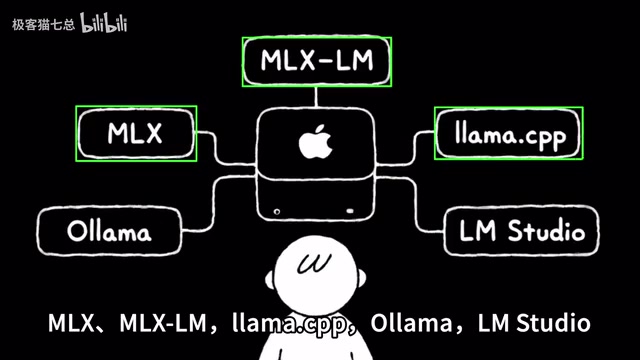
That doesn't mean the Mac Studio is left out in the cold. Tools like MLX, Ollama, and LM Studio have made local AI on Mac genuinely capable and user-friendly. Add in the macOS advantage of being a fully functional computer — edit videos during the day, run models at night, keep a browser and code editor open at the same time — and it never feels like you're babysitting a server.
So, Which One Should You Choose?
Neither of these machines is aimed at everyday office users. The right choice comes down to your specific use case:
- If you're an AI developer who works with new models daily, needs CUDA, TensorRT-LLM, vLLM serving, a Linux environment, and potentially wants to build a multi-node cluster down the road — DGX Spark is the better fit.
- If you prioritize massive unified memory, high bandwidth, and long-context inference, want to run larger quantized models locally, and also need to edit video, retouch photos, write code, and handle daily productivity tasks — Mac Studio (especially the 512GB M5 Ultra) is extremely attractive. Its 1.2TB/s bandwidth paired with 512GB of memory makes it arguably the most capable local AI desktop machine available right now.
Of course, if you want both — well, your wallet will make the final decision for you.
Related articles

Should U.S. College Fraternities Be Banned? A Researcher's Incisive Observations
Why not just ban U.S. college fraternities? A researcher finds the key resistance comes from decision-makers' own fraternity identities and schools' "willful ignorance."

Microsoft Discovery: Accelerating Scientific Discovery with AI Agents
Microsoft's Discovery platform runs specialized AI agents to help researchers screen and prioritize the most promising compounds and experimental paths, reducing experiments and accelerating scientific discovery.

Cambridge Heavy Industries Secretly Develops Desktop-Scale Nuclear Fusion Device
Cambridge Heavy Industries is secretly developing a desktop-scale laser-driven nuclear fusion device, targeting the equipment supply market for fusion power plants. This article analyzes its miniaturization technology path, commercialization logic, and unique positioning in the fusion startup wave.