Dify 1.8.0 Deployment Guide: Build AI Apps Without Writing Code

Step-by-step guide to deploying Dify 1.8.0 with Docker and building AI apps without code.
This article walks through the full deployment process for Dify 1.8.0, an open-source AI application platform. It covers Docker-based one-click setup, environment variable configuration, a breakdown of Dify's five application types (including Workflow and Chatflow), and a comparison with tools like Coze, RagFlow, and N8N. Ideal for beginners looking to build AI agents and RAG-powered apps with minimal coding.
Dify 1.8.0 Deployment Guide: Build AI Apps Without Writing Code
In the AI application development space, low-code platforms that help developers — and even non-technical users — quickly build intelligent agents (Agents) are becoming the go-to choice. The rise of Low-Code Platforms stems from the urgent need for enterprise digital transformation: traditional software development cycles are long and labor costs are high, while low-code platforms dramatically lower the barrier to entry through visual drag-and-drop interfaces and reusable templates. In the AI domain, this trend has evolved into an explosion of "AI application development platforms": developers no longer need deep expertise in large model API calls, prompt engineering, or vector database operations — they can build agents entirely through a graphical interface. According to Gartner, by 2026, more than 80% of enterprises will use low-code/no-code tools to participate in technical product development. This article provides a comprehensive walkthrough of the installation, deployment, and core capabilities of Dify 1.8.0, helping beginners build their own AI applications from scratch.
What Is Dify? The Core Value in One Sentence
Dify is an open-source AI application development platform whose core strength lies in rapidly building and deploying AI applications without writing extensive code. Compared to similar tools like Coze, Dify supports a broader range of application types.
Coze primarily supports two application formats — Agents and AI applications with workflows — while Dify offers five application types: three foundational types aimed at newcomers, plus two advanced formats: "Workflow" and "Chatflow."
It's worth noting that AI Agents represent the core paradigm for deploying large models in real-world applications. Unlike simple question-answering models, an Agent has a closed-loop "Perceive–Decide–Act" capability: it can call external tools (such as search engines, code executors, and database queries), break complex tasks into sub-steps, and dynamically adjust execution paths based on intermediate results. Typical Agent architectures include two paradigms: ReAct (Reasoning + Acting) and Plan-and-Execute. The value of platforms like Dify lies in encapsulating these complex Agent orchestration patterns into visual nodes, enabling non-technical users to build AI applications with tool-calling and multi-step reasoning capabilities.

Although Workflow and Chatflow both fall under the "workflow" umbrella, they serve different purposes. Workflow uses a Directed Acyclic Graph (DAG) structure where data flows in one direction from a start node to an end node — well-suited for batch processing, data pipelines, automated report generation, and other scenarios that don't require ongoing interaction. Chatflow, on the other hand, introduces a "conversation state persistence" mechanism on top of the workflow foundation: each round of user input acts as a new trigger entering the flow, while carrying the historical conversation context, allowing the entire process to track the semantic evolution of a multi-turn dialogue. This design draws on the approach of ConversationalChain in LangChain, enabling complex multi-step tasks to be presented to end users in the form of natural conversation. This distinction lets developers choose the most appropriate building approach for their use case.
Why Choose Dify? The Case for Enterprise AI Development
When evaluating enterprise AI application development tools, the leading options include Dify, Coze, RagFlow, and N8N. These tools can be differentiated along two dimensions: "deployment model" and "technical depth." Both Coze (ByteDance) and Dify offer cloud-based SaaS versions, but Dify additionally supports full on-premises private deployment — critical for industries with strict data compliance requirements such as finance, healthcare, and government. RagFlow focuses on fine-grained control of RAG pipelines and is well-suited for knowledge management scenarios with high demands on document parsing quality, but its general-purpose Agent capabilities are relatively limited. N8N is a general-purpose workflow automation platform with native support for hundreds of SaaS integrations, but its AI-native capabilities require plugin extensions and carry a steeper learning curve. Weighing functionality against ease of adoption, Dify ranks highest overall for enterprise use cases, followed by Coze.

Dify's differentiated advantage in this landscape is that it offers both a low barrier to entry (visual orchestration, built-in model management) and sufficient engineering depth (support for custom tools, code nodes, and private model integration), covering the full lifecycle from PoC validation to production deployment. Domestic AI development platforms have undergone rapid iteration and now hold clear advantages in engineering capability and local market adaptation — with Dify performing best in terms of ease of use and user-friendliness. For beginners, choosing a platform that is both feature-complete and easy to get started with can significantly reduce the learning curve and accelerate the journey from concept to production.
Full Dify 1.8.0 Deployment Walkthrough (One-Click Docker Launch)
This tutorial is based on Dify 1.8.0. Compared to older versions, the new release has significantly simplified deployment configuration, making the overall process much smoother.
Docker is currently the most mainstream containerization technology. Its core value lies in "environment consistency" — by packaging application code, runtime dependencies, and configuration files into an image, it ensures a completely consistent runtime environment on any Docker-compatible machine, fundamentally solving the classic "it works on my machine" problem. A complete Dify deployment involves multiple containers: the API service, Worker processes, Nginx reverse proxy, PostgreSQL database, Redis cache, and a vector database. Docker Compose is the tool used to orchestrate and manage the relationships between all these containers.
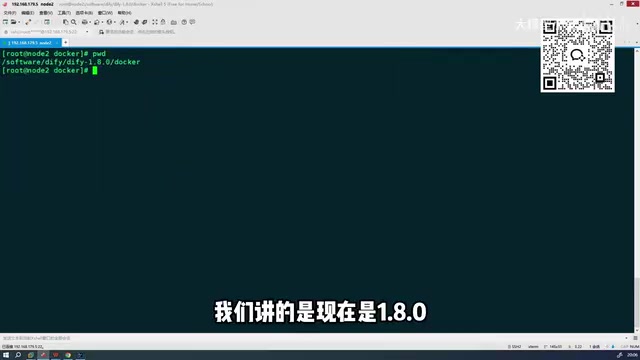
Full Installation Steps
- Extract the archive: Unzip the downloaded Dify package to your target directory.
- Navigate to the Docker directory: Use
cdto enter the Dify directory, then navigate into thedockersubfolder. - Configure environment variables: Locate the
.env.examplefile in the directory and rename it to.env. This file already contains all required default environment variables. The.envfile is the standard practice for managing environment variables in container orchestration — centralizing sensitive parameters like database passwords, API keys, and port mappings avoids hardcoding them into code or images, making it a security best practice for cloud-native applications. - One-click launch: Run
docker compose up -dto fully start all Dify services. The-dflag (detached mode) means all containers run as background daemon processes, freeing up your terminal window.
Key Improvements in Version 1.8.0
The biggest highlight of this deployment is a dramatically reduced configuration burden. Older versions required many manual configuration steps, whereas version 1.8.0 only requires renaming a single environment variable file — no other complex operations needed.

In terms of image size, the Docker images for this version total approximately 5–6 GB (encompassing the complete runtime environments for all microservice components). Thanks to mirror source optimizations, download speeds are noticeably faster in the new version, and the time to pull all images and complete startup has been significantly reduced. The new version also fixes numerous known issues from older releases, with improved overall stability.
Login Interface and Core Module Breakdown
Once startup is complete, access the deployment node through your browser to log in. The Dify main interface contains four core modules:
- Explore: Browse and experience pre-built application templates to quickly understand platform capabilities
- Studio: The primary workspace for creating and managing AI applications
- Knowledge: Manage document data used for RAG (Retrieval-Augmented Generation)
- Tools: Integrate external tools and plugins to extend application capabilities
The Knowledge module is powered by RAG (Retrieval-Augmented Generation) technology — the mainstream technical approach for addressing the "hallucination" problem and knowledge recency limitations of large models. The core principle works as follows: user questions are converted into vectors, relevant document chunks are retrieved from a pre-built knowledge base (typically backed by a vector database such as Chroma, Milvus, or Weaviate), and the retrieved results are sent to the large model alongside the original question, enabling the model to generate answers grounded in real documents. Dify fully encapsulates this complex pipeline — users simply upload documents in PDF, Word, web page, or other formats, and the platform automatically handles document chunking, vector storage, and retrieval interface configuration, significantly lowering the technical barrier to building private enterprise knowledge bases.
Studio is the main arena for building AI applications. Click "Create Blank App" to start building an agent or workflow from scratch.
Getting Started Tips and Learning Path for Beginners
For users new to Dify, following a "simple to complex" learning path is recommended:
- Start with the three foundational application types — practice each one hands-on to understand the appropriate use cases for each;
- Once you're comfortable with the platform's interaction patterns, move on to orchestrating Workflows and Chatflows — the former focuses on automated batch processing tasks, while the latter is better suited for building interactive AI products with multi-turn conversation capabilities;
- When following tutorials, pay attention to version numbers to avoid configuration discrepancies caused by version differences.
Overall, Dify offers individuals developers and enterprise teams an efficient path to deploying AI applications — thanks to its comprehensive feature set (covering core AI application scenarios including Agent orchestration, RAG knowledge bases, and workflow automation), user-friendly interface design, and streamlined Docker deployment process. Whether you're quickly validating an AI product idea or building a production-grade agent system, it's well worth exploring as your go-to platform.
Related articles

Andrew Ng's New Company LearnVector: Achieving One-on-One Personalized Learning with AI
Andrew Ng launches LearnVector, using generative AI to deliver one-on-one personalized learning. Explore its core vision, potential capabilities, challenges, and how LLMs can solve education's scalability problem.

Truth Has No Direction: How the Tarski Paradox Challenges LLM Truth Probe Techniques
How a Tarski-style attack challenges LLM truth probes from the foundations of logic. Is the linear representation hypothesis valid, or is the "truth direction" in AI activations just a statistical illusion?

Andrew Ng's New Company LearnVector: Achieving One-on-One Personalized Learning with AI
Andrew Ng launches LearnVector, leveraging generative AI to create one-on-one personalized learning experiences. Explore its core vision, potential capabilities, challenges, and how LLMs could solve education's scalability problem.