Dify Agent Building Tutorial: Tool Calling & ESA Search Practical Guide

A complete guide to building AI Agents on Dify's no-code platform with tool calling and ESA search.
This article explains how to build AI Agents on Dify's no-code platform. An Agent's core capability lies in tool calling (Function Call/ReAct), but with a 5-call limit, you should follow the single responsibility principle. The article highlights the RAG-based ESA search tool and addresses the common time awareness problem with three solutions: adding a time tool, using a stronger model, or optimizing prompts.
Introduction
AI Agents are one of the most exciting directions in large language model applications. Unlike ordinary chat assistants, Agents can autonomously call external tools, retrieve real-time information, and complete complex tasks. This article is based on the Dify no-code platform, walking you through the Agent building process step by step — from tool calling mechanisms to search tool configuration, and solutions for time awareness issues — helping you get started with Agent development quickly.

How Agents Differ from Chat Assistants
When creating an Agent application in Dify, the interface looks very similar to a chat assistant — you write prompts on the left and test conversations on the right. But the fundamental difference is: Agents have the ability to call tools.
The Function Call Mechanism
The Agent settings use Function Call mode by default — this is the tool-calling API standard developed by OpenAI. The core idea behind Function Call is: developers pre-define a set of function names, parameter descriptions, and usage instructions; during conversation, the model determines whether it needs to call a specific function and automatically generates parameters conforming to the JSON Schema specification. This mechanism upgrades large language models from pure text generators to intelligent dispatchers capable of interacting with external systems. Currently, Anthropic's Claude, Google's Gemini, and domestic models like Tongyi Qianwen have all implemented compatible or similar tool-calling protocols, making it the de facto standard for Agent development.
Most models that support tool calling are compatible with this protocol. One critical point to note: Dify Agents can call tools a maximum of 5 times, and this limitation directly affects how you design your Agent.
Therefore, when designing Agents, you should follow the "single responsibility" principle:
- An Agent dedicated to web searching and information summarization
- An Agent dedicated to weather forecasting
- An Agent dedicated to stock analysis
ReAct Mode
For models that don't support Function Call (such as DeepSeek R1 reasoning models), Dify provides ReAct mode. ReAct (Reasoning + Acting) is an Agent reasoning framework jointly proposed by Princeton University and Google Brain in 2022. Its core innovation lies in interleaving Chain-of-Thought reasoning with external actions: the model first generates a reasoning step (Thought), then decides to execute an action (Action), observes the action result (Observation), and enters the next round of reasoning. This "think-act-observe" loop allows the model to dynamically adjust its strategy.
Unlike Function Call, ReAct relies entirely on prompt engineering and doesn't require native model support for tool-calling APIs, giving it broader compatibility but relatively lower stability and efficiency. Essentially, it simulates tool-calling capability through prompt engineering.
Dify's Tool Ecosystem: How to Choose from 161 Plugins
Since Dify 1.0, tools need to be downloaded and installed from the Marketplace. The platform currently offers 161 tools covering search, image generation, file processing, email sending, and many other functions.
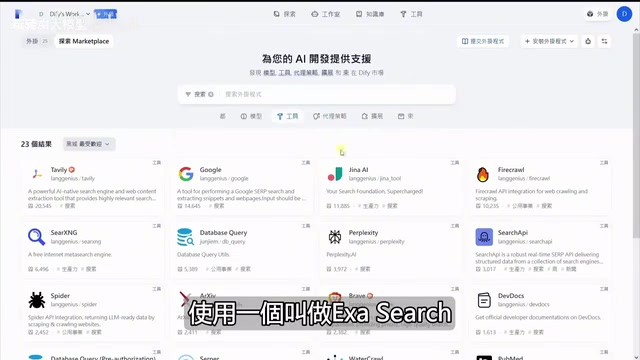
Popular Tools Overview
| Tool Name | Description | Downloads |
|---|---|---|
| Tavily | Web search and content queries | 20K+ |
| Google Search | Traditional search engine queries | - |
| Jina | Web content crawling and parsing | - |
| DALL-E | AI image generation | - |
| Firecrawl | Deep web crawling (supports multi-level) | - |
| Poke | Markdown to PPT/Word | - |
| Email sending | - |
Firecrawl deserves special attention — it can crawl an entire website's content and supports configurable crawl depth levels, making it ideal for scenarios requiring large amounts of web data.
ESA Search Tool: A Smarter Retrieval Solution Than Tavily
Among the many search tools, ESA is an underrated choice. Its biggest difference from traditional search tools like Tavily and Jina is: ESA uses technology similar to RAG (Retrieval-Augmented Generation), pre-storing website content in a vector database and returning results through semantic fuzzy matching during queries, achieving higher retrieval accuracy.
RAG (Retrieval-Augmented Generation) is a technical paradigm proposed by Meta AI in 2020. The core idea is to retrieve relevant document fragments from an external knowledge base as context before the large model generates an answer. Traditional search engines rely on keyword inverted indexes for exact matching, while RAG systems use Embedding models to convert text into high-dimensional vectors, store them in vector databases (such as Pinecone, Milvus, Weaviate, etc.), and perform semantic-level fuzzy matching through algorithms like cosine similarity during queries. ESA applies this technology to internet search scenarios — it pre-crawls and vectorizes large amounts of web content, so user queries don't require real-time crawling but instead perform semantic retrieval directly in the vector database, resulting in faster speed and higher relevance.
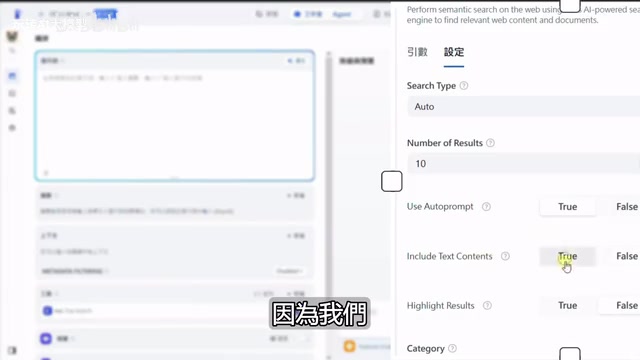
ESA's Four Functional Modules
- ESA Search: Supports three search modes — neural network (vector retrieval), keyword matching, and hybrid mode
- URL Content: Fetches web content directly from a given URL, similar to Firecrawl but faster (since content is pre-crawled)
- Similar Link: Finds semantically similar web pages through a URL for information expansion
- ESA Answer: Returns answers directly summarized by a large model
Key Configuration Recommendations
- Search Mode: Auto (hybrid mode) is recommended, combining the advantages of both vector retrieval and keyword matching. Vector retrieval excels at understanding semantic similarity — for example, searching "how to improve code quality" can match documents about "software engineering best practices" — but performs poorly with proper nouns and exact numbers. Keyword matching (based on algorithms like BM25) works extremely well for exact term matching but cannot understand synonyms and semantic associations. Hybrid mode merges the retrieval results from both approaches using algorithms like Reciprocal Rank Fusion (RRF), combining their strengths.
- Number of Results: 10 is sufficient for simple queries; for in-depth research reports, increase to several hundred
- Use Auto-Prompt: Enable this if you haven't done prompt optimization
- Text Content: Must be checked, otherwise only summaries are returned instead of full content
- Category Filter: Filter by domain (news, GitHub, Twitter, finance, etc.) to prevent search results from going off-topic
Registration and Pricing
ESA provides generous free credits upon registration, and completing onboarding tasks grants approximately $230 in usage credits — more than enough for daily use without additional payment.
Hands-On: Solving the Agent's Inability to Find Latest Information
In practice, many people encounter a confusing issue: even though the Agent is equipped with search tools, the news it retrieves is from 2023 or even earlier. The root cause is that large language models lack real-time time awareness — they don't know what "today" is.
From a technical perspective, a large language model's training data has a definitive cutoff date (knowledge cutoff). For example, GPT-4O Mini's training data ends in October 2023. During inference, the model is essentially performing probability-based text generation — it has no built-in clock and cannot perceive the current real time. When users say "recently" or "today," the model can only guess based on the time distribution in its training data, often outputting content corresponding to the most frequent time period in the training data. This is why, even with search tools equipped, if the search query doesn't include explicit time parameters, the returned results may still be outdated — the query received by the search tool itself lacks time constraints.
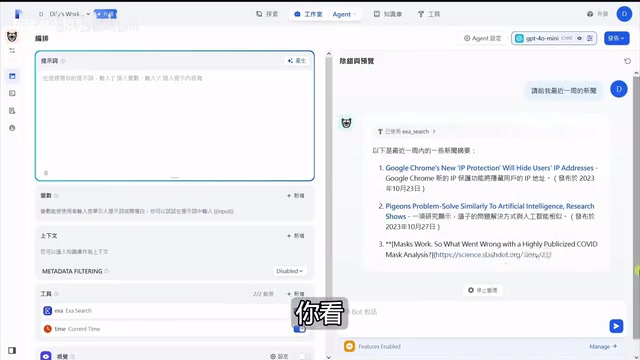
Reproducing the Problem
When querying "AI-related news" with the GPT-4O Mini model, even with the ESA search tool added, the returned results are still old news from 2023. Even explicitly requesting "news from the past week" doesn't help — because the model simply doesn't know what specific dates "the past week" corresponds to.
Three Solutions
Solution 1: Add a CurrentTime Tool
Add a time tool (such as CurrentTime) to the Agent so the model can retrieve the current time. However, this requires the model to be "smart" enough to autonomously combine the time information with the search tool.
Solution 2: Switch to a More Powerful Model
Switch from GPT-4O Mini to a model with stronger reasoning capabilities, such as DeepSeek V3. A smarter model will automatically complete the following steps:
- First call CurrentTime to get the current time
- Calculate the specific date range for "the past week"
- Pass the time parameters into the ESA search tool
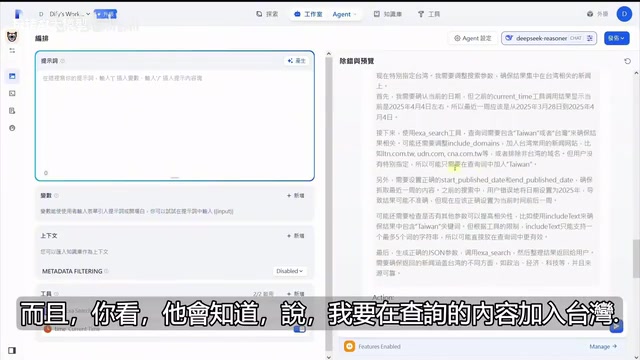
Solution 3: Explicit Guidance Through Prompts
For less capable models, you need to spell out the operational steps in the prompt: "Please first call the time tool to get the current time, then search based on the time range." While not the most elegant approach, it's reliable and stable. This is essentially a "prompt programming" mindset — shifting the Agent's decision logic from the model's autonomous reasoning to the developer's explicit instructions, trading flexibility for determinism.
Agent Memory Capability
It's worth mentioning that Agents have conversational memory. In the second round of conversation, the Agent remembers the time information obtained in the previous round and doesn't need to call the time tool again — it can directly pass the time parameters to the search tool. This is one of the things that makes Agents more practical than ordinary chat assistants. This memory capability relies on the conversation context window — the Agent passes previous conversation history (including tool call records and returned results) as context to the model, enabling it to leverage previously obtained information for subsequent reasoning.
Best Practices for Agent Design
Single Responsibility Principle
Since tool calls are capped at 5, don't try to make one Agent handle everything. Split by function instead:
- News Query Agent: Equipped with search tool + time tool
- Knowledge Base Q&A Agent: Equipped with local knowledge base
- Data Analysis Agent: Equipped with specialized analysis tools
This design philosophy aligns with the microservices architecture concept in software engineering — each service (Agent) is responsible for only one clear functional boundary. Complex tasks are accomplished by combining multiple simple Agents rather than building one massive all-purpose Agent. In Dify, you can chain multiple Agents together through Workflows to implement more complex business logic.
Auxiliary Feature Configuration
In the Agent's management settings, several practical features are worth configuring:
- Opening Statement: Guide users on how to ask questions, lowering the usage barrier
- Next Step Suggestions: Predict the user's likely follow-up questions based on conversation content
- Annotated Replies: Ideal for customer service scenarios, allowing standardized answer formats
- Knowledge Base References: Combine with local knowledge bases to enhance answer quality, suitable for enterprise internal applications
Summary
Dify's Agent functionality enables no-code users to build practical AI agents. Let's recap the key takeaways:
- Understanding the Function Call mechanism is the foundation for using Agents effectively — keep the 5-tool-call limit in mind
- ESA search tool is based on RAG technology with higher retrieval accuracy than traditional search tools — recommended as your first choice
- Time awareness issues can be resolved by adding a time tool, switching to a more powerful model, or optimizing prompts
- The single responsibility principle is key to Agent design — one Agent, one job
As Dify's tool ecosystem continues to grow and large model capabilities keep improving, the application scenarios for Agents will only expand. Now is the perfect time to start building.
Related articles
 Tutorials
ChatGPT Plus Subscription Guide: Are GPT-5.5, image-2, and Codex Worth the Upgrade?
A detailed look at ChatGPT Plus features — GPT-5.5, image-2, and Codex — with a Plus vs Pro comparison and a complete step-by-step subscription guide for users outside the US.
 Tutorials
Harness AI Engineering in Practice: Using Claude Code to Master Enterprise-Level E-Commerce Development
Deep dive into Harness AI Engineering: master enterprise e-commerce development with Claude Code using the Rules, Skills, Wiki, and Changes framework.
 Tutorials
Cursor + Codex Dual-IDE Collaboration: A Practical Methodology for Open-Source Project Customization
A complete methodology for open-source project customization based on real-world experience, detailing the Cursor+Codex dual-IDE workflow, seven-stage process, MVP validation, and AI source code reading techniques.