Dify AI Agent Tutorial: Build Tool-Calling & Smart Search with Zero Code

A hands-on guide to building AI Agents with web search capabilities on Dify using zero code.
This article provides a detailed walkthrough of building an AI Agent on the Dify platform with zero code, covering the core differences between Agents and chatbots (tool-calling capabilities), choosing between Function Call and ReAct modes, configuring search tools like Exa, and solving the problem of outdated search results caused by LLMs' lack of time awareness. It emphasizes splitting Agents by function as a best practice and highlights how model reasoning capabilities critically impact tool-calling effectiveness.
Introduction
In the world of AI application development, Agent is one of the hottest concepts right now. Unlike simple chatbots, an Agent can autonomously call tools, retrieve real-time information, and complete complex tasks. From an academic perspective, the concept of an Agent originates from the "intelligent agent" theory in artificial intelligence — an autonomous entity that can perceive its environment, make decisions, and take actions to achieve goals. This article walks you through how to build an AI Agent with web search capabilities on the Dify platform, step by step and with zero code, covering key topics such as Agent mode selection, tool configuration, and prompt optimization.

What's the Difference Between an Agent and a Chatbot?
The interface for creating an Agent in Dify looks very similar to that of a chatbot — you write prompts on the left and test conversations on the right. But the fundamental difference lies in the fact that an Agent has tool-calling capabilities.
Dify is an open-source LLM application development platform, positioned as the "middleware" layer for AI applications. It provides visual prompt orchestration, RAG pipelines, an Agent framework, model management, and other core capabilities, supporting integration with dozens of LLMs including OpenAI, Anthropic, and locally deployed open-source models. Dify uses a decoupled frontend-backend architecture, with Python/Flask on the backend and Next.js on the frontend, and supports one-click Docker deployment. Its 1.0 version introduced a plugin marketplace mechanism, shifting the tool ecosystem from built-in to community-driven, allowing developers to build and publish plugins for others to use.
Function Call: The Mainstream Tool-Calling Mechanism
The most critical setting for an Agent is the calling mode. The default is Function Call, which is the tool-calling API standard proposed by OpenAI.
Function Call was officially introduced by OpenAI in June 2023 alongside the GPT-3.5/GPT-4 API update. Its core principle works as follows: developers describe available tools — their names, parameters, and purposes — in JSON Schema format within the API request. When generating a response, the model determines whether a tool call is needed and outputs a structured function call request (including the function name and arguments). The developer then executes the actual function call upon receiving this request and returns the result to the model for the final answer. This mechanism has evolved LLMs from pure text generators into intelligent agents capable of interacting with external systems. Today, major models including Anthropic's Claude, Google's Gemini, and Meta's Llama all support similar tool-calling protocols.
Most models that support tool calling are compatible with OpenAI's Function Call protocol, which is why Dify displays this option by default.
One important caveat: Dify limits Agents to a maximum of 5 tool calls per conversation turn. This means that even if you've attached many tools, the model can only execute up to 5 tool calls in a single turn. Therefore, it's recommended to split different functionalities into separate Agents — for example, one dedicated to web search and summarization, and another for checking the weather or analyzing stocks.
ReAct Mode: The Alternative When Function Call Isn't Supported
Not all models support Function Call. For instance, DeepSeek's reasoning model R1 doesn't support it. For such models, Dify provides the ReAct (Reasoning-Acting) mode.
ReAct was first proposed by Princeton University and the Google Brain team in their 2022 paper ReAct: Synergizing Reasoning and Acting in Language Models. The core idea of this framework is to have the language model alternate between reasoning (Thought) and action (Action) steps: the model first thinks about what it should do, then performs an action (such as a search), observes the result (Observation), and enters the next round of reasoning. This combination of chain-of-thought and tool calling enables models without native Function Call capabilities to complete complex multi-step tasks through carefully designed prompt templates.
ReAct works by using prompting techniques to make the model repeatedly execute a loop of "query data → feed results back to the model → reason again" until it arrives at a final answer. In essence, it simulates tool-calling capabilities through prompt engineering.
Deep Dive into Dify's Tool Ecosystem and Plugin Marketplace
Tools are the core source of an Agent's capabilities. Since Dify 1.0, only a few preset tools remain (such as CurrentTime and Audio), and most tools need to be manually downloaded and installed from the Plugin Marketplace.

What Tools Are Available in the Plugin Marketplace?
Click "Plugins" → "Explore Marketplace" to enter the tool marketplace. Currently, there are 161 tools available, filterable by popularity, recently updated, newly published, and other dimensions.
Some notable popular tools include:
- Tavily: Over 20,000 downloads, used for web search and content queries
- Jina: A web search tool similar to Tavily
- DALL-E: A standalone tool for OpenAI's image generation model
- FireCrawl: A deep web crawling tool that allows you to set crawl depth and scrape entire website contents
- Markdown to PPT/Word: Converts Markdown content into presentations or documents
- Email Tool: Automatically sends emails after researching information
Why Exa Is the Recommended Search Tool
Among the many search tools available, Exa is a standout choice well worth trying. Unlike Tavily and Jina, Exa uses a technology similar to RAG (Retrieval-Augmented Generation) — it pre-crawls and stores website content in its own vector database, using fuzzy semantic matching rather than simple keyword search for queries.
RAG (Retrieval-Augmented Generation) is a technical architecture proposed by Meta AI in 2020. Its workflow consists of three steps: first, documents are converted into high-dimensional vectors using an Embedding model and stored in a vector database; when a user asks a question, the query is similarly converted into a vector, and the most semantically similar document fragments are found in vector space using algorithms like cosine similarity; finally, the retrieved relevant content is injected as context into the LLM's prompt, allowing the model to generate answers based on real data. This approach both solves the problem of outdated LLM knowledge and significantly reduces the probability of hallucinations.
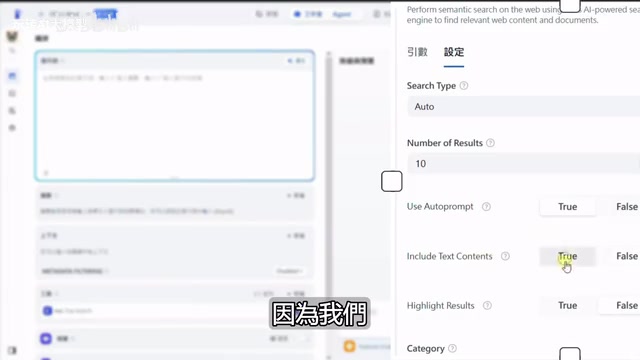
Exa offers four main feature modules:
| Feature | Description |
|---|---|
| Exa Search | Supports neural network search, keyword search, and hybrid search |
| URL Content | Fetches webpage content directly from a given URL, extremely fast |
| Similar Link | Finds other websites with similar content based on a URL |
| Exa Answer | Directly answers questions and provides summaries |
After registering for Exa, you'll receive generous free credits, and completing onboarding tasks can earn you an additional $20-30 in usage credits — essentially enough for long-term free use.
How to Configure Key Parameters for Exa Search
After installing Exa, you need to configure the API Key in Dify and adjust the search parameters:
Search Mode Selection:
- Neural: Neural network semantic search (i.e., vector retrieval)
- Keyword: Traditional keyword exact matching
- Auto (Recommended): Hybrid mode, combining the strengths of both semantic understanding and keyword matching
Regarding the technical principles behind vector retrieval: The vector retrieval technology used by Exa relies on Embedding models to convert text into floating-point vectors with hundreds of dimensions. In this high-dimensional space, semantically similar texts are mapped to adjacent positions. For example, "苹果公司股价" (Apple company stock price in Chinese) and "Apple Inc. stock price" have completely different text but are very close in vector space. Common vector databases include Pinecone, Weaviate, Milvus, and Qdrant, which achieve millisecond-level similarity retrieval through ANN (Approximate Nearest Neighbor) algorithms. Compared to traditional inverted index keyword search, semantic search understands query intent rather than just matching literal words. This is why Auto mode (hybrid search) typically delivers the best results — it combines the flexibility of semantic understanding with the precision of keyword matching.
Number of Results: Defaults to 10. If you're doing in-depth research or writing a report, increase this number; if you're just checking weather or news, 10 is sufficient.
Content Options: Make sure to check "Include text content," otherwise only summary information will be returned without detailed data.
Category Filters: You can select specific domains such as GitHub, News, Twitter, PDF, etc., to prevent search results from drifting off topic. For example, selecting the News category when searching for financial news will yield more precise results.
Practical Pitfalls: What to Do When Your Agent Can't Find the Latest Content
After configuring Exa and running tests, you'll encounter a classic problem: Large language models have no concept of time.
Reproducing the Problem
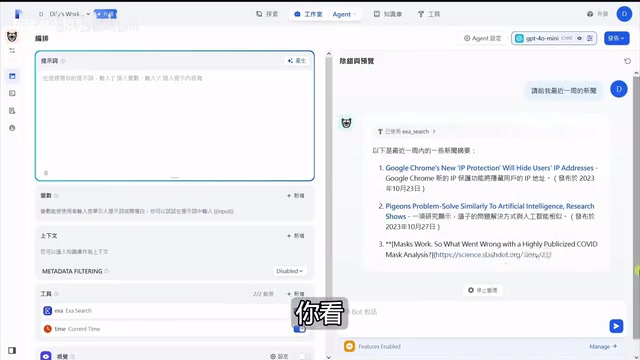
When you ask "Give me the latest news," the Agent successfully calls the Exa search tool, but all the results returned are from 2023 or even earlier. Even when you follow up with "Give me news from the past week," the results are still outdated.
The reason is simple: when the model sends a search request, it doesn't know what "now" is — it uses the time concept from when its training data was last updated. LLM training data has a clear cutoff date (Knowledge Cutoff), and the model's understanding of terms like "recent" and "current" is stuck at the last time point of its training data. This is an inherent limitation of all LLMs, and it's also why RAG and tool calling are so important for obtaining real-time information.
Solution: Add the CurrentTime Tool
The fix is to add the CurrentTime tool so the Agent can obtain the current time. But simply adding the tool isn't enough — less capable models (such as GPT-4o mini) won't proactively check the time first before searching for news, even with the time tool available.
Different models perform vastly differently in Agent scenarios, and this is directly related to their reasoning capabilities. Lightweight models like GPT-4o mini are fast and cost-effective but tend to "take shortcuts" in scenarios requiring multi-step planning — they prefer to answer directly rather than proactively plan a tool-calling chain. In contrast, reasoning models like DeepSeek R1 and OpenAI o1/o3 have been trained through reinforcement learning to develop "thinking" abilities, generating detailed internal reasoning processes (Chain of Thought) and autonomously breaking down task steps. While these models have longer response times and higher token consumption, their success rates in complex Agent tasks are significantly higher.
In this case, there are two strategies:
- Switch to a model with stronger reasoning capabilities: For example, DeepSeek R1. It will autonomously reason through "first call CurrentTime to get the current time, then pass the time parameter to Exa search," completing the correct tool chain call.
- Provide explicit instructions in the prompt: Write clearly in the system prompt to "first get the current time, then search for content based on the time range."

How Stronger Models Handle Tool Calling
With DeepSeek R1, the Agent automatically executes the following workflow:
- Calls CurrentTime to get the current date
- Calculates the date one week ago
- Passes the time range parameters to Exa search
- Returns genuinely up-to-date news
Even more noteworthy is the Agent's conversation memory capability. In a second conversation turn, when you follow up with "news about Taiwan," it won't redundantly call the time tool again. Instead, it reuses the time information from the previous turn and adds "Taiwan" to the search keywords for a precise query. This conversation memory relies on the LLM's Context Window mechanism — previous conversation history is sent to the model as context, allowing it to extract previously obtained information and avoid redundant operations. This is also why making smart use of memory is especially important given the 5-tool-call limit.
Best Practices for Building Dify Agents
Split Agents by Function
Due to the 5-tool-call limit, don't try to cram all capabilities into a single Agent. The recommended approach is:
- News Agent: Search tool + Time tool, focused on news queries and summarization
- Knowledge Base Agent: Connected to a local knowledge base, focused on internal enterprise Q&A
- Data Analysis Agent: Specialized tools for stocks/weather, focused on specific domains
This "single responsibility" design philosophy aligns with the microservices architecture concept in software engineering — each Agent focuses on doing one thing well, reducing complexity through clear responsibility boundaries. In more advanced scenarios, a Multi-Agent (multi-agent collaboration) architecture can be used, where a "dispatcher Agent" routes tasks to different specialized Agents based on user intent, enabling more complex workflows.
Configuration Tips for Better User Experience
In the Agent's management settings, you can configure the following features to enhance user experience:
- Opening Statement: Provide sample questions for users who aren't sure what to ask
- Suggested Next Steps: Leverage the model's predictive capabilities to automatically recommend potential follow-up questions
- Annotated Replies: In knowledge base Q&A scenarios, ensure specific questions are answered in a fixed format — ideal for customer service systems
Conclusion
Dify's Agent functionality enables zero-code users to build intelligent agents with tool-calling capabilities. The key takeaways include: understanding the applicable scenarios for both Function Call and ReAct calling modes, making informed choices when selecting and configuring search tools (Exa is recommended), being aware of how model capability differences affect tool-calling effectiveness, and following the "single responsibility" principle to split Agent functions. Master these key points, and you'll be able to quickly build practical AI Agent applications on Dify.
Key Takeaways
- Dify Agents support a maximum of 5 tool calls per turn — it's recommended to split functionality across multiple independent Agents
- Exa search tool uses RAG technology for semantic retrieval, outperforming traditional keyword search tools, and offers generous free credits
- LLMs lack time awareness — pairing them with the CurrentTime tool and using models with strong reasoning capabilities (such as DeepSeek R1) is necessary to correctly fetch the latest information
- Function Call works with models compatible with the OpenAI protocol, while ReAct mode enables tool calling for models that don't support Function Call through prompt engineering
- Agents have conversation memory capabilities, allowing them to reuse previously obtained information across multiple conversation turns and avoid redundant tool calls
Related articles
 Tutorials
ChatGPT Plus Subscription Guide: Are GPT-5.5, image-2, and Codex Worth the Upgrade?
A detailed look at ChatGPT Plus features — GPT-5.5, image-2, and Codex — with a Plus vs Pro comparison and a complete step-by-step subscription guide for users outside the US.
 Tutorials
Harness AI Engineering in Practice: Using Claude Code to Master Enterprise-Level E-Commerce Development
Deep dive into Harness AI Engineering: master enterprise e-commerce development with Claude Code using the Rules, Skills, Wiki, and Changes framework.
 Tutorials
Cursor + Codex Dual-IDE Collaboration: A Practical Methodology for Open-Source Project Customization
A complete methodology for open-source project customization based on real-world experience, detailing the Cursor+Codex dual-IDE workflow, seven-stage process, MVP validation, and AI source code reading techniques.