Dify Getting Started Guide: Build Enterprise-Grade AI Apps with Zero Code

A beginner's guide to deploying Dify 1.8.0 and building enterprise AI apps with zero code.
Dify is a Chinese open-source, self-hostable AI application platform that supports five app types including Chatbot, Agent, and Workflow. This guide explains why enterprises should prioritize Dify over tools like Coze and n8n, walks through Docker Compose deployment of version 1.8.0, and shows how to create your first AI app — all with minimal coding required.
What Is Dify? An Underrated Chinese AI Application Platform
In the world of AI application development, "building AI apps without writing code" is becoming a reality. Behind this trend is the extension of the low-code/no-code development paradigm into the AI era — developers no longer need to deeply understand model training, API calls, or vector database configuration. Instead, they can build AI applications simply by dragging nodes and filling in configuration fields. Dify is a prime example of this trend: it has nothing to do with DeFi in cryptocurrency — it's a visual development tool for building AI applications, developed by the LangGenius team and fully open-sourced on GitHub.
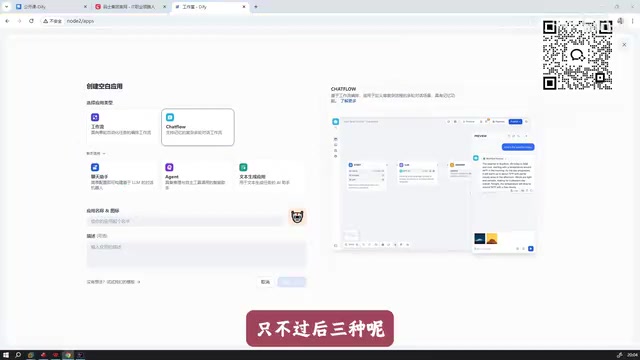
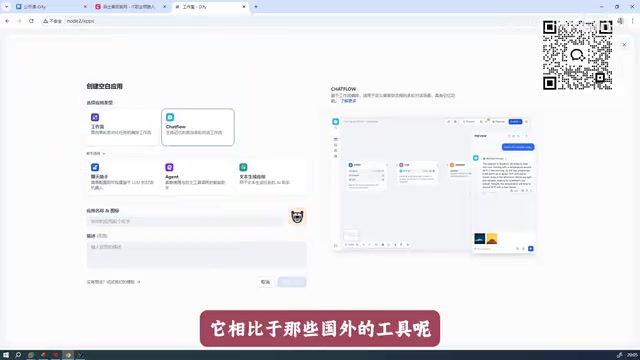
In short, once you log into Dify, you can quickly create a wide variety of AI applications. Compared to early versions that only supported two types — "Agent" and "AI app with conversation" — Dify now supports five application types: Chatbot, Agent, Workflow, Chatflow, and more, each designed for different use cases.
Workflow is an orchestration mechanism that chains multiple processing steps into a Directed Acyclic Graph (DAG). It lets you visually connect steps like "user input → knowledge base retrieval → LLM call → formatted output," with each node handling an independent unit of logic. Chatflow builds on top of the standard workflow by adding Conversation Memory, making it suitable for scenarios that require multi-turn context awareness. Both are fundamentally DAG-based orchestrations — the key difference is whether session state is maintained, which determines their respective use cases.
Why Should Enterprises Prioritize Dify?
There are many AI workflow tools on the market today, including Dify, Coze, RAGFlow, and the internationally popular n8n. In terms of recommended priority for enterprise deployment, Dify ranks first, followed by Coze.
Understanding this ranking requires knowing the distinct positioning of each major tool:
- Coze (from ByteDance) is primarily a cloud-based SaaS platform with a rich plugin marketplace and bot publishing channels, making it better suited for lightweight, consumer-facing scenarios;
- Dify is centered on open-source self-hosting, allowing enterprises to fully deploy it on their own servers with data never leaving the internal network — a better fit for B2B enterprise clients with strict data security requirements;
- RAGFlow specializes in RAG (Retrieval-Augmented Generation) scenarios — one of the most mainstream technical approaches for enterprise AI deployment. The core idea is to retrieve semantically relevant document snippets from an external knowledge base (typically a vector database) before querying the LLM, then pass them as context to the model, enabling it to reference private enterprise data. RAGFlow has targeted optimizations for document parsing quality and retrieval accuracy;
- n8n, as an open-source general-purpose automation tool, boasts a node ecosystem covering hundreds of SaaS integrations, but lacks the depth of AI-native capabilities (such as LLM calls and vector search) that Dify offers.
The core reasoning is straightforward: compared to foreign counterparts, these two domestic products offer richer feature sets, better usability, and stronger localization. For Chinese enterprises and developers, Dify deserves top consideration in terms of feature breadth, onboarding ease, and Chinese language support.
Of course, tool selection should still be guided by your specific business context — n8n has its own unique ecosystem for general automation workflows, and RAGFlow is more specialized for knowledge retrieval augmentation (RAG) use cases. But for the core goal of "rapidly building business-oriented AI applications," Dify's overall performance makes it the go-to first choice.
Deploying Dify 1.8.0 in Practice
This tutorial is based on Dify version 1.8.0. Compared to older versions, the deployment process has been significantly simplified. Here are the key steps:
Docker Deployment Walkthrough
Dify uses Docker Compose for multi-container orchestration. Docker Compose defines the images, ports, networks, and dependencies of multiple services through a single YAML configuration file. A full Dify installation depends on several microservice components: an API service, a Worker async task queue, a frontend Web service, a vector database (Weaviate or Qdrant), a relational database (PostgreSQL), and a caching layer (Redis). Compose manages the coordination of all these services, turning what would otherwise be a complex manual setup into just a few simple steps:
- Extract the package: Unzip the downloaded Dify archive to your target directory;
- Enter the Docker directory:
cdinto the extracted Dify folder, then navigate into thedockersubfolder; - Configure environment variables: Rename the
.env.examplefile in that directory to.env— no additional configuration is needed in the new version; - One-command startup: Run
docker compose up -dand Dify will be fully up and running.
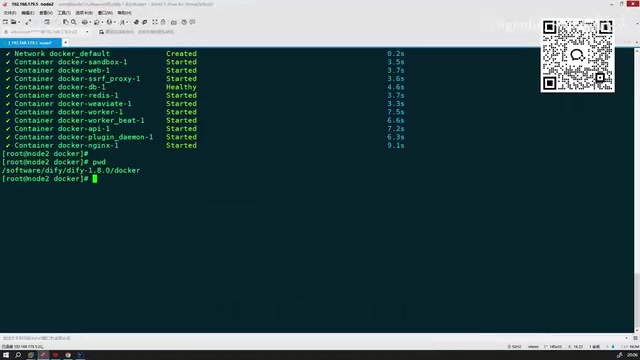
Version 1.8.0 significantly lowers the manual configuration barrier, representing a notable improvement in experience for developers looking to get started quickly.
Image Size and Download Speed
The total Docker image size for this version is approximately 5–6 GB, well within 10 GB. Thanks to updated mirror sources, download speeds are noticeably faster compared to older versions, and several known issues from previous releases have also been resolved.

Deployment tip: Reserve at least 10 GB of disk space before deploying locally and ensure your Docker environment is running properly. If downloads are slow, consider configuring a domestic mirror acceleration source.
Creating Your First AI Application After Launch
Once Dify is running, you can access its web interface via the IP and port of your deployment server. After logging in, you'll see the following core modules:
- Explore: Browse official application templates;
- Studio: The main workspace for creating and managing AI applications;
- Knowledge: Manage the document data required for RAG — i.e., vectorized storage and retrieval configuration for your enterprise's private knowledge;
- Tools: Integrate external tools and APIs.
Studio is the most critical module. The workflow is highly intuitive: go to Studio → click "Create Blank App" → select an application type, and you're ready to start building your first AI application.
The Value and Limits of Low-Code AI Development
Dify is lowering the barrier to AI application development to an unprecedented level — rename an environment variable, start Docker with one command, and configure everything through a drag-and-drop interface. This is enormously valuable for small-to-medium enterprises and individual developers who want to quickly validate AI-driven business ideas.
That said, a few things are worth acknowledging honestly:
- Low-code doesn't mean zero learning curve: Understanding workflow logic, prompt design, and RAG principles (retrieval strategies, chunking methods, similarity threshold tuning, etc.) is still essential for building high-quality applications;
- Tool selection should reflect your situation: "Dify first" is an experience-based recommendation — actual tool selection should align with your team's tech stack and business requirements;
- Rapid version iteration: New versions simplify deployment but may also introduce new features and new issues. Always consult the official documentation before deploying.
Overall, as a representative open-source Chinese AI application platform, Dify delivers a competitive answer in terms of feature completeness and usability — backed by its open-source self-hosting data security advantages, robust RAG knowledge base integration, and continuously evolving workflow orchestration capabilities. It's well worth in-depth study and hands-on practice for anyone looking to enter the world of AI application development.
Key Takeaways
Related articles

Resume Guide for Programmers Transitioning to AI: From an HR Perspective to Job Requirement Matching
How should programmers transitioning to AI write a resume? This Bilibili tutorial gives five key preparation actions: set aside two or three days to review skills and projects, choose a simple template, reverse-engineer the tech stack from job sites, emphasize LLM capabilities, and do a final check from an HR perspective.

Building a RAG Knowledge Base: A Complete Guide from Architecture to Retrieval Evaluation
A systematic overview of the full RAG knowledge base workflow: from overall architecture and mature retrieval solutions to key details of retrieval evaluation and who should learn it, helping developers build a path from beginner to hands-on practice.

Turn Screenshots into Web Code in Seconds: Anyone Can Write HTML with AI
A Bilibili creator demonstrates using AI to turn webpage screenshots directly into HTML and CSS code without manual coding. The article analyzes the tool's usage, new features like video-based app cloning, iterative refinement, and the real boundaries of AI giving zero-foundation users programming ability.