Dify Local Deployment Guide: One-Click Private AI Platform with Docker

Deploy Dify AI platform locally using Docker in under 30 minutes with this step-by-step guide.
This guide walks through deploying the Dify open-source LLM application platform locally using Docker and Docker Compose. It covers environment setup across Linux, Windows, and macOS, explains key concepts like RAG and Agent orchestration, and details the full startup process — including the critical .env configuration step. It also introduces Ollama for running local LLMs to complete a fully private AI stack.
Why Choose Local Deployment for Dify
Dify is one of the most widely used tools for enterprise-grade LLM application development. Launched in 2023 as an open-source LLM application development platform, its core architecture integrates a RAG (Retrieval-Augmented Generation) engine, an Agent orchestration framework, and a visual Prompt engineering tool. By 2024, the GitHub repository had accumulated over 40,000 stars, making it one of the most watched open-source projects in this space.
RAG (Retrieval-Augmented Generation) was formally introduced in 2020 by the Meta AI research team in the paper "Retrieval-Augmented Generation for Knowledge-Intensive NLP Tasks." The core insight is that a large language model's knowledge is "frozen" at its training cutoff date. When faced with time-sensitive or domain-specific questions, the model either produces outdated information or "hallucinations" — outputs that seem plausible but are factually incorrect. RAG addresses this by introducing a dynamic retrieval step during generation: the user's question is converted into a vector embedding, a semantic similarity search is performed against a pre-built vector database, the top-K relevant document chunks are retrieved, and these chunks are injected into the Prompt's context window so the model can answer based on retrieved "reference material." This mechanism effectively combines the model's parametric knowledge with external explicit knowledge, making it particularly effective for enterprise knowledge base Q&A, regulatory compliance queries, and similar use cases. Dify's RAG pipeline also supports advanced optimization strategies such as hybrid retrieval (vector retrieval + keyword retrieval) and Reranker reranking.
The Agent orchestration framework draws from the ReAct (Reasoning + Acting) paradigm proposed by Google in 2022. Traditional Chain-of-Thought prompting only has the model perform internal reasoning, whereas ReAct interweaves reasoning with external actions, forming a "Thought → Action → Observation" loop. In each cycle, the model first describes its current reasoning state in natural language, then selects a tool to execute (such as calling a search engine for real-time information, running Python code, or querying a database), and finally injects the tool's returned result as a new observation into the next reasoning cycle — until the model determines the task is complete. This architecture enables Agents to handle complex tasks that require multiple steps and tool coordination, such as "retrieve last month's sales data from a database, write code to plot a trend chart, then generate an analysis report." Dify combines both capabilities with a visual workflow editor, allowing non-technical users to build complex AI business processes through drag-and-drop node composition.
Similar to platforms like Coze, Dify excels at low-code/no-code AI application development. Developers can rapidly build chatbots and Agents without writing code, and connect them to business systems through visual workflows.
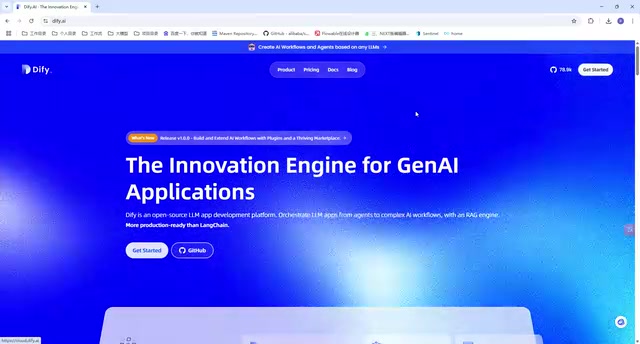
For teams looking to deploy AI projects, Dify offers two usage paths: accessing the official website to use the online version, or pulling the source code for local private deployment.
The online version is the fastest to get started with, but has two notable drawbacks: limited network access speed and restricted to online models only. Both of these directly impact real-world development efficiency. For serious enterprise-grade use cases, local deployment paired with local LLMs is the more reliable choice.
Environment Setup: Docker and Docker Compose
The core prerequisite for deploying Dify locally is a working Docker environment. Docker is currently the most mainstream containerization platform, first publicly demonstrated in 2013 by Solomon Hykes at PyCon. Its core idea is to package an application and all its dependencies into a standardized "container image," achieving "build once, run anywhere."
Docker's containerization technology is based on two key Linux kernel mechanisms: namespace provides isolated views of resources such as processes, networks, and filesystems (each container "sees" its own independent process tree and network interface); cgroup (Control Groups) enforces upper limits on physical resources like CPU time, memory usage, and disk I/O, preventing any single container from exhausting the host machine's resources. This differs fundamentally from traditional virtual machines (VMs): VMs require a Hypervisor to emulate a complete hardware layer, with each VM running an independent OS kernel, startup times typically in the minutes range, and image sizes often several GB. Containers, by contrast, share the host kernel and only isolate user-space processes — startup times are in seconds or even milliseconds, and image sizes are typically tens to hundreds of MB. This lightweight nature makes containers the runtime of choice for microservice architectures and CI/CD pipelines.
Docker Compose is Docker's official multi-container orchestration tool. It defines multiple interrelated services in a single YAML configuration file, allowing an entire service stack to be started and managed with a single command. Compose introduces the concept of a service dependency graph: the depends_on field defines service startup order, and the networks field places multiple containers on the same virtual network so they can address each other by service name rather than IP address. It's worth noting that depends_on only guarantees container startup order — it does not wait for a dependency service to be truly "ready" (e.g., for a database to finish initializing). In production environments, this is typically combined with a healthcheck mechanism to ensure reliable inter-service communication.
Dify depends on Docker Compose precisely because its service architecture includes multiple independent containers: an API service, Worker queue, PostgreSQL database, Redis cache, vector database (Weaviate/Qdrant), and more. Dify's docker-compose.yml leverages Compose's networking so that the API service container can reach other components directly by service names like db, redis, and weaviate — the entire system's network topology is managed automatically by Compose, with no manual port mapping or IP binding required. According to the official Dify GitHub repository, the hardware requirements are modest:
- CPU: ≥ 2 cores
- RAM: ≥ 4 GB
Once the requirements are met, starting the entire stack requires just a single docker compose up -d command. But executing that command first requires Docker and Docker Compose to be installed on your machine.
Linux (Ubuntu / CentOS)
The installation process is essentially the same for Ubuntu and CentOS. You can use a pre-packaged installation script that handles Docker itself and all required dependencies — just run the corresponding command to complete the installation.
If image pulls are slow due to network conditions, there are two approaches: download the script locally before executing it, or configure a Chinese mirror accelerator for Docker to improve pull speeds.
Once Docker is installed, install Docker Compose separately. If running docker compose version prints a version number successfully, your environment is ready.

Windows and macOS
Windows users are recommended to use Docker Desktop. Go to the Docker Desktop official website, download the installer (.exe file), and double-click to install. Note that Docker Desktop on Windows requires WSL 2 (Windows Subsystem for Linux 2) or Hyper-V as the underlying virtualization layer. WSL 2, introduced by Microsoft in 2019, replaced the first-generation WSL's "syscall translation" approach with a real Linux kernel, significantly improving Docker's compatibility and performance on Windows. macOS users can follow the same desktop approach — Docker Desktop for Mac runs containers inside a lightweight Linux VM (based on the Apple Hypervisor framework), completely transparent to the user.
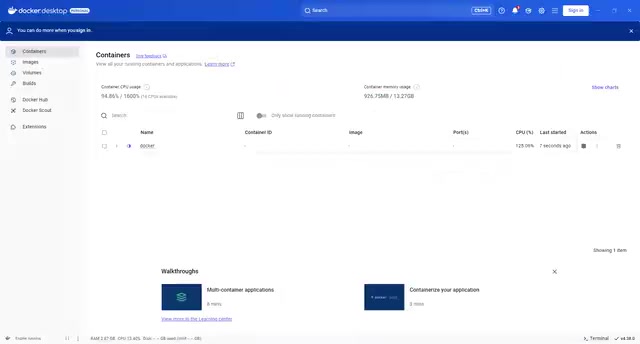
After installing Docker Desktop, you'll see a graphical interface with a built-in terminal where you can run commands directly. You can also use your system's native command-line tools — the behavior is identical either way.
If you already have a working Docker Compose environment on your machine, you can skip the installation steps above.
Starting the Dify Service
Once your environment is ready, you can proceed to launch Dify. The following details are where beginners most commonly run into issues — pay close attention.
Navigate to the Correct Directory
After pulling and extracting the Dify source code from GitHub, the startup command must be run from within the docker subdirectory of the source code. This directory contains the Docker Compose configuration files. If you're in the wrong directory, the command won't find the configuration and the services will fail to start.
Modify the Environment Configuration File
Before running the startup command, there's a critical step that's easy to overlook: inside the docker directory is a file called .env.example. You need to manually rename it to .env (removing the .example suffix).
The .env file follows the widely adopted "environment variable configuration" convention in software development, rooted in the 12-Factor App methodology — a cloud-native application design philosophy proposed in 2011 by Heroku engineer Adam Wiggins, outlining twelve principles for building scalable and maintainable SaaS applications. The third principle, "Config," explicitly requires strict separation of configuration from code: code should remain identical across environments, while configuration (database connection strings, third-party API keys, feature flags, and anything else that varies between deployment environments) is injected via environment variables. The deeper rationale is the unification of security and portability — if secrets are hardcoded into the codebase or committed to a repository, a repository leak immediately compromises all credentials. By externalizing configuration as environment variables, the same code image can be seamlessly reused across development, testing, and production environments, and operators can make configuration changes without touching the source code. For this reason, the .env file itself should be added to .gitignore, with only .env.example committed to the repository as a configuration template.
Docker Compose natively supports automatically reading a .env file in the same directory and expanding its variables into ${VARIABLE} placeholders in docker-compose.yml, allowing a single Compose configuration file to work seamlessly across different environments. Dify provides .env.example as a configuration template — copy and rename it to .env, then modify key parameters like SECRET_KEY and database passwords as needed. Skipping this step will cause Compose to fail or behave incorrectly because required environment variables will be missing. Do not skip this step.
Run the Startup Command
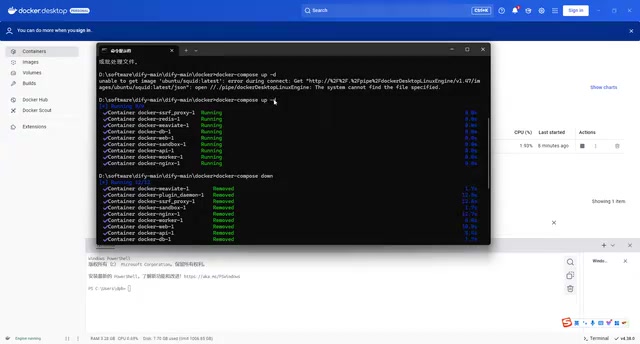
With the above preparations complete, run the following from within the docker directory:
docker compose up -d
The -d flag runs the services as a daemon (in the background), so the terminal won't continuously stream logs. To view live logs from all containers, run docker compose logs -f; to check the health status of each service, docker compose ps will list all containers and their current states. Dify will bring up each component container in the background.
Note: The first run requires pulling the relevant images, which may take some time. Please be patient. Subsequent restarts will be much faster.
First Access and Initialization
Dify uses port 80 by default. Once the services are running, open a browser and navigate to http://localhost/install to enter the initialization interface.
The initialization steps are as follows:
- Switch language: On first entry, you can switch the interface to your preferred language;
- Set up the admin account: Enter an admin email, username, and password;
- Log in: After setup, you'll be redirected to the login page — sign in with the credentials you just created.
Once logged in, you'll land on the Dify main workspace. Your local private deployment is now complete.
Next Step: Connecting a Local LLM
Deploying the Dify platform is just the first step. To create truly functional AI applications, you'll need to connect an inference model or vector (Embedding) model to power real business workflows.
Since Dify is already running locally, the natural next step — to maintain environmental consistency and reduce dependency on external APIs — is to deploy a large language model locally as well. The recommended tool for this is Ollama — a lightweight open-source tool designed specifically for running large language models locally, supporting mainstream open-source models like Llama 3, Mistral, Qwen, and DeepSeekAd on consumer-grade GPUs or even CPU-only environments.
Ollama is built on the llama.cpp quantized inference engine — a pure C++ inference framework released by Georgi Gerganov in March 2023. To understand its significance, consider the core bottleneck in LLM deployment: a 7B-parameter model stored in 16-bit floating point (FP16) format requires approximately 14GB of VRAM, far exceeding the capacity of most consumer GPUs. llama.cpp addresses this through GGUF format quantization (formerly GGML), compressing model weights: 4-bit quantization reduces each weight from 16 bits to a 4-bit integer representation, shrinking the model size by approximately 75% and bringing the same 7B model's storage requirement down to around 4GB — runnable on an ordinary laptop with just 8GB of RAM. The trade-off is precision loss, but experiments show that 4-bit quantized models perform within 1–3% of FP16 versions on most benchmarks, making this entirely acceptable in engineering practice. llama.cpp also includes platform-specific optimizations for Apple Silicon's Metal GPU, x86 AVX2/AVX-512 instruction sets, and CUDA/ROCm heterogeneous compute platforms to maximize parallel computing efficiency. Ollama builds on top of llama.cpp to add model management (ollama pull/run commands), automatic GPU detection and offloading, concurrent request queuing, and more — making it feasible to run 7B to 13B parameter models on a typical developer machine.
More critically, Ollama exposes a REST interface fully compatible with the OpenAI Chat Completions API format (default port 11434). This design decision has significant strategic value: OpenAI's API format has de facto become the industry standard interface for LLM calls, natively supported by virtually all major LLM application frameworks (LangChain, LlamaIndex, Semantic Kernel, etc.). This means any code or platform originally calling GPT-4 only needs to change base_url from api.openai.com to localhost:11434 to seamlessly switch to a local model. Dify connects to Ollama directly by configuring a "custom OpenAI-compatible endpoint" — no additional adapter layer required.
This creates a complete local private deployment loop from application platform down to the underlying model — data never leaves the local network, ensuring data security while completely eliminating network and rate-limit constraints imposed by online services. This is especially valuable for industries with strict data compliance requirements such as finance, healthcare, and government.
Summary
This article provides a complete walkthrough of the Dify local deployment process. The core steps are summarized as follows:
Prepare Docker environment → Pull source code → Rename .env config file → Start with docker compose → Complete initialization in browser
The entire process requires no coding whatsoever — developers and operations newcomers alike can complete it within half an hour. Mastering Dify's local private deployment is a solid foundation for building enterprise-grade AI workflow projects going forward.
Related articles

Cursor AI in Practice: Weighing Efficiency Gains Against Costs in an AI IDE
An in-depth look at Cursor AI IDE's interface layout, four modes (Agent/Plan/Debug/Ask), model selection, and Git context integration, with hands-on demos weighing subscription costs against going direct to Claude.

Free Landing Page Design Rules Library: A Practical Guide for Claude Code and Cursor
A free landing page design skill for Claude Code and Cursor: MIT licensed, nearly 9,000 stars, asks about offer/audience/action before planning 12 sections with hard font and spacing constraints.

Cursor Keeps Writing Wrong Code? The Problem May Be Context, Not Prompts
Cursor keeps writing wrong code? The problem may be context, not prompts. Learn how to supply relevant files, full error messages, and expected results, plus a plan-first, small-step, test-driven workflow to reduce AI coding errors—while remembering code review remains the developer's job.