Dify Self-Hosted Deployment in Practice: Building an Enterprise-Grade AI Application Platform from Scratch

A practical guide to self-hosting Dify for building enterprise-grade AI applications from scratch.
This guide walks through the complete process of self-hosting Dify, an open-source LLM application development platform. Covering environment preparation, Docker Compose deployment, LLM provider integration, and AI application building, it demonstrates how teams can get a production-ready AI platform running with as little as 2 CPU cores and 4GB RAM. The article also explains Dify's microservices architecture, RAG knowledge base capabilities, and workflow orchestration features.
What is Dify
Dify is one of the most popular open-source large language model (LLM) application development platforms available today. It combines the concepts of Backend as a Service (BaaS) and LLMOps, enabling developers to rapidly build production-grade generative AI applications.
The Fusion of BaaS and LLMOps: BaaS (Backend as a Service) originated during the mobile internet era, represented by platforms like Firebase and Parse, helping frontend developers bypass backend engineering complexity by directly calling platform-provided APIs for databases, authentication, file storage, and more. LLMOps emerged as the industry recognized that LLM applications differ fundamentally from traditional software engineering after GPT-3's commercialization — prompts are code, model behavior is non-deterministic, and evaluation criteria are ambiguous. It gradually formed an engineering discipline covering the full lifecycle of LLM applications from development, testing, and deployment to monitoring, including prompt version control, model evaluation, usage tracking, and other engineering practices. Dify's fusion of both means it provides out-of-the-box backend service capabilities (developers can access conversation history storage, user management, and other backend capabilities as easily as calling Firebase), while also embedding operations toolchains specific to LLM applications (prompt version comparison, A/B testing, usage monitoring, etc.). The practical value of this fusion is that enterprises don't need to procure and integrate two separate systems to get a complete capability loop from prototype validation to production operations.
Its greatest strength lies in its low barrier to entry — even non-technical personnel can participate in defining AI applications and managing data operations. Dify has a complete built-in tech stack for building LLM applications, supports hundreds of mainstream models, and offers a clean, user-friendly visual interface. This means you don't need to reinvent the wheel and can focus your energy on the business logic itself.
From the main interface, Dify consists of four major modules: Explore, Studio, Knowledge Base, and Tools. Users can freely create various types of applications, including writing assistants, translation tools, development aids, and more — covering a rich range of use cases.
Why Choose Dify
There's no shortage of LLM application development frameworks in the industry. Dify's core advantage is that it's open source — maintained by a dedicated full-time team alongside the community. This means enterprises can perform secondary development on its source code to build their own private deployment versions.
Dify's typical value is reflected across several dimensions:
- Rapid Validation: Build a minimum viable product (MVP) and complete concept and market validation through proof of concept (POC);
- Business Integration: Integrate LLM capabilities into existing business code via API endpoints to enhance application intelligence;
- Enterprise Infrastructure: Some banks and major internet companies have already deployed Dify as an internal LLM gateway to accelerate generative AI adoption;
- Capability Exploration: Tech enthusiasts can easily practice prompt engineering and agent technologies using Dify.
Horizontal Comparison with Similar Frameworks: In the LLM application development ecosystem, LangChain is known for its code-first approach and high flexibility, making it suitable for developers with strong engineering capabilities, but its steep learning curve and frequent API changes deter many teams. Flowise is a visual wrapper built on LangChain — easy to get started with but limited in customization and with a relatively weak community ecosystem. OpenAI Assistants API is deeply tied to the OpenAI ecosystem, making it difficult to switch model providers, and also faces access stability issues in certain network environments. Dify's differentiated positioning is that it provides both a visual low-code interface to lower the barrier and retains complete API interfaces with open-source code, while offering more comprehensive support for multi-model providers, self-hosted deployment, and enterprise-grade features (such as permission management, audit logs, and SSO single sign-on). It is currently one of the most well-rounded open-source options available.
It's worth noting that Dify's GitHub Star growth in 2024 ranked among the top AI tool open-source projects, backed by an active community of thousands of contributors — an active community ecosystem means not only faster feature iteration but also a richer plugin ecosystem and more comprehensive Chinese documentation support, which is especially important for developers in China.
Two Ways to Use Dify
There are two main paths to using Dify.
Official Cloud Service: Visit cloud.dify.ai, register an account, and start using it immediately. The features are essentially the same as the self-hosted version, making it ideal for users who want to quickly explore and try things out.
Self-Hosted Deployment: If you need customized development or want to integrate it into your enterprise infrastructure, you'll need to set it up yourself. The official recommendation is to deploy using Docker Compose, with detailed documentation available in both Chinese and English.
It's worth mentioning that Dify's official documentation also provides horizontal comparisons with tools like LangChain, Flowise, and OpenAI Assistants API. These comparisons show that Dify has a high degree of completeness in workflow orchestration and enterprise-grade features, and is also quite friendly toward local self-hosted deployment.
Dify Self-Hosted Deployment in Practice
Environment Preparation
Dify has extremely low hardware requirements — it can run on just 2 CPU cores + 4GB RAM. This is because it primarily orchestrates calls to LLM services rather than running models locally. If you also need to self-host LLMs, configuration requirements increase significantly — for example, running a 7B parameter model requires at least a GPU with 16GB VRAM, while running 70B-class models requires multiple high-end GPUs or dedicated inference hardware, forming a stark contrast with Dify's own lightweight positioning.
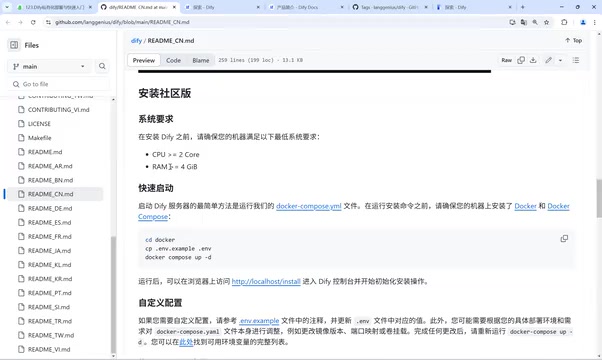
The demo environment uses an Ubuntu 22.04 server. Beginners are advised to choose the relatively stable 0.x version (e.g., 0.15.7), while users pursuing new features can try the 1.x version — both versions are currently being maintained.
Docker Compose Deployment Steps
Docker Compose Technical Background: Docker Compose was developed by Orchard Labs in 2014, later acquired and integrated by Docker, Inc. It uses a single YAML configuration file to define and run multiple interrelated container services. Dify chose Docker Compose as its recommended deployment method because it consists of multiple microservices — frontend, API service, message queue, database, vector database, and more that need to work together. Docker Compose can launch the entire service stack with one command and automatically handles inter-container networking and dependencies, greatly reducing deployment complexity.
Compared to heavyweight orchestration solutions like Kubernetes, Docker Compose is better suited for small-to-medium-scale self-hosted deployment scenarios. In production environments, enterprises can also migrate Docker Compose configurations to Kubernetes Helm Charts for higher-availability cluster deployments. Docker Compose's core advantage lies in "Infrastructure as Code" — the entire service stack configuration is described in declarative YAML files that can be version-controlled, enabling consistent environment reproduction and completely eliminating the classic "it works on my machine" problem. For team collaboration scenarios, this means new members can reproduce a local development environment identical to production with a single command.
The deployment process can be summarized in the following key steps:
- Obtain the installation package: Clone the project via Git, or directly download the source code as a Zip file (the latter is recommended as it's simpler);
- Configure the environment: Navigate to the
dockerdirectory and copy the environment configuration file withcp .env.example .env; - Start services: Run
docker compose up -d(version 1.x usesdocker-compose).
On first execution, the system will download a series of images. Since foreign image registries are used by default, the entire process takes about ten minutes or so. It's recommended to configure a domestic mirror accelerator in advance to speed up downloads.
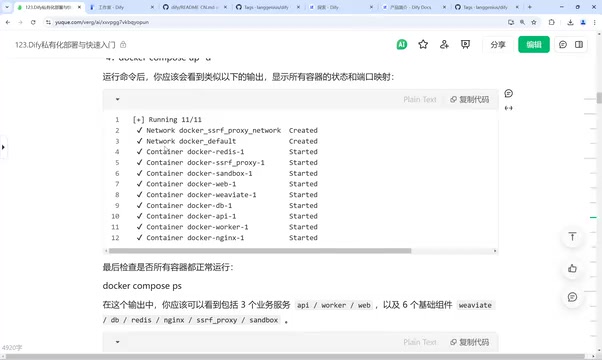
After image downloads complete, Docker will create and start multiple containers. You can check service status with the docker compose ps command. A complete Dify environment includes multiple components: dify-web, dify-api, Redis, database, vector database (defaulting to the open-source Weaviate), Nginx, and more.
Dify Microservices Architecture Explained: Dify's underlying design follows a microservices architecture, with functional modules decoupled and running independently according to the single responsibility principle. Its core components include:
- dify-web: Handles frontend rendering, built with Next.js, supporting server-side rendering (SSR) for optimal first-screen loading performance;
- dify-api: Processes business logic, implementing core API routing and model call orchestration based on Python Flask;
- Celery Worker: Handles asynchronous tasks such as document indexing and model calls — during document processing peaks, it can be horizontally scaled independently without affecting other services;
- Redis: Message middleware handling task queues and caching, supporting Celery's distributed task scheduling;
- PostgreSQL: Relational database storing structured data such as user data, application configurations, and conversation history;
- Nginx: Reverse proxy that uniformly handles external request routing and SSL termination, serving as the unified entry point for the entire service stack.
This architecture allows individual components to be independently scaled and replaced — for example, enterprises can replace the default Weaviate with Milvus, Qdrant, PGVector, or other vector database solutions to adapt to different performance and cost requirements. Another advantage of microservices architecture is fault isolation: a single component crash won't bring down the entire system — a Celery Worker exception won't affect the normal operation of frontend chat functionality, which is especially important for enterprise deployment scenarios pursuing high availability.
The Role of Vector Databases: Vector databases are the core infrastructure for RAG (Retrieval-Augmented Generation) technology, with the underlying core algorithm being Approximate Nearest Neighbor (ANN) search. Unlike traditional relational databases that retrieve by exact values, vector databases convert unstructured data like text and images into high-dimensional numerical vectors (typically floating-point arrays of 768 to 4096 dimensions) and perform semantic similarity retrieval based on cosine similarity or Euclidean distance.
Dify's default integrated Weaviate uses the HNSW (Hierarchical Navigable Small World) algorithm, achieving a good balance between recall rate and query latency, capable of retrieving the most relevant results from vector libraries of millions of entries in milliseconds. In Dify's knowledge base feature, uploaded documents are chunked and vectorized for storage in Weaviate; when a user asks a question, the system first vectorizes the question, then retrieves the most relevant document fragments from the vector library and injects them as context into the prompt, enabling the LLM to answer based on private knowledge and effectively addressing model knowledge cutoff dates and hallucination issues.
The quality bottleneck of RAG typically lies not in the LLM itself but in the accuracy of the retrieval stage — document chunking strategies, embedding model selection, and hybrid retrieval weight tuning all significantly impact the final results. Using a typical enterprise knowledge base scenario as an example: for the same question, semantic chunking strategies typically achieve 15% or higher recall accuracy compared to fixed-length chunking, and introducing a Reranker model can further improve accuracy by 10-30%.

When all services show Up status, the deployment is successful. You can access it directly using the server's IP address (default port 80). The first visit will trigger the initialization flow, where you set up the admin account and password.
Updates and Uninstallation
Routine operations are equally simple:
- Update: For source code deployments, first run
git pullto fetch the latest version, then executedocker compose pullfollowed bydocker compose up -d; - Uninstall: Run
docker compose downin the docker directory to stop all services.
Important note: all docker compose commands must be executed in the docker directory, as they depend on the docker-compose.yaml file in that directory. Additionally, only one version can run on the same server; otherwise, port conflicts will occur.
Common Cloud Server Deployment Issues: If the IP is inaccessible, it's usually because the firewall policy or security group hasn't opened port 80 — you'll need to manually add an allow rule.
Connecting LLMs and Building AI Applications
Configuring Model Providers
The first step after deployment is to connect an LLM. Click "Settings" in the upper right corner → "Model Providers" and select the desired model service.
Here are several China-friendly options:
- SiliconFlow: Rich model variety covering Tongyi Qianwen, DeepSeek, and various voice, image, and video models. Free credits upon registration, accessible via API;
- DeepSeek Official: Top up on the official website to get an API Key and start using it;
- Other domestic services include Tongyi Qianwen, Zhipu, ERNIE Bot, Kimi, and more.
Overseas users can use OpenAI, Google, Hugging Face, and other services.
Technical Mechanism of Model Integration and Provider Agnosticism: Dify uses a unified Model Abstraction Layer to shield differences across provider APIs. Its technical implementation resembles the database driver Adapter Pattern — implementing a specific adapter with a unified interface for each model provider, while upper-layer application code only interacts with the abstract interface. Whether the underlying call is to OpenAI's GPT-4o, Anthropic's Claude, or domestic DeepSeek, the upper-layer application logic doesn't need any changes — just switch in the model provider settings.
This design follows the principle of "provider agnosticism," effectively mitigating Vendor Lock-in risk — once deeply tied to a single provider, the differences in API formats, billing models, and rate limits across providers make migration costs extremely high. For enterprise users, this means you can mix multiple providers across different nodes of the same workflow — for example, using a low-cost model for document summarization and a high-performance model for final answer generation, achieving fine-grained balance between quality and cost. From a practical cost perspective, pricing differences between models for similar tasks can exceed 10x, making the flexible scheduling enabled by provider agnosticism crucial for cost control in high-concurrency scenarios.
Creating Your First AI Application
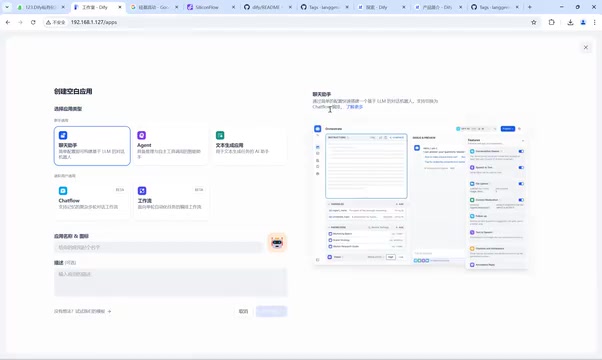
Dify Studio offers multiple application templates. Understanding their differences is key to getting started:
- Chatbot: The most basic Q&A application, ideal for getting started quickly;
- Agent: Equipped with reasoning and autonomous tool-calling capabilities, able to perform tasks like checking weather, travel planning, and image generation;
- Text Generation Application: Focused on specific tasks like translation and speech transcription;
- Chatflow: Complex multi-turn conversational workflows with memory support, suitable for crafting polished conversation experiences;
- Workflow: For advanced users, supporting node orchestration, branching logic, variable passing, HTTP requests, and hundreds of built-in tools — ideal for complex automation scenarios.
Workflow Orchestration and the Low-Code AI Development Trend: The concept of node-based visual programming traces back to the Dataflow Programming paradigm of the 1990s and was popularized in the automation integration space by tools like n8n and Make in the AI era. Dify's Workflow module builds on this by introducing AI-native nodes — LLM nodes, knowledge retrieval nodes, code execution nodes (supporting Python/JavaScript sandbox execution, allowing custom logic to be embedded in workflows without deploying independent services), HTTP request nodes, and more — enabling complex AI processing pipelines to be designed through drag-and-drop.
The underlying difference between Chatflow and Workflow lies in state management: Chatflow maintains a persistent conversational state machine with built-in conversation history management and multi-turn memory mechanisms, where each turn can access the historical message window — suitable for scenarios requiring contextual coherence. Workflow is a stateless Directed Acyclic Graph (DAG) execution engine, better suited for batch automation tasks like document processing and data extraction. Compared to pure-code solutions (like LangChain), visual workflows reduce debugging difficulty — each node's inputs and outputs can be viewed in real-time, transforming anomaly localization from "searching for a needle in a haystack of logs" to "clicking a node to view intermediate state." In enterprise implementation, product managers directly participating in workflow node design has become an increasingly common collaboration model — this is the core value of the low-code AI development paradigm.
Agent Technical Principles: Agent is one of the important paradigms in current LLM applications. Its core idea originates from the ReAct (Reasoning + Acting) framework jointly proposed by Princeton University and Google Research in 2022. Unlike simple Q&A, an Agent can decompose complex tasks into multiple reasoning steps and autonomously decide at each step whether to call external tools — such as search engines, calculators, weather APIs, code executors, and more. This process follows a "Thought → Action → Observation" loop until the task is complete.
In Dify's Agent implementation, tool calling follows the OpenAI Function Calling specification — developers describe tool input/output parameters in JSON Schema format, and the model automatically generates call parameters conforming to the Schema during reasoning, eliminating the need to manually write tool dispatch logic. It's worth noting that Agent reliability is highly dependent on the base model's instruction-following capability — strong reasoning models like GPT-4o and Claude 3.5 perform significantly better in Agent scenarios than weaker reasoning models with similar parameter counts, which is a key consideration when selecting a base model for Agents. With Anthropic's release of the Model Context Protocol (MCP) in late 2024 and its widespread adoption, the standardization of the Agent tool ecosystem is accelerating — MCP defines a unified protocol for model-to-external-tool interaction, similar to how the USB interface standardized the hardware ecosystem. Dify is also actively following up on MCP protocol support.
Taking the example of building a translation bot: After creating a Chatbot, simply describe your requirements in the prompt area — you can even click "Generate" to let the model automatically write the prompt. After configuring parameters like source language and target language, enter "我今天去爬山了" (I went hiking today), and the bot instantly outputs the corresponding English translation.
Prompt Engineering in Practice with Dify: Prompt Engineering is a key factor affecting LLM application quality and a core component of the LLMOps engineering system. Dify includes a built-in prompt editor supporting layered management of System Prompts and user messages, with variable interpolation syntax that allows user input to be dynamically injected into prompt templates. More advanced features include conditional rendering based on Jinja2 template syntax — Jinja2 is a widely-used template engine in the Python ecosystem supporting variable interpolation, conditional statements ({% if %}), loop iteration ({% for %}), and other control structures, giving prompt templates the expressive power of a programming language (for example, dynamically adjusting translation instructions based on the user's selected target language, or dynamically injecting different behavioral constraints based on user role permissions).
Prompt version management borrows from Git's version control philosophy — each modification generates a snapshot, supporting rollback and effect comparison, transforming the previously experience-dependent "alchemy" process into traceable engineering practice. Additionally, Dify provides an "auto-generate prompt" feature where users simply describe the application goal in natural language, and the system calls an LLM to generate a structured system prompt, further lowering the barrier to prompt engineering. In prompt design best practices, structured prompts (clearly defining four elements: Role, Task, Constraint, and output Format) typically deliver more stable output quality than free-form descriptions — this is also the basic framework Dify follows when auto-generating prompts.
Beyond this, you can add conversation starters, file uploads, text-to-speech, knowledge base integration, visual understanding, and other features to continuously optimize the interaction experience.
Knowledge Base and RAG Engineering Practice: RAG (Retrieval-Augmented Generation) is the mainstream technical approach for solving the private knowledge problem of LLMs. Compared to fine-tuning approaches, RAG offers lower knowledge update costs, requires no GPU training resources, and provides traceable information sources. Its engineering pipeline consists of two phases: the offline indexing phase, where enterprise documents (PDF, Word, web pages, Markdown, etc.) are parsed, chunked, vectorized, and stored in a vector database; and the online retrieval phase, where user queries are vectorized and matched against the knowledge base for similarity, recalling the most relevant text fragments, concatenating them into the prompt, and sending them to the LLM for answer generation.
Dify's knowledge base module encapsulates this complex process into visual operations, supporting customizable chunking strategies (fixed-length vs. semantic chunking), recall count, similarity thresholds, and other parameters, and provides a recall testing feature — allowing developers to build enterprise-grade knowledge Q&A systems without needing to deeply understand vector retrieval principles. Furthermore, Dify supports hybrid retrieval mode (weighted fusion of vector retrieval + full-text retrieval), with a Reranker model implemented via Cross-Encoder to rerank recall results, improving retrieval accuracy by 10-30% and effectively mitigating LLM hallucination issues. From an engineering practice perspective, RAG system tuning is a continuous iterative process — Dify's recall testing feature allows developers to directly verify retrieval results for specific questions without triggering the full conversation flow, dramatically shortening the debugging cycle from what used to take days to minutes.
Important Reminder: After completing your configuration, be sure to click "Publish" → "Update" in the upper right corner to save. Otherwise, all configurations will be lost upon page refresh.
Summary
For teams and individuals looking to get started with LLM application development, Dify provides a low-barrier, high-efficiency path. Mastering Dify's core workflow can be summarized in four steps: Understand features → Self-hosted deployment → Connect LLMs → Build applications.
From minimal hardware requirements of 2 cores and 4GB RAM, to visual application orchestration, to hundreds of built-in tools, Dify makes "solving real business problems with AI" genuinely achievable. Whether you're building an MVP to validate ideas or using it as an enterprise-grade LLM gateway, it deserves a place on your technology evaluation shortlist.
Key Takeaways
Related articles

Should You Open Source Your Project? A Layered Open Source Strategy Using Project Replay as a Case Study
Should indie developers open source their projects? Using the game custom achievement tool Project Replay as a case study, this article analyzes the open source decision and offers a practical layered strategy.

130+ Open-Source Interactive Security Awareness Training: Reshaping Habit Formation Through 3D Office Scenarios
A project with 130+ free open-source interactive security awareness exercises using immersive 3D office scenarios to simulate phishing, vishing, MFA fatigue attacks and more, building employee security habits.

From Musk to Jefferson: Beware the Cognitive Trap of Cross-Domain Experts
Why do geniuses in one field often become overconfident in others? From Musk's controversial interview to Jefferson's blind spots, an exploration of cross-domain cognitive arrogance.