DingTalk's Official Open-Source CLI: How dws Turns Enterprise Collaboration into an AI-Programmable Workbench

DingTalk's open-source dws CLI gives AI Agents a unified, secure, scriptable interface to real enterprise workflows.
DingTalk's official open-source CLI tool dws consolidates chat, calendar, to-dos, documents, and spreadsheets under a single command-line entry point, with deep AI Agent adaptation: structured JSON output by default, jq field extraction and field projection to minimize LLM context usage, and built-in skill descriptions for out-of-the-box agent use. Security layers include OAuth Device Flow login, domain allowlists, least-privilege permissions, full audit logs, and a Dry Run rehearsal mechanism before critical actions. The tool enables complete "Read → Process → Execute → Sync" workflow loops — such as auto-extracting tasks from meeting minutes and syncing to group chats — offering teams a practical paradigm for deploying agents in real enterprise environments.
DingTalk has officially open-sourced a command-line tool that targets a real pain point in enterprise digitalization: collaboration capabilities are scattered across countless pages and subsystems, forcing users to constantly switch between them. The tool, called DingTalk Workbench Shell (dws), unifies these fragmented capabilities under a single entry point — and more importantly, it was designed from the ground up with AI Agents in mind, enabling intelligent agents to directly operate real enterprise workflows.
One dws Entry Point to Rule Them All
Completing a cross-system collaboration task used to mean opening multiple pages and toggling between different tools. dws consolidates all of this under a single CLI entry point, organizing features in a clear hierarchical structure where the help output itself serves as the documentation — making the learning curve essentially zero for developers already comfortable with the command line.
The coverage starts with everyday collaboration: contacts, chat, and calendar are all directly accessible. From there, it extends to to-dos, approvals, and attendance; documents, cloud drives, and spreadsheets are brought under the same roof; whiteboards, email, and knowledge bases fill in the gaps; even meeting minutes can serve as the starting point for a workflow. Essentially, all the high-frequency collaboration modules within DingTalk have been made CLI-accessible.
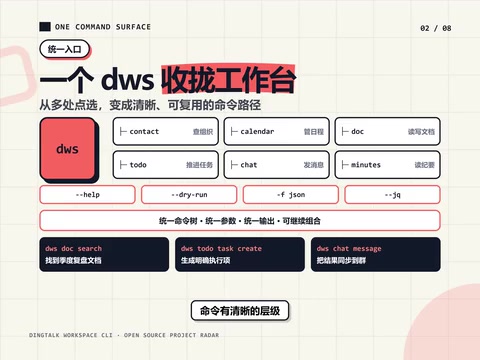
The value of this unified entry point is that it condenses what were once fragmented, context-switching-heavy operations into a composable, scriptable instruction set. For a team, this means repetitive "data shuffling" work can be fully automated.
Design Details Built for AI Agents
What truly sets dws apart from a typical CLI tool is how friendly it is to AI Agents. It returns structured JSON by default and works seamlessly with jq for precise field extraction, so agents don't need to do complex text parsing on the results.
The tool ships with a set of built-in skills that let agents work out of the box. It also supports field projection and a Mock mode to reduce unnecessary context consumption — both of which matter a lot in practice. LLM context windows and token costs are real constraints: field projection ensures only the needed information is returned, while Mock mode lets you rehearse a workflow without triggering real business operations.
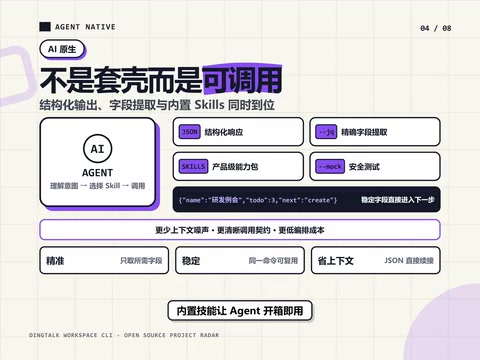
Looked at from another angle, this design is essentially establishing a standardized interface for "agents operating enterprise systems." Compared to having an agent simulate browser clicks, calling a structured, skill-described CLI is far more stable and controllable.
What is
jq?jqis a lightweight command-line JSON processor whose syntax resembles pipe operators, supporting filtering, extraction, and transformation of JSON data. For example,dws calendar list | jq '.items[].title'extracts the titles of all calendar events from the response without writing any parsing script. In agent workflows, this capability is especially valuable: every time a large model calls a tool, the returned content consumes context window space. If the raw JSON contains many irrelevant fields, it wastes tokens and may interfere with the model's reasoning. Field projection (returning only specified fields) combined with precisejqextraction acts as a noise-reduction step before information enters the model, giving the agent cleaner, more focused data.
Security and Control: The Real Hurdle for Enterprise Adoption
When AI Agents touch real enterprise data, security cannot be an afterthought. dws addresses this with several layers of protection: login uses the OAuth Device Flow, access scope is controlled by a domain allowlist, permissions follow the principle of least privilege, and a complete audit log is maintained.
Even more noteworthy are the two safeguards at the execution layer: Dry Run (preview without execution) before any action, and a "rehearse first, then commit" mechanism for critical operations. This means that in an agent-driven workflow, dangerous actions are never executed immediately — a preview of the expected outcome is presented for confirmation first. For enterprise administrators, this system provides a controllable, auditable agent entry point rather than a black box.
What is OAuth Device Flow? The OAuth Device Authorization Grant is an OAuth 2.0 authorization mode designed for devices without a browser or with limited input capabilities (such as CLI terminals or smart TVs). When a user initiates login from the terminal, the device generates a short code and a verification URL. The user completes identity confirmation on another device (typically a phone or browser), and the terminal then polls to obtain an access token. This approach avoids entering credentials directly in the command line and eliminates the need to run a local HTTP server to receive callbacks — striking a good balance between security and usability in CLI contexts. For automated agent invocations, once the initial authorization is complete, subsequent operations can use refresh tokens to maintain the session without repeated manual intervention.
Real Workflows: A Complete Loop from Read to Execute
A tool's capabilities only become meaningful when chained into a workflow. The original demo highlights two representative examples:
The first: extract action items from meeting minutes, automatically create tasks, and notify the relevant group chat. The second: search for related documentation, generate a summary, write it into a smart spreadsheet, and sync the result to a project group.
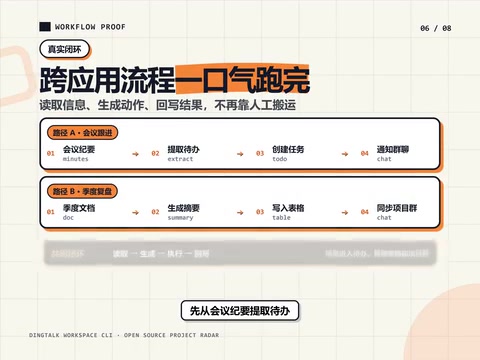
Both examples share a common structure: a complete loop of Read → Process → Execute → Sync. The agent isn't just answering questions — it's actually completing a chain of actions inside enterprise systems. This is precisely the missing piece in current agent productization: moving from "can say" to "can do."
Who Should Use It, and How to Get Started
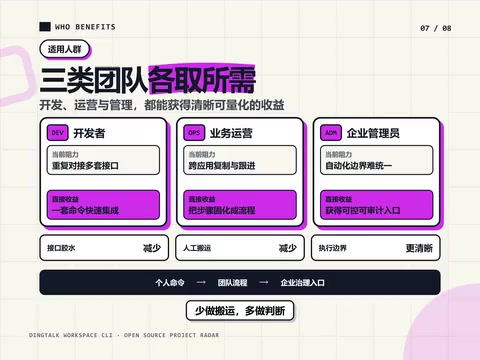
According to the documentation, dws is especially well-suited for three types of users: developers who want to avoid writing repetitive API integration code; operations teams who want to automate repetitive app workflows; and enterprise administrators who want a single, controllable entry point. The value proposition for each role is clear, all converging on the same outcome — less manual data shuffling, more time for actual judgment.
Installation is straightforward: it supports script-based installation, NPM, and Homebrew, and runs on all three major operating systems. Once installed, complete the login authorization and you're ready to explore with a single command.
Conclusion
The significance of dws goes beyond "DingTalk open-sourced another tool." It offers a pragmatic paradigm for connecting AI Agents to real enterprise operations: a unified entry point reduces complexity; structured output and built-in skills lower the cost of agent integration; and OAuth, domain allowlists, least-privilege access, and Dry Run collectively hold the security line. For teams actively exploring agent deployment, turning DingTalk into a programmable workbench is a direction worth taking seriously.
Related articles

Trump's Request to Rename the Atlantic Rejected by Google; 1Password Lets AI Agents Log In Securely
The Vergecast roundup: Trump's request to rename the Atlantic the 'Trump Ocean' was politely declined by Google's CEO; 1Password's new feature lets AI agents log into accounts without touching passwords; OPPO launches the world's first 200-megapixel phone, the Find X10 Pro Max. All three point to the boundaries of tech authorization and trust.

The Truth About American College Party Culture: The Risks Schools Won't Admit
Behind American college party culture, the administration's "don't ask, don't tell" attitude is amplifying freshman risks. This article analyzes how the pandemic strengthened Greek dominance, freshmen's difficulty accessing safety information, and the chain reactions caused by a culture of denial.

OpenAI Reportedly Raising $30B at $1.25T Valuation Ahead of IPO
OpenAI is planning a $30B funding round at a possible $1.25T valuation, paving the way for an IPO. If completed, it would set a private company valuation record. This article analyzes the funding size, pre-IPO logic, and industry signals.