DIY AI Storyboard Tool: Precisely Control Video Generation with Grid-Based Panels

Open-source AI storyboard tool solves the uncontrollable "card-pulling" problem in video generation
This article introduces an open-source AI storyboard assistant developed in three days using MiniMax M2.5 and Cloud Code, designed to solve the pain point of random, uncontrollable results in AI video generation tools like Seedance 2.0. The tool supports 3×3 and 5×5 grid storyboard generation, per-panel fine-tuning, and merge-export functionality that seamlessly integrates with Seedance 2.0 for image-to-video generation, creating a complete workflow from concept to video output.
Why Do We Need AI Storyboard Tools?
When using AI video generation tools like Seedance 2.0, many people run into the same problem: the results are completely unpredictable, forcing you to repeatedly "pull cards" and hope for the best, burning through credits and wasting time.
The term "pulling cards" (抽卡) is a metaphor used in AI creative communities for randomly generated results—each time you submit a prompt, the model produces different outputs based on a random seed, and whether the result is good or bad is entirely up to luck. The root cause lies in how current text-to-video models work: the model encodes text prompts into latent space vectors, then progressively denoises through a Diffusion Process to generate video frames, with significant randomness throughout the entire process.
Storyboards are essentially structured visual pre-production tools originating from Hollywood's animation industry, used to plan composition, movement, and narrative rhythm for each shot through static image sequences before actual filming or production begins. Introducing storyboards into the AI video generation workflow provides the model with stronger Visual Anchors, transforming vague textual intent into concrete spatial layout information, thereby significantly compressing the model's random search space and improving the alignment between generated results and creative intent.
One developer started from exactly this pain point and built an open-source AI storyboard assistant in just three days using MiniMax M2.5 model paired with Cloud Code. This tool supports 3×3 grid and even 5×5 grid (25-panel) storyboard generation, with precise editing capabilities for individual panels—a true productivity powerhouse for AI video creation.
Core Features of the Storyboard Tool
Storyboard Generation: From Text Descriptions to Visual Output
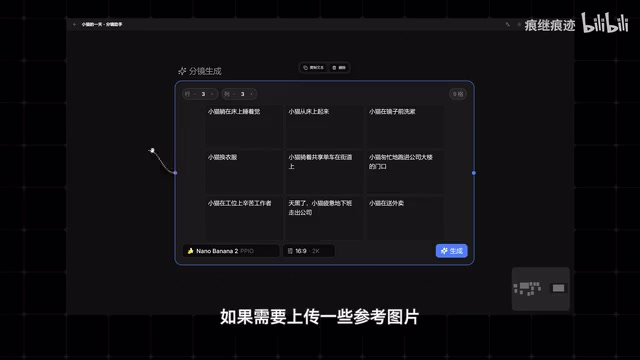
After installation, first configure your API keys in settings. Enter the canvas interface and double-click the left mouse button to bring up the node panel. The core node is "Storyboard Generation"—quickly set the number of panels you need, then fill in scene descriptions for each grid cell.
If you need to upload reference images, drag a connection line from the blue dot on the left side of the node and select the "Upload Image" node. Type "@" within a storyboard cell to quickly reference uploaded images, then click generate and wait for results.
The 3×3 grid (9 panels) and 5×5 grid (25 panels) storyboard formats aren't arbitrary choices—they're based on visual information density considerations. In the AI image generation field, combining multiple frames into a single grid image as model input is a technique that leverages the model's spatial reasoning capabilities—the model can perceive positional relationships between cells in the grid, maintaining style consistency and shot coherence during generation. This method draws from "reference image concatenation" techniques in image generation, guiding the model to understand the overall narrative direction by providing multi-frame context within a single inference pass.
Splitting and Editing: Fine-Tuning Each Panel
After generating the complete storyboard, select the output and click "Split"—it requires virtually no additional configuration to separate each grid cell independently. Split results support drag-and-drop reordering. When you want to modify a specific panel individually, click the separate button to isolate it, then connect an AI image node to edit it with AI.
Once editing is complete, connect the output to the input of the split results, and click the icon in the bottom-right corner of the storyboard cell for quick replacement. You can also replace any cell's content directly through the upload local image node.
Merge and Export: Seamless Integration with Seedance Video Generation
Seedance 2.0 is ByteDance's AI video generation model and one of the mainstream commercial products in the current Text-to-Video and Image-to-Video space. Its technical approach is based on the Diffusion Transformer (DiT) architecture, which offers stronger temporal consistency when processing long-sequence video frames compared to earlier U-Net-based diffusion models. Seedance 2.0 supports reference images as first-frame or keyframe inputs—this is precisely the technical foundation that enables the storyboard tool to form a complete workflow loop with it. The storyboard provides the model with a clear visual starting point, upon which the model performs temporal expansion to generate coherent video clips. This "image-to-video" mode significantly reduces the randomness of generated results compared to pure text-driven approaches, forming a natural complementary relationship with the storyboard tool's design philosophy.
Once all storyboard adjustments are complete, click "Merge and Export" to directly download or copy the storyboard image and paste it into Seedance 2.0. Storyboard description text can also be copied directly by selecting the node, creating a complete closed loop from concept to video generation.
Development Process: From Zero to Finished Product in Three Days with MiniMax M2.5
Getting Started: Sketches Plus Prompts
MiniMax M2.5 is a large language model from Shanghai-based MiniMax, positioned for high-performance reasoning and code generation scenarios. MiniMax has been deeply invested in the multimodal large model space, with its model series demonstrating strong capabilities in code generation, long-text understanding, and Function Calling.
Cloud Code is a category of AI programming platforms that deeply integrate large language models with code execution environments. Its core architecture typically comprises three layers: a natural language understanding layer (parsing developer intent), a code generation and modification layer (calling LLMs to generate or refactor code), and an execution and feedback layer (running code, capturing errors, and passing error information back to the model for automatic repair). This "generate-execute-feedback" loop enables rapid iterative development.
Related articles
 Tutorials
ChatGPT Plus Subscription Guide: Are GPT-5.5, image-2, and Codex Worth the Upgrade?
A detailed look at ChatGPT Plus features — GPT-5.5, image-2, and Codex — with a Plus vs Pro comparison and a complete step-by-step subscription guide for users outside the US.
 Tutorials
Harness AI Engineering in Practice: Using Claude Code to Master Enterprise-Level E-Commerce Development
Deep dive into Harness AI Engineering: master enterprise e-commerce development with Claude Code using the Rules, Skills, Wiki, and Changes framework.
 Tutorials
Cursor + Codex Dual-IDE Collaboration: A Practical Methodology for Open-Source Project Customization
A complete methodology for open-source project customization based on real-world experience, detailing the Cursor+Codex dual-IDE workflow, seven-stage process, MVP validation, and AI source code reading techniques.