DIY Bluetooth Clicker + Voice-Controlled Vibe Coding: A Hands-Free Voice Programming Setup

A DIY Bluetooth clicker and mic setup enables hands-free voice-driven AI programming with Claude Code
A tech creator built a minimalist voice-driven Vibe Coding workflow using a Bluetooth presentation clicker and wireless microphone, combined with key remapping software, Doubao voice input, TMUX terminal multiplexer, and a custom AnyVibe program. The setup enables issuing voice commands to AI programming Agents like Claude Code from any position, with support for multi-Agent voice switching, demonstrating how programming interaction is evolving from keyboard coding toward voice-based conversation.
When Programming No Longer Requires Sitting at a Computer
Have you ever imagined writing code could be as effortless as scrolling through short videos on the couch? Recently, a Chinese tech creator shared a DIY "Vibe Coding Anywhere" setup — using a Bluetooth presentation clicker plus a wireless microphone to achieve a completely keyboard-free workflow for issuing voice commands to an AI programming assistant anytime, anywhere.
First, let's explain the concept of "Vibe Coding." Vibe Coding is a programming philosophy proposed in 2025 by AI luminary Andrej Karpathy. It refers to developers no longer writing code line by line, but instead describing their intent in natural language to an AI Agent that automatically generates, debugs, and iterates on the code. The core shift is this: the developer's role transforms from "code writer" to "intent communicator." With the maturation of AI programming tools like Claude Code, Cursor, and GitHub Copilot, Vibe Coding has moved from theory into everyday practice.
The core idea behind this setup isn't complicated, but it cleverly chains together hardware modification, key remapping, voice input, and multi-Agent management into a complete "keyboard-free programming" experience. Let's break down the design philosophy and technical architecture of this system.
Hardware Setup: The Minimalist Bluetooth Clicker + Wireless Mic Combo
The total hardware cost is extremely low. There are only two core components:
- Bluetooth presentation clicker: A common PPT clicker with several physical buttons
- Wireless microphone: For voice input
The two are taped together with adhesive tape, forming a "handheld programming remote." A Bluetooth presentation clicker is essentially a stripped-down Bluetooth HID (Human Interface Device) keyboard that sends standard keyboard scan codes to the operating system. Common clicker buttons typically map to Page Up, Page Down, Escape, and similar key values. Because the OS treats it as standard keyboard input, subsequent key remapping becomes possible.
The buttons on the clicker are remapped to different functions:
| Button Action | Mapped Function | Purpose |
|---|---|---|
| Double-click left button | Double-tap Fn key | Activate Doubao voice input |
| Press confirm button | Enter key | Send command to Claude Code |
| Double-click space | Special character | Trigger Agent switching |
| Delete button | Delete | Launch AnyVibe switcher |
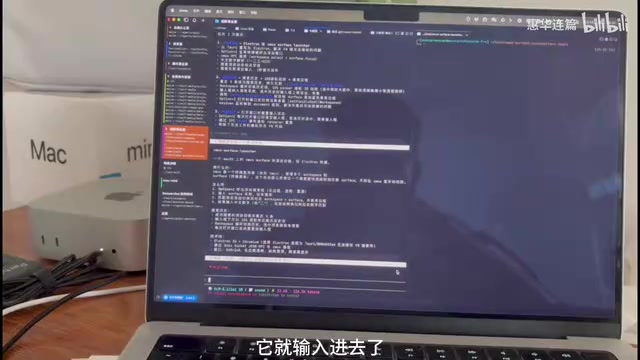
Key remapping software (similar to tools like AutoHotkey or Karabiner-Elements) operates at the OS input event layer, intercepting specific key signals and remapping them to other keys or key combinations. The "double-click detection" requires a time-window judgment at the software level — only when two identical key events are detected within a certain millisecond interval does it trigger the corresponding mapped action. This is one of the key components in the setup that requires custom development.
The elegance of this design lies in: you can Vibe Code in any position. Lying down, standing up, walking around — as long as you're holding this small device, you can continuously interact with your AI programming assistant.
Voice Input Pipeline: From Sound to Claude Code Commands
The complete voice input chain is designed quite cleverly. When the user double-clicks the left button on the clicker, the system goes through the following flow:
- Bluetooth signal interception: The Bluetooth key signal from the clicker is captured by custom software
- Key remapping: The software maps the double-click to a double-tap of the Fn key
- Voice activation: The Doubao voice assistant detects the Fn double-tap signal and launches automatically
- Speech-to-text: The user speaks through the wireless microphone, and the audio stream is converted to a character stream in real-time
- Command injection: The character stream enters the system, gets passed to the TMUX terminal, and ultimately reaches Claude Code
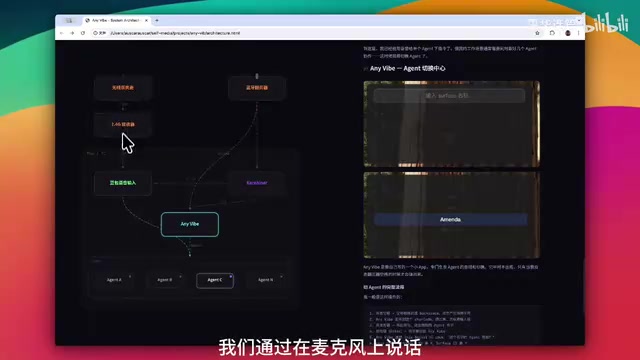
The Doubao voice input is based on ASR (Automatic Speech Recognition) technology. Modern ASR systems typically use end-to-end deep learning architectures to convert audio waveforms directly into text sequences. A key feature of Doubao voice input is that it outputs recognition results as a "character stream" in real-time — characters appear as you speak, rather than waiting for the entire sentence to complete before returning results. This streaming output mechanism is critical to this setup because it makes the voice input experience closer to real-time typing, significantly reducing perceived latency. Additionally, Doubao supports global activation via system-level shortcuts (like Fn double-tap), enabling it to be invoked in any application context rather than being limited to specific input fields.
There's a key technical detail here: the character stream generated by voice is not directly input into the terminal. It first goes through system-level processing, then gets distributed to the corresponding Agent window via TMUX (a terminal multiplexer). From the user's perspective, it looks like voice input is happening directly at the cursor of a particular terminal, but the underlying data flow path is far more complex.
Multi-Agent Management: TMUX as the Core of Voice-Driven Switching
Merely being able to voice-input commands only qualifies as "casual Vibe Coding." What truly makes this setup practical is the multi-Agent switching capability.
In real-world Vibe Coding workflows, developers often manage multiple AI Agents simultaneously, each responsible for different tasks. Here we need to introduce TMUX (Terminal Multiplexer), an open-source terminal multiplexing tool that allows users to create, manage, and switch between multiple independent terminal sessions within a single terminal window. TMUX's core capabilities include: session persistence (processes continue running after disconnection), window splitting (displaying multiple terminals side-by-side on one screen), and programmatic control via command-line API. It's precisely TMUX's API capabilities — querying window lists, searching windows by name, and activating specific windows via scripts — that make voice-driven Agent switching possible. In this setup, each AI Agent runs in an independent TMUX window, with windows named after their respective Agents.
The creator demonstrated several of their Agents:
- Karpathy: The primary coding Agent, running Claude Code
- Amanda: Another Claude Code instance handling different development tasks
- Coco: A Bilibili channel analytics Agent

Claude Code mentioned here is a command-line AI programming tool from Anthropic. It runs in the terminal environment where developers interact with it through natural language commands. It can directly read project files, write code, execute commands, and fix bugs. Unlike IDE plugin-based AI assistants, Claude Code's terminal-native nature makes it naturally suited for pairing with TMUX — voice-converted text can be injected directly into terminal sessions without any additional GUI adaptation layer.
Agent Switching Flow in Detail
When the user double-clicks the space button on the clicker, it produces a special character that cannot be typed on a regular keyboard. This character won't be intercepted by the key mapping software (since it's not registered there) but will be detected by a custom program called "AnyVibe."
Once AnyVibe is activated, the user speaks the target Agent's name (e.g., "Amanda" or "Coco"), then presses Enter to trigger the search. What follows:
- AnyVibe calls TMUX's API to query the Agent window ID matching that name
- TMUX returns the matching window ID
- AnyVibe calls TMUX's API again with that ID to highlight and activate the corresponding window
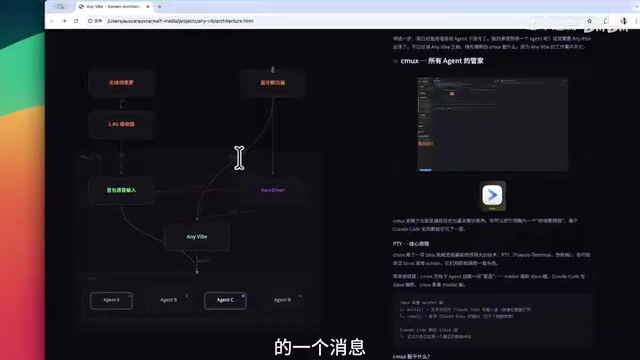
The entire process is smooth and natural — say a name, press Enter, and the work context switch is complete. This design cleverly leverages TMUX's programmatic control capabilities, simplifying operations that would normally require memorizing keyboard shortcuts (like Ctrl+B plus a window number) into a single voice interaction.
Architecture Overview: The Complete Tech Stack of Voice-Driven Vibe Coding
Let's review the full technical stack of this voice programming setup:
- Hardware layer: Bluetooth clicker + wireless microphone (physical interaction entry point)
- Mapping layer: Custom key remapping software (converts clicker buttons to system shortcuts)
- Voice layer: Doubao voice input (speech-to-text, ASR capabilities)
- Management layer: TMUX terminal multiplexer (multi-window/multi-Agent management)
- Dispatch layer: AnyVibe custom program (Agent search and switching)
- Execution layer: Claude Code and other AI programming Agents (actual coding execution)
The design philosophy of this architecture is noteworthy: it doesn't invent any new technology, but cleverly chains existing mature tools together through creative combinations. The Bluetooth clicker is off-the-shelf, Doubao voice is off-the-shelf, TMUX is off-the-shelf, and Claude Code is off-the-shelf. The innovation lies in the "glue layer" — the key remapping software and the AnyVibe switching program. This kind of "glue innovation" has a long tradition in software engineering. The Unix philosophy of "do one thing well, then combine through pipes" receives a vivid modern reinterpretation here.
What Voice Programming Means for the Vibe Coding Trend
Although this DIY project might seem like a "toy," it points to an important trend: the interaction paradigm of programming is being redefined.
Looking back at the evolution of programming interaction methods, it's a microcosm of human-computer interaction history: from early punch cards, to command-line terminals, to graphical IDEs — each revolution lowered the physical barrier to programming. The current explosion of AI programming tools is catalyzing a fourth interaction paradigm shift — from "writing code" to "conversational programming."
The traditional programming interaction model is "eyes on screen, hands on keyboard" — a highly attention-intensive work mode. But when AI Agents become sufficiently powerful, the developer's role transforms from "the person who writes code" to "the person who gives instructions." If it's about giving instructions, why must it be done with a keyboard? Why must you sit in front of a computer?
Voice, as humanity's most natural communication method, has an input speed (approximately 150 words per minute on average) that far exceeds typing speed (approximately 40-60 words per minute on average), giving it a natural advantage in expressing high-level intent. When AI Agents can understand fuzzy, high-level natural language instructions and autonomously complete code implementation, the speed advantage of voice input gets fully amplified.
Of course, this setup still has obvious limitations: speech recognition accuracy, the efficiency of expressing complex instructions, and the continued reliance on a screen when reviewing code. Voice also has clear disadvantages in precision and editability — it's quite difficult to precisely describe a complex data structure or algorithm logic through voice, which is why current voice programming is better suited for "issuing commands" rather than "writing code" scenarios. But as a Proof of Concept, it successfully demonstrates a possibility — future Vibe Coding might truly be as simple as making a phone call.
For developers looking to replicate this voice programming setup, the barrier to entry isn't high: a Bluetooth clicker (a few dollars), a wireless microphone, Doubao voice input, TMUX, plus some scripting skills for key remapping and window management. The real challenge lies in designing an Agent system and switching logic that fits your own workflow.
Key Takeaways
- Achieves keyboard-free voice programming interaction through a Bluetooth clicker + wireless microphone hardware combo
- Uses key remapping software to convert clicker buttons into system shortcuts, paired with Doubao voice input for speech-to-command conversion
- Implements voice-driven multi-AI-Agent switching management based on TMUX terminal multiplexer and the custom AnyVibe program
- The core innovation lies in cleverly chaining existing mature tools (Bluetooth clicker, Doubao voice, TMUX, Claude Code) through a glue layer
- This setup points to a trend in programming interaction evolution: as AI Agents grow powerful enough, developers shift from writing code to giving instructions, and interaction is no longer limited to keyboards
Related articles
 Tutorials
ChatGPT Plus Subscription Guide: Are GPT-5.5, image-2, and Codex Worth the Upgrade?
A detailed look at ChatGPT Plus features — GPT-5.5, image-2, and Codex — with a Plus vs Pro comparison and a complete step-by-step subscription guide for users outside the US.
 Tutorials
Harness AI Engineering in Practice: Using Claude Code to Master Enterprise-Level E-Commerce Development
Deep dive into Harness AI Engineering: master enterprise e-commerce development with Claude Code using the Rules, Skills, Wiki, and Changes framework.
 Tutorials
Cursor + Codex Dual-IDE Collaboration: A Practical Methodology for Open-Source Project Customization
A complete methodology for open-source project customization based on real-world experience, detailing the Cursor+Codex dual-IDE workflow, seven-stage process, MVP validation, and AI source code reading techniques.