DockDuck: A Native Swift macOS File Manager — The Best Alternative to Finder
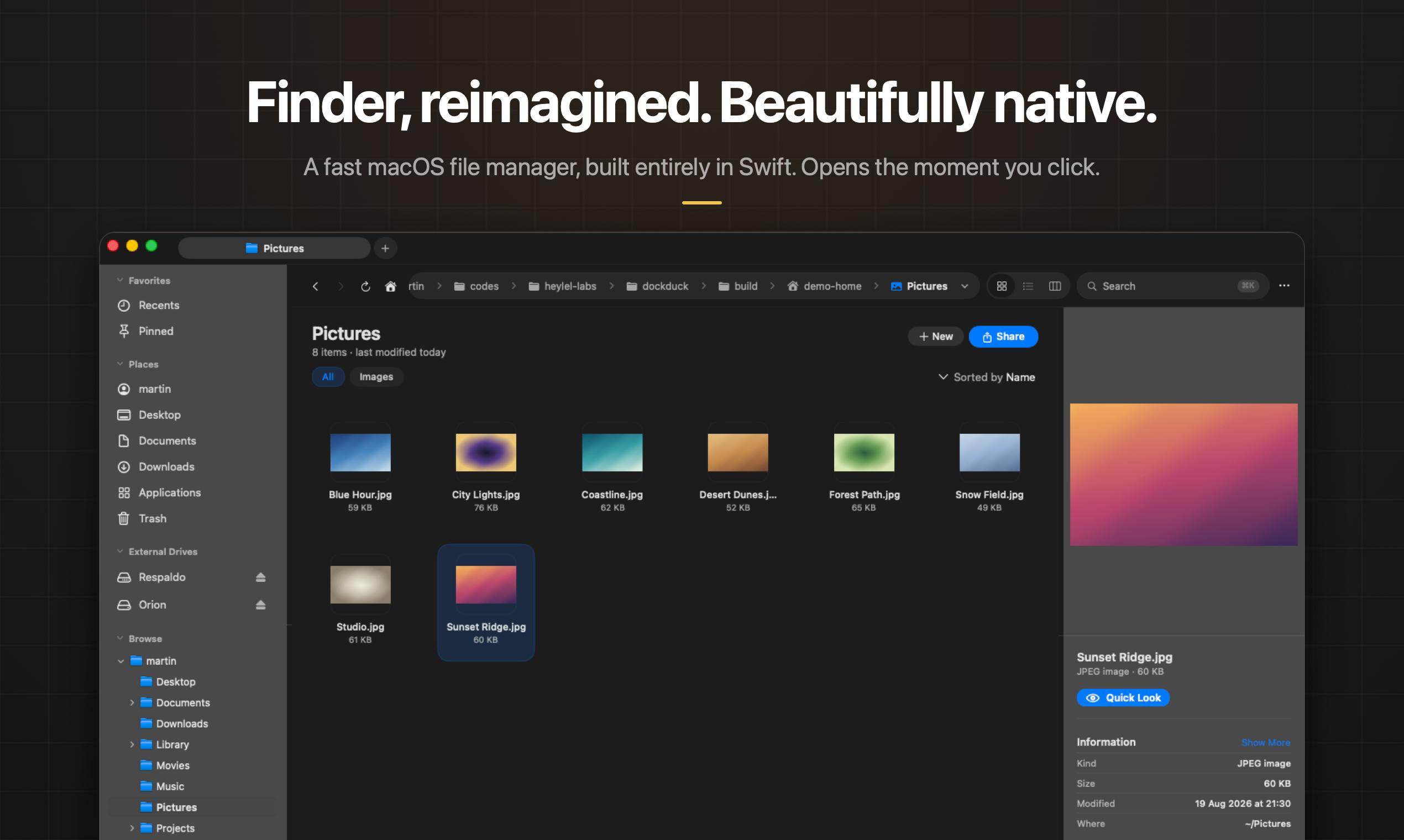
DockDuck is a native Swift macOS file manager built to be the Finder replacement Apple never made.
DockDuck is a 100% Swift-native macOS file manager designed to address Finder's longstanding shortcomings. It features dual-pane view, tabs, batch rename, instant search, and built-in SFTP/SMB remote connections — all in one window. With a pay-once pricing model and a strict local-first privacy policy, it targets developers, creators, and power users seeking a fast, beautiful Finder alternative.
Finder's Pain Points Gave Birth to DockDuck
For every macOS user, Finder is a core tool opened countless times each day — yet it has long been plagued by frustrating shortcomings: the lack of native tab support (only added in recent years), no truly useful dual-pane view, weak batch rename capabilities, and a cumbersome experience when connecting to remote servers.
As the default file manager for macOS (and its predecessor Mac OS), Finder has a history spanning over 40 years, dating back to the original Macintosh in 1984. Although Apple introduced tabs in macOS Mavericks (2013) and improved window management with Stage Manager in macOS Ventura, Finder's core architecture and interaction paradigm have seen limited change over the years. The dual-pane view — an efficient workflow pattern validated for decades on Windows by tools like Total Commander and Directory Opus — still isn't natively supported by Finder. This conservative iteration strategy has left enormous market space for third-party file managers.
These pain points have spawned a wave of third-party file managers, and DockDuck, which recently launched on Product Hunt, is a noteworthy new contender.
DockDuck's tagline is straightforward — "The native macOS file manager Finder should be." It earned 67 upvotes on Product Hunt, ranking 19th for the day, and was categorized under Mac, Productivity Tools, and Developer Tools.
100% Native Swift Development: Speed Meets Aesthetics
One of DockDuck's core selling points is its claim to be 100% natively developed in Swift. This is uncommon in the file manager space — many competing tools rely on Electron or cross-platform frameworks. While these frameworks offer higher development efficiency, they often come with high memory usage, slow startup times, and UIs that feel disconnected from the operating system.
From a technical perspective, Swift is a programming language Apple introduced in 2014, designed specifically for the Apple ecosystem (iOS, macOS, watchOS, tvOS), with direct access to system frameworks like Cocoa and AppKit. In contrast, Electron is a cross-platform framework built on Chromium and Node.js that essentially runs a customized browser instance on the desktop. Electron apps typically consume an additional 200–500MB of memory to maintain the Chromium runtime environment, and their startup times are significantly longer than native apps. On Apple Silicon (M1/M2/M3/M4 series chips) with their unified memory architecture, native Swift apps can run directly on high-performance cores using the ARM instruction set without the Rosetta 2 translation layer, delivering significant advantages in startup speed, memory efficiency, and battery life.
Developer Martin emphasizes two key experience advantages of DockDuck: speed and beauty. For a file manager — a tool invoked frequently throughout the day — startup speed is critical. DockDuck promises it "opens the moment you click," which is a compelling proposition for users accustomed to the occasional lag of third-party tools.
Why Native Development Matters for macOS Users
For macOS users, a native Swift app means better system integration, lower resource consumption, and a visual experience consistent with macOS's design language. In an era where Apple Silicon chips are ubiquitous, native apps can fully leverage hardware performance — and that's the foundation behind DockDuck's confidence in its "fast" claim. An increasing number of macOS users are paying attention to whether apps are natively developed when choosing tools, a trend that is reshaping the competitive landscape of the Mac software market.
DockDuck Feature Overview: All File Operations in One Window
DockDuck aims to consolidate all the file operations users need into a single window. Key features include:
- Tabs: Manage multiple directories within the same window, reducing the chaos of window switching.
- Dual-pane view: The classic dual-panel design that makes file copy and move operations intuitive — a workflow habit many power users developed from tools like Total Commander.
- Pinned Start dashboard: A customizable starting panel for quick access to frequently used locations.
- Tags system: Classify and label files to improve search efficiency.
- Instant search: Quickly locate target files.
- Batch rename: Process large numbers of file renames at once — a long-standing weakness of Finder.
- Remote server connections: Support for SFTP and SMB protocols, enabling seamless management of local and remote files.
A Closer Look at SFTP and SMB Protocols
In the remote connection feature, SFTP (SSH File Transfer Protocol) is a file transfer protocol based on an SSH encrypted channel. Unlike traditional FTP, SFTP encrypts all data during transmission — including authentication credentials and file contents — making it far more secure than plaintext FTP. It's the most commonly used file transfer method in Linux server management and remote development scenarios. SMB (Server Message Block) is a network file-sharing protocol primarily developed by Microsoft, widely used for file sharing within local networks and accessing NAS (Network Attached Storage) devices. While macOS natively supports SMB connections, Finder's SMB implementation has long suffered from slow speeds and unstable connections, especially when interacting with NAS devices from brands like Synology and QNAP.
By integrating both protocols into the file manager, DockDuck means users don't need to switch to Terminal or install dedicated FTP clients like Cyberduck or Transmit — they can manage local and remote files from the same interface.
This feature set broadly covers the core needs of developers, content creators, and power users who work heavily with files.
Pricing and Privacy: Pay Once, Local-First
In an era dominated by subscriptions, DockDuck has opted for a pay-once, no-subscription business model — a clear plus for users tired of endless monthly fees.
The software industry has undergone a massive shift from perpetual licenses to subscriptions since the mid-2010s, with Adobe Creative Suite becoming Creative Cloud and Microsoft Office becoming Microsoft 365 being the most emblematic examples. Subscriptions provide developers with predictable recurring revenue, but they've also triggered strong user backlash — especially for tool-type software like file managers, which are functionally stable and don't require frequent major version updates. In the indie developer community, the perpetual license model is experiencing a "renaissance." Cases like Sketch's hybrid model (perpetual license + optional paid updates) and Sublime Text's version-based purchases prove that for vertical tool software, the pay-once model remains a viable and user-preferred business strategy. By choosing the pay-once model, DockDuck lowers the decision-making barrier for users while also signaling confidence in the product's completeness.
While the perpetual license model may face questions about motivation for future updates, for utility software it relieves users of the long-term psychological burden of ongoing costs.
Even more noteworthy is the privacy commitment: "Your files never leave your Mac." This means DockDuck doesn't rely on cloud processing — all file operations are completed locally, offering peace of mind to security-conscious users. Against a backdrop where more and more apps quietly upload data, this explicit local-first stance is quite persuasive.
DockDuck vs. the Competition: Can It Break Through?
The macOS third-party file manager market is far from a blue ocean — established products like Path Finder, ForkLift, and Commander One have already carved out their positions.
Specifically, Path Finder is one of the longest-standing third-party file managers for macOS, offering extremely rich customization options and a modular interface at around $36, though its learning curve is steep and its update cadence has slowed in recent years. ForkLift 3, developed by BinaryNights, is known for its elegant dual-pane interface and excellent remote connection capabilities, supporting multiple cloud storage protocols including Amazon S3 and Google Drive — it's a well-regarded choice among developers. Commander One, from Eltima Software (now Electronic Team), offers a free basic version and a paid Pro version with comprehensive features, though some users feel its UI design doesn't quite match macOS's native aesthetic. Additionally, there are open-source or lightweight alternatives like Marta and muCommander. In this niche market, product differentiation often comes down to performance, UI polish, remote connection stability, and depth of integration with new macOS features like Stage Manager and Quick Actions.
As a newcomer, DockDuck needs more than a comprehensive feature set to break through — the real test is whether it can truly deliver on its promises of "speed" and "beauty."
DockDuck is still in its early stages (with only 2 comments on Product Hunt), and its stability, update cadence, and real-world reputation remain to be proven by the market. However, its clear positioning — native Swift, pay-once, local privacy, integrated features — shows the developer's precise understanding of the target user base. For Mac users who have long been frustrated by Finder's limitations, DockDuck offers at least a new option worth trying.
If you're looking for a macOS file manager that combines aesthetics with efficiency and doesn't hold you hostage to subscription fees, DockDuck might be worth a shot.
Key Takeaways
Related articles

Why Does the Tesla Roadster Need to Fly? A Deep Dive into Musk's Wild Demo
Tesla's Roadster launch showed wall-climbing, upside-down driving, and flying stunts—but The Vergecast notes the demo car may lack a battery, the Rocket version is invite-only and not street-legal, and the website terms don't guarantee delivery. After nine years of delays, why does this car still need to exist?

AI Is Not a Replacement: Human-AI Collaboration Through the Lens of Factory Root Cause Analysis
Starting from factory root cause analysis, this article explains how AI accelerates evidence chain construction rather than replacing human experts, exploring the pragmatic implementation logic and business value of 'AI supporting people rather than replacing them.'

AI Agent Decision Auditing: Building an Evidence Chain in Regulated Workflows
Starting from a Reddit discussion, this article analyzes three core issues in AI agent decision auditing within regulated workflows: what fields audit records should contain, how to handle feedback latency for erroneous decisions, and how to continuously calibrate LLM judge consistency with human judgment.