Docker Model Runner Tutorial: Run AI Models Locally with a Single Command

Docker Model Runner makes local AI model deployment as simple as running Docker containers.
Docker Model Runner solves the pain points of local AI model deployment — CUDA version management, dependency conflicts, and complex configuration — by standardizing AI model execution into the Docker workflow. It supports pulling and running models with a single command, integrates deeply with Docker Compose, and is compatible with the standard OpenAI API interface, allowing developers to orchestrate AI models just like regular container services and dramatically lowering the barrier to local AI development.
Why Do We Need Docker Model Runner?
Deploying AI models locally has traditionally been a headache: installing Python, configuring CUDA, managing various dependency libraries, and praying they don't produce version conflicts. Even with tools like Ollama, you still need to set up an additional API layer. Developers often spend far more time on environment configuration than actually building applications.
The root cause of this pain point is CUDA (Compute Unified Device Architecture) — NVIDIA's parallel computing platform that's practically a prerequisite for running large language models locally. However, CUDA version management is extremely complex: different model frameworks (PyTorch, TensorFlow) have strict CUDA version requirements, and CUDA versions are tightly coupled to GPU driver versions. Maintaining multiple CUDA versions on a single machine is nearly a nightmare, which is why "it works on my machine" has become a classic meme in AI development.
Docker Model Runner was created to solve exactly this pain point. It standardizes AI model execution into the Docker workflow — one command to pull a model, one command to run it, no extra configuration needed, with all underlying CUDA dependencies and driver adaptations fully encapsulated internally. More importantly, it integrates directly into Docker Compose, allowing AI models to be orchestrated and managed just like regular container services.
Getting Started: Pull Models Like You Pull Images
Docker Model Runner introduces a new keyword: model. If you already have the latest version of Docker Desktop installed, simply enable the Docker Model feature in settings to get started.
This "pull models like you pull images" experience relies on an extension of the OCI (Open Container Initiative) standard. Traditional Docker images use the OCI Image Spec for storage and distribution, and model files (typically in GGUF format — a quantized model format optimized for inference) can similarly be packaged as OCI-compliant artifacts and stored in container image registries. This means existing registry infrastructure (including Docker Hub and private Registries) can be directly reused to host and distribute AI models, without establishing a new model storage system.
The core commands are very concise:
# Pull a model
docker model pull ai/gpt-oss
docker model pull ai/llama-3.2

# View pulled models
docker model list

# Run a model directly (auto-downloads if not pulled)
docker model run ai/gpt-oss
After running, you'll enter a CLI interactive interface where you can chat directly with the model. The first request requires waiting for the model to load into memory, but subsequent responses are very fast. If you prefer not to use the command line, Docker Desktop also provides a graphical model management interface that supports one-click pulling, running, and chatting.
This experience is nearly identical to pulling Docker images, dramatically lowering the barrier to local AI model deployment.
Deep Integration with Docker Compose
Docker Model Runner's real killer feature is its seamless integration with Docker Compose. You can define an AI model as a service in your docker-compose.yml, orchestrated alongside your other application services.
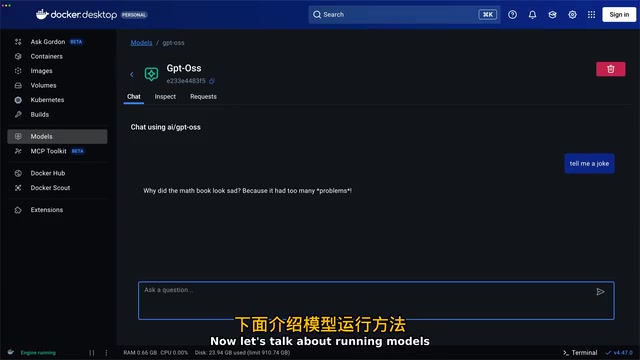
Here's a configuration example using Open WebUI as the frontend and Docker Model Runner as the backend model service:
services:
  webui:
    image: open-webui
    ports:
      - "3000:3000"
  model-runner:
    provider:
      type: model
    options:
      model: ai/gpt-oss
Two key configuration points: first, the provider type is set to model; second, the application communicates with the model service through the internal DNS model-runner.docker.internal.
model-runner.docker.internal is an extension of Docker's internal DNS resolution mechanism designed for inter-container communication. In Docker networks, containers can access each other directly via service names, while *.docker.internal domains are specifically used for containers to access the host machine or special Docker services. This design avoids the problem of hardcoded IP addresses, while also resolving the address difference between development environments (localhost:12434) and container environments (model-runner.docker.internal) — you only need to switch via environment variables, with no changes to the application code itself, embodying the best practice of separating configuration from code as advocated by the Twelve-Factor App methodology.
After running docker compose up, both services start simultaneously, and Open WebUI can automatically discover local models and switch between them in the interface.
Since Docker Model Runner is compatible with the standard OpenAI API interface, switching models later only requires changing a single line of configuration. It's worth noting that since 2023, OpenAI's Chat Completions API (/v1/chat/completions) has become the de facto industry standard interface for large language model services — virtually all local inference frameworks including Ollama, LM Studio, vLLM, and LocalAI have chosen to be compatible with this interface. This means any client code written for the OpenAI API, including mainstream AI application frameworks like LangChain and LlamaIndex, can switch to local models without any modifications. You can treat the model service as an ordinary service in your Compose file — start, stop, restart, entirely within the Docker workflow you're already familiar with.
Hands-On: Building a Custom AI Chat Application
To demonstrate a real-world development scenario, here's a complete chatbot application example. The tech stack includes Next.js, TypeScript, Tailwind CSS, and React, with Docker Model Runner providing model inference capabilities on the backend.
Application Architecture
The core architecture is very straightforward:
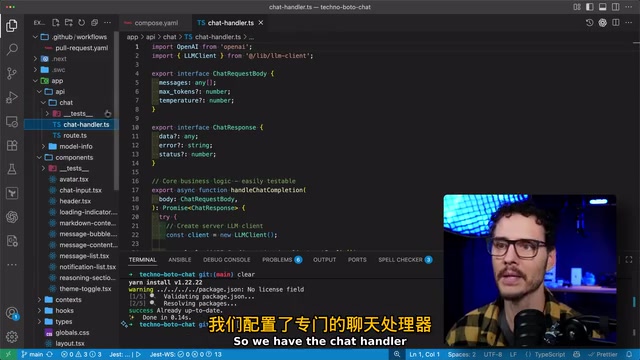
- API Layer: Contains
/chatand/model-infoendpoints - Message Flow: User sends message → Node.js server → Docker Model Runner API → Returns inference results → Renders on the client
- Environment Configuration: Managed through a
.env.localfile; the model API address islocalhost:12434for local development andmodel-runner.docker.internalwhen running inside containers
Running Results
Once the application is launched, users can interact directly with the local model through the chat interface.
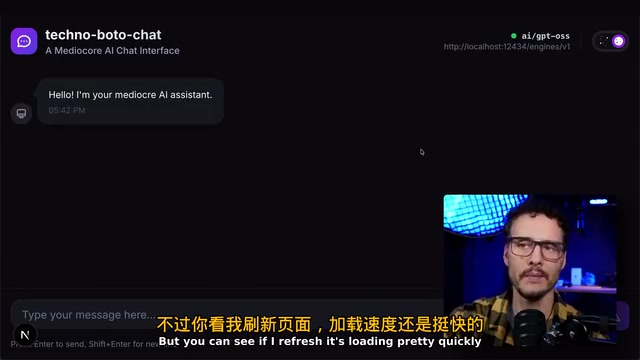
I tested with a prompt like "Plan a trip to Neptune," using a model that supports Chain of Thought (CoT). Chain of Thought is a prompt engineering technique proposed by Google Research in 2022, which later evolved into a specifically trained model capability — before giving a final answer, the model first outputs a structured reasoning process (typically wrapped in <think> tags). This "think first, answer second" approach significantly improves the quality and reliability of responses for complex reasoning tasks.
Related articles
 Tutorials
ChatGPT Plus Subscription Guide: Are GPT-5.5, image-2, and Codex Worth the Upgrade?
A detailed look at ChatGPT Plus features — GPT-5.5, image-2, and Codex — with a Plus vs Pro comparison and a complete step-by-step subscription guide for users outside the US.
 Tutorials
Harness AI Engineering in Practice: Using Claude Code to Master Enterprise-Level E-Commerce Development
Deep dive into Harness AI Engineering: master enterprise e-commerce development with Claude Code using the Rules, Skills, Wiki, and Changes framework.
 Tutorials
Cursor + Codex Dual-IDE Collaboration: A Practical Methodology for Open-Source Project Customization
A complete methodology for open-source project customization based on real-world experience, detailing the Cursor+Codex dual-IDE workflow, seven-stage process, MVP validation, and AI source code reading techniques.