Doubao AI Coding Tutorial: Complete Guide to Developing Web Apps Without Writing Code

A complete tutorial on building web apps with zero code using Doubao's AI coding feature.
This article explains how to use Doubao desktop's AI coding feature to develop web applications without writing code by describing requirements in natural language. Using a Pomodoro timer as an example, it walks through the complete workflow from requirement description, code generation, online preview, conversational iterative optimization, to exporting HTML files — ideal for non-technical users building lightweight front-end applications.
Developing a web application independently without writing a single line of code? This used to sound like a fantasy, but with the proliferation of AI coding tools today, it's become a reality. This article will walk you through how to use Doubao desktop's AI coding feature to develop a practical web application from scratch.
Why Choose Doubao AI Coding for Web App Development
There are plenty of AI coding tools on the market, but for users with zero coding experience, Doubao desktop has one core advantage: integrated code generation and preview.
In a traditional development workflow, even if AI generates code for you, you still need to download a code editor, configure the runtime environment, and install preview tools — each of these steps can be a dealbreaker for beginners. Doubao integrates all of these into one seamless experience — after generating code, you can preview the results directly within the interface. What you see is what you get.
It's worth noting that the ability of AI coding tools to accomplish all this relies on the deep code comprehension capabilities of Large Language Models (LLMs). These models are pre-trained on billions of lines of open-source code from platforms like GitHub, learning programming language syntax rules, common design patterns, and the mapping relationships between natural language and code. When you describe "make a Pomodoro timer" in plain language, the model converts this natural language description into structured technical requirements and outputs the corresponding HTML, CSS, and JavaScript code — the entire process is completely transparent to the user.

This means you only need to focus on one thing: describing what you want in natural language — and leave the rest to AI.
Industry Context: No-Code and Low-Code development platforms aren't new to the AI era — tools like Webflow and Bubble have existed since the 2010s. But AI's involvement has fundamentally raised the ceiling for this space: traditional no-code platforms rely on preset drag-and-drop components with limited flexibility, while AI-driven code generation can theoretically implement any custom logic, as long as you can describe it clearly in words. Gartner predicts that by 2026, low-code/no-code tools will handle over 65% of enterprise application development, and the proliferation of AI coding tools is accelerating this trend.
Hands-On Demo: Building a Pomodoro Timer with Doubao — Zero Code Required
We chose the Pomodoro timer as our introductory example because its requirements are extremely clear: The Pomodoro Technique, invented by Francesco Cirillo in the late 1980s, centers on breaking work into 25-minute focused units (called a "pomodoro"), followed by a 5-minute break after each unit, with a longer 15-30 minute break after every 4 pomodoros. This method has been confirmed by extensive cognitive science research to effectively combat procrastination and enhance focus. Its functional logic is simple and its interface requirements are clear, making it an ideal first project for AI coding practice.
Step 1: Open the AI Coding Feature
Open the Doubao desktop homepage and find and click the "AI Coding" entry point. You'll see an input box — this is your communication window with the AI.
Step 2: Describe Your Requirements in Detail Using Natural Language
In the input box, describe the application you want as thoroughly as possible. For example, since this time our goal is to create a Pomodoro timer for improving focus, you can describe:
- Core functionality (timing, reminders)
- Interface style preferences
- Interaction methods (start, pause, reset buttons)
Key principle: The more detailed your description, the closer the result will be to your expectations.
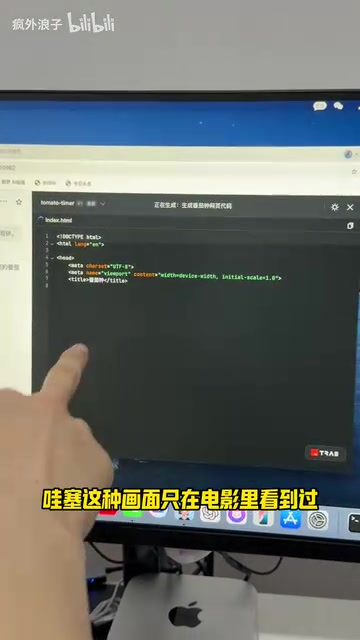
After submitting, Doubao will begin automatically writing code. Lines of code scroll rapidly across the screen — reminiscent of movie scenes of hackers programming.
Step 3: Online Preview and Functional Testing
Once code generation is complete, the interface automatically displays a preview. You can interact with it directly:
- Click the "Start" button to begin the countdown
- Click the "Reset" button to zero out the timer and start over
The basic functionality is already working.
Step 4: Iteratively Optimize the App Through Conversation
Not satisfied with the first-generation result? No problem at all. This is precisely the beauty of AI coding — you can continuously optimize through conversational interaction.
In the input box at the bottom left, continue entering modification requests:
- "Add a custom time feature"
- "Change the background to a gradient color"
- "Add a notification sound when completed"

This multi-turn conversational optimization capability relies on the LLM's "Context Window" mechanism. When processing each new round of requirements, the model incorporates all previous conversation history and generated code as reference, achieving the effect of "remembering the previous version and modifying from there." This is highly similar to the version control concept in traditional software development — each conversation is equivalent to a code commit, with AI playing the dual role of both developer and version management system.
After each modification input, AI adjusts based on the current code, progressively approaching your ideal result.
Tip: Be patient — don't expect perfection in one generation. Think of it as communicating with a programmer colleague — you provide requirements, they implement them, and after several rounds you'll polish out a satisfying product.
Step 5: Export the HTML Web Application File
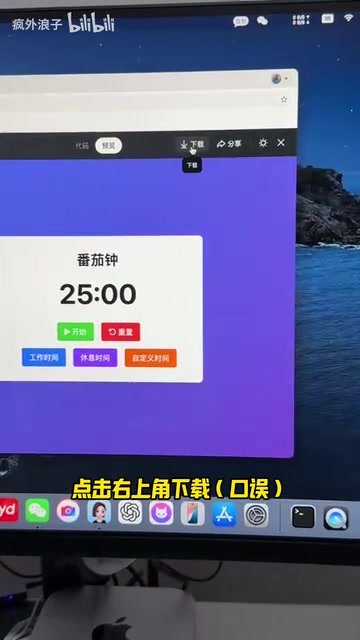
Once you're satisfied with the adjustments, click the "Download" button in the bottom right corner to export an HTML-format web application file. Double-click this file to open it in your browser — no software installation required.
Here's a technical detail worth understanding: The exported HTML file works with a simple "double-click" because modern browsers are themselves complete runtime environments. A standard HTML file can embed both CSS styling code and JavaScript logic code; once the browser parses it, it can render the interface and execute interaction logic without any server support. These types of applications are technically called "pure front-end applications" or "static web applications" — all computation is done locally in the user's browser.
What Else Can Doubao AI Coding Develop?
The Pomodoro timer is just an introductory example. Using the same zero-code development approach, you can also try:
- To-do lists: Manage daily tasks
- BMI calculators: Auto-calculate based on height and weight input
- Casual games: Classic games like Snake, Breakout, etc.
- Data dashboards: Visual display of data charts
- Countdown tools: Countdowns for exams, events, etc.
These applications share common characteristics: relatively independent logic, no backend server required, and all functionality can be completed on the frontend. For personal use or small-scale sharing, they're perfectly sufficient.
Limitations and Usage Recommendations for Doubao AI Coding
While AI coding significantly lowers the development barrier, it's important to be clear-eyed about a few points:
- Best suited for lightweight applications: Complex commercial-grade products still require professional development teams
- Requires clear requirement articulation skills: The more accurately you can describe what you want, the better results AI can deliver
- Debugging requires patience: Multiple rounds of conversation may be needed to achieve the ideal result
- Generates static web applications: It doesn't involve backend features like user login or data storage — this is determined by the technical architecture of pure front-end applications, not a deficiency of the tool itself
For non-technical people who want to experience "creating a product from 0 to 1," Doubao AI coding is an excellent starting point. It lets you focus on creativity and requirements themselves, rather than getting tripped up by technical details.
Key Takeaways
- Doubao desktop's AI coding feature supports integrated code generation and real-time preview, eliminating the hassle of configuring development environments
- Generate applications by describing requirements in natural language — the more detailed the description, the better the result
- Supports conversational iterative optimization — continuously modify requirements in the input box until satisfied (powered by LLM's context window mechanism)
- Export the final HTML web file that works with a double-click in any browser, no server needed
- Ideal for developing lightweight pure front-end applications like Pomodoro timers, to-do lists, mini-games, and calculators
Related articles
 Tutorials
ChatGPT Plus Subscription Guide: Are GPT-5.5, image-2, and Codex Worth the Upgrade?
A detailed look at ChatGPT Plus features — GPT-5.5, image-2, and Codex — with a Plus vs Pro comparison and a complete step-by-step subscription guide for users outside the US.
 Tutorials
Harness AI Engineering in Practice: Using Claude Code to Master Enterprise-Level E-Commerce Development
Deep dive into Harness AI Engineering: master enterprise e-commerce development with Claude Code using the Rules, Skills, Wiki, and Changes framework.
 Tutorials
Cursor + Codex Dual-IDE Collaboration: A Practical Methodology for Open-Source Project Customization
A complete methodology for open-source project customization based on real-world experience, detailing the Cursor+Codex dual-IDE workflow, seven-stage process, MVP validation, and AI source code reading techniques.