Doubao Work in Action: The All-in-One AI Workflow That Cuts E-commerce Design Costs to Zero

Doubao Work bundles copywriting, image gen, and video into one tool for e-commerce content in under an hour.
Doubao Work is ByteDance's all-in-one AI productivity platform, integrating a conversational model (Doubao 2.1 Pro/Turbo), image generation (Cdreams 5.0 Pro), and video generation (Cdance 2.5) so e-commerce operators can produce detail page images, promotional copy, and product videos without switching apps. Its cloud desktop mode keeps long-running tasks going even after local shutdown, and Feishu integration enables team collaboration on generated content. The AI proactively asks for missing info and generates a storyboard before producing video, minimizing wasted effort. Real-world testing shows a full asset set can be completed in under an hour at zero outsourcing cost — though outputs still need human refinement, making it best used as a first-draft accelerator.
Most e-commerce operators know the struggle — running five or six apps at once is just the norm. One app for image editing, another for copywriting, another for video editing, and files constantly getting lost between versions. Outsourcing to designers costs money and takes forever. In a recent tutorial, Bilibili creator 小老同学 demonstrated a different approach: using ByteDance's "Doubao Work" to complete the entire workflow — from product detail pages and promotional copy to product videos — all within a single application. According to the creator, this approach brings design costs down to zero.
This article breaks down the tutorial to examine the real capabilities and limitations of Doubao Work, as a reference for e-commerce content and asset creators.
What Is Doubao Work: ByteDance's Full AI Stack Under One Roof
Many people have the Doubao app on their phones for looking things up or asking questions, but "Doubao Work" is a separate product line. It's powered by ByteDance's full suite of AI models, bundling multiple capabilities into a single product:
- Conversation and reasoning: Doubao 2.1 Pro and Turbo
- Image generation: Cdreams 5.0 Pro
- Video generation: Cdance 2.5
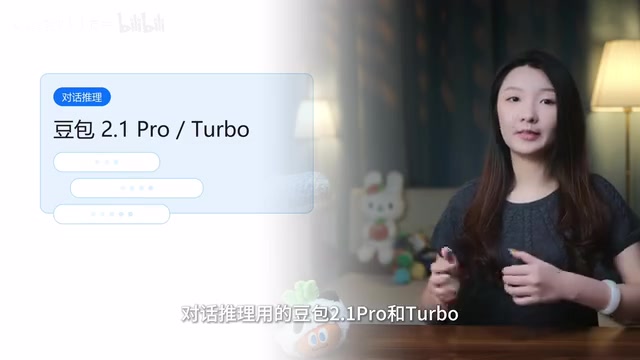
Text, image, and video — the three high-frequency needs in e-commerce — are all handled in one place. The creator emphasizes that the core value isn't how strong any single capability is, but rather that "you don't have to jump between multiple apps or pay separately for each service." For e-commerce operators who spend their days bouncing between tools and battling version control headaches, that kind of integration is genuinely compelling.
The app is available for download on the official website, and new users get a 30-day free subscription, which lowers the barrier to trying it out.
Cdreams and Cdance are ByteDance's proprietary generative AI models. Cdreams focuses on text-to-image and image-to-image tasks, while Cdance handles video generation. Cdreams 5.0 Pro can generate high-quality commercial images from text descriptions or reference photos, covering common e-commerce formats like white-background product shots, lifestyle scenes, and close-up detail images. Cdance 2.5 is ByteDance's flagship video generation model, capable of turning static images and text scripts into short video clips with camera movement control and multi-clip editing. Both models previously existed as standalone products (such as Jimeng AI). Doubao Work essentially bundles them with a conversational model into a unified productivity-focused interface, eliminating the hassle of managing separate accounts and quotas across different platforms.
Local vs. Cloud Desktop: The Key Choice for Uninterrupted Tasks
One easily overlooked but critical detail in practice is the choice of runtime environment. In the chat interface, you can choose between "Run on local computer" or "Cloud desktop."
Complex tasks like batch image generation and video creation can take a long time. If you run them locally, the task pauses the moment you shut down or close the app — and if your machine isn't powerful enough, generating images or video can cause significant lag.
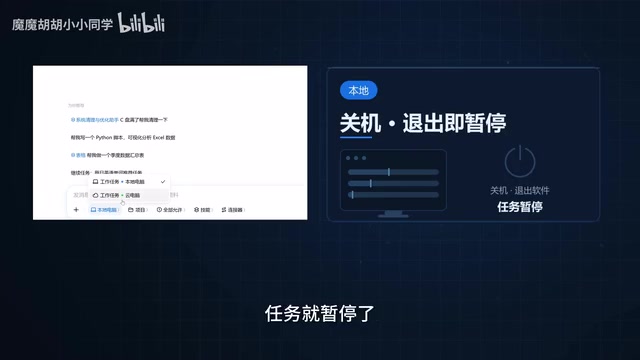
This is where the cloud desktop shines. A high-performance cloud sandbox doesn't consume your local CPU or RAM, and tasks keep running in the cloud even if you shut down your machine or lose your internet connection. The creator's advice is pragmatic: use local for quick, lightweight tasks, and switch to cloud desktop for time-consuming operations like video generation. It's a tip that can save a lot of waiting time.
The cloud desktop is essentially a remote virtual machine service: your commands are sent to ByteDance's servers, the computation runs on high-performance cloud hardware, and the results are streamed back to your local display. For AI generation tasks, this means the GPU power required for model inference is entirely handled in the cloud — your local device only needs a network connection to monitor progress. Even a low-spec office laptop won't limit the quality or speed of image and video generation. This is fundamentally different from the older approach of installing tools like ComfyUI or Stable Diffusion locally and depending on your GPU. It significantly lowers the hardware barrier for everyday e-commerce operators. Note that cloud desktop usage is typically billed separately based on session time or compute consumption, so be sure to check the pricing details once the free subscription period ends.
Full Run-Through: From Product Draft to E-commerce Detail Page
The tutorial uses a PC case as the demo product, starting with only a rough product shot and targeting a complete set of e-commerce assets, promotional content, and video materials.
The first step is creating a project. Setting one up in the "Projects" section helps keep files organized and prevents assets from getting scattered — a good habit to build when producing content in volume.
After dragging the product draft into the chat window, select a "Skill." Here the creator offers a practical tip: first-time users will find the skill list overwhelming and hard to navigate. The suggestion is to go into Skill Management and disable the ones you rarely use, keeping only a few high-frequency ones and adding more later as needed. This makes selection much more efficient.
Choose the "E-commerce Product Assets" skill, enter "Generate e-commerce detail page images for this PC case based on these materials," and the AI will analyze the product and begin execution.
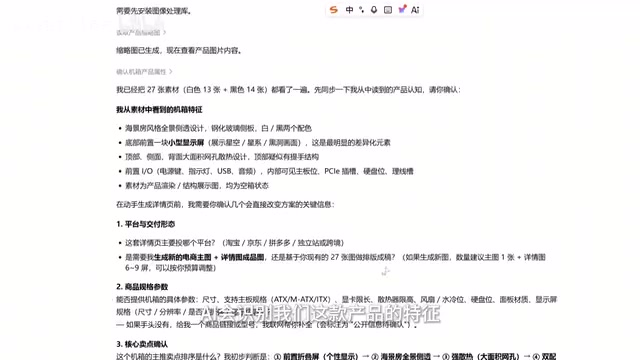
One notably well-designed interaction detail: the AI doesn't generate blindly. When it detects missing product information, it proactively asks the user for specifications and key selling points. After resubmitting, you can ask it to continue. This "confirm requirements before acting" mechanism is far more reliable than generating a pile of unusable results in one shot. In addition to the detail page images, it also generates a Feishu document containing a product overview and descriptive copy that can be directly shared with your team for collaborative editing.
Copywriting and Video: Feishu Integration and Storyboard Confirmation
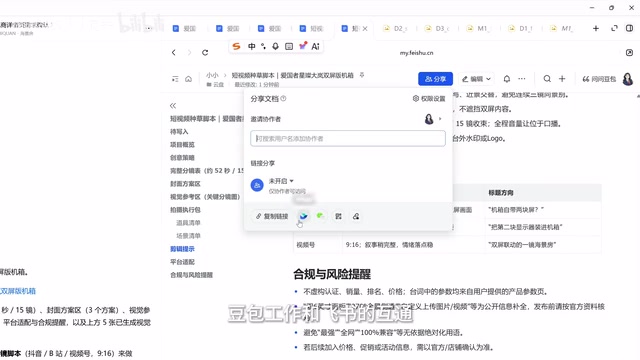
Generating promotional copy and scripts is equally straightforward — just switch to the "Social Media Writing" skill. The creator admits the output isn't ready to use directly, but the promotional script's Feishu document can be shared with the team for discussion and refinement. The Doubao Work–Feishu integration genuinely smooths out the collaboration process.
The highlight is video generation. The cloud desktop is recommended here since generation takes a while. Use the slash command to call up a skill, then select the "Launch Event & Product Video" prompt with Cdance 2.5.
This step reflects the same "plan before execute" philosophy: Doubao Work doesn't immediately start generating footage. Instead, it first understands your requirements, generates a detailed storyboard script, and only begins producing a usable product video after you confirm it. From a rough product shot to detail page images, to a promotional script, to a product ad — the entire chain completes within a single application, without moving a single file or switching a single tool.
A storyboard is a planning document used in video production that breaks written content into shot-by-shot descriptions, typically including the visual content, duration, camera movement, and voiceover script for each shot. In traditional ad production, storyboards are written by creative teams and serve as the central reference for directors and editors. By generating a storyboard and waiting for user confirmation before producing video, Doubao Work effectively automates this step — one that traditionally requires professional involvement. Users can modify shot order or adjust which product features are emphasized at this stage, avoiding the waste of discovering a direction mismatch only after the video has already been generated. This "planning-first" interaction design is also a common strategy in mainstream AI Agent workflows to reduce unnecessary generation.
The Real Value and Limitations of an Integrated Workflow
What resonates most with e-commerce operators in this demo isn't any single capability — it's the complete closed loop of "copy, images, and video all produced together." According to the creator's hands-on test, the entire content set can be completed in under an hour with zero outsourcing cost.
That said, it's worth being clear-eyed about the limitations. The creator repeatedly describes results as "decent" or "not quite ready to use as-is," requiring team discussion and refinement. This suggests Doubao Work is better suited as a first-draft accelerator and asset production tool than as a final-polish replacement for designers and copywriters. For small teams and individual sellers, it can dramatically cut upfront costs and workflow friction; for brands that demand top-tier quality, the human refinement step remains non-negotiable.
For e-commerce operators frustrated by constant app-switching, outsourcing costs, and slow turnaround times, this kind of all-in-one AI workspace is worth a serious test run — especially while the 30-day free subscription is available to map out your own core workflow.
Related articles

Why Does the Tesla Roadster Need to Fly? A Deep Dive into Musk's Wild Demo
Tesla's Roadster launch showed wall-climbing, upside-down driving, and flying stunts—but The Vergecast notes the demo car may lack a battery, the Rocket version is invite-only and not street-legal, and the website terms don't guarantee delivery. After nine years of delays, why does this car still need to exist?

AI Is Not a Replacement: Human-AI Collaboration Through the Lens of Factory Root Cause Analysis
Starting from factory root cause analysis, this article explains how AI accelerates evidence chain construction rather than replacing human experts, exploring the pragmatic implementation logic and business value of 'AI supporting people rather than replacing them.'

AI Agent Decision Auditing: Building an Evidence Chain in Regulated Workflows
Starting from a Reddit discussion, this article analyzes three core issues in AI agent decision auditing within regulated workflows: what fields audit records should contain, how to handle feedback latency for erroneous decisions, and how to continuously calibrate LLM judge consistency with human judgment.