DSH-Work Open Source: Install DeepSeek Harness Client with Zero Configuration

DSH-Work wraps DeepSeek Harness into a no-config desktop app for non-technical users.
DeepSeek Harness is a powerful AI framework from DeepSeek, but its reliance on Node.js makes setup daunting for non-developers. DSH-Work, open-sourced by a Bilibili creator, packages the tool into a double-click desktop installer for both macOS and Windows, eliminating all command-line and package manager friction. The common macOS "app is damaged" warning — caused by the lack of an Apple developer certificate — is also resolved via a bundled one-click repair script. The project represents a classic community pattern of wrapping technical tools to broaden accessibility.
From Command-Line Barrier to "Download and Run"
After DeepSeekAd released DeepSeek Harness (also known in the community as DSH), many users eager to try AI tools rushed to check the official installation guide — only to be turned away by what they found. This is not software you can simply download and double-click to run.
The official setup process requires configuring a Node environment on your machine, along with familiarity with package management tools like NPM, NPX, and PNPM. For developers, these are second nature. But for most everyday users, even understanding "what is Node" can feel like a wall — let alone typing commands into a terminal.
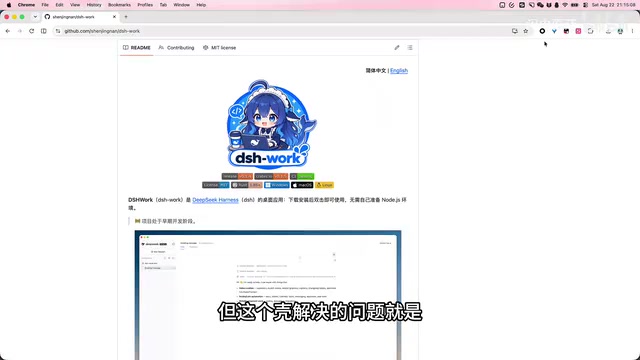
To address this pain point, a Bilibili content creator developed and open-sourced a client project called DSH-Work. In the author's own words, it's essentially "a wrapper around DeepSeek Harness" — but that wrapper solves exactly the problem that trips up regular users: no need to understand Node, no need to touch NPM, and no command line required. Download, install, open — and you're ready to go.
DeepSeek Harness (DSH) is an AI capability invocation framework released by DeepSeek. It allows developers to interface with DeepSeek's large language models through a standardized API, enabling conversational tasks, benchmarking, automation, and more. It is built on the Node.js runtime and relies on NPM (Node Package Manager) or its alternative PNPM to install and manage dependencies. NPX is a command execution tool bundled with NPM that lets you run packages without globally installing them. This tech stack is ubiquitous among frontend and full-stack developers, but for users without a programming background, just figuring out "what Node.js is, where to download it, and how to verify the installation" can drain significant time and patience.
What Problem Does DSH-Work Actually Solve
Environment Setup Is the Biggest Hidden Barrier
Many open-source AI projects share a common issue: the development team assumes users have some technical foundation, so installation docs typically start with "please install Node.js first." That kind of prerequisite is zero-cost for developers, but it creates a very real entry barrier for content creators, product managers, and curious non-technical users.
DSH-Work's approach is straightforward: bundle the complex runtime environment inside a desktop application so users only interact with a familiar graphical interface — not a string of unfamiliar commands. This "packaged distribution" approach is nothing new in the open-source ecosystem, but the speed with which a community developer responded to a brand-new tool like DeepSeek Harness speaks to the community's agility.
Cross-Platform Support for macOS and Windows
The project provides builds for both macOS and Windows. Users simply scroll down the GitHub homepage to find the download table and select the version that matches their system. For users in China who have difficulty accessing GitHub, the author has also prepared a Baidu Netdisk download link as an alternative.
DSH-Work Installation Walkthrough
macOS Installation Steps
Mac users download the appropriate version, double-click to open the DMG file, and drag DSH-Work into the Applications folder to complete the installation.

However, on first launch, the system may display a warning: "The application is damaged and cannot be opened." The author specifically notes that the app is not actually damaged — this happens because the project has not purchased Apple's $99/year developer signing certificate, causing macOS's Gatekeeper to block the unsigned application.
The fix is simple: inside the DMG package, the author has thoughtfully included a repair script. Double-click it to open a terminal window, wait for the repair-complete prompt, then relaunch DSH-Work — it will work normally.

It's worth noting that this "application is damaged" issue affects all unsigned open-source apps on macOS — it's not unique to DSH-Work. The author automated this fix with a single script, further reducing friction for non-technical users.
macOS Gatekeeper is a security mechanism Apple introduced in OS X Mountain Lion. By default, it only allows apps from the App Store or those that have been notarized by Apple to run. To bypass the block, developers must pay $99/year to join the Apple Developer Program and sign their apps with an Apple-issued certificate. For individual developers or small open-source projects, this cost and review process is often not worthwhile. The standard manual workaround is to run xattr -cr /Applications/AppName.app in the terminal to remove the quarantine attribute. The repair script bundled with DSH-Work essentially automates this command, so users unfamiliar with the terminal don't need to type anything manually.
Windows Installation Steps
Compared to macOS, the Windows installation is even simpler. Find the Windows version on the GitHub homepage, download it, double-click the installer, and click "Next" through the wizard — no signing or permission issues to deal with.

Continuous Iteration and Community Collaboration
DSH-Work has just been open-sourced, and the author has made clear that improvements are ongoing. An open invitation has also been extended to the community: if users encounter bugs or have ideas for new features, they're welcome to open an Issue on GitHub.
This model of "open source + rapid iteration + community collaboration" is a microcosm of the thriving AI tools ecosystem today. When a valuable underlying tool is released, it typically sparks a wave of wrappers, localizations, and graphical interfaces that lower the barrier to entry — letting non-technical users benefit from technical advances just as readily as developers.
Summary
For users who want to try DeepSeek Harness but have been put off by environment setup, DSH-Work offers a much smoother path:
- No knowledge of Node, NPM, or other development tools required
- Graphical installer — double-click and go
- Supports both macOS and Windows
- Available via both GitHub and Baidu Netdisk
Of course, as a project in its early stages, DSH-Work primarily addresses the question of "can I even get it running." Feature completeness and stability will need more time to mature. If you have a use case for DeepSeek Harness, it's worth downloading and trying — and submitting feedback to the author to help this small tool grow.
Related articles

Claude Code v2.1.316 Update Analysis: Enterprise Gateway and Multiple Stability Fixes
Claude Code v2.1.316 released: new enterprise gateway pooled group budgets, layered policy mode, subagent effort control, dozens of Shell, network, and session recovery fixes, and Opus 4.8 fast mode deprecated.

17th-Century British Floods and Doomsday Panic: A New Perspective on Weather History
Based on a Hacker News discussion of '17th-Century British Floods and Foreboding,' this piece explores how extreme weather was given divine and political significance, and what weather history teaches us about contemporary climate communication.

Salesforce Acquires Rune for $375M: AI Logistics Tech Bolsters Defense Business
Salesforce reportedly acquires defense tech startup Rune for $375M. Rune's AI logistics tech will strengthen Salesforce's Missionforce defense platform, continuing its M&A spree.