EasyClick Multi-IDE Collaborative Programming in Practice: Three Approaches to Double Your Development Efficiency

Multi-IDE collaboration effectively addresses single-tool limitations in EasyClick projects, boosting development efficiency.
This article addresses pain points in EasyClick automation script development where a single AI IDE falls short in features or runs out of free API calls. It proposes a multi-IDE collaborative development approach with three core strategies: separating UI and script development, pairing the main project with Java plugin modules, and modular splitting for large projects—each suited to small, performance-extension, and large complex projects respectively. The article emphasizes that architecture design and interface contracts are key to successful collaboration, with core advantages including breaking through call limits, leveraging tool strengths, parallel efficiency gains, and reduced coupling.
Why Does EasyClick Development Need Multi-IDE Collaboration?
Trae, Lingma, Cursor, QoderAd... AI programming tools are multiplying, but anyone who's used them knows that no single IDE can do it all. Incomplete feature coverage, running out of free API calls, struggling with complex business logic, difficulty maintaining large projects—these pain points are especially pronounced in EasyClick automation script development.
About EasyClick: EasyClick is a mobile automation script development platform based on JavaScript syntax, supporting UI automation operations, accessibility service calls, and native Java plugin extensions on Android devices. Its script engine integrates a hybrid Java-JavaScript runtime at its core, which is precisely why Java plugins are needed in performance-sensitive scenarios. This dual-layer architecture of "JS scripts + Java native code" makes multi-IDE collaborative development particularly well-suited for EasyClick projects.
The idea behind multi-IDE collaboration is straightforward: combine the strengths of different tools to compensate for each other's weaknesses. These AI IDEs each excel in different areas because they're built on different underlying large models with different training data focuses—Cursor is deeply customized on VSCode, integrating GPT-4/Claude models, and excels at multi-file context understanding and code completion; Lingma (Tongyi Lingma) is developed by Alibaba Cloud with specialized optimization for Chinese comments and domestic development ecosystems; Trae is ByteDance's AI IDE with unique design for project engineering management and task decomposition; Qoder focuses on code review and refactoring suggestions. Cursor has fast code completion, Lingma excels at Chinese comprehension, and Trae is smooth for project management—rather than struggling with a single tool, let each one do what it does best. Real-world project validation shows that the efficiency gains are tangible.
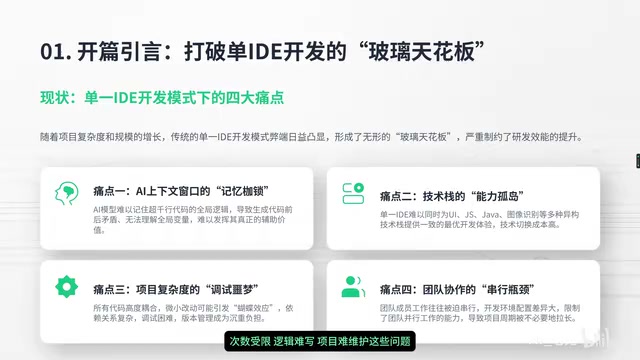
Below are three battle-tested collaborative development approaches. You can match them directly to your project scale.
Three Core Collaboration Strategies
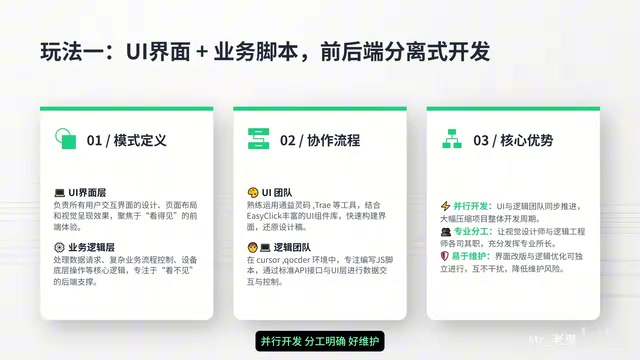
Strategy One: Separate UI Interface and Automation Script Development
This is the quickest to adopt and most practical collaboration model. The core idea is simple—UI stays with UI, logic stays with logic.
This separation strategy has a solid theoretical foundation in software engineering: the UI layer (layout XML/JS rendering logic) and the automation script layer (device operations, flow control) naturally belong to different "concerns." Forcing them together leads to debugging difficulties and low reusability. This is the engineering practice of the "Single Responsibility Principle"—each module handles only one thing, and modifying one part shouldn't affect another.
Here's how it works:
- UI tool handles interface layout and interaction design—pick an AI IDE that's good at frontend generation to quickly scaffold the interface
- Logic tool handles automation script writing—use an AI IDE that excels at code reasoning to handle core functionality
Two parallel tracks, no interference. Modifying the interface doesn't touch the scripts; optimizing scripts doesn't affect the interface—this decoupled approach is especially friendly for later iterations and maintenance. In EasyClick projects, interface adjustments and script optimizations often alternate, and separated development saves enormous amounts of repetitive debugging time.
Strategy Two: Main Project with Plugin Modules
When a project needs stronger performance or native capability extensions, the main project + plugin module approach is more suitable. This strategy has two directions:
- Java plugin mode: Ideal for scenarios requiring low-level high performance and native capability extensions. The workflow: Create hybrid project → Write Java plugin code → Compile and package → Main project calls the plugin
- Project encapsulated modules: Extract common functionality into independent modules for direct reuse across multiple projects
Java Plugin Mechanism Explained: EasyClick supports writing Android native Java/Kotlin plugins to extend script capabilities. This hybrid development model is similar to React Native's native module mechanism. After Java plugins are compiled into .aar or .jar packages, they're dynamically loaded by the EasyClick runtime and can directly call Android SDK low-level APIs, breaking through the performance and system permission ceiling of pure JS scripts. Typical use cases include: high-frequency image recognition, Bluetooth/serial communication, custom encryption algorithms, and other features that have strong dependencies on performance or native capabilities. This is why such development requires a dedicated Java IDE (like IntelliJ IDEA or Android Studio) to work in coordination with the main EasyClick IDE.
The biggest benefit of this model is stability, flexibility, and strong reusability. Core functionality packaged as plugins can be shared across multiple EasyClick projects without reinventing the wheel. Plugins can be updated independently, and risks are more controllable.
Strategy Three: Modular Splitting for Large Projects
For large EasyClick projects with complex functionality, modular splitting is virtually the only way forward. Split the project into multiple independent modules by function, and develop each module with the IDE best suited for it:
- Modules are developed in parallel—team members can work simultaneously without waiting in queue
- Each module is debugged independently—when problems occur, they can be quickly isolated to a specific module
- Finally, unified integration—assemble the debugged modules together
The core value of modularization is breaking big problems into small ones. From a software engineering perspective, this directly reduces code "coupling"—in highly coupled code, modifying one part often triggers chain reactions, while a low-coupling modular architecture allows each part to evolve and be tested independently. A project with several thousand lines split into five or six modules dramatically reduces each module's code volume and logic complexity, naturally resulting in fewer bugs and easier maintenance.
How to Choose a Collaboration Strategy Based on Project Scale?
Don't rush to apply all multi-IDE collaboration techniques at once—different project scales call for different strategies. Using a complex approach for a small project actually slows things down.

| Project Type | Recommended Strategy | Rationale |
|---|---|---|
| Small EasyClick projects | Strategy One (UI & script separation) | Simple, direct, quick results |
| Projects needing performance extensions | Strategy Two (main project + plugins) | Balances performance and flexibility |
| Large complex projects | Strategy Three (modular splitting) | Reduces complexity, supports team collaboration |
In practice, the three strategies can absolutely be mixed. For example, a large EasyClick project might first undergo modular splitting (Strategy Three), with some modules internally adopting UI and script separation (Strategy One), and then introducing Java plugins for performance enhancement (Strategy Two). Flexible combination yields maximum results.
Standard Workflow for Multi-IDE Collaborative Development
Regardless of which strategy you choose, the development workflow can be summarized in five steps:
- Architecture design: Define the project structure, determine module divisions, and assign IDE responsibilities
- Parallel development: Each IDE develops its assigned portion simultaneously
- Code consolidation: Integrate code from all parts into the main project
- Unified debugging: Conduct integration testing in a unified environment
- Production deployment: Deploy, verify, and confirm functionality works correctly
The most critical of these five steps is the first one. Good architecture design leads to clear division of labor, smooth consolidation, and painless debugging. Starting without a clear architecture will almost certainly result in conflicts and compatibility issues during integration, with high rework costs. This is especially important in multi-IDE collaboration scenarios—code generated by different IDEs may differ in naming conventions and interface agreements. Defining clear Interface Contracts during the architecture design phase is key to avoiding the "puzzle pieces that don't fit" problem during integration.
Four Core Advantages of Multi-IDE Collaborative Development
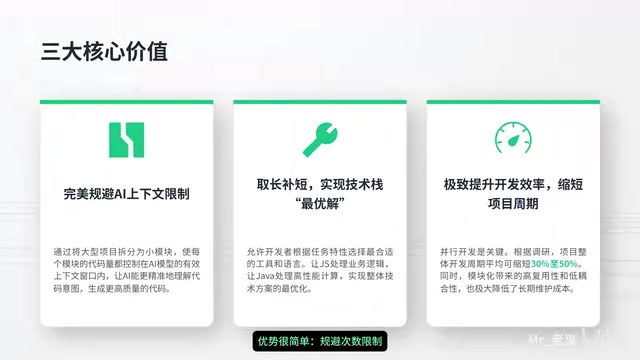
In summary, multi-IDE collaboration brings four main benefits to EasyClick development:
- Breaking through API call limits: Stack the free quotas of different AI IDEs—no longer bottlenecked by a single tool's usage cap
- Leveraging each tool's strengths for multiplied results: Cursor's fast completion, Lingma's accurate Chinese comprehension, Trae's smooth project management—combined use far outperforms any single tool
- Parallel development shortens timelines: Multiple tasks advancing simultaneously dramatically compresses overall development time
- Module decoupling improves stability: Separated and modular development naturally reduces code coupling, making systems more stable and easier to maintain long-term
Final Thoughts
Multi-IDE collaboration isn't just a flashy technique—it's a pragmatic solution addressing real pain points in EasyClick development. For projects that need to juggle interface, logic, and performance simultaneously, relying on a single IDE is genuinely tough. Properly leveraging the respective strengths of Trae, Lingma, Cursor, and Qoder delivers visible efficiency gains.
I recommend starting with Strategy One to get your feet wet. Once you experience the benefits of separated development, gradually introduce plugin modules or modular splitting based on project needs. Tools serve people—finding the combination that suits your project matters more than pursuing the most complex approach.
Related articles
 Tutorials
ChatGPT Plus Subscription Guide: Are GPT-5.5, image-2, and Codex Worth the Upgrade?
A detailed look at ChatGPT Plus features — GPT-5.5, image-2, and Codex — with a Plus vs Pro comparison and a complete step-by-step subscription guide for users outside the US.
 Tutorials
Harness AI Engineering in Practice: Using Claude Code to Master Enterprise-Level E-Commerce Development
Deep dive into Harness AI Engineering: master enterprise e-commerce development with Claude Code using the Rules, Skills, Wiki, and Changes framework.
 Tutorials
Cursor + Codex Dual-IDE Collaboration: A Practical Methodology for Open-Source Project Customization
A complete methodology for open-source project customization based on real-world experience, detailing the Cursor+Codex dual-IDE workflow, seven-stage process, MVP validation, and AI source code reading techniques.