FastAPI + Next.js + Supabase: A Practical Guide to Full-Stack AI Application Architecture
Building full-stack AI applications with FastAPI + Next.js + Supabase architecture
Using a "Readme to Website" project as an example, this article introduces a full-stack AI application tech stack: Next.js as the BFF layer handling frontend interactions, FastAPI with Celery processing time-consuming AI tasks, and Supabase managing data storage. This architecture solves typical AI application challenges including serverless time limits, async task management, and real-time progress feedback, achieving the goal of leveraging each technology's strengths with independent scaling.
Why AI Applications Need This Tech Stack
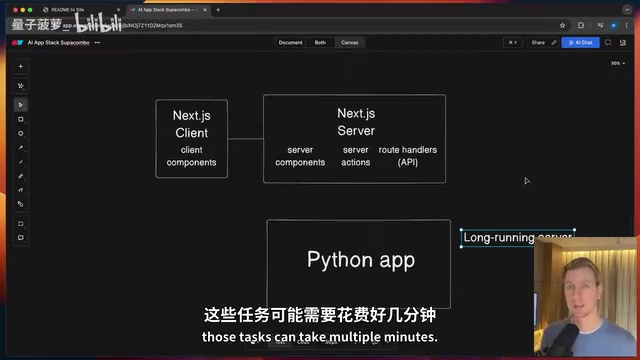
Anyone who's built AI applications has likely encountered this contradiction: Python is irreplaceable for AI/ML processing, but building frontend experiences with it is mediocre at best; Next.js can deliver excellent web interfaces, but struggles with AI generation tasks that can take several minutes.
Is there an architecture that combines the strengths of both?
This article breaks down a battle-tested full-stack AI application tech stack: FastAPI (Python backend) + Next.js (frontend/BFF layer) + Supabase (data layer). Using a real "Readme to Website" project as an example, I'll demonstrate how this architecture solves typical challenges in AI applications.
Project Example: Automatic Readme-to-Website Conversion
The project is called Readme2Site, and its functionality is straightforward: users submit a GitHub repository's README link, and AI transforms that Markdown file into a beautifully designed landing page. Users can preview the result and publish it with one click if satisfied.
The requirements seem simple, but there are significant technical challenges underneath:
- AI generation of complete HTML/CSS can take several minutes
- Reliable asynchronous task processing and state management are needed
- Generated artifacts need persistent storage
- The frontend must display generation progress in real-time
When these requirements stack up, neither Next.js alone nor Python alone provides an elegant solution.
Why Next.js Needs a Separate Python Backend
Next.js is indeed a full-stack framework, but in AI application scenarios, pairing it with a separate Python backend has several unavoidable reasons.
Serverless Time Limits
Next.js deployments typically rely on Serverless Functions, which have strict execution time limits (10 seconds on Vercel's free tier, 60 seconds on Pro). AI tasks routinely take several minutes or even 20+ minutes, making Python's long-running server naturally suited for handling such scenarios.
The time limits of serverless architecture stem from its underlying design philosophy. Serverless Functions (such as AWS Lambda, Vercel Edge Functions) are essentially stateless, short-lived containers, and platforms need to dynamically allocate and reclaim computing resources across global data centers. To ensure resource utilization and prevent single tasks from monopolizing compute resources, platforms set strict execution time limits. Vercel's 10-second free tier and 60-second Pro tier limits aren't arbitrary—they're based on the assumption that "most web requests should complete within seconds." Functions exceeding the limit are forcefully terminated, causing request failures. This barely affects traditional web applications, but AI generation tasks (like calling GPT-4 to generate complete HTML pages) often require 30 seconds to several minutes, creating a fundamental conflict with serverless design assumptions. There are two categories of solutions: one is using long-running servers (like the FastAPI approach in this article); the other is using streaming responses to break long tasks into continuous small data chunks, though the latter isn't always applicable for scenarios involving AI generation of complete files.
Leveraging the Best of Each Technology Ecosystem
- Python side: Rich AI/ML library ecosystem, mature task queues (Celery), native integration with OpenAI and similar APIs
- Next.js side: Static Site Generation (SSG), Server Actions, smooth frontend development experience
- Independent deployment: Both services can scale independently without affecting each other
Why FastAPI Instead of Django or Flask
In this architecture, Python primarily plays the role of a "processing layer" and doesn't need Django's complete ORM and Admin system. FastAPI's lightweight, high-performance, API-first design philosophy naturally aligns with this division of responsibilities. Combined with its native async support and automatic API documentation generation, development efficiency is high.
It's worth noting that Next.js in this architecture actually serves as a BFF (Backend for Frontend)—a microservices architecture pattern formally proposed by Sam Newman in 2015. Its core idea is to provide a dedicated backend aggregation layer for frontend clients rather than having the frontend directly call multiple microservices. Next.js receives browser requests, validates and transforms data, then calls the FastAPI backend, and finally returns processed data to the frontend. This pattern hides the real addresses and internal architecture of backend services, improving security while letting the Python backend focus on AI processing logic for clearer separation of concerns.
Four-Phase Data Flow Architecture Explained
The entire application's data flow is divided into four phases, each with clear technology selection considerations.
Phase One: Request Submission
User submits GitHub URL in browser → Next.js Server Side receives it → Calls FastAPI endpoint.
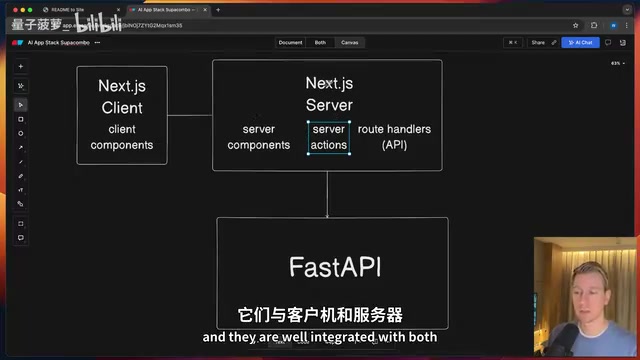
There's a design detail here: requests first pass through Next.js API Routes, then get forwarded to the Python backend. The benefit is leveraging Next.js Server Actions for data validation and preprocessing while hiding the backend service's real address from the frontend.
Phase Two: Async Task Enqueueing
After FastAPI receives the request, it doesn't wait around for AI generation to complete. Instead, it:
- Creates a project record in the Supabase database
- Submits the generation task to the Celery task queue
- Immediately returns a Job ID to the frontend
This is the classic async task pattern—respond to the user quickly, handle time-consuming operations in the background.
Celery is the most mature distributed task queue framework in the Python ecosystem. Its core architecture consists of three components: Producer (the task producer, i.e., the FastAPI application), Broker (the message middleware, typically Redis or RabbitMQ), and Worker (the task consumer). When FastAPI calls the .delay() method, the task is serialized and written to the Redis queue—an operation that typically completes in 1-5 milliseconds, allowing the API to return a response immediately. Celery Workers are independently running Python processes that continuously listen to the Redis queue and execute tasks as soon as they're discovered. This producer-consumer pattern brings key advantages: tasks can be distributed across multiple Workers (horizontal scaling); tasks aren't lost if a Worker crashes (message persistence); and task priorities, retry strategies, and timeout limits can be configured. In AI applications, Celery's built-in retry mechanism can automatically retry when OpenAI API rate limits are hit, preventing permanent task failure.
Phase Three: AI Generation and Result Storage
The Celery Worker picks up the task from the queue, calls the OpenAI API to generate HTML/CSS, then uploads the result to Supabase Storage.
Why use Storage instead of storing directly in PostgreSQL? Three reasons:
- HTML artifacts are complete files that only need whole-file read/write operations, not field-level queries
- Files can be quite large (tens to hundreds of KB), avoiding database bloat
Related articles
 Tutorials
ChatGPT Plus Subscription Guide: Are GPT-5.5, image-2, and Codex Worth the Upgrade?
A detailed look at ChatGPT Plus features — GPT-5.5, image-2, and Codex — with a Plus vs Pro comparison and a complete step-by-step subscription guide for users outside the US.
 Tutorials
Harness AI Engineering in Practice: Using Claude Code to Master Enterprise-Level E-Commerce Development
Deep dive into Harness AI Engineering: master enterprise e-commerce development with Claude Code using the Rules, Skills, Wiki, and Changes framework.
 Tutorials
Cursor + Codex Dual-IDE Collaboration: A Practical Methodology for Open-Source Project Customization
A complete methodology for open-source project customization based on real-world experience, detailing the Cursor+Codex dual-IDE workflow, seven-stage process, MVP validation, and AI source code reading techniques.