Feishu CLI Goes Open Source: Let Claude Code and Other AI Agents Control Feishu Automatically

Feishu open-sources its CLI tool, enabling AI agents to automate all Feishu features via command line.
Feishu has officially open-sourced its command-line tool (CLI), comprising the CLI itself and 19 Skills packages covering Calendar, Messages, Documents, Bitable, Tasks, and more. AI agents like Claude Code and OpenClaw can directly read and write Feishu data through this tool, enabling cross-module automated operations. Setup requires only three steps, supports multi-terminal collaboration on the same data, and significantly lowers the barrier to enterprise office automation.
As one of China's most popular collaborative workplace platforms, Feishu's command-line tool (CLI) has officially gone open source. This means AI agents like Claude Code and OpenClaw can now interact deeply with Feishu directly through the command line. This not only breaks down the final barrier between AI Agents and enterprise workplace scenarios but also opens up entirely new possibilities for automated office workflows.
What Is Feishu CLI? Why Should You Care?
Feishu's open-source command-line toolkit consists of two core components: the CLI tool itself (installed via npm install) and a companion set of 19 Skills packages.
CLI (Command Line Interface) is a way of interacting with computers through text commands. Compared to graphical interfaces, CLI is naturally suited for programmatic invocation and automation scripting. For AI Agents, CLI acts like a standardized set of "control handles" — the Agent translates natural language intent into specific command-line instructions, then executes actual operations through the CLI. This architecture is called Tool Use, which is the most mainstream capability extension paradigm in the current AI Agent field. Claude Code is Anthropic's programming agent capable of autonomously writing and executing code in terminal environments; OpenClawAd is another AI terminal tool that supports the MCP protocol. Both can invoke Feishu CLI as an external tool to gain the ability to operate Feishu.
The design philosophy of the CLI tool is very clear — it can be used directly by developers in the terminal, or serve as the "hands and feet" of an AI Agent, enabling intelligent agents to read and write various types of data in Feishu. Combined with Skills packages, Agents can interact with Feishu more intelligently. Skills packages are essentially a set of predefined prompt templates and tool description files that tell the AI Agent the purpose, parameter format, and usage scenarios of each CLI command. This design draws from the MCP (Model Context Protocol) approach — separating tool capability descriptions from actual execution logic, allowing AI to autonomously select appropriate tool combinations based on semantic understanding. The 19 Skills packages cover different functional modules of Feishu. After receiving a user's natural language instruction, the Agent first matches the most relevant Skills package, then breaks down the instruction into a specific CLI command sequence for execution.
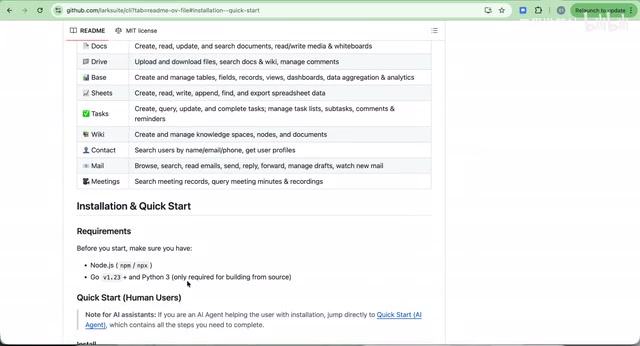
In terms of functional coverage, this toolkit covers virtually all of Feishu's core business areas:
- Calendar: Create, query, and manage schedules and reminders
- Messages: Send and manage Feishu messages
- Documents: Operate on Feishu document content
- Bitable (Multi-dimensional Tables): Read and write multi-dimensional table data (one of the most powerful capabilities)
- Tasks: Create and manage tasks
- Meetings: Manage meeting-related information
- Forms: Operate Feishu forms
Among these, Feishu Bitable is similar to Airtable or Notion Database — it combines the flexibility of traditional spreadsheets with the structured capabilities of relational databases. Each Bitable can contain multiple data tables, supports rich field types (text, numbers, dates, relations, formulas, etc.), and provides multiple views such as Kanban boards, Gantt charts, and forms. For AI Agents, Bitable is the ideal data interaction medium — it has sufficient structural rigor for AI to read and write precisely, yet enough flexibility to adapt to various business scenarios. This is why it's called "one of the most powerful capabilities."
Basically, any Feishu feature you can think of is already covered.
Installation & Configuration: Three Steps to Get Started
The entire installation and configuration process is very streamlined, consisting of three steps:
Step 1: Install the CLI Tool and Skills Packages
# Install the command-line tool
npm install -g @anthropic/feishu-cli

# Install Skills packages
npx skills
npm (Node Package Manager) is the largest package management tool in the JavaScript/Node.js ecosystem, with over 2 million open-source packages. Feishu CLI's choice to distribute through npm means any developer with a Node.js environment installed can complete the installation with a single command, greatly reducing the complexity of distribution and deployment. npx is npm's built-in package execution tool that can directly run remote packages without global installation, commonly used for one-time initialization or configuration operations.
Both steps are essential. You can simply hand the code repository or documentation link to Claude Code or OpenClaw and let the AI refer to the docs to complete the installation on its own — in the AI era, many operations no longer need to be performed manually.
Step 2: Configure Application Credentials
Run the config init command to start the configuration process. The system generates a link — open it, select a name and avatar to create your application, and obtain the application ID.
Step 3: Complete Login Authentication
Execute the auth login command, which similarly generates an authentication link. Complete the authorization in your browser. You can check the current login status at any time with auth status.
The entire process takes less than 5 minutes with an extremely low barrier to entry.
Practical Demo: AI Automatically Manages A-Share Investment Tracking
To demonstrate the real power of Feishu CLI, here's an example using an "A-Share Daily Tracking" Bitable to show how an AI agent can complete complex data management and calendar creation through command-line tools.
Scenario Design
This Bitable contains rich investment tracking dimensions:
- Watchlist: The most important listed companies across 4 sectors
- Daily Market Tracking: Individual stock gains/losses, fundamentals, industry dynamics, international landscape
- Trend Analysis: Upward, downward, and oscillating states
- Technical Indicators: Moving average status, MACD, etc.
- Sector Capital Flow & Commentary
- Sentiment News, Trading Logs, Investment Dashboard
Among the technical indicators mentioned here, MACD (Moving Average Convergence Divergence) is one of the most commonly used trend-following indicators, using the crossover and divergence of fast and slow moving averages to determine buy/sell timing. Moving average status reflects the arrangement of moving averages across different periods (such as 5-day, 20-day, 60-day), used to judge short, medium, and long-term trend directions.
All of this data management is accomplished through the Feishu CLI tool.
AI's Complete Execution Flow
In a Claude Code session, first have the AI review the Bitable's data. Through the CLI tool, the AI returns a complete data summary including all data tables, fields, record counts, and other information.
Next comes a very practical scenario:
Requirement: Find the best-performing stock on March 27 (last Friday), and create a calendar reminder in Feishu to alert me to pay special attention to this stock during trading hours on Monday.
The AI's execution process:
- Data Analysis: Query trading data for March 27 from the Bitable, identifying the best performer — Hengrui Medicine, up 6.88%
- Calendar Creation: Create a reminder in Feishu Calendar for March 30 (Monday), set from 9:25 to 15:00 (A-share trading hours), with an automatic reminder 5 minutes before market open
- Content Population: Include detailed focus points in the calendar description — analytical dimensions such as whether the opening continues the strong momentum — along with a link to the Bitable for easy reference
A note on the timing details: A-share trading hours are 9:30-11:30 AM and 1:00-3:00 PM on weekdays, with a call auction phase from 9:15 to 9:25. The AI set the reminder to start at 9:25 with a 5-minute advance alert precisely so the user can prepare during the pre-market call auction phase, demonstrating the AI's deep understanding of the business scenario.

The entire process flows seamlessly. The AI not only completed the data query and calendar creation but also thoughtfully included a detailed analytical framework and data links in the reminder. This kind of cross-module automated operation is where Feishu CLI delivers its greatest value. Traditional office automation is typically confined to a single module — such as using scripts to batch-process spreadsheet data or using APIs to create calendar events. Feishu CLI's breakthrough is that it exposes multiple functional modules as a unified command-line interface, while AI Agents inherently possess cross-module orchestration capabilities. This means a single natural language instruction can trigger compound workflows like "read Bitable → analyze data → create calendar reminder → send message notification," similar to the effect of RPA (Robotic Process Automation) but without needing to write fixed process scripts in advance — the AI can dynamically determine execution paths based on context.
⚠️ Note: The above demonstration is purely a technical showcase and does not constitute any investment advice.
Multi-Terminal Collaboration: Unified Management with Claude Code + OpenClaw
Another highlight of Feishu CLI is its multi-terminal collaboration capability. Integrating Feishu CLI in OpenClaw is equally simple:
- Provide the Feishu CLI code repository link to OpenClaw
- Let it refer to the official manual to complete the installation on its own (NPM package + Skills packages)
- Complete application configuration and user login authorization
Multi-terminal collaboration is feasible because Feishu CLI's underlying calls go to Feishu Open Platform's unified API, with different terminals accessing the same dataset through identical application credentials and OAuth authorization mechanisms. OAuth (Open Authorization) is the internet-standard authorization protocol that allows users to authorize third-party applications to access their data without exposing passwords. This means whether it's Claude Code or OpenClaw, as long as they've completed authorization for the same Feishu application, they can read and write the same Feishu workspace data, achieving true multi-entry-point, single-data-source collaboration.
This means you can manage the same Feishu data from different terminals like Claude Code and OpenClaw. Different AI tools have their own strengths — Claude Code excels at code-level fine-grained operations, while OpenClaw is more natural for conversational interaction — multi-terminal collaboration lets you flexibly choose the most appropriate tool based on the scenario.
Summary and Outlook
The open-sourcing of Feishu CLI essentially opens up enterprise-grade collaboration platform capabilities to the AI ecosystem through standardized interfaces. This brings several far-reaching implications:
- Lowering the automation barrier: No need to write complex API call code — Feishu operations can be completed through natural language instructions
- Breaking down data silos: AI can simultaneously read and write data across multiple modules like Bitable, Calendar, and Documents, enabling cross-functional linkage
- Empowering individual productivity: From investment tracking to project management, everyone can build their own automated workflows
The 19 Skills packages already cover Feishu's core functionality, and as the community participates and iterates, the capability boundaries will continue to expand. If you're a heavy daily Feishu user, it's strongly recommended to try this toolkit early — it may completely transform how you interact with Feishu.
Related articles
 Tech Frontiers
A Rare Quiet Day in AI: Recursive Self-Improvement Stirs Beneath the Surface
A rare quiet day in AI sees multiple sources go silent simultaneously. Behind the calm, Recursive Self-Improvement (RSI) research continues. What this means for the industry.
 Tech Frontiers
Reve 2 vs. Ideogram 4: A Deep Dive into Layout Control in AI Image Generation
A deep comparison of Reve 2 and Ideogram 4's layout control capabilities, covering technical approaches, real-world use cases, and industry trends for designers and creators.
 Tech Frontiers
In the Weights: Check Your Influence Score in the AI World
In the Weights is an AI influence search engine that quantifies your presence in the AI world with a score. Explore how it evaluates practitioners and what it means for digital identity.