Fileregister: A Plain Text File Tagging and Reference Management System
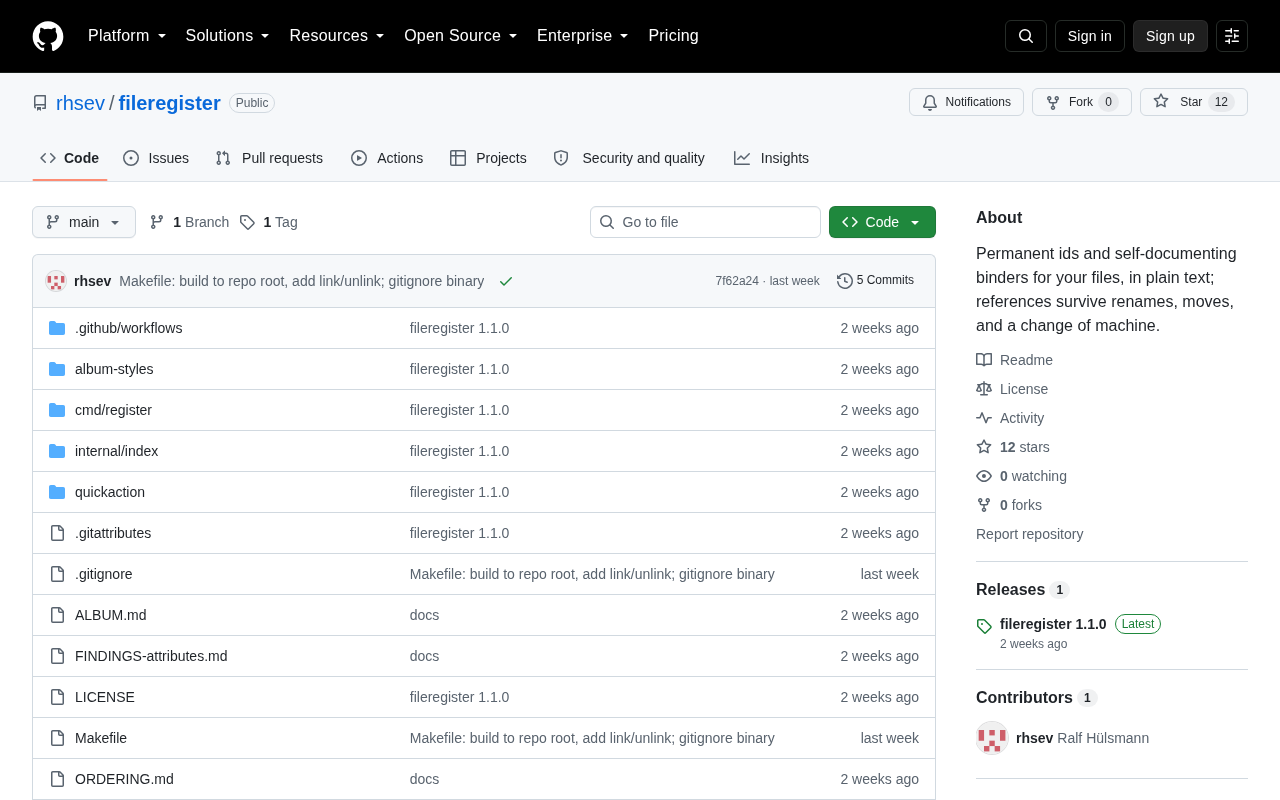
A plain text-based file tagging system enabling flexible, version-controlled file organization
Fileregister is a plain text file tagging and reference management system that solves the limitations of traditional folder hierarchies. By creating an independent metadata layer without modifying original files, it enables multi-dimensional file organization, version control, and cross-platform portability—ideal for knowledge management, creative asset tracking, and developer workflows.
Why We Need File Tagging Systems
In daily work, file management remains an unavoidable challenge. Traditional folder tree structures fall short when facing cross-domain, multi-dimensional file organization needs—a design draft might belong to a specific project while also needing to be marked as "pending review" and "high priority." This single-inheritance organizational model originates from the hierarchical file system design of the 1960s Multics operating system, with the core assumption that each file belongs to only one classification node. Information science refers to this structural limitation as the "Classification Problem"—real-world information is inherently faceted, while tree structures can only express single hierarchical relationships. Tagging systems, as a flattened form of "folksonomy," allow assigning multiple non-overlapping descriptive dimensions to the same object, fundamentally resolving this contradiction.
While operating systems provide tagging functionality, these tags are often locked to specific platforms, making them difficult to migrate and version control.
Fileregister emerged precisely to address this pain point. It provides a plain text-based file tagging and reference layer, making file organization more flexible and controllable.
Core Design Philosophy of Fileregister
Plain Text-First Metadata Storage
Fileregister's most distinctive feature is storing all metadata in plain text format. Tags, reference relationships, and classification information are all saved in readable text files rather than hidden in databases or binary files.
The Plain Text First philosophy has deep roots in the technical community, tracing back to the Unix philosophy's core principle of "using text streams as a universal interface." Eric Raymond summarized this in The Art of Unix Programming as the "textuality rule": data should be stored in human-readable text formats because text is the most durable and interoperable data format. This philosophy continues to flourish in modern tools—the popularity of Markdown, YAML, and TOML formats are clear evidence. By comparison, while SQLite databases or custom binary formats have performance advantages, they fall far short of plain text in terms of auditability, debuggability, and toolchain compatibility.
This design brings several significant advantages:
- Version control friendly: You can directly use tools like Git to track the change history of your tagging system. Particularly in version control scenarios, Git's diff and merge mechanisms naturally fit text files, clearly displaying the specific content of each metadata change
- Cross-platform universal: Independent of specific operating systems or applications
- Long-term maintainable: Even if the tool itself is no longer maintained, text files remain readable and usable
- Easy backup and migration: Copying text files completely migrates the entire tagging system
Reference Layer Design: No Modification of Original Files
Fileregister doesn't modify your original files but builds an independent reference layer on top of the file system. This design is quite clever—original files remain unchanged, with all tags, classifications, and association information stored in separate registry files. This neither pollutes the files themselves nor facilitates reusing the same files across different projects.
This pattern embodies the classic principle of "Separation of Concerns" in software engineering. In data management, it's called the "Sidecar file" or "companion metadata" approach—metadata is stored independently of the original data, similar to how Adobe XMP Sidecar files (.xmp) store editing parameters for RAW photos. The deeper value of this design lies in maintaining the immutability of original files: a file's hash value doesn't change due to metadata operations, which is crucial for scenarios requiring file integrity verification (such as legal documents or research data). Additionally, decoupling metadata from data means different teams or workflows can maintain their own independent tagging systems without mutual interference.
Use Cases and Workflows for Fileregister
Knowledge Management and Document Organization
For users managing large volumes of documents, notes, and research materials, Fileregister can establish a flexible knowledge network. You can tag the same paper with "machine learning," "to read," and "high citation value," then quickly retrieve related materials through tag combinations.
Asset Management for Creative Projects
Designers and video producers often need to manage massive asset files. Using Fileregister, you can tag assets with "Client A," "summer theme," "licensed," while establishing reference relationships between assets, such as marking which images come from the same photo shoot.
Auxiliary Tool for Developers' Projects
Development projects often have various configuration files, documents, and scripts scattered across different directories. Through Fileregister, you can establish logical associations, such as marking "production environment configuration" or "needs refactoring," without changing the project's actual directory structure.
Comparison of Fileregister with Existing File Management Solutions
While many file management tools exist on the market, Fileregister's plain text reference layer design makes it stand out. Traditional tagging solutions typically rely on the following forms:
| Solution Type | Examples | Main Limitations |
|---|---|---|
| Native OS Tags | macOS Tags, Windows File Properties | Not cross-platform, difficult batch operations |
| Dedicated Software | Evernote, Notion | Files must be imported, losing native file system flexibility |
| Database Solutions | DAM Systems | Too complex for ordinary users, inconvenient version control |
DAM (Digital Asset Management) systems mentioned in the table are important tools for enterprise-level content management, with representative products including Adobe Experience Manager Assets, Bynder, and Brandfolder. These systems typically use relational databases (like PostgreSQL) or specialized indexing engines (like Elasticsearch) to store and retrieve metadata, supporting complex permission controls, version management, and approval workflows. However, DAM systems have high deployment and maintenance costs, usually requiring dedicated administrators, and data is often locked into specific vendor ecosystems (vendor lock-in). For individual users or small teams, the complexity of DAM systems far exceeds actual needs.
Fileregister takes a third path: it maintains files in their native file system locations while providing powerful organizational capabilities through plain text, precisely filling the gap between "native OS tags" and "enterprise-grade DAM."
Technical Implementation Analysis
Starting from the "plain text reference layer" design philosophy, we can infer that the core implementation maintains one or more index files recording mappings between file paths and tags/metadata. Technical challenges this approach needs to address include:
- Path change handling: How to maintain reference validity when files are moved or renamed
- Large-scale file retrieval performance: Fast queries when file counts are massive
- Collaboration conflict resolution: Handling tag conflicts in multi-user collaboration scenarios
If the project uses JSON, YAML, or custom DSL formats, combined with file hash values (rather than relying solely on paths) to identify files, it can adequately address the above issues.
File hash values are fixed-length strings calculated from file content using cryptographic hash functions (like SHA-256), acting as the file's "digital fingerprint"—as long as the file content remains unchanged, the hash value stays consistent, independent of filename and storage path. This method of identifying files by their content is called "content-addressable." Git version control system's core is built on this mechanism—every commit, file, and directory tree in Git is uniquely identified by SHA-1 hash values. IPFS (InterPlanetary File System) similarly uses content addressing as the foundation for its distributed storage. In Fileregister's scenario, using file hashes rather than paths to establish mapping relationships elegantly solves the problem of references becoming invalid after file renaming or moving: even if a file changes location or name, as long as the content remains unchanged, the system can still correctly identify it through the hash value.
Potential Feature Extension Directions
Fileregister's design philosophy can extend into more possibilities:
- Deep Git integration: Automatically track historical changes of file tags
- Command-line tools: Support quickly adding tags and querying files by conditions
- Visualization interface: Display reference relationships between files in graph form
- Automated rule engine: Automatically add tags based on file types and path patterns
Among these, automated rule engines already have mature precedents in file management. Tools like Hazel on macOS and the cross-platform Organize have implemented rule-based automatic file classification, with the core principle being defining "condition-action" rule pairs: when files meet specific conditions (like extension .pdf, path contains /invoices/, file size exceeds 10MB), automatically execute predefined actions (like adding tags, moving to specified directories). In the plain text ecosystem, such rules can be defined using YAML or similar declarative syntax and triggered in real-time through file system monitoring (like Linux's inotify, macOS's FSEvents). Combined with cron scheduled tasks or Git hooks, tag status can automatically sync and update when specific events occur.
For users pursuing workflow automation, plain text format means easily writing scripts to batch-operate the tagging system—something graphical tools struggle to achieve.
Summary
Fileregister represents a "minimalist but not simplistic" file management philosophy. It doesn't attempt to replace the file system but provides a lightweight organizational layer on top of it. For users who value data control and wish to build sustainable workflows, this plain text tagging approach deserves serious attention. In today's era of prevalent cloud services and proprietary formats, seeing tool design thinking that returns to fundamentals is genuinely refreshing.
Related articles

Cursor AI in Practice: Weighing Efficiency Gains Against Costs in an AI IDE
An in-depth look at Cursor AI IDE's interface layout, four modes (Agent/Plan/Debug/Ask), model selection, and Git context integration, with hands-on demos weighing subscription costs against going direct to Claude.

Free Landing Page Design Rules Library: A Practical Guide for Claude Code and Cursor
A free landing page design skill for Claude Code and Cursor: MIT licensed, nearly 9,000 stars, asks about offer/audience/action before planning 12 sections with hard font and spacing constraints.

Cursor Keeps Writing Wrong Code? The Problem May Be Context, Not Prompts
Cursor keeps writing wrong code? The problem may be context, not prompts. Learn how to supply relevant files, full error messages, and expected results, plus a plan-first, small-step, test-driven workflow to reduce AI coding errors—while remembering code review remains the developer's job.