Filling the Gaps in DeepSeek Desktop: An Open-Source Plugin for Bulk Deletion and Chinese Search

Open-source plugin adds bulk deletion, recycle bin, and Chinese search to DeepSeek's desktop client.
DeepSeek's desktop client only archives conversations — never truly deletes them — leaving archived content stored locally where it can skew future AI responses. A Bilibili creator built an open-source plugin that adds four capabilities: bulk selection and archiving, safe deletion with a three-stage recycle bin workflow, batch recovery, and Chinese full-text contextual search. Compared to similar community tools, its key differentiators are recycle bin protection and precise in-context search. The plugin also saves tokens and provides visual control versus issuing commands directly to the AI.
After DeepSeek's official desktop client launched, many power users quickly noticed significant gaps in conversation management — no real delete function, only archiving, and search limited to session names. A Bilibili content creator tackled these pain points by building an open-source plugin with AI assistance, adding four missing capabilities: bulk management, safe deletion, recovery, and full-text Chinese search. This article breaks down the plugin's core features, its design philosophy, and how it differs from similar community solutions.
What the Official Desktop Client Is Missing
DeepSeekAd's desktop client currently only offers an archive function for chat history — there's no actual delete option. Archiving might seem sufficient on the surface, but the author highlights an easy-to-miss problem: archived conversations remain in the local folder, and the AI can still reference that content in future sessions, contaminating your current conversation intent and skewing responses.
The only way to fully clean up is to manually navigate the file system, locate the corresponding files, and delete them one by one — tedious work with a high risk of accidental deletion. In other words, the official client has handed cleanup entirely to the community. Search is equally limited: native search only targets session names, and even after modifications it only handles English content, with no support for Chinese body text.

At its core, the DeepSeek desktop client is a conversation client built on local file storage — each conversation maps to a local data file. Archiving simply changes the file's index state (hiding it from the main list) without moving or deleting the underlying file. Because the desktop client may read the full local conversation history when building context for new sessions, archived-but-not-deleted content remains within reach. This differs fundamentally from the web version, where data lives on servers and users can't directly intervene. The local client gives users far more control over their data — but the official app provides no corresponding management tools, creating a glaring capability gap.
The Plugin's Four Core Capabilities
This plugin addresses all four official shortcomings. Entry points are flexible: the three-dot menu in the upper right of any conversation, the top conversation manager, or the bottom of the sidebar.
Bulk Selection and Archive Operations
Inside the management interface, each conversation gets a checkbox, supporting single or select-all. You can then bulk archive or unarchive — a direct efficiency gain over the official one-at-a-time approach.
Safe Deletion Mechanism
Deletion is the plugin's most critical feature, and the author built in two layers of safety. First, any in-progress conversation displays a "Running" status and cannot be deleted, preventing accidental disruption of active sessions. Second, deletion doesn't immediately erase content — it moves items to a Recycle Bin first, giving users a chance to undo.
The workflow: select the target conversations, generate a delete command, send that command to the chat box, and the chosen model executes it. Speed depends on the model's inference speed. Once complete, the conversations disappear from the list and move to the Recycle Bin.
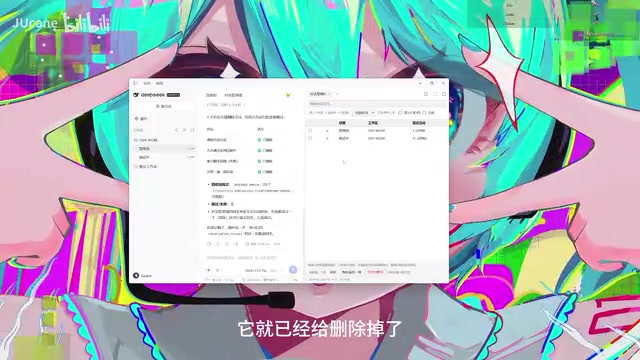
"Executed by the selected model" means the plugin injects the delete instruction — in natural language or structured command form — into the chat input, letting the local DeepSeek model parse it and trigger the corresponding file operation, rather than the plugin calling system file APIs directly. This design leverages the desktop client's existing model invocation channel, sidestepping potential permission or consistency issues that could arise from directly manipulating underlying files. The trade-off is that deletion speed is limited by model inference latency, so bulk-deleting many conversations will take noticeably longer.
Recovery and Final Purge
From the Recycle Bin, users can restore deleted conversations in batches by sending a restore command, then refreshing the list to see the content return. Once you're sure you no longer need something, you can execute a final purge. This three-stage "delete → recycle → purge" design significantly reduces the cost of accidental deletions.
Chinese Full-Text Search
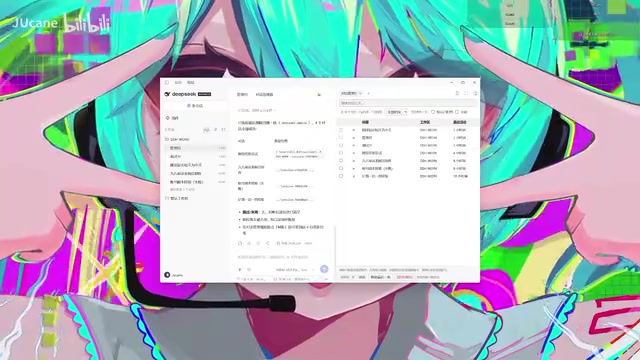
The plugin enhances search across both the standalone search box and the official magnifying glass entry point. Unlike the official version which only locates sessions, this plugin searches Chinese body text directly and can copy results to send to the AI, surfacing original and translated excerpts containing the keyword — no more scrolling through conversations from memory.
How It Differs from Similar Community Plugins
The author acknowledges that other developers have already built conversation-deletion plugins, but points to two differentiators:
First, the Recycle Bin mechanism. Most deletion plugins are permanent. This one provides a complete chain of batch recovery and purging, leaving users room to change their minds.
Second, precise contextual search. Rather than simply locating a conversation, it can pinpoint specific positions within the context, eliminating the need to hunt through sessions from memory.

Why Install a Plugin Instead of Just Asking the AI?
A reasonable question: if deletion, recovery, and search are all handled by the AI anyway, why bother installing a plugin instead of just asking the AI directly? The author offers three reasons:
- Saves Tokens: Having the AI handle these tasks consumes a significant number of tokens — the longer the context, the more noticeable the cost. The plugin meaningfully reduces this overhead.
- Reduces Risk: Asking the AI directly to delete things leaves you uncertain about exactly what it's deleting — a real source of risk.
- Visual Control: The plugin provides a visual interface, giving users a clear view of exactly what they're operating on.
Tokens are the basic unit of text measurement for large language models, roughly corresponding to a word or a few characters (in Chinese, approximately 1–2 characters per token). Locally running models typically have a context window limit (e.g., 4K, 8K, or 32K tokens). As conversation history grows longer, each inference requires reading and processing more tokens, consuming more VRAM/memory and slowing responses. Using the plugin for management tasks like deletion and search means those operations never enter the model's context, preserving that valuable space for conversations that actually matter.
How to Get It
The plugin offers two installation methods: click "Add Plugin" on the official plugin page and enter the author's repository link to download directly, or visit the author's personal repository for more detailed instructions and multiple download options. The entire plugin was written with AI assistance, and the author welcomes community feedback and improvement suggestions.
For heavy DeepSeek desktop users, this plugin fills more than just a missing delete button — it delivers a complete conversation management solution that balances safety and efficiency. Until the official client catches up, community plugins remain an essential force in bridging the experience gap.
Related articles

Gemini 4 Argon Hands-On: AI Builds Board Games, Constructs Temples, and Trains Robots Autonomously
Gemini 4 Argon hands-on roundup: AI autonomously builds a desk racetrack and temple in Blender, writes a ray tracing engine, trains a humanoid robot to sink 7 shots, plus API pricing and developer access.

The Magic Octagonal Coin: Why Only 9% of People Can Predict Its Flip?
Only 9% of people can correctly predict the Magic Octagon coin flip. This article explains its spatial rotation mechanism, common cognitive pitfalls, and a new hypothesis based on Relevance Theory, exploring the limits of human spatial reasoning.

Sam Altman: AI Is Entering the Era of Scientific Discovery — Math Breakthroughs Will Replicate in Biology and Energy
Sam Altman says AI is entering the era of scientific discovery — math breakthroughs will replicate in biology, materials science, and energy to help develop new drugs and energy sources.