Free Claude Code Hands-On: Zero-Barrier Access to DeepSeek, Full Walkthrough
Free Claude Code uses a local proxy to swap the model layer, letting Claude Code run DeepSeek with fast speed and low cost.
Based on a hands-on video, this article covers the open-source project Free Claude Code, which uses a local FCC Server to take over Claude Code's model calls and forward them to third-party models like DeepSeek. Setup takes three steps: clone, UV Sync, and run the server, then configure Providers and Model Config. Testing shows fast domestic response and low token costs, though the override mechanism can cause model name mismatches and the project depends on third-party maintenance.
Claude Code's terminal agent experience has long been praised by developers, but its model call limits and costs deter many. An open-source project called Free Claude Code attempts to break this limitation—it lets you replace the model behind Claude Code with any custom model, including China's DeepSeek. Based on a hands-on video from a Bilibili creator, this article walks through the entire process from cloning the project to running a successful conversation, and analyzes the practical value and potential issues of this approach.
Core Idea: Decoupling the Model Layer
Free Claude Code's positioning is clear: preserve Claude Code's terminal interaction experience, but forward model requests to your own API. It takes over model calls through a local service (FCC Server), while the frontend still displays Claude's model names—yet requests are actually routed to your configured third-party model.
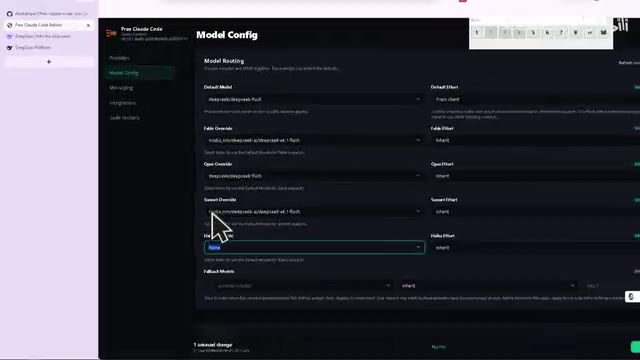
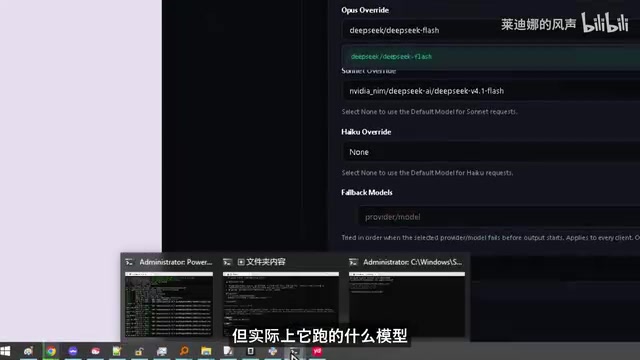
This "model override" mechanism is the key to the whole scheme. In the video, the creator demonstrates: on the Model Config page, you can specify an override target for each model, for example mapping Opus to DeepSeekAd Flash. What you see in the frontend is Opus, but DeepSeek runs in the background—which also explains why the response speed is "very fast."

Claude Code itself is Anthropic's official terminal coding agent, which by default only calls Anthropic's own models and bills through account subscription or API Key. The so-called "model layer decoupling" essentially inserts a middle layer compatible with the Anthropic API protocol between Claude Code and the model service: the client still sends requests in the original format, the middle layer parses and forwards them to an OpenAI-compatible or custom interface, then converts the response into a format the client can recognize. Common implementations of such proxies include local HTTP services and environment variables pointing to a custom base URL. Understanding this clarifies why the frontend model name can be displayed arbitrarily while the backend can call any vendor's model.
Deployment Process: Three Steps to Get Running
Step 1: Clone and Install Dependencies
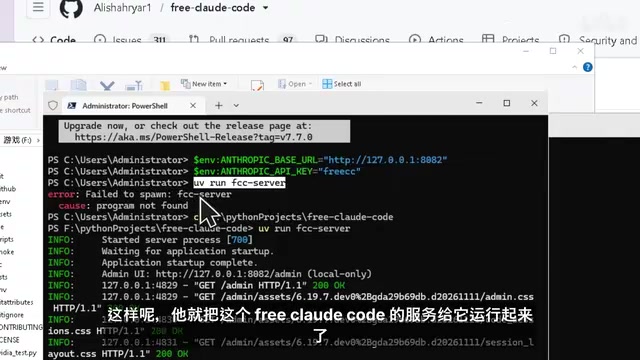
After cloning the project locally, run UV Sync to install dependencies. UV is a relatively new package manager in the Python ecosystem, with a clear speed advantage over traditional pip. Once installation is complete, the project is ready to run.
UV is a Python package and project manager written in Rust by the Astral team (the authors of ruff). It is compatible with pip's dependency resolution logic but typically installs an order of magnitude faster than pip. It integrates virtual environment management, dependency locking, and project execution into a single command-line tool. uv sync creates a consistent virtual environment and installs dependencies based on the project's pyproject.toml and uv.lock, while uv run executes commands directly in that environment without manual activation. For open-source tools that require pinned dependency versions, UV significantly reduces the chance of "can't install, version conflicts."
Step 2: Start the Local Service
Run UV Run FCC Server, and the Free Claude Code service starts, automatically opening a web configuration page. The entire startup process requires no additional environment variable configuration, making it very low-barrier for developers unfamiliar with the Node/Python toolchain.
Step 3: Configure Providers and Model Config
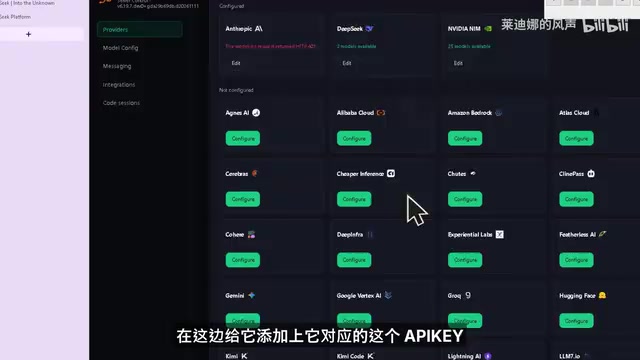
On the web page, go to Providers and add the models you want to use along with their API Keys. In the demo, the creator configured DeepSeek and NVIDIA models, and mentioned that Alibaba's Tongyi Qianwen can also be integrated—just fill in the corresponding API Key.
After configuring Providers, go to the Model Config page. Here's an easily overlooked detail: for Default Model to take effect, all model override items below must be left as None. Otherwise, the system prioritizes the override model, so you may think you're using the default model while requests are actually forwarded elsewhere.
The creator specifically highlighted this: if you select Opus as the Model and also point Opus to DeepSeek Flash in the override settings, then requests are actually routed to DeepSeek Flash. The frontend shows Opus, but the backend runs DeepSeek—this "mismatch" is by design, not a bug.
Hands-On Experience: Domestic Speed Is the Biggest Highlight
After configuration, the creator chatted directly with the Agent. When asked "Hello, how can I help you?", the Agent correctly identified the current directory and explained the project's purpose; when given a task, the command was executed quickly after pressing Enter.
The creator repeatedly emphasized that it's "very fast domestically." This is easy to understand: DeepSeek's API has low latency in the domestic network environment, a clear advantage over directly connecting to overseas model services. For developers who frequently call Agents daily, the improved response speed is a tangible experience boost.
On cost, the creator saw 250,000 tokens consumed in the DeepSeek backend and noted that domestic token prices are relatively cheap. It should be noted that this figure comes from a single observation in the video demo and does not represent average consumption over long-term use—Agent-type tools consume far more tokens than ordinary conversations because they read files and execute commands.
The token consumption structure of Agent-type tools differs from chat: each task often includes system prompts, directory structures, file contents, historical tool call results and other context, and a single conversation may trigger multiple model requests, so a single task can involve tens of thousands of tokens or more. 250,000 tokens may seem exaggerated in the demo, but it's a normal magnitude for sessions involving multiple rounds of file reading and command execution. When evaluating costs, pay attention to the unit price difference between input and output tokens, whether cache billing applies, and the hidden overhead of repeatedly sending context in long sessions.
Who This Scheme Is For
Based on the hands-on test, Free Claude Code's value is mainly reflected in three scenarios:
- Want to use Claude Code interaction but limited by model availability: bypass restrictions through model override while keeping the terminal agent workflow.
- Sensitive to response speed: the low latency of domestic model APIs is noticeably better in interactive Agent scenarios.
- Want to control costs: replace with cheaper domestic models, lowering the per-token price.
But there are things to watch out for. The model override mechanism means the model name you see may not match the model actually being called, which can cause confusion when troubleshooting; moreover, this scheme relies on continuous maintenance of a third-party project, and API changes may break the configuration.
Summary
Free Claude Code uses a local proxy layer to decouple Claude Code's model layer, allowing developers to freely integrate domestic models like DeepSeek. The deployment process is simple, and the hands-on speed performance is outstanding—suitable for developers who want to keep the terminal agent experience while reducing costs or improving response speed. The trade-off is needing to understand the model override logic and stay aware of the project's maintenance status.
One-line Summary
Free Claude Code replaces the model layer through a local proxy, letting Claude Code access domestic models like DeepSeek, with fast speed and low cost in hands-on testing.
Paragraph Summary
The article, based on a hands-on video from a Bilibili creator, walks through the complete usage flow of the open-source project Free Claude Code. The project takes over Claude Code's model calls through a local FCC Server, preserving the terminal interaction experience while forwarding requests to user-configured third-party models such as DeepSeek, NVIDIA, or Tongyi Qianwen. Deployment requires only three steps: clone the project, install dependencies with UV Sync, and run UV Run FCC Server, then configure Providers and Model Config on the web page. Hands-on testing shows domestic models respond very quickly and token prices are relatively cheap. The article also notes that the Model Config override mechanism can cause the frontend model name to differ from the actual backend call, and that the scheme relies on third-party project maintenance.
Related articles
Cursor Supply Chain Attack: How a Single Key Compromised 5,000 Developers
Cursor discloses results of its October supply chain attack investigation: attackers used a leaked Fireworks access key to plant an SSH backdoor disguised as the Anthropic Claude code extension in Cursor's marketplace cache, potentially affecting ~5,000 developers. This article covers the timeline, accountability, and self-checks developers should perform.
vLLM Releases v0.34.0rc4 Release Candidate: Focused on Test Stability and warmup-gate
vLLM releases v0.34.0rc4 release candidate with only one test-related commit involving the warmup-gate test runner and num_speculat parameters. This article analyzes the engineering signals, the significance of speculative decoding test coverage, and the impact on users.

Dynamic Rank Allocation for LoRA: A New Optimization Direction for Lightweight Fine-Tuning
Exploring dynamic rank allocation for LoRA fine-tuning: why fixed rank may not be optimal, core mechanisms, potential gains, engineering challenges, and how to get involved.