Free Claude Code: One Proxy Connecting 50 Providers and 9 Coding Assistants
FCC is an open-source local proxy unifying 50 AI providers and 9 coding agents with automatic failover.
Free Claude Code (FCC) is an MIT-licensed open-source local proxy that consolidates 50 AI model providers and 9 coding agents — including Claude Code, Codex, and Hermes — into a single unified workflow. It solves three key developer pain points: rapid token depletion, service disconnections, and account ban risks. With automatic failover, RTK terminal compression, tiered routing, and support for both cloud and local GGUF models, FCC provides a stable, cost-efficient coding experience.
One Local Proxy to Solve the Three Biggest Pain Points of Coding Agents
Developers who regularly use AI coding assistants like Claude Code and Codex are likely all too familiar with three recurring headaches: errors mid-way through long-running tasks, having to reconfigure environments every time you switch tools, and complete downtime when the network drops. To make matters worse, some Coding Agents can only connect through vendor billing accounts, and one wrong move can trigger risk controls or even account bans.
An MIT-licensed open-source project called Free Claude Code (FCC for short) tackles these pain points with a local proxy approach. It consolidates 50 Providers, approximately 1.3 billion tokens of monthly free quota, and 9 Coding Agents into a single local proxy — deploy once, and all nine Agents are routed through it.
A Local Proxy is a classic middleware architecture pattern that inserts a locally-running intermediary layer between the client and remote services, handling request routing, authentication, caching, and fault recovery in a unified manner. In microservices architecture, this pattern is known as a Sidecar Proxy, widely adopted by projects like Envoy and Nginx. FCC applies this pattern to the AI coding assistant domain, meaning all API requests from Coding Agents first pass through the local proxy, which then decides which backend Provider to forward them to — enabling unified management and intelligent routing.
FCC is independently open-sourced under the MIT license and has no official affiliation with Anthropic, OpenAI, or any other vendor. It's essentially a middleware layer — your Coding Agent uses it to orchestrate various backend model resources.
The Three Problems FCC Actually Solves
Problem 1: Tokens Burn Through Fast
In the billing system of large language models, tokens are the fundamental unit of measurement. One token corresponds to roughly 3/4 of an English word, or about 1-2 Chinese characters. Coding Agents consume massive amounts of tokens during operation: each conversation requires sending the complete system prompt, tool schema, conversation history, and the user's current code snippets. A complex code refactoring task can easily consume tens of thousands — or even hundreds of thousands — of tokens in a single conversation.
Once a single provider's quota for mainstream models is exhausted, you're left with two options: top up or switch accounts. What's worse, different Coding Agents each bind to their own model catalogs, making it impossible to pick a more optimal combination. FCC's catalog of 50 Providers lets all Agents share the same model list, unifying free quotas scattered across different platforms into a single orchestration layer. This dramatically improves quota utilization and significantly extends usable time.
Problem 2: Service Disconnections Derail Everything
Rate limiting during high-traffic periods, gateway jitter, and upstream service outages can all cause a Coding Agent to freeze. After a manual restart, the context is lost and your workflow is completely disrupted. FCC has a built-in automatic Failover mechanism: when the current Provider fails, it automatically switches to the next available model without manual intervention, and all clients share the same fallback catalog.
Failover is a core mechanism for ensuring high availability in distributed systems. In traditional web services, load balancers use health checks to probe backend node status and automatically reroute traffic to standby nodes upon detecting a failure. FCC brings this mechanism to LLM API calls: when a Provider returns a 429 (rate limited), 503 (service unavailable), or timeout error, the proxy immediately reroutes the request to the next available node in the preset backup Provider list. This process is completely transparent to the Coding Agent above — the Agent only sees a consistently available local API endpoint and doesn't need to be aware of the underlying Provider switch, thereby avoiding context loss and task interruption.
Problem 3: Account Binding and Ban Risks
Some Coding Agents only connect through vendor billing accounts, and running them directly with API Keys can easily trigger risk controls. FCC mitigates this risk through local proxy isolation combined with multi-channel fallbacks. The project also emphasizes a "risk-control friendly" approach, following upstream terms of service and removing any non-compliant providers.
Three Steps to Get Started: Install, Launch, Configure a Channel
Step 1: Install FCC
FCC is built on Python 3.14 + UV and offers desktop clients for Windows, macOS, and Linux. macOS or Linux users can pipe the install.sh script via curl in the terminal; Windows users use PowerShell 5.1+ to fetch and execute the install script via irm. It's recommended to inspect the script contents before running it for full transparency.
Once installed, you'll see a Free Claude Code launcher on your desktop, and a series of commands prefixed with FCC will appear in the command palette — this is the unified entry point for all 9 Coding Agents. During installation, you'll be asked whether to also install the RTK Terminal Compressor (an optional token-saving tool).
The RTK Terminal Compressor is a filter applied to the Coding Agent's output pipeline. When a Coding Agent executes terminal commands (such as ls -la, git log, npm install, etc.) and feeds the output back to the LLM as context, these raw outputs often contain large amounts of repetitive, redundant, or reasoning-irrelevant information. For example, a single npm install might output hundreds of lines of dependency resolution logs, but all the model really needs to know is whether the installation succeeded and if there were any errors. RTK uses rule matching and pattern recognition to compress this verbose output to less than 10% of its original size, leaving more of the Context Window available for the code content and conversation history that actually matter.
Step 2: Launch the FCC Proxy
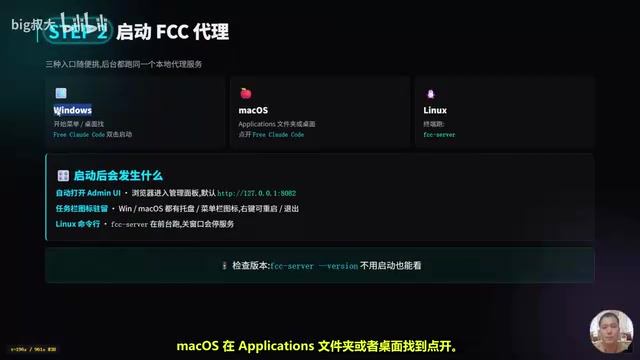
All three methods point to the same local proxy: double-click the icon on Windows or macOS, or run the fcc-server command on Linux. Once launched, the Admin UI management panel opens automatically at the default address http://127.0.0.1:8082. To check the version number, simply run fcc-server --version — no need to start the full service.
Step 3: Configure an Available Token Channel
Using NVIDIA NIM as an example (which offers a substantial monthly free quota), the workflow is: create an API Key in the NVIDIA developer portal → open the Admin UI in your browser → paste the Key into the NVIDIA NIM API Key field → leave the Model field at its default (NEMOTRON series) → click Validate to verify, then click Apply.
If you want to add a layer of protection to the local proxy, you can enable the Proxy Authentication toggle in the Admin UI. With this on, all calls must include a Bearer Token — even if the port is discovered through scanning, it can't be abused. Proxy Authentication is an important security measure. FCC listens on 127.0.0.1 (the local loopback address) by default, meaning external networks theoretically can't access it directly. However, in certain scenarios — such as sharing the proxy within a LAN, using port forwarding tools, or running in cloud development environments (like GitHub Codespaces or Gitpod) — the local port may be accidentally exposed. With Proxy Auth enabled, every API request must carry a Bearer Token in the HTTP Header for authentication; even if the port is scanned, unauthorized calls will be rejected. This is a lightweight implementation of the zero-trust security model for local tooling.
One Model Catalog Covering 9 Coding Agents
FCC's core value lies in this: model configurations are managed centrally in the backend and automatically synced to all clients. All Agent launch commands are prefixed with FCC, and each can be run with a single command:
- Claude Code:
fcc-claude - Codex:
fcc-codex - Hermes:
fcc-hermes - Plus Pi, OpenCode, Cline, DeepSeekAd Harness, Grok Build, Muse Code, and more — 9 Agents total, one command each.
When switching between Agents, there's no need to configure environment variables separately — the proxy has already handled the integration in the background. If a model isn't in the default catalog, you can manually enter it in the Admin UI using the Provider ID / Exact Model ID format.
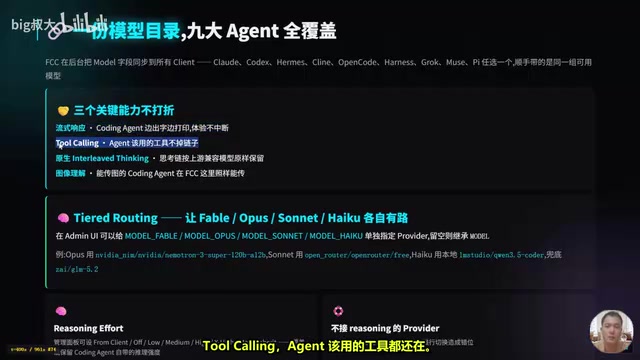
It's worth emphasizing that the Agents' key capabilities are not diminished: streaming responses, Tool Calling, Interleaved Thinking, and image understanding are all preserved as-is for compatible upstream models. Tool Calling is one of the core capabilities of modern LLM Agents, allowing the model to request external tool invocations during text generation — such as file read/write, terminal command execution, and code search. OpenAI and Anthropic each define their own Function Calling/Tool Use protocols, where the model returns structured JSON specifying which tool to call and what parameters to pass. Interleaved Thinking is the Extended Thinking feature introduced by Anthropic Claude, where the model outputs its internal reasoning process before generating the final answer, helping to accomplish complex multi-step programming tasks. As a proxy layer, FCC needs to transparently pass through all these protocol details, including thinking blocks and tool_use blocks in streaming SSE (Server-Sent Events). Any field loss or format alteration could cause Agent functionality to break.
The advanced Tiered Routing feature even lets you assign different Providers to OPUS, SONNET, and HAIKU respectively — for example, routing OPUS through NVIDIA NIM, SONNET through OpenRouter's free tier, and HAIKU to a local Qwen3 Coder running on LM Studio. The design logic behind this tiered dispatch stems from Anthropic's Claude model family hierarchy: OPUS has the strongest reasoning capability, suitable for complex architectural design; SONNET strikes a balance between performance and cost, ideal for everyday coding; HAIKU is lightweight and fast, suited for simple completions and formatting. Different tiers of tasks have vastly different model capability requirements — using OPUS for code formatting is wasteful, while using HAIKU for architectural refactoring falls short. Tiered Routing allows users to specify the optimal Provider and model combination for each tier, enabling fine-grained control over cost and performance.
Domestically Available Models and Local Fallback Solutions
For developers in China, FCC's most practical value is this: "When overseas channels hit rate limits or face bans, domestic models plus local GGUF models can step in immediately."
All major domestic SaaS models are supported: Tongyi Qianwen (Qwen), DeepSeek, Zhipu GLM, Kimi Code, SiliconFlow, MiniMax M-series, Alibaba's Coding Program, and more. On the local LLM side, Ollama, Ollama Cloud, LM Studio, and llama.cpp can all be integrated, and any model in GGUF format can be run.
GGUF (GPT-Generated Unified Format) is a model file format defined by the llama.cpp project, and it has become the de facto standard for locally deploying open-source large language models. The GGUF format supports multiple quantization precisions (such as Q4_K_M, Q5_K_S, Q8_0, etc.), allowing developers to choose an appropriate quantized version based on their local hardware's VRAM and RAM capacity. For example, a 7B parameter model at Q4 quantization requires only about 4GB of VRAM to run. Ollama, LM Studio, and llama.cpp all natively support the GGUF format, launching a local HTTP service compatible with the OpenAI API format. FCC can interface with these local services just like it would with a cloud Provider. This means that even in a completely offline environment, developers can still drive Coding Agents through local GGUF models to complete coding tasks, though inference speed and model capability will be somewhat reduced.
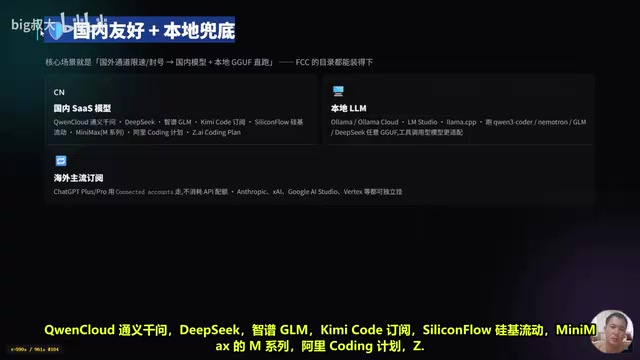
A common domestic fallback combination is: primary model "Tongyi Qianwen Qwen3-Plus," first backup "DeepSeek Chat," second backup a local 7B "Qwen3 Coder GGUF" (fully usable offline). After setting these as the Failover Models list, the Coding Agent runs stably in China's network environment and can continue working even when offline.
One important note: Coding Agents typically require Tool Capable models, and local models also need sufficient Context to accommodate the System Prompt plus tool definitions. FCC prioritizes recommending versions with tool calling support when selecting models, which can be filtered in the Admin UI search.
The Stability Trifecta and Client Matrix
FCC ensures a smooth experience through three mechanisms:
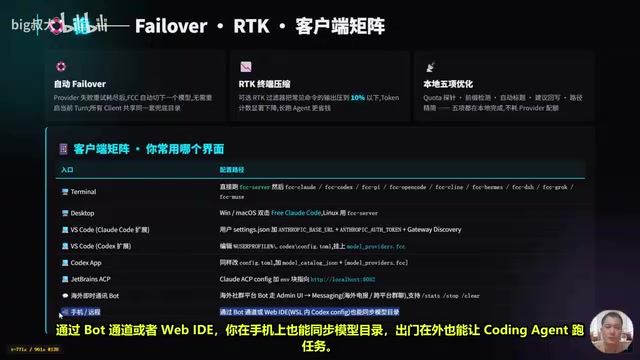
- Automatic Failover: Automatically switches when a Provider fails; all clients share the same fallback catalog
- RTK Terminal Compression: An optional filter that can compress common command outputs to less than 10% of their original size, saving tokens during long Agent sessions
- Five Local Optimizations: Quota probing, pre-flight checks, auto-titling, suggestion writeback, and path simplification — none of which consume Provider quota
Client integration coverage is also extensive: terminal users run commands directly; VSCode users add environment variables in settings.json, pointing ANTHROPIC_BASE_URL to the local proxy; Codex extension and App users modify config.toml; JetBrains users go through ACP configuration; even messaging bots (like Telegram) can connect through the Admin UI's Messaging channel, using commands like /stats, /stop, and /clear to sync model catalogs and remotely execute tasks from your phone.
Voice, Uninstallation, and Compliance Notes
FCC also offers an optional voice transcription feature. Simply re-run the install script with the corresponding parameter: --voice-nim (NVIDIA NIM transcription), --voice-local (local Whisper), or --voice-all (install both). Local Whisper supports CPU or CUDA acceleration. Whisper is OpenAI's open-source automatic speech recognition (ASR) model, supporting multilingual transcription and translation. When deployed locally, you can choose from different model sizes (tiny, base, small, medium, large). With CUDA GPU acceleration, it achieves near real-time transcription speed, and even in CPU mode, it completes transcription with acceptable latency.
The uninstall process is clean: stop all FCC processes, then run the uninstall script. It removes the .fcc directory, desktop launcher, and FCC commands, but preserves UV, Python, Claude Code, Codex, and other Agent binaries. In other words, uninstalling FCC won't affect your installed Coding Agents — a thoughtful design choice.
Three compliance points worth noting: first, MIT license with a risk-control friendly policy; second, enabling Proxy Auth is recommended for production environments; third, Provider and Fallback lists can be adjusted at any time and are entirely under the user's control.
Summary: Who Is FCC For?
In one sentence: FCC is a local proxy that strings together 50 Providers, 9 Coding Agents, voice transcription, RTK compression, and automatic Failover into one stable workflow.
It's primarily suited for three types of developers: those who need to flexibly switch between multiple Coding Agents, those who feel uneasy relying on a single provider's token quota, and those who want to run local GGUF models alongside Coding Agents.
The onboarding path is clear: start by installing FCC with NVIDIA NIM to complete the Quick Start; once comfortable, add domestic models as your primary channel and overseas models as fallbacks in the configuration; then connect your unified model catalog in VSCode or the Codex App; finally, add voice features as needed. For developers frustrated by vendor lock-in and quota anxiety, this open-source middleware layer undeniably offers more freedom and control.
Related articles
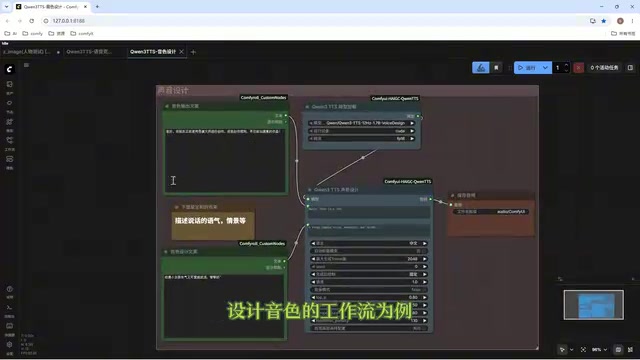
Director Master Tutorial: Full Workflow for AI Character Voice Design and Binding
Based on a Bilibili tutorial, this guide details how to design and bind AI character voices in Director Master: uploading voices, generating them via ComfyUI workflows, producing voice profiles alongside character design, and automatically inheriting voices in storyboard prompts.
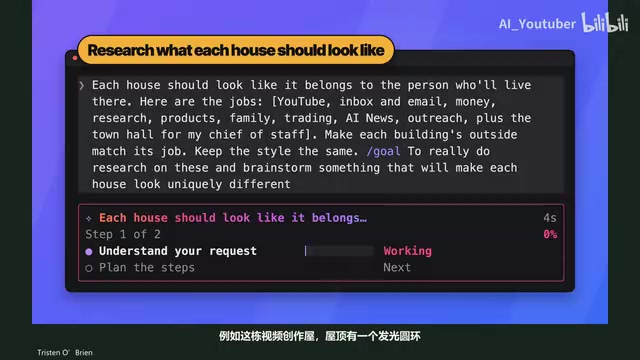
3.5 Hours and $47: Building an AI Agent Village Step by Step
A Bilibili creator built an AI Agent village in 3.5 hours for about $47: Claude Code handles logic and behavior, Higgs Field generates art. Seven steps cover maps and buildings, chief of staff and director roles, walkable areas and behavior rules, connecting to real tools like email and calendars, proving ground meetings, and retaining final human approval—including a cost ledger and prompt design thinking.
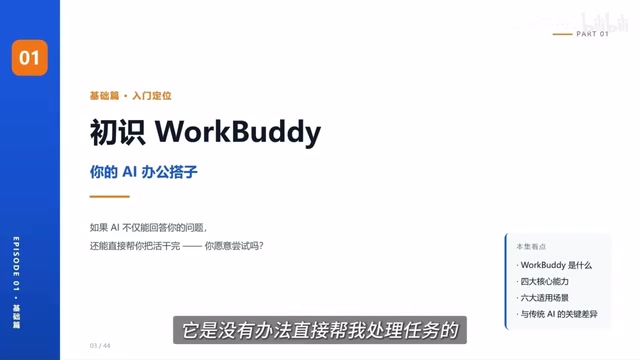
WorkBuddy Complete Beginner's Guide: Master Your AI Digital Employee in 7 Days
A detailed breakdown of the WorkBuddy beginner's guide: how this domestic Codex alternative works, its four advantages over traditional AI, and a learning path for newcomers.