Free Grok Alternative: Generate Watermark-Free Cinema-Quality AI Videos with OPPO + VO3

Build a free VO3 video generator on Google's OPPO platform as a $30/month Grok alternative.
This article explains how to use Google's free no-code OPPO platform to build an AI video generator powered by VO3 (Veo 3), serving as an alternative to Grok's $30/month subscription. The solution enables unlimited generation of 8-second cinema-quality videos with synchronized sound effects and no watermarks, with setup taking only about 2 minutes. The article emphasizes that success hinges on prompt engineering — structuring your prompts to specify video concept input, mood selector, visual style, and other functional modules — and validates output quality through three practical examples.
Spending $30/month on a Grok subscription to generate AI videos? There's now a completely free alternative — by leveraging Google's OPPO platform powered by the VO3 video model, you can generate unlimited cinema-quality AI videos with sound effects and no watermarks. This article breaks down the complete setup process and real-world results.
Why Look for a Grok Alternative?
Grok is the AI video generation tool launched by the X platform (formerly Twitter), and its video generation capabilities are genuinely impressive. Its underlying Aurora model uses a Diffusion Transformer architecture that can generate high-fidelity video clips directly from text descriptions. xAI was founded by Elon Musk in 2023, initially starting with large language models before rapidly expanding into multimodal generation. The Aurora model's training data reportedly includes extensive film footage and professional photography material, which gives it particularly strong performance in lighting and camera movement.
But here's the problem: it's locked behind a $30/month Premium Plus subscription plan, and even after paying, there's still a generation limit. Locking this capability behind a premium subscription tier is essentially xAI's monetization strategy — using high-value features to drive paid user growth on the X platform.
For most content creators and AI enthusiasts, $30/month just to generate a few videos isn't great value. Especially if you're just testing the waters with AI video, or just starting a YouTube automation channel — the expense is even harder to justify.
The good news is that Google's most advanced AI video model, VO3 (Veo 3), is now available for unlimited use through a free platform.
What is OPPO: Google's Free AI App Builder
OPPO is Google's latest AI platform, with the core capability of letting users build fully functional applications in seconds — no code required, completely free. Simply put, it's a personal AI app builder.
This platform is part of Google's broader "AI democratization" strategy that they've been aggressively pursuing in recent years. The underlying logic is to expose Google's massive AI model ecosystem (including the Gemini language model series, Imagen image models, Veo video models, etc.) to everyday users through a no-code interface. Users describe their needs in natural language, and the platform automatically orchestrates the frontend UI, backend API calls, and data flow logic. This approach is similar to earlier offerings like Google AI Studio and Vertex AI, but with a much lower barrier to entry, targeting creators with absolutely no programming experience. Google's core purpose in offering this platform for free is to build a developer and creator ecosystem, competing with OpenAI, Anthropic, and other competitors for user mindshare at the AI application layer.
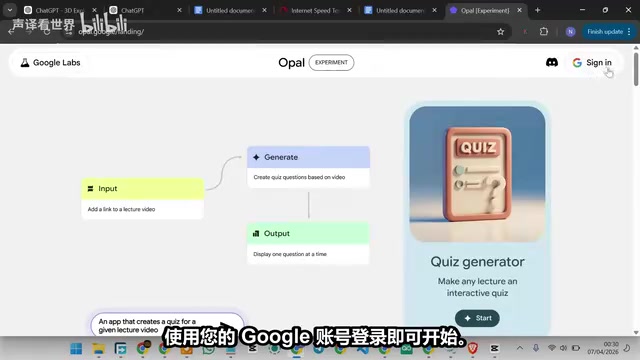
Just log in with your Google account to get started. After entering the platform, you'll see a series of ready-made templates, but to maintain full control over every detail of your app, I recommend building from scratch. Just click "Create New Project."
What we're doing today is building a VO3-powered AI video generator from scratch using OPPO. VO3 is the shorthand for Google DeepMind's third-generation video generation model, Veo 3. Compared to its predecessors, Veo 3's biggest breakthrough is native audio generation — it doesn't just generate video visuals, but simultaneously produces synchronized environmental sound effects, dialogue, and even background music that matches the visual content. This is an industry-first level capability. Veo 3 is built on Google's Flow Matching technology, a generation paradigm more efficient than traditional diffusion models, capable of producing high-quality results in fewer inference steps. The model debuted at the 2025 Google I/O conference and is considered a top-tier video generation model competing directly with OpenAI's Sora and Runway Gen-3.
It can transform your creative ideas into cinema-quality videos with synchronized sound effects in under a minute.
The Key to Building Your Video Generator: Prompt Engineering
Why Most People Fail
This is the most critical step in the entire process, and where most people stumble. Many people enter OPPO and just casually type something vague like "make a video generator," resulting in a fragmented, half-functional app.
The secret lies in prompt quality. The reason prompt engineering is so critical in AI app building traces back to the fundamental working mechanism of large language models — they're essentially conditional probability generators whose output quality is highly dependent on the completeness and structure of input information. In no-code platforms like OPPO, your prompt effectively serves as a "requirements specification document." When you input vague instructions, the model has to fill in massive information gaps on its own, introducing uncertainty. Structured prompts dramatically compress the model's "guessing space" by explicitly specifying UI components, data flows, model call parameters, and other elements. This aligns perfectly with the software engineering principle that "the clearer the requirements, the higher the delivery quality." The industry now treats prompt engineering as an independent skill, with dedicated Prompt Engineer positions emerging.
You need a detailed, well-structured prompt that clearly tells OPPO which functional modules to build:
- Video concept input field: For describing the video scene
- Mood/atmosphere selector: Setting the emotional tone of the video
- Visual style settings: Such as photorealistic, sci-fi noir, dark fantasy, etc.
- Duration control: VO3's standard duration is 8 seconds
- Reference image upload (optional): Using images to guide visual style
Vague prompts produce vague applications. This rule applies almost universally in the AI domain.
How It Works Behind the Scenes
Once built, the app's workflow is quite elegant:
- Collects all your input information (concept, mood, style, duration, etc.)
- Distills a refined and optimized video prompt from these inputs
- Sends the prompt to the VO3 model
- Delivers the final video directly within the interface
Essentially, you've built a polished frontend interface connected to one of the world's top AI video models on the backend. And the entire build process takes just two minutes.
Practical Demonstrations: Three Cinema-Quality Video Examples
Example 1: Lighthouse Keeper in a Storm
First test prompt:
"A solitary lighthouseAd keeper stands at the edge of a cliff, in raging storms, with massive waves crashing below. A mysterious glowing ship silently emerges from the fog."
- Mood: Eerie and cinematic
- Visual style: Photorealistic
- Duration: 8 seconds
- Reference image: None
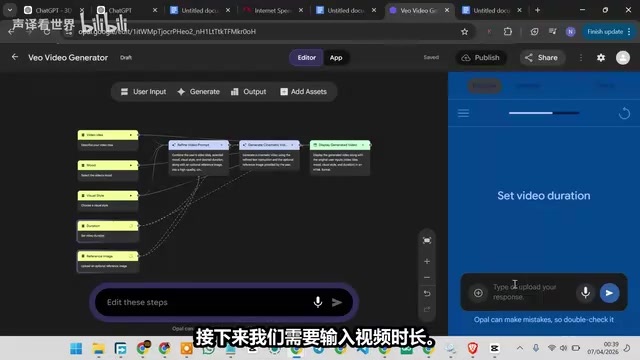
Moments after submitting, a fully rendered video with sound effects and no watermark was ready. This is what Grok charges $30/month to do — and you just did it for free.
Example 2: Bounty Hunter in a Sci-Fi Space Station
The second test incorporated a reference image to guide visual style:
"A futuristic female bounty hunter walks in slow motion through a collapsing space station, debris floating around her in zero gravity, emergency red lights flashing against the pitch-black space backdrop behind her."
- Mood: Intense and cinematic
- Visual style: Sci-fi noir
- Duration: 8 seconds
- Reference image: Uploaded a character reference image
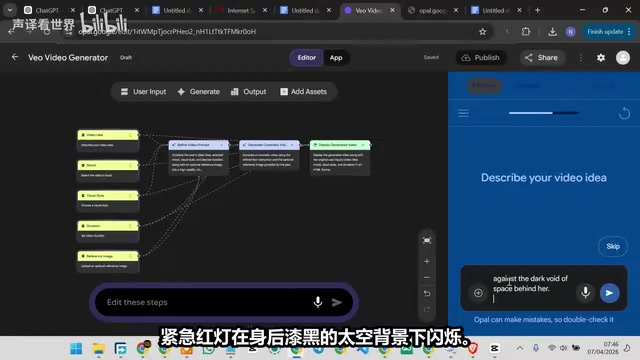
The reference image feature is technically known as Image-to-Video or Image-Conditioned Generation. It works by converting the uploaded reference image through a visual encoder (such as CLIP or SigLIP) into high-dimensional feature vectors, which are then injected as additional conditioning signals into the video generation model's denoising process. This means the model references not just the text description, but also extracts color tones, composition, character appearance, lighting style, and other visual information from the image to constrain the generated output. This multimodal conditional control is a core technical trend in video generation today, allowing creators to achieve more precise control over outputs rather than relying entirely on the expressive power of text descriptions.
The motion, lighting, and underlying sound effects in the generated result were all impressive. The reference image feature effectively guides the visual direction of the video, making outputs closer to your expectations.
Example 3: Storm Dragon Diving at a Medieval Fortress
The third example challenged a more complex fantasy scene:
"An ancient dragon made of storm clouds and lightning dives toward a medieval fortress at dusk, its wingspan eclipsing the setting sun, as terrified villagers scatter below."
- Mood: Mythical and overwhelming
- Visual style: Dark fantasy, cinematic, painterly yet photorealistic
- Duration: 8 seconds
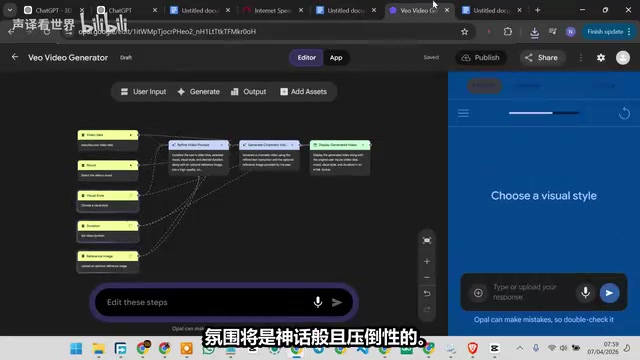
The final result is exactly what cinema-quality AI video should look like — and it didn't cost a cent.
Grok vs OPPO+VO3: An Honest Comparison
| Comparison | Grok | OPPO + VO3 |
|---|---|---|
| Price | $30/month | Completely free |
| Generation limit | Limited | Unlimited |
| Watermark | Yes | No |
| Sound effects | Supported | Supported (synchronized) |
| Video quality | Cinema-grade | Equally cinema-grade |
| Barrier to entry | Subscribe and use | Need to build app (~2 min) |
To be fair, Grok is a great tool, and its video generation quality is genuinely impressive. But if you haven't paid for it yet, there's no rush to open your wallet. OPPO powered by VO3 delivers equivalent video quality with sound effects, no watermarks, and unlimited generation.
Final Thoughts
The only barrier between you and Hollywood-quality AI content is a good prompt and this free tool. The entire setup takes under two minutes, but it can save you $30/month while giving you unrestricted creative freedom.
For content creators, this means you can freely experiment with different visual styles and narrative approaches without worrying about hitting generation limits. For newcomers to AI video, this is an excellent zero-cost entry point.
The AI video generation space in 2025 is in an intense arms race. Major players include: OpenAI's Sora (known for physics simulation capabilities), Google DeepMind's Veo 3 (leading in native audio generation), Runway's Gen-3 Alpha (most mature creative community ecosystem), Kling (under Kuaishou, dominant in Asian markets), and Pika Labs (known for ease of use and rapid iteration). These models each have different strengths across dimensions like video duration, resolution, motion consistency, and physical realism. Notably, free access is becoming an important strategy for platforms competing for users — Google opening VO3 for free through OPPO is essentially trading model capability for ecosystem scale, a strategy identical to how Google once offered Gmail and Google Docs for free.
Whether it's Grok, VO3, or other models, the competitive landscape could reshuffle at any time. But at least for now, you can absolutely get professional-grade outputs with a free solution. Remember one thing: mastering prompt engineering skills matters more than agonizing over which tool to choose.
Key Takeaways
- Google's OPPO platform lets you build a free VO3-powered video generator for unlimited, watermark-free, sound-enabled cinema-quality AI video generation
- The key to success lies in prompt quality — you need to clearly specify functional modules including video concept input, mood selector, visual style, duration, etc.
- VO3's standard video duration is 8 seconds, supports reference images to guide visual style, and the entire setup takes approximately 2 minutes
- Compared to Grok's $30/month subscription, the OPPO+VO3 solution offers an equivalent free alternative in video quality, sound effects, and watermark-free output
- Prompt engineering skills matter more than tool selection — detailed, well-structured prompts are the core of achieving high-quality AI videos
Related articles
 Tutorials
ChatGPT Plus Subscription Guide: Are GPT-5.5, image-2, and Codex Worth the Upgrade?
A detailed look at ChatGPT Plus features — GPT-5.5, image-2, and Codex — with a Plus vs Pro comparison and a complete step-by-step subscription guide for users outside the US.
 Tutorials
Harness AI Engineering in Practice: Using Claude Code to Master Enterprise-Level E-Commerce Development
Deep dive into Harness AI Engineering: master enterprise e-commerce development with Claude Code using the Rules, Skills, Wiki, and Changes framework.
 Tutorials
Cursor + Codex Dual-IDE Collaboration: A Practical Methodology for Open-Source Project Customization
A complete methodology for open-source project customization based on real-world experience, detailing the Cursor+Codex dual-IDE workflow, seven-stage process, MVP validation, and AI source code reading techniques.