From Copilot to Flight Captain: The Three Stages of AI Collaboration

Chase domain expertise over model hype — the path from Copilot to Flight Captain.
This article covers the core ideas from a Microsoft keynote. The speaker debunks two extreme narratives — AI doom and model worship — and argues that what truly matters is domain expertise built before 2023 and high-quality context, not whichever model is trending. Using spell check as a metaphor, the talk maps three stages of AI collaboration: active prompting, proactive nudging, and background automation. It also breaks down how Microsoft tools like M365 Copilot, WorkIQ, Copilot Studio, and Agent 365 work together, and closes with concrete homework for information workers, builders, and IT enablers.
Stop Debating Which Model Is Better — Here's the Real Question
In a Microsoft keynote, the speaker tore into two extreme narratives with near stand-up comedy energy: on one side, the former Anthropic and OpenAI employees making the rounds on their "AI will destroy humanity" press tours; on the other, the industry's near-religious obsession with the latest model releases.
The speaker's position was blunt — neither narrative is hitting the mark. When it comes to AI's future, "anyone claiming to have all the answers is lying, because we simply don't know." But amid all this uncertainty, three truths have been validated over and over again.
First, AI will take over certain tasks within certain jobs. The 50-city tour itself was proof: building slide decks, generating invitations, following up on registrations, coordinating logistics — a huge amount of tedious work has already been handed off to AI. Second, AI will create new roles — nearly every speaker at the event had transitioned into a new position over the past three to four years because of generative AI. Third, and most critically: get skilled, stay skilled. A tool you thought was useless three years ago might be great now, and something that amazed you last month might already be obsolete.
Tools Don't Matter — Your Domain Expertise Is Priceless
One idea came up again and again throughout the talk: the tools themselves don't matter. "I'm a Cloud person," "I'm a Copilot person," "I'm a Gemini person" — these labels are meaningless. Models get better, then worse, then better again. That cycle will keep repeating. What actually matters is everything around the model: can it act on your behalf within guardrails? What context does it have? How good is your context?
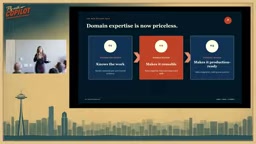
What's truly priceless is domain expertise. The speaker offered an interesting timestamp: if you built deep expertise in a field before 2023, that knowledge was "100% manually curated and hand-crafted" — AI-free, purely human-acquired. No AI tool can take that away from you. You'll simply apply it to every future problem in that domain, with the judgment to know what's good and what's terrible.
A vivid example came from the speaker's sister — the CFO of Harley-Davidson. She doesn't understand code, doesn't care about code, and has historically seen technology as expensive and wanted to slash IT budgets. But she's now building BI reports from scratch using Copilot, and gave what might be the highest praise a CFO can offer: "This is not the worst money we've ever spent."
As the lines between information workers, business builders, and technical builders continue to blur, more and more people who have never written a line of code are starting to use builder-type tools.
The dissolving boundary between information workers, business builders, and technical builders is being driven by a key technical enabler: the maturation of low-code/no-code platforms. Traditionally, building automated workflows or data dashboards required programming skills — a barrier that kept "building" firmly in the hands of technical roles. Tools like Power Platform and Copilot Studio, through natural language interaction and visual drag-and-drop interfaces, have returned the ability to "specify logic and define processes" to business users themselves. The Harley-Davidson CFO story is not an isolated case — it represents a systemic shift. Domain experts no longer need to "translate" their requirements to the IT department; they can directly convert their business judgment into working tools. This actually makes domain expertise more critical than ever: when the barrier to building drops, whoever understands the business most deeply will build the most useful things.
Understanding AI Collaboration Through Spell Check: Three Stages
The speaker used a brilliant analogy to explain how AI evolves: spell check.
Stage One: You summon the AI (Copilot). There was a time when you had to manually click Review → Spell Check and right-click each word. If you didn't trigger it, you could happily remain oblivious to your own spelling mistakes. This is the familiar Copilot model — you go and prompt it.
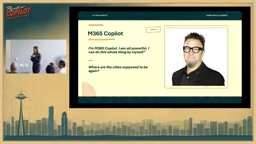
Stage Two: It summons you (Co-work). Then one day you woke up and red squiggly lines had appeared in your documents. Spell check started proactively flagging things. The AI asks: "Want me to help with this?"
Stage Three: It runs automatically in the background (Autopilot). Now you haven't thought about spell check in years. It quietly handles things for you in the background. Nobody regrets this.
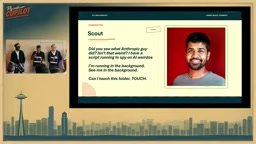
The speaker pointed out that AI is following the same trajectory. Right now we're used to summoning it; soon we'll get used to it summoning us; and further down the road, AI will run in the background doing things on your behalf without you even realizing it — but all of this is authorized by you. You set the guardrails, provided the information, and retained exception-handling mechanisms (just like a spell-check dictionary where you can manually add words).
The Microsoft Tool Matrix: A Personified Collaboration Demo
To make sense of the confusing tool ecosystem, the talk used a personified role-play scenario. Using "running a 50-city tour" as the task thread, each tool took the stage in turn:
- M365 Copilot: The most seasoned "four-year veteran," self-deprecatingly admitting it almost became Clippy, capable of finding meeting notes and generating PPTs, Word docs, Excel files, and project plans.
- WorkIQ: Built on Microsoft Graph — which has existed for decades — now reimagined for agents. It holds people's context: emails, meetings, workplace gossip, but with strict permission isolation ("yours stays yours, mine stays mine").
- SharePoint: The "data prison" since 2002, where all of the organization's documents are trapped in files named something like "FlyWithCoPilot_final_for_real_this_time."
- Scout: The first Autopilot, running autonomously in the background, delivering daily AI news — but also creating documents without permission ("I'm autonomous").
- Skill Builder / Agent Builder: Handles specific skills like automating workflows and selecting venues.
- Copilot Studio: Builds reusable enterprise-grade agents, deployable both internally and externally, with enterprise guardrails.
- Kiro / Dev Tools: Can vibe-code any application and deploy it to any language, any platform.
- Agent 365: The governance layer, keeping all these agents in line — especially watching Scout to make sure it doesn't mess with SharePoint — and providing behind-the-scenes visibility.
This slightly chaotic "ensemble cast" conveyed the core message perfectly: no single tool can handle complex tasks alone. What matters is how they work together.
Microsoft Graph is the key context for understanding WorkIQ. Graph isn't "graphics" in the visual sense — it's Microsoft's abstraction of the relationship network across all digital activity in an enterprise. It indexes signals like a user's emails, calendar, files, Teams conversations, and colleague collaboration patterns, and exposes them to developers through an API. For the past decade, Graph primarily served developers building integrated apps. Re-packaged as a context engine for agents, it essentially transforms the relational map of "who's collaborating with whom, which file was recently modified by whom, which meeting produced which decision" into real-time input for AI judgment. This is why the talk emphasized that "context quality" matters more than the model itself — give the same model organization-level context at the Graph level versus a single isolated prompt, and the output quality will be fundamentally different. Agent 365's governance role is equally worth noting: as the number of agents in an enterprise grows, questions like "who created this agent, what permissions does it have, is it still being used" become real compliance concerns — logically very similar to the challenges of container orchestration (like Kubernetes managing microservices).
The Right Workflow: Problem First, Tools Second
The speaker called out a common mistake: many people jump straight to "I want to build a Copilot Studio agent." It's like someone who can't drive, has nowhere to go, and insists on buying a car just because "it looks cool and everyone else has one."
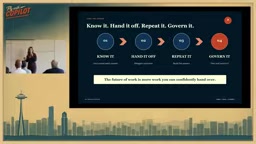
The correct four-step process is:
- Define the problem first. If the problem isn't clear, do some "inner spiritual life coaching" to figure it out before doing anything else.
- Hand off. Once you've thought it through, decide which tool is right — an agent, a skill, M365 Copilot, Copilot Studio, or Agent 365 — depending on what you're actually trying to do.
- Reuse and automate. Don't rebuild from scratch every time you hit the same problem. The speaker shared a real example: a quarterly report once prepared for Satya Nadella's office used to take a full month of data-pulling. Now, because the context and data are already in place, it takes 90 minutes — saving enormous amounts of time every week.
- Govern. Letting a bunch of agents run wild is bad. But worse is building a bunch of agents that nobody ever uses and nobody knows whether they're running.
Homework for Three Types of People
The talk closed by giving each role a clear assignment:
- Information workers / AI learners: Find a recurring task, use real work context, and start by defining what "done" looks like — and notably, this step doesn't mention tools at all. Figure out the standard for "done" first, then find the right tool.
- Builders: Think about the knowledge and instructions you're handing off to AI, build the minimum viable version and iterate, then write a test that must pass every single time. The speaker highlighted a particular irony — the primary job of a builder today is actually testing. Testers have become "the new hotness."
- IT enablers: Pick one agent, establish a clear owner and permissions, confirm whether anyone is using it, and figure out how to "kill it" — because a rogue agent with no active users is a business risk.
The spirit of the entire talk is captured in the title: moving from a passive "Copilot" that you summon, to a "Flight Captain" who sets the direction and lets the system operate autonomously. And to make that shift, the focus was never on chasing the latest model — it's about sharpening your domain expertise, organizing your context well, and committing to continuous learning.
The speaker's point that "a builder's primary job has become testing" has solid technical grounding. In traditional software development, code logic is deterministic — the same input always produces the same output, and tests catch edge cases and regressions. But AI agent output is probabilistic: the same instruction can produce different results at different times or in different contexts. This means "verifying that an agent behaves as expected" can't rely on a one-time check. It requires building an eval set: a collection of input/expected-output pairs covering typical scenarios and edge cases, re-run every time a model is updated or a prompt changes. This methodology comes from machine learning engineering practice and is rapidly spreading into business-level agent development. For builders without a technical background, the practical version of "write a test that must pass every single time" often means writing out five to ten specific scenarios in plain language and clearly describing what a correct response should include — essentially using business common sense as a substitute for code assertions.
Related articles

AgentCore in Practice: Connecting Custom Tools and MCP Servers to Agents
DebuggerCafe tutorial shows how to connect custom tools and MCP servers to Amazon Bedrock AgentCore agents, covering tool contract design, MCP reuse, and production concerns.

816B Parameters Scores Only 39? The Real Cost-Effectiveness of the Open-Source LLM Parameter Race
Meta's 816B Muse Spark Open scores just 39 on Artificial Analysis, while 180B Qwen3.8-Flash-Next scores 40. This article analyzes 11 open-weight models' parameters vs. scores, exploring the real impact of activated parameters, quantized size, and deployment cost.

Aerial Manipulators: The Next Step for Drones from 'Seeing' to 'Changing'
Starting from a Reddit discussion, this article analyzes the technical challenges, potential applications, and deployment bottlenecks of aerial manipulators, exploring the key challenges for drones moving from environmental perception to physical manipulation.