Gemini 3.1 Hands-On: Deploy a Professional Website in 5 Minutes with Zero Code

Gemini 3.1 Pro enables coding novices to generate and deploy professional websites in minutes for free.
This article demonstrates how to use Google AI Studio with Gemini 3.1 Pro's Vibe Coding mode to generate a high-quality landing page—complete with professional layouts, SVG animations, and responsive design—in just minutes using only natural language descriptions. The page is then deployed live at zero cost through GitHub and free hosting services, creating a complete end-to-end workflow from requirements to production.
Introduction: A Designer's Career Crisis
A web designer with over a decade of experience recently felt an unprecedented sense of career threat. Those polished web pages with professional-grade layouts, silky-smooth interactive animations, and real-time global accessibility—no code written, no server costs incurred—are now being automatically generated by Gemini 3.1 Pro in just minutes and deployed with a single click.
This isn't just a simple "AI writes code" demo. It's a complete end-to-end workflow from verbally describing requirements to deploying a live website. This article breaks down the entire process in detail to see whether a coding novice armed with Gemini 3.1 can truly take on an entire professional web development team.
Google AI Studio Web Coding Mode: The Core Tool
The core tool powering this entire workflow is Google AI Studio, running the latest Gemini 3.1 Pro model.
About Google AI Studio and Gemini 3.1 Pro: Google AI Studio is an AI prototyping platform launched by Google DeepMind for developers and creators, formerly known as MakerSuite. It provides direct API access to the Gemini model family and supports multimodal input (text, images, audio, video). Gemini 3.1 Pro is Google's flagship reasoning model released as of 2025, featuring significant improvements in code generation, long-context understanding (supporting million-token context windows), and multi-step reasoning, outperforming GPT-4o and Claude 3.5 Sonnet on multiple programming benchmarks.
Compared to a regular Gemini chat window, AI Studio is more professional and powerful, with three key capabilities:
- Superior abstract reasoning: Can understand complex design intentions
- SVG animation generation: Can produce code-level dynamic effects
- Long-text processing: Supports full webpage code output in a single pass
Click Build to enter the Web Coding Vibe Coding mode—you have a natural conversation with the AI, and it automatically writes code and generates application interfaces.
What is Vibe Coding? Vibe Coding is a new programming paradigm coined by OpenAI co-founder Andrej Karpathy in early 2025. The core idea is that developers no longer write code line by line. Instead, they describe their intent in natural language, let AI handle all code implementation, and humans only need to review the results. This concept quickly sparked widespread discussion in the developer community and is seen as the next major milestone in software development democratization following "low-code/no-code."
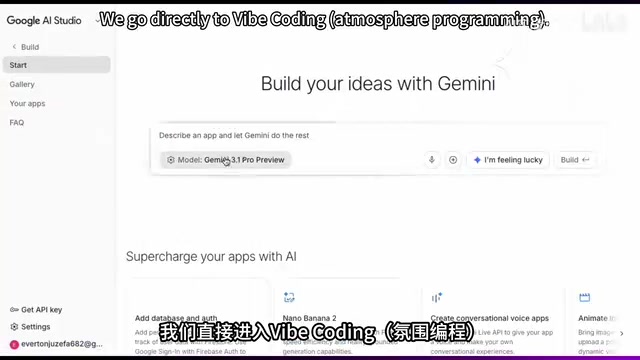
Hands-On Demo: Generating a Landing Page with Gemini 3.1
Why a Landing Page?
A Landing Page is the most common page type in web design—and one that truly tests a designer's skills. It's the core vehicle for marketing conversion. Unlike a website homepage, a landing page typically has a single clear call-to-action (CTA). Its design involves Conversion Rate Optimization (CRO) theory, including the AIDA model (Attention-Interest-Desire-Action), scarcity principles, social proof, and other psychological mechanisms. Top-performing landing pages can achieve 3-5x the conversion rate of ordinary pages—which is why large enterprises are willing to pay tens of thousands of dollars in design fees for a single landing page.
Previously, creating a high-converting landing page meant burning through several late nights just on layout planning and animation effects. Now you just input a simple prompt, click Build to submit, and Google AI Studio completes the code and generates the interface in about two minutes.
If there are any details you're not satisfied with, simply communicate with it in the chat box to make modifications.
Key Tip: "Responsive design" in the prompt is critically important. Responsive Web Design (RWD) was proposed by Ethan Marcotte in 2010. Its core technologies include CSS Media Queries, Flexbox, and CSS Grid. Truly high-quality responsive design isn't just about "scaling"—it requires replanning information hierarchy, touch target sizes, and visual focal points for different devices. This is why many AI-generated pages "fall apart" on mobile. Including this instruction means the generated webpage will automatically adapt across computers, tablets, and phones while maintaining perfect visual proportions.
Don't Know Design? Here's How to Write Prompts
For complete beginners with no web design knowledge, there's a shortcut: create a prompt assistant in Gemini and feed it a pre-prepared instructions file. After that, you just give it a brand description (like "artisan custom cake shop"), and it instantly returns a professional-grade prompt with interaction logic. Simply copy and paste it into Google AI Studio to generate the webpage.

Results Analysis: AI's Aesthetic Standards Exceed Expectations
As a design veteran with over a decade of experience, the most surprising thing isn't how fast AI writes code—it's the aesthetic standards and marketing savvy.
Visual Design
- Dark luxury style: Uses a full-screen starry sky background for immersive visuals that instantly evoke a sense of serene escape from the city
- SVG campfire animation: Not a static image, but code-driven flame flickering and sparks floating. SVG (Scalable Vector Graphics) animations are entirely code-driven with minimal file sizes that remain crisp at any resolution. Implementing complex effects like fire and particles typically requires combining CSS Animation with JavaScript's requestAnimationFrame API, demanding strong math and graphics fundamentals from front-end engineers. Previously this meant drafting several versions in Figma and then coordinating with developers to fine-tune effects—now AI does it in one step
- Typography taste: Uses serif fonts for headings paired with generous white space, delivering a premium feel that directly rivals top international brands
Marketing Strategy
AI deeply understands marketing psychology—scarcity cues like "Only two stargazing tents remaining this weekend," combined with customer testimonials as social proof, perfectly embodying the principle that "great design is the best salesperson." Behind these design decisions is AI's deep understanding from training on massive amounts of high-converting marketing page data.
Responsive Adaptation
Many AI-generated webpages look fine on desktop but fall apart on mobile. However, Gemini 3.1's responsive code not only covers various mobile screen sizes but also considers touch spacing (meeting Apple's recommended minimum 44×44pt touch targets) and visual focal points. This industrial-grade delivery quality is genuinely putting pressure on many designers.

Zero-Code Deployment: From AI Studio to Globally Accessible
The code is ready, but it currently only exists within AI Studio. To make it accessible to anyone on the internet, you need to deploy it. The entire process takes three steps:
Step 1: Publish the Code to GitHub
GitHub is the world's largest code hosting platform, built on the Git distributed version control system. It was acquired by Microsoft for $7.5 billion in 2018 and currently has over 100 million registered developers, serving as the core infrastructure for the global open-source software ecosystem. For non-technical users, we're simply using it as a "code cloud drive"—but its core value lies in version history tracking, where every code change is fully recorded and can be rolled back at any time. Free accounts support unlimited public and private repositories.
In the upper right corner of AI Studio
Related articles
 Tutorials
ChatGPT Plus Subscription Guide: Are GPT-5.5, image-2, and Codex Worth the Upgrade?
A detailed look at ChatGPT Plus features — GPT-5.5, image-2, and Codex — with a Plus vs Pro comparison and a complete step-by-step subscription guide for users outside the US.
 Tutorials
Harness AI Engineering in Practice: Using Claude Code to Master Enterprise-Level E-Commerce Development
Deep dive into Harness AI Engineering: master enterprise e-commerce development with Claude Code using the Rules, Skills, Wiki, and Changes framework.
 Tutorials
Cursor + Codex Dual-IDE Collaboration: A Practical Methodology for Open-Source Project Customization
A complete methodology for open-source project customization based on real-world experience, detailing the Cursor+Codex dual-IDE workflow, seven-stage process, MVP validation, and AI source code reading techniques.