Gemini CLI Free Integration with Cline/RooCode Tutorial: Zero-Cost AI Coding Setup Guide

Cline and RooCode now support free Gemini CLI integration for zero-cost AI agentic coding
Google's Gemini CLI is now officially supported by both Cline and RooCode, enabling developers to call Gemini 2.5 Pro for AI agentic coding completely free (approximately 1000 requests per day). The key setup requirement is choosing the Free Tier authentication instead of an API key. In testing, RooCode outperformed Cline in response speed, stability, and prompt adaptation, making RooCode + Gemini CLI the recommended best-value free AI coding solution of 2025.
Google has been making aggressive moves in the AI coding space recently, launching both Gemini CLI and Gemini Code Assist agents, directly targeting the red-hot AI agentic coding market. Agentic Coding is one of the hottest development paradigms of 2025, and it's fundamentally different from traditional AI code completion. Traditional tools like GitHub Copilot primarily offer line-level or function-level code suggestions, requiring developers to review and confirm each suggestion manually. In agentic coding mode, AI can autonomously understand task requirements, plan implementation steps, write complete code, execute terminal commands, read and write files, and even debug errors automatically — the entire process is more like a junior programmer independently completing a task.
Even more exciting news: Cline and RooCode now officially support Gemini CLI integration, meaning you can call the Gemini 2.5 Pro model for AI-assisted coding completely free — with approximately 1000 requests per day and 60 per hour, which is more than enough to cover most developers' daily coding needs.
Why Gemini CLI Integration with Cline/RooCode Matters
The AI coding tool market is fiercely competitive right now. Claude is riding high with its subscription service, and Cursor has accumulated a large base of loyal users. But Google has seized a critical differentiator — free access. Through Gemini CLI's free tier, developers can use top-tier LLM coding assistance without spending a dime.
Gemini CLI is a command-line AI tool launched by Google in June 2025, essentially an AI agent that runs in the terminal. Built on the Gemini 2.5 Pro model, it can understand project context, manipulate the local file system, and execute shell commands. Similar to OpenAI's Codex CLI, Gemini CLI uses the MCP (Model Context Protocol) to extend its tool capabilities. Its generous free tier far exceeds competing products — a strategic move by Google to capture the developer ecosystem.
Cline added Gemini CLI integration support in a recent version update, along with improved compatibility with the Gemini 2.5 series models. Almost simultaneously, RooCode completed the same integration. It's worth noting that RooCode is actually an independent project forked from the Cline project — they share an early code base but have diverged in their subsequent development. Cline is known for its simplicity and community-driven approach with rapid update cycles; RooCode has added more enterprise-grade features on top of Cline's foundation, including multi-profile management, Custom Modes, and more granular token controls. Both are open-source projects that run as VSCode extensions, and their competitive relationship is similar to the divergence between Linux distributions — same origin but different emphases.
This means developers now have two mature free paths to choose from.
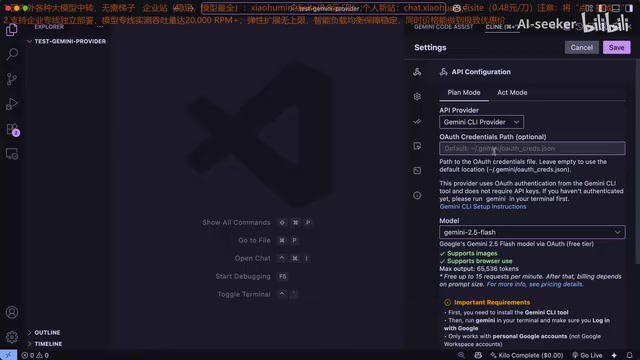
Tutorial: Configuring Gemini CLI in Cline
Step 1: Install Gemini CLI
First, install Gemini CLI globally via npm:
npm install -g @google/gemini-cli
The global npm installation means Gemini CLI depends on a Node.js runtime — developers need to ensure Node.js 18 or above is installed locally.
After installation, complete the authentication. Here's a critical detail: you must select the Free Tier for authentication, not an API key. If you authenticate with an API key, you won't get the free quota, and the core advantage of this entire approach disappears.
The difference between these two authentication methods is worth understanding in depth. The free tier works through Google account OAuth authentication, tied to your personal Google account, leveraging Google's generous free quota offered to promote their ecosystem. The API key method generates keys through Google AI Studio or Google Cloud and follows standard cloud service billing, charging per input/output token — Gemini 2.5 Pro costs approximately $1.25 per million input tokens and $10 per million output tokens. Both methods technically call the same model, but the billing logic is entirely different. Choosing the wrong authentication method means going from "free" to "pay-per-use," and in agentic coding scenarios where token consumption is extremely high, a single complex task could easily cost several dollars.
Step 2: Complete Configuration in Cline
- Open VSCode and make sure Cline is updated to the latest version
- Go to the Cline settings panel
- Select "Gemini CLI" from the Provider dropdown menu
- If your Gemini config file is in the default location, no additional path setup is needed; otherwise, manually specify the config file path
- Select Gemini 2.5 Pro as the model — this is currently the best-performing option
Once configured, Cline will handle all AI requests through Gemini CLI's free tier on the backend.
Tutorial: Configuring Gemini CLI in RooCode
RooCode's configuration process is equally straightforward but offers more fine-grained control options:
- Open RooCode and go to the settings page
- Create a new profile named "Gemini CLI"
- Select Gemini CLI as the AI provider
- If Gemini CLI is installed in a non-default path, manually configure the Auth path
- Select Gemini 2.5 Pro as the model

Thinking Token Budget Optimization Tips
RooCode provides a Thinking Token Budget setting option. Thinking tokens are an important mechanism introduced by reasoning-enhanced models like Gemini 2.5 Pro, originating from Chain-of-Thought technology. When the model handles complex problems, it first generates an internal reasoning process — similar to a human "drafting rough notes" — and then produces the final answer based on that reasoning. The thinking token budget determines how many tokens the model can use for this internal reasoning. The higher the budget, the better the model performs on complex logic and multi-step tasks because it has more "thinking space."
Here's a practical tip: set the thinking token budget to maximum. The reason is simple — under Gemini CLI's free tier, requests are counted per call, not per token. Whether you set the thinking token budget high or low, each request consumes the same amount of free quota. Since the cost doesn't change, you might as well let the model "think" thoroughly for higher-quality output. This is a pure-upside optimization strategy with no additional cost.
Real-World Experience: Cline vs. RooCode with Gemini CLI
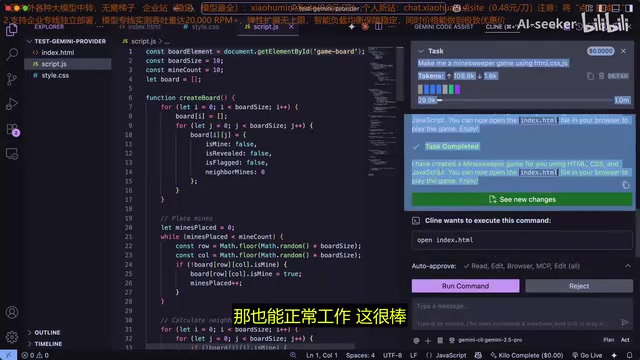
In actual testing, both tools completed tasks successfully. Cline generated an HTML/CSS/JS Minesweeper game, and RooCode generated an RAS calculator script — both delivered runnable code. However, there are some noteworthy differences in user experience.
System Prompt Conflict Issues
The system prompt is a core concept in LLM interaction — it's a hidden instruction injected before user messages that defines the model's behavioral boundaries, role settings, and output formats. In AI coding tool scenarios, system prompts typically contain thousands of tokens covering code standards, tool-calling protocols, safety constraints, and more.
Gemini CLI carries its own extensive system prompts (defining its behavior as a terminal AI agent), while Cline also has its own set of system prompts (defining its behavior as a VSCode coding assistant). When both are stacked together, a system prompt overlap problem occurs — the model may receive contradictory instructions regarding file operation permissions, output formats, task decomposition strategies, etc. This causes the model to become "confused," resulting in degraded performance on complex tasks. This is a notable weakness of the Cline approach currently.
RooCode + Gemini CLI Performs Better
From practical use, RooCode's integration quality is higher, specifically in three areas:
- Faster response times: Code generation and interaction responses are noticeably faster than Cline
- Better stability: Fewer anomalies and errors during use
- Better prompt adaptation: RooCode's system prompts are better adapted for the Gemini model, effectively mitigating prompt conflict issues for a smoother overall experience
Of course, this may also depend on personal usage habits and project types, but based on objective performance, the RooCode + Gemini CLI combination is indeed the most recommended free AI coding solution currently available.
Limitations of the Free Approach
Although this zero-cost solution is highly attractive, it's important to understand its boundaries:
- Large projects consume quota quickly: Complex projects will rapidly eat through request quotas. The 60 requests per hour limit can become restrictive during intensive development. In agentic coding mode, completing a moderately complex feature may require 10-20 back-and-forth interactions, meaning you can only complete 3-6 independent tasks per hour
- Performance limitations in complex scenarios: When handling high-difficulty coding tasks, performance is inferior to using Gemini CLI natively due to factors like system prompt conflicts
- Free API not yet fully open: Currently, Gemini 2.5 Pro's free quota is limited to the CLI and Code Assist channels. The general API endpoint hasn't opened equivalent free access, meaning other tools that depend on API key integration cannot enjoy the same free benefits
Summary: The Best Value AI Coding Solution of 2025
Through Gemini CLI's free tier, combined with Cline and RooCode integration support, Google has created a zero-cost AI coding workflow for developers. For developers on a budget who still want to experience top-tier AI coding assistance, this is undoubtedly the optimal choice right now.
If you're looking for a free alternative to Cursor, I strongly recommend trying the RooCode + Gemini CLI combination. Simple setup, free to use, excellent results — this may be the best value AI coding solution of 2025.
Looking forward to Google further opening up Gemini 2.5 Pro API access in the future, making this ecosystem even more flexible and powerful.
Related articles
 Tutorials
ChatGPT Plus Subscription Guide: Are GPT-5.5, image-2, and Codex Worth the Upgrade?
A detailed look at ChatGPT Plus features — GPT-5.5, image-2, and Codex — with a Plus vs Pro comparison and a complete step-by-step subscription guide for users outside the US.
 Tutorials
Harness AI Engineering in Practice: Using Claude Code to Master Enterprise-Level E-Commerce Development
Deep dive into Harness AI Engineering: master enterprise e-commerce development with Claude Code using the Rules, Skills, Wiki, and Changes framework.
 Tutorials
Cursor + Codex Dual-IDE Collaboration: A Practical Methodology for Open-Source Project Customization
A complete methodology for open-source project customization based on real-world experience, detailing the Cursor+Codex dual-IDE workflow, seven-stage process, MVP validation, and AI source code reading techniques.