Gemini CLI Free Tier Discontinued: A Guide to Migrating Personal Accounts to Anti-Gravity CLI

Gemini CLI stops serving personal accounts; free users migrate to Anti-Gravity CLI with a weekly bucket quota.
Google's Gemini CLI stopped serving free personal accounts, Google AI Pro, and Ultra on June 18, ending the 1,000 free daily requests. Personal users migrate to Anti-Gravity CLI (command AGY), which uses a weekly-refreshing bucket quota with no published count; check balances via `/usage` or `/quota`. The free tier's main model is Gemini 3.8 Flash, while Gemini 4 and Gemini 3.1 Pro are unavailable, and 3 more models will be removed on November 2. Migration has four steps: token conversion, plugin import, Skills folder renaming, and MCP config migration; Gemini.md global instructions still work. Enterprise Code Assist license and paid API Key users are unaffected.
Google's AI command-line tool Gemini CLI has officially stopped serving free personal accounts. As of June 18, Google AI Pro, Google AI Ultra, and free personal accounts can no longer sign in to use Gemini CLI and the editor extension via Google. The old "1,000 free requests per day" is now officially a thing of the past, replaced by Anti-Gravity CLI (command AGY).
Scope of the Shutdown: Which Accounts Are Affected
According to two official announcements on the GitHub repository (the May 19 "Transition to Anti-Gravity CLI" and the June 18 "Gemini CLI has stopped serving personal accounts"), the shutdown explicitly targets three categories: Google AI Pro, Google AI Ultra, and free personal accounts. Google's developer website deprecation page gives a finer boundary — Code Assist Standard and Enterprise editions have a separate timeline and are not part of this shutdown.
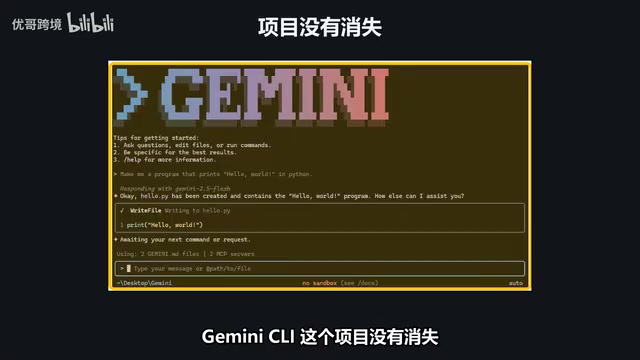
The official announcements also confirm that enterprise users with Code Assist licenses and users authenticating with API Keys are completely unaffected. The May announcement is more specific: paid Gemini API Keys can still be used with Gemini CLI as before. The project itself hasn't disappeared — the code continues to be open-sourced under the Apache 2.0 license, and version 0.64 was released on October 13. The repository is alive; it's just that the free personal account path no longer works.
The relationship between Google Code Assist and Gemini CLI: Code Assist is Google's AI coding assistant service for enterprises, divided into Standard and Enterprise editions, typically subscribed through Google Cloud and tied to organizational accounts. At the authentication level, Gemini CLI supports two types of identities: personal Google accounts (free, Pro, Ultra) and enterprise Code Assist licenses or Gemini API Keys. This shutdown targets the former, because usage for personal accounts is subsidized by Google; Code Assist enterprise users pay per seat and API Key users are billed per token, so the cost models differ, hence the separate timelines. This also explains why the same open-source tool ends up in a split state of "personal stopped, enterprise continues."
Recalling the Old Quota: How the 1,000 Requests Per Day Came About
The official quota page retains the pre-shutdown numbers: signing in with a Google account allowed up to 1,000 model requests per user per day; the earlier description on the repository homepage was 60 requests per minute and 1,000 per day. The paid tiers were Google AI Pro at 1,500 per day and Ultra at 2,000 per day; unpaid users with a Gemini API Key got 250 per day, and only for the Flash model. Even earlier, a March 18 announcement stipulated that starting March 25, free accounts could only use the Flash model, with Pro models requiring a paid subscription. These numbers belong to the previous era — looking at the banner together with the June 18 date at the bottom of the page makes it clear.
The New Setup: How the Free Tier of Anti-Gravity CLI Works
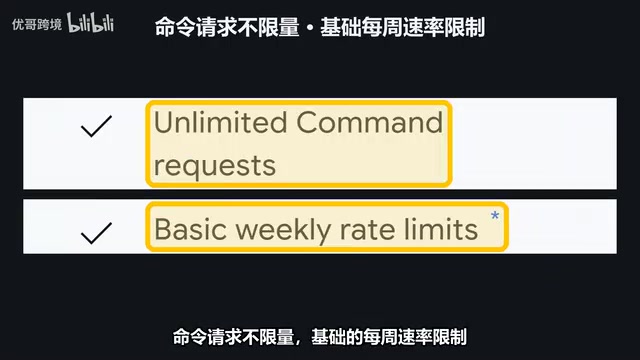
Personal accounts now correspond to Anti-Gravity CLI. In the authentication table on the official getting-started page, personal Google accounts cover the free, Pro, and Ultra plans. The free tier pricing page states $0 per month, including multiple Agent models, unlimited Tab completion, unlimited command requests, and basic weekly rate limits. All plans come with all product features, including the command line.
The core change lies in the billing logic: previously it was a matter of counting — 1,000 per day; now it's a bucket that fills up once a week, and how much it holds depends on what you ask it to do — changing a color and refactoring an entire project consume vastly different amounts. Google no longer publishes specific daily counts. To find out how much is left in the bucket, type /usage or /quota in the AGY input box, which refreshes the model configuration and quota status and opens a panel showing the balance for each model. Quotas are calculated per model — the Cloud bucket may be empty while the Gemini 3.8 Flash bucket is still full.
Usage-based billing and the bucket model: The traditional "N requests per day" is a counting system where every request has equal weight; the "weekly bucket" used by Anti-Gravity CLI is closer to a quota system converted by token or compute volume. A simple Tab completion or short command consumes very little, while having the Agent refactor an entire project, read large numbers of files, and make multiple rounds of tool calls can quickly drain the quota. Google doesn't publish specific counts because the "usable number of times" for the same bucket varies enormously across different tasks. The /usage and /quota commands read the model-level balance returned by the server, so each model is calculated independently and doesn't draw from the others. This design makes it easier for free users to hit the ceiling on high-intensity tasks, but for everyday lightweight use it may actually be more generous than 1,000 per day.
Model Availability: Gemini 4 Not Available on the Free Tier
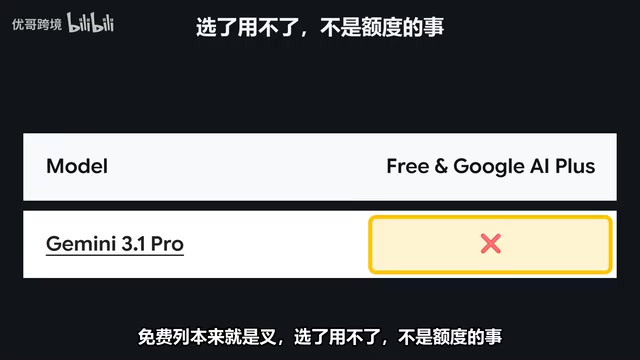
On the models page, the row for Gemini 4 and Argon is marked X for the free tier, with only Ultra and Enterprise showing Go. The API pricing page also states there's no free tier for it. The current workhorse for the free tier is Gemini 3.8 Flash. Additionally, starting November 2, the free tier will lose 3 more models — the specific list was covered in the previous Anti-Gravity piece.
Four Migration Steps: From Gemini CLI to AGY
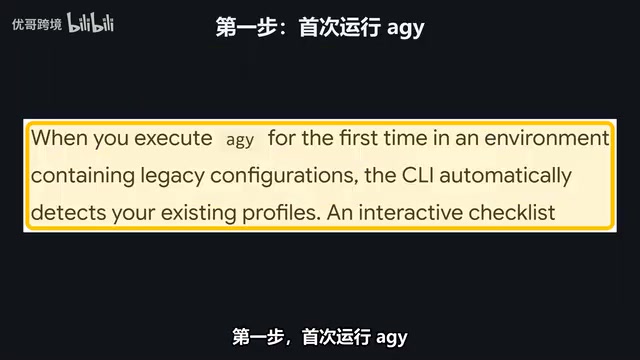
The official migration guide gives four actions. First, run AGY for the first time; it detects the old configuration and lets you choose which session tokens to convert into the system keychain. Second, convert extensions into plugins with the command AGY Plugin Import Gemini. Third, the ScanSkills folder in your workspace needs to be renamed manually, moving from .Gemini/Skills to .Agent/Skills. Fourth, move the MCP configuration to the MCP Config file, and change the URL field for remote services to Server URL. The good news is that global instructions written in Gemini.md are still read by AGY, so no rewrite is needed; some custom terminal themes may not be supported.
MCP (Model Context Protocol): MCP is an open protocol proposed by Anthropic and later widely adopted, used to let AI assistants connect to external tools and data sources in a standardized way, such as databases, file systems, Git repositories, or third-party APIs. In Gemini CLI, MCP servers are declared via a configuration file containing the launch command, arguments, and environment variables; remote services are connected via URL. When migrating to AGY, the configuration file paths and field names change, with the URL field for remote services renamed to Server URL, while the launch configuration for local servers basically keeps its structure. Understanding this helps troubleshoot "can't connect" issues with tools after migration: most cases are due to incorrect field names or paths, not the service itself failing.
Three Troubleshooting Checks: If Commands Don't Respond, Look Here First
If the installed Gemini command is still there but doesn't respond, spend a minute checking three things. First, confirm your account type: free personal accounts, Pro, and Ultra no longer get responses from Gemini CLI as of June 18 — this is a server-side shutdown, not a machine problem; enterprise licenses and paid API Keys are not included. Second, if you're stuck after switching to AGY, first type /usage to see how much quota remains for the selected model, since quotas are tracked per model. Third, check whether the selected model is on the free list — Gemini 4 and Gemini 3.1 Pro were never on the free list, so not being able to use them after selecting is not a quota issue. If the numbers still don't add up after these three checks, see whether the official page has adjusted the limits — every number is subject to the day you open the page.
Three Paths When You Run Out of Quota
First, wait for the free tier to refresh once a week; during these days, switch to Gemini 3.8 Flash — Tab completion and command requests are stated as unlimited on the pricing page. Second, upgrade your plan: Pro quota refreshes every 5 hours until you hit the weekly cap; Ultra has the highest quota. The pricing page doesn't list the monthly price for these two tiers, so check the subscription page for the current price. Third, for those who don't want to switch tools, the official escape hatch is a paid API Key, which keeps Gemini CLI working.
To wrap up in three sentences: Gemini CLI stopped serving free personal accounts on June 18, and the 1,000 per day figure is a pre-shutdown number; free personal accounts now use Anti-Gravity CLI, with quotas refreshing weekly and no official count published — type /usage to see how much is left; Gemini 3.1 Pro and Gemini 4 are not available on the free tier, only on Ultra and Enterprise, and the free tier will lose 3 more models on November 2.
Do you have enough to last the week, or can't make it to Friday? Let us know in the comments, and tell us which model you're using.
One-line Summary
Gemini CLI stops serving personal accounts; free users migrate to Anti-Gravity CLI with a weekly bucket quota model.
Paragraph Summary
Google's Gemini CLI stopped serving free personal accounts, Google AI Pro, and Ultra on June 18, ending the old 1,000 free requests per day, with personal users migrating to Anti-Gravity CLI (command AGY). The new setup uses a weekly-refreshing bucket quota with no official count published; users can check each model's balance via /usage or /quota. The free tier's main model is Gemini 3.8 Flash, while Gemini 4 and Gemini 3.1 Pro are unavailable, and 3 more models will be removed on November 2. Migration has four steps: token conversion, plugin import, Skills folder renaming, and MCP config migration; global instructions in Gemini.md still apply. Enterprise Code Assist license and paid API Key users are unaffected and can continue using Gemini CLI.
Related articles

Apple Opens Multiseat Subscription Purchasing: App Subscriptions Can Now Be Sold in Bulk to Businesses and Schools
Apple opens multiseat purchasing for auto-renewable subscriptions: businesses and schools can bulk-buy via Apple Business and Apple School Manager, adding or removing seats anytime. Enabled by default in App Store Connect—developers should verify settings; group purchasing sandbox testing opens October 2026.

X-Hinges: Giving Everyday Objects Sensing Capabilities Through 3D Printing
X-Hinges is a design software that automatically embeds sensors into 3D-printed objects, enabling lamps, gloves, and other everyday items to sense human contact and respond adaptively. This article covers its core features, design approach, and potential limitations.

Meta's Clause Revision Still Fails to Stop AI Scraping? Legal Experts Say News Sites' Risks Persist
Meta revised its business terms to remove AI training language, but legal experts say the phrase "related to your product or service" still leaves loopholes, and news sites' content scraping risks remain.