Gemini CLI Tutorial: Installing the Nano Banana Extension for Image Generation

Nano Banana extension adds AI image generation to Gemini CLI, automating the image-to-code integration workflow.
This article covers the Nano Banana extension for Gemini CLI, which adds AI image generation capabilities through the MCP protocol. It walks through installation and configuration (global install, API key setup), demonstrates using /generate and other commands to create food combination images for a webpage and automatically integrate them into code. Each image costs approximately 15-25 cents. The author concludes with advice for developers to avoid over-relying on AI and to maintain active involvement and code review throughout development.
In lesson ten of the Gemini CLI tutorial series, we'll explore a highly practical extension—Nano Banana. This extension gives Gemini CLI the ability to generate AI images, allowing you to create various types of visuals through simple commands, including regular images, diagrams, icons, and more. This article provides a complete walkthrough from installation and configuration to hands-on usage.
Installing the Nano Banana Extension
Finding and Installing from the Extension Marketplace
Nano Banana is a third-party extension for Gemini CLI that can be found in the extension marketplace. The installation process is straightforward:
- Locate the Nano Banana extension on its extension page
- Copy the installation command provided on the page
- Run that command in your terminal
It's important to note that extensions don't need to be installed within a specific VSCode project—they're added globally to your computer's Gemini configuration. Gemini CLI extensions use a global installation mechanism, registering directly in the Gemini configuration folder under your home directory (typically ~/.gemini/Extensions/) as a globally available MCP server. This differs from how VS Code extensions are independently activated in each workspace window—no matter which project directory you launch Gemini CLI from, you can access all installed extension features. After installation, you'll see the new Nano Banana extension folder appear in the Extensions directory under your Gemini folder.
Configuring the API Key
Using the Nano Banana extension requires an API key, and image generation is paid—each generated image costs approximately 15 to 25 cents, depending on image quality.
The process of creating an API key is exactly the same as when you previously created a key in Google AI Studio for Gemini CLI—you can even reuse the same API key. Once you have the key, add it to your project's .env file:
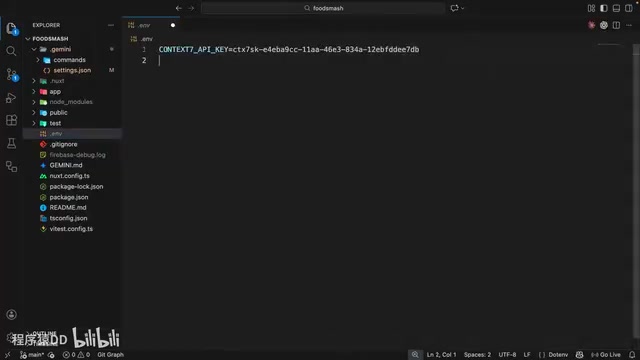
In your .env file, create an environment variable named NANO_BANANA_GEMINI_API_KEY (all uppercase), paste your API key, and save. When you send an image generation request, Nano Banana will automatically read this environment variable for authentication.
The .env file is a widely used configuration management approach in software development, originating from the "store config in the environment" principle of the Twelve-Factor App methodology. Its core concept is separating sensitive information like API keys and database connection strings from source code, storing them as plain-text key-value pairs in the project root directory. In practice, .env files must be added to .gitignore to prevent them from being committed to version control. In the Node.js ecosystem, the dotenv library is commonly used to load these variables, while modern runtimes like Bun and Deno have built-in native support for .env files. For production environments, dedicated secrets management services like AWS Secrets Manager or HashiCorp Vault are recommended for enhanced security.
⚠️ Security Reminder: Never expose your API keys publicly, as others could misuse them and incur charges on your account.
MCP Commands Provided by Nano Banana
Once installed, Nano Banana registers a global MCP server and adds a series of custom commands to Gemini CLI.
MCP, or Model Context Protocol, is a standardized protocol proposed and open-sourced by Anthropic in late 2024. Its core goal is to establish a unified communication interface between AI models and external tools/data sources—similar to how USB-C provides a universal physical connection standard for various devices. In the MCP architecture, AI applications (like Gemini CLI) act as "clients," while extensions like Nano Banana run as "servers," communicating bidirectionally through standardized JSON-RPC message formats. This means extension developers only need to implement the MCP server interface once, and their tools become callable by all MCP-supporting AI clients, greatly reducing the complexity of ecosystem integration.
To view all newly added commands, type a forward slash / in the chat input and press the up arrow key:
/generate— Generate images/edit— Edit existing images/diagram— Create diagrams/icon— Create icons- And more
These commands cover common image generation needs and support manually adding context information to make results more precise.
Hands-On: Generating Food Combination Images for a Webpage with Nano Banana
Using the /generate Command to Create Images
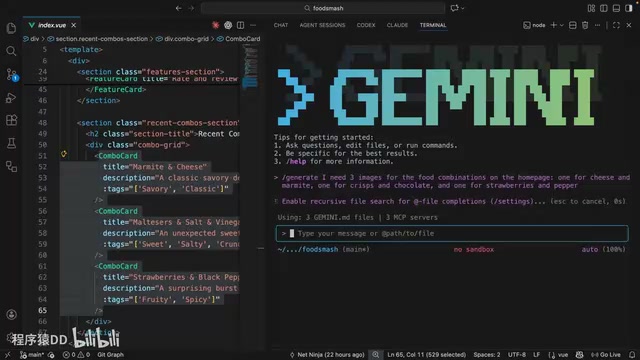
In this practical example, the goal is to generate images for food combination cards on a homepage. First, open the homepage file and select the relevant combination card code to automatically add it as context. Then use the /generate command with the following prompt:
I need three images for the food combinations on the homepage:
one of cheese and marmite, one of crisps and chocolate, one of strawberries and pepper
After pressing Enter, Gemini CLI will request permission to use the "generate image" MCP tool. Select "Always allow" and the extension begins working.
The AI image generation technology behind Nano Banana has undergone rapid iteration. From Stable Diffusion and DALL·E 2 pioneering text-to-image generation in 2022, to Midjourney V5 and DALL·E 3 making leaps in realism and semantic understanding in 2023, to Google Imagen 3, Flux, and other models achieving breakthroughs in detail control and consistency in 2024-2025—the pace of progress in this field has been remarkable. Most of these models are based on the Diffusion Model architecture—starting from pure noise images and gradually generating clear images through a learned denoising process. The 15-25 cent pricing per image reflects the GPU computational cost during inference, as generating a high-quality image typically requires dozens of iterative denoising steps, each involving substantial matrix operations.
Once generation is complete, all images are saved to Nano Banana's output directory. Opening the file manager reveals three high-quality food combination images:
- Marmite with cheese — Looks great
- Chocolate with crisps — Looks delicious (chocolate with salt and vinegar crisps is indeed an amazing combination)
- Strawberries with pepper — Also generated successfully
Integrating Generated Images into the Webpage
After the images are generated, the next step is to have Gemini CLI apply them to actual web components. Simply type in the chat:
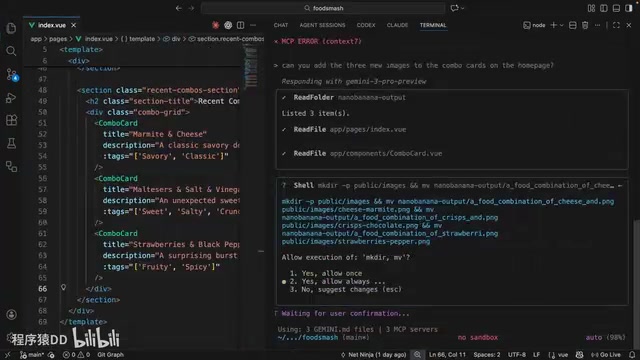
Can you add these three new images to the combination cards on the homepage?
Gemini CLI will automatically perform the following operations:
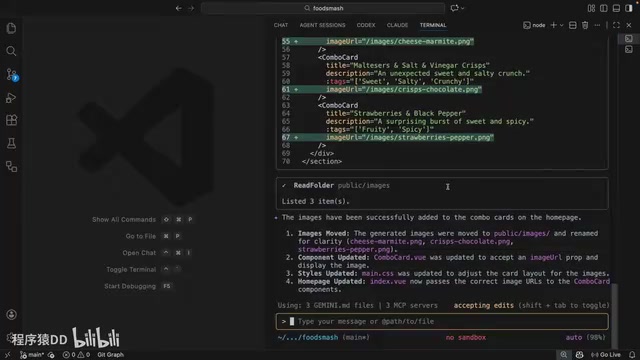
- Move the images to the project's public folder
- Add correct image URL references in the code
- Update the combination card component code
Switching to the browser preview and scrolling down to the combination cards section—the three newly generated images are perfectly displayed on the page, looking great. The entire process from image generation to integration required virtually no manual code writing.
Tips for Using AI Coding Assistants
As a wrap-up for the Gemini CLI tutorial series, here are some important tips about using AI coding assistants:
Don't Over-Rely on AI
AI is a powerful assistive tool, but over-reliance will hinder your personal skill development. Whether it's coding, writing, design, or other fields, maintaining independent thinking and hands-on ability is crucial.
AI Is Not Omnipotent
AI coding assistants can't solve every problem and will make mistakes. Based on practical experience, staying engaged at every stage of development, properly guiding the AI, and diving into details when necessary are all key to ensuring project quality.
Stay Actively Involved in the Development Process
The best practice is to treat AI as an "accelerator" rather than a "replacement." Developers should:
- Understand every piece of code the AI generates
- Conduct manual reviews at critical decision points
- Use AI to handle repetitive work while focusing energy on architecture design and business logic
These tips aren't just theoretical. GitHub's 2024 developer survey found that developers using Copilot completed tasks approximately 55% faster, but the rate of logic errors caught during code review also increased by about 20%. This has given rise to the "AI-in-the-loop" collaboration paradigm: developers handle architecture design, requirements analysis, and final review, while AI handles code generation, pattern matching, and repetitive work. Research from Stanford University also indicates that junior developers who over-rely on AI code completion perform significantly worse on independent programming ability tests compared to control groups. Therefore, the best practice is to view AI as a "pair programming partner"—it can accelerate execution, but the responsibility for architectural decisions and quality assurance always remains with humans.
Conclusion
The Nano Banana extension brings AI image generation capabilities to Gemini CLI, greatly expanding its use cases in frontend development. From installation and configuration to practical usage, the entire workflow is quite smooth. While each image costs 15-25 cents, it's a worthwhile investment for rapid prototyping and improved development efficiency. Combined with Gemini CLI's own code generation capabilities, developers can achieve full-process automation from image generation to code integration, significantly boosting development productivity.
Key Takeaways
- The Nano Banana extension adds image generation capabilities to Gemini CLI, supporting multiple types including images, diagrams, and icons
- Using the extension requires API key configuration, with each image costing approximately 15-25 cents
- You can batch-generate images through simple natural language prompts and have AI automatically integrate them into project code
- The extension works through the MCP server mechanism—once installed globally, it's available in any project
- The author advises developers not to over-rely on AI tools and to stay actively involved with code review at every development stage
Related articles
 Tutorials
ChatGPT Plus Subscription Guide: Are GPT-5.5, image-2, and Codex Worth the Upgrade?
A detailed look at ChatGPT Plus features — GPT-5.5, image-2, and Codex — with a Plus vs Pro comparison and a complete step-by-step subscription guide for users outside the US.
 Tutorials
Harness AI Engineering in Practice: Using Claude Code to Master Enterprise-Level E-Commerce Development
Deep dive into Harness AI Engineering: master enterprise e-commerce development with Claude Code using the Rules, Skills, Wiki, and Changes framework.
 Tutorials
Cursor + Codex Dual-IDE Collaboration: A Practical Methodology for Open-Source Project Customization
A complete methodology for open-source project customization based on real-world experience, detailing the Cursor+Codex dual-IDE workflow, seven-stage process, MVP validation, and AI source code reading techniques.